How do you use checklists in your day to day life? Where have they been most transformative?
* Daily work
DONE Check commission goal for EOY and update
DONE Start airtable timing
DONE Log in to TalkDesk (reboot, make sure active)
DONE Sales startup
* DONE select rotating priority of the day, tag with dailyFocus
* DONE check calendar for any major events unprepared for
* DONE check email and star anything urgent - skim. if you don't need to reply right now, don't
* DONE check new leads in uservoice for anything time-sensitive. if you don't need to reply right now, don't
* DONE rearrange plans on calendar to fit meetings etc in the day
Sales general workflow
* DONE Prepare for major interactions today
* DONE 1bd email, including new leads
* Tasks in SFDC: high, >20, or 0 (unweighted
* 2 definite reply email
* Tasks in SFDC: >3
* Contact all of dec/jan closes, to see if do again
* Weekly goals
* follow up on sammy's intros - probably a longer play
* devlearn followups
* Check out read receipts to see how can move along larger deals
* Create jump discontinuities for future, or set up ability to do same
Can you elaborate on this?
> Create jump discontinuities for future
During this operationally-focused mode, I don't let myself innovate too much, though I'll take down notes with ideas. The "jump discontinuities" would be things like making a common sequence of responses into an autoresponder, outsourcing a common research task, or making a case to my team to add or cut a service offering.
In practice, the above strategic work happens during times I allocate and protect in advance, where I focus on improvement instead of running down the operational list. Typically for me these are 2-hour blocks, about 1-3x per week.
    *** HN keeps the formatting
^-> see?But I like the original formatting better because lines wrap on narrow viewports (i.e. phones). It's frustratingly common that people post quotes with the code-snippet syntax and the lines are so long that stuff is nearly unreadable on mobile, unless you are masochistic and like reading in a scrolling viewport that only shows 40% of the line width at each time.
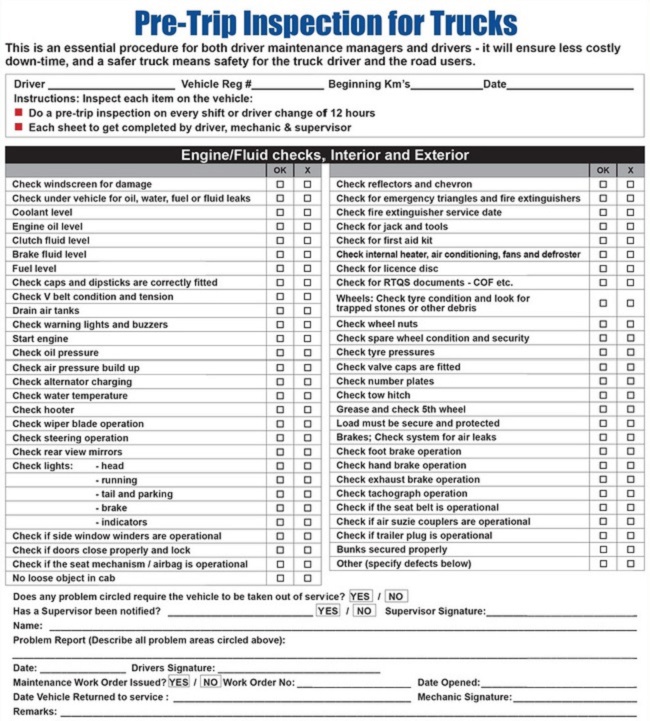
Just to add my two cents to the conversation, it's a personal call between using checkboxes versus sub-heading TODO items, but I typically use checkboxes for physical items (packing lists) or actions with a duration that is sub-minute (eg, areas of vehicle to check for weekly inspection).
http://pmarchive.com/guide_to_personal_productivity.html
One section is dedicated to his general process on checklists, which I find extremely interesting and have started seeing my increased productivity since adopting it a few months ago.
I keep a book of cards similar to this on the dash. Fill one out on any trip over an hour. [1] Have been helpful in tracking tire/brake wear. Have not had a breakdown in the bush since using these.
Taped 3x5 cards to the steering wheel with packing lists and important equipment for field work. (Laptop, cell phones, Radios, spare clothing, chargers)
[1] https://www.fueloyal.com/wp-content/uploads/2016/09/How-To-F...
1. Printed checklists that we provide to our integrators that summarize the details we describe in our design guide (we make industrial equipment that needs to be designed into our customers physical and computer systems). These are intended for our customers to confirm the covered all the important details in our design guide.
2. We have a similar type of checklists as #1 for our dealers' technicians to follow when commissioning one of our systems. In this case, the technician needs to sign it and also get the customer to sign it (marking it complete). Plus the technician needs to submit it to us to ensure warranty coverage.
3. We have production checklists when physically assembling and testing our hardware. These require a signature from a supervisor. The purpose is to help ensure that no steps were missed. We keep these in version control with our other documentation and they are updated as we change the process/assembly or find improvements.
4. We have less formal checklists that we manage in Trello. We use them for lightweight project manager. We also save templates of some Trello checklists for reoccurring processes (think sw release todos).
I know that sounds like a lot but we try to keep things as simple as possible. We've found that checklists are easy ways to reduce mistakes and communicate progress/requirements across customers, colleagues, and partners.
I do (1) immediately. I work on (2) until I need a break, and work on (3) for a bit, then go back to doing (2). All 3 lists live in a single text or markdown file, one for each day.
Like most people, I have a bit of an attention deficit, so putting fun and long term useful (but not necessary) tasks on (3) makes it easier to take breaks but still remain productive. An example is writing a blog post.
But I think you meant checklists like pilots use to avoid human error. I make those very reluctantly, preferring to simplify whatever system seemed to need a list.
This way, all my research notes, and my diary, and completed projects stays in the journal, but pending or ongoing tasks travel with me through time until they are done.
Over the course of my career in financial software development I've participated in several large production events where an upgraded or new application would be deployed overnight to servers that require substantial uptime while serving millions of users. We minimize human error by developing the Go-Live checklist several weeks in advance from tasks discovered during "dry-runs" where we practice the deploy process on similar hardware with similar data. Task durations are recorded during the last dry-run to store in the checklist.
The checklist itself is pretty simple and is stored in a spreadsheet with these columns:
StartTime Duration CompletedTime ResponsibleParty TaskDescription
Interesting example. Do you find yourself reusing checklists or are they specific to the job?
So over the last few years we have built, used and iterated on a checklist for this. It has been pivotal in meeting our goals here.
In addition to a backlog table I have a Waiting and a Someday table to capture things that are out there but not actionable yet.
My work lists:
- 'today': things I need to get done, or follow up on, today. This can be items in other lists (it's a filter of a tag with a shortcut key).
- 'tomorrow': I use Apple Script to move 'tomorrow'->'today'. 'tomorrow' starts with a few fixed repeating tasks (email, pipeline, a few others) and an ingest of my calendar for tomorrow via Apple Script. Every evening I go through tomorrow's meetings or events to take notes and mark up things I need to cover.
- 'interviews': a task per person in my pipeline, with ongoing notes. I change the due date as interviews progress with next steps. Keeping it in a single todo item gives me a quick overview of people.
- 'near': things I need to do in the near future, < 2 weeks
- 'future': things I should do in the future; reviewed weekly to move things forward or ideally delete things, I keep this capped at 30 things
Recently we have been using Wunderlist for grocery shopping.
This system, if you can even call it that, works for me for two reasons:
1) It gets the thoughts out of my head, so I don't have a constant "background noise" reminding me of something I have to do.
2) It separates the planning from the doing. This keys off the fact that many people feel good about getting organized, even if we tend to procrastinate on doing actual work. Separating planning from doing turns scary tasks into a short, clear bullet point.
For me (working mainly as a software engineer), the hardest part about any task is scoping and defining it. There are no hard tasks, only vague ones.
So I have a strict policy these days of only taking notes either on a piece of paper that sits on my desk, or in electronic form synced to all my devices (using OneNote fwiw but document files in Google Drive would probably work just as well).
I also have around 20 notebooks scattered around the house, office, car, friends's houses, etc.
In return, I get something that works closer to the speed of thought than any digital tool — I can write down a thought in less time than it takes to unlock my phone or open a Google Doc. That's important for me because it's too easy for me to not bother writing it down if it breaks my flow.
It literally did transform my life and made me free and independent...
That said, I've made a custom spreadsheet to handle my real-time prioritizing the way I think about it, so I've gone beyond simple lists by quite a bit.
I do feel like I have a decent grasp on the whole range of activities I do, though, from daily pet care/home stuff to social calendar, bills, projects, etc.
I use checklists for planning vacation trips and for grocery lists.
I also use them to describe processes at work. This has been the most helpful when on-boarding new employees in our group.
Usual stuff: groceries, travel packing list, travel bucket list, ideas, restaurants to go to, date ideas, hiking trails, places to notify about address change, wishlist (things to buy), books to read (separate list for fiction and non-fiction), gift ideas, beers, wines, document checklists for more or less complicated things like mortgage or visa applications, conferences.
* Paper: You check it today and have to rewrite for tomorrow, as the checkboxes are filled. Also, I tend to not look at my notebook at all, or lose it. Its never gonna be where I am.
* Apps: I tested a few, from regular todo apps to specialized "routine" apps, but they all have their quirks.
So if any of you use an app for that and are happy with it, please tell me so I can try to!
For day-to-day personal tasks, I use a list through rememberthemilk.com and accompanying app.
However, half the battle is actually sticking with the system you created. So it's a challenge to make it simple and a bigger challenge to make it into a solid habit.
I'm not going to shamelessly promote it here. Messsage me if you want to try it come demo time.
I'll make temporary lists for specific, detailed tasks like a moving checklist or a packing checklist. Afterwards, I'll delete them.
As for the tasks themselves, I try to make them as fine-grained as possible. Like, "write tests for that function you wrote", or "talk to Allen about something". Sometimes they're just questions I have that I need to think about, like "what about this edge case?" or "how far back do we look?"
Usually there's something else that tracks what I have to do at a higher level, i.e. JIRA or Trello. In those cases, at the end of my current tasks, I simply have a "look at JIRA"
It would of been interesting to see the comparisons he would of made if he had spent time with the infrastructure department of a software company.
Other times I use notes (typically Apple Notes just because it's auto-synced between mac and iphone, but I don't really care about the app) to create small lists of things I really have to do in order, and then I check them along the way.
Then I can see all of my next action tasks I can do at my current location.