BIOS would no longer detect the disk on that machine, or any other I tried it on (on both USB-to-PATA and honest-to-goodness motherboard PATA controllers). The drive spun up but made a repeated ticking sound (I assume seeking back and forth looking for servo tracks).
I sent the drive to Kroll Ontrack (because, stupidly, I had billing data that wasn't backed-up on the drive). The report I received back indicated that 80% of the drive's sectors were unreadable.
As an aside: The data I was looking for was ASCII text and Kroll Ontrack was completely unhelpful in just sending me a bitstream image of the drive so I could grovel thru looking for data I needed. Being plain ASCII, their "file carving" tools didn't locate any of the data. (They sent me a "preview" of the data they'd located, and while it got lots of Microsoft Office-format files, it didn't have any ASCII text files). I offered them a 3x multiple of the rate they asked for file-level recovery to simply send me the bitstream image of the disk that they'd already made. They wouldn't do it, and wouldn't even let me pay to talk to somebody who understood what I was saying. I ended up taking a major loss on the billing data I destroyed. I'll never recommend them to anybody.
I won't ever play with neodymium magnets around spinning rust media again.
1) external magnet messed up heads movement closed control loop (internal drive's magnets + voice coil + positioning marks on the platters), and as a result head actual position became different from what controller thought it was.
2) control loop tried to correct itself, repeatedly failing, all while head kept moving across the platters, while controller was still thinking it's elsewhere.
3) controller was writing to disk, so it overwrote data in highly irregular tracks that followed erratic head dance. some of that overwrote positioning markers.
4) when recovering, even though 99.9% of data was still there, controller failed to position the head on erased markers, so reported "unreadable sectors"
> (harvested from an old hard disk drive)
Okay, this is making even less sense. "Hard drive magnets", in a drive, are millimeters from the spinning platters. I refuse to believe that the same magnet, moved 6 inches away from the computer caused catastrophic damage.
If it was a coincidence it was certainly well-timed. I don't have the Thinkpad anymore, but I do still have some 2.5" PATA drives. It might be interesting to test this and make a video.
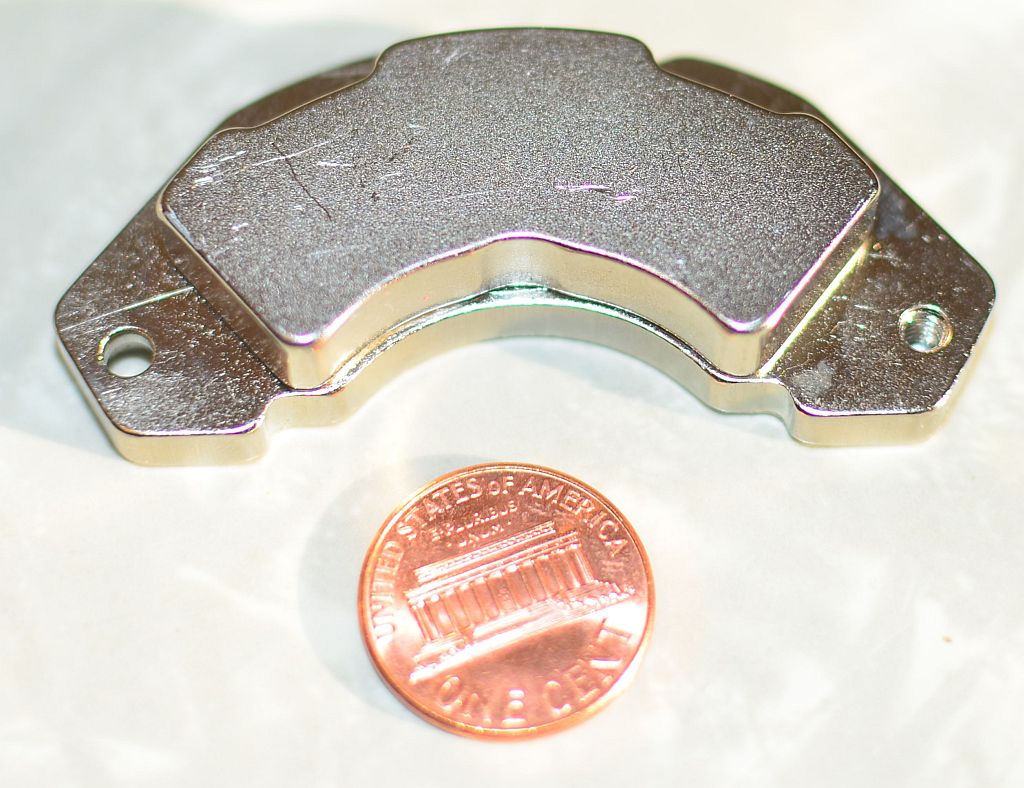
Here's a picture of the magnet in question (it holds stuff to my refrigerator now), w/ a penny for scale: http://mx02.wellbury.com/misc/20171203-Magnet_of_doom.jpg
This magnet was pulled from a Micropolis 9GB SCA-II 3.5" low-profile drive dating from roughly 1998 (I had a crap-ton of these drives and, as they died, I pulled their magnets, so I have a bunch of these). These particular magnets will stick to each other thru my 3" thick butcher block table. They are physically larger (substantially thicker) than the ones I've pulled from newer drives.
Edit:
I assume that the data and servo tracks written to the drive are done so in the presence of the magnetic flux of the magnets supporting the voice coil. I always just assumed that adding a substantial new source of magnetic flux (the magnet in my hand) either induced a current or magnetized some component in the drive.
kees99 posted a possible explanation, where the magnet moves the voice coil, which ends up destroying the drive by writing data in the wrong places.
Eventually I got a call back from somebody saying that they understood what I was asking for but couldn't send it to me. At that point I got fed-up and paid the minimum bench fee and asked for my disk back. I probably should have pushed the issue further, but my need was timely and I'd already started reconstructing the data from other sources.
You held a magnet 6 inches away from a plate spinning at 5400 rpm.
That is your take away? Not that "I ensure all my data is backed up using the 3-2-1 Method at a minimum" it is "never play with magnets"?????? Really?
People never cease to amaze me when it comes to data security.
It was a failure in following disciplined practices, in this instance, and it caused me monetary loss. It was a good lesson. I am happy with my attitude toward data security and data loss, and it's certainly not codified in the statement "never play with magnets".
Personally for my drives, I use Boot and Nuke to erase the drive three times, first with zeroes, then with random data, then with zeroes again. After that I disassemble the drive, put a strong magnet over each platter, shredder the drive into almost powder, burn the pieces in a fire and then throw away the leftovers. Probably overkill but I want to be certain.
I recall one datacenter consolidation project where the hard drives from decommissioned servers were zapped with a degaussing device, shredded, and then somebody signed off that they were dumped in a furnace somewhere. (At some ridiculous expense)
Meanwhile, the normal operation bins of drives that were in little blue bins for collection where just picked up and moved by the moving men, and are probably still in some closet in the new facility!
When it is time to move on, one simply forgets the passphrase and reformats the drive.
Seriously: that is what I'm doing with ssd drives. Anyone know of any issues?
1. Everything stored on the drive is always encrypted when at rest.
2. The drive has some sort of firmware, memory and microprocessor that stores a key and en/de-crypts data in transit to/from storage.
3. To 'erase' the drive, the SED simply erases the key.
Of course there are many potential flaws in implementation, but conceptually it's simple. And as with most drive encryption solutions, the fatal flaw is that the data is available if the computer is on or asleep, which means that for most users the security is disabled 99% of the time (but that problem doesn't apply to drive wiping).
AFAIK: Many common drives have SED functionality. Until the user "locks" the drive, the data is en/decrypted invisibly to the user and system. Locking the drive creates a passphrase and a pre-boot environment for authentication. Locking the drive requires an OS-level utility. Opal by TCG (the same people who provide the TPM spec) is the common standard.
better because it's harder to bruteforce an aes key than a passphrase.
1) Fire a twelve gauge shotgun slug into the drive (these would have been external drives).
2) Place a thermite grenade on drive, pull pin.
3) Bug out.
Thermite grenades aren't very good at melting a huge chunk of metal either, sure it'll go straight through a machine block but it won't melt the entire machine block.
To destroy all data on a harddrive all parts of the platter must be destroyed and heated to their Curie point.
But to put things into perspective with some numbers, the write heads on a modern HDD use somewhere on the order of 50 mA of current. That may sound like a reasonable amount until you consider that the magnetic field [flux] is condensed down to a 60 x 20 nm area. It usually takes a little over 1 Tesla to flip the magnet.
I have been out of the Industry for a little bit now, but things are moving towards a magnetic substrate that has a smaller grain size (allowing smaller bits at a similar SNR) but a coercivity well over 3T at room temperature.
Absolutely. It's bloody amazing how my laptop has a device with finger-sized actuators that read/write bit cells that are about as small as couple-year-old semiconductor feature sizes -- and that can survive mistreatment that one doesn't usually associate with micromanipulators.
Some harddrives do this too, I believe but it's not as widespread yet.
It makes their end of life that much easier.
If you're looking to reuse the drive, use one of the NIST SP 800-88 Revision 1 recommendations. It lists the methods in the preferred order. Ideally the drive supports ATA crypto secure erase, where it just wipes the DEK and KEK, poof, in effect the crypto encoded form of you data can no longer be turned into plain text. You can mimic this with software FDE (Bitlocker, LUKS/dm-crypt, Filevault). Fast.
But they also say it's adequate to use the other kinds of secure erase, because other than firmware bugs/exploits it's the only way to erase sectors not assigned an LBA, e.g. sectors that once had an LBA, had data written to them, but subsequently failed overwrite and the LBA remapped to a reserve sector, leaving data on a sector that cannot be overwritten via SATA commands.
CMS (Centers for Medicare and Medicaid Services) can require proof of destruction. That video does it.
The problem with erasure is that there is residual amounts of magnetic fields that can be picked up by the right equipment. In the day, it was reported that they had success with recovery of information that had been overwritten by 8 - 10 times. It just took a lot of patience to do so. Those who want to recover this information will have that patience.
For the former, you're absolutely right. For the latter, multiple-pass overwrite provides greater assurance than single pass. Following that up with physical destruction of the platters provides further assurance.
The required equipment makes magnetic data unlikely to be recoverable except in exclusive cases where certain government agencies with sophisticated labs get involved, but in short, storage leaves lasting (trace) physical changes behind.
SSDs and operating systems without proper Secure Erase support can very easily leave behind complete data.
With a magnetic swipe card that you demagnetize so it is no longer read successfully, you may well be able to recover the information using a better reader.
Depending on drive age the same may be possible using a hard drive.
The best option for modern drives is still to use software to wipe the drive and if reuse is not required destroy the reading mechanism and platters.
There definitely was a period where labs could recover data this way, but I think it's passed.
Though if you really want to sell or give your drive to someone else, the best thing to do is to use full disk encryption from the beginning, then there will be no plain text data on the drive.
If you need more security, building a simple furnace isn't too hard:
That really helps you wipe things like SSDs which can copy and migrate data, and make it hard to be certain you destroyed a sector
That can't be right (I don't know anything about this though). If you control the data (with a non-interactive non-destructive decryption process), a loss of a single bit just means you have to test two possible keys. In terms of brute forcing, the security is the same per number of bits lost. The benefit of using a large key would be that if you lose a certain fraction of your key (say 10%), then that would correspond to more bits (as long as you erase 128 or more bits you'd be fine).
Also beware of key stretching, use it only when absolutely necessary. Key stretching doesn't modify the ratio of work necessary for your encryption/decryption vs the work necessary for brute forcing -- i.e. it doesn't improve the security factor. You're essentially doing an economic defense vs a mathematical one, and hoping that computers won't improve and your attacker isn't willing to spend much relative to what you spent.
I don't think anything I or my employer has would be worth the effort to recover.
    Advancing technology has created a situation that has altered previously held best practices
    regarding magnetic disk type storage media. Basically the change in track density and the
    related changes in the storage medium have created a situation where the acts of clearing and
    purging the media have converged. That is, for ATA disk drives manufactured after 2001
    (over 15 GB) clearing by overwriting the media once is adequate to protect the media from
    both keyboard and laboratory attack.
[1] http://nvlpubs.nist.gov/nistpubs/Legacy/SP/nistspecialpublic...
If the device isn't healthy and can't zero all of the media then you will need to resort to physical destruction.
I don't know if the salt water really adds to security, but for the type of data on my drives, just drilling the hole seems like more than enough - no one is going to spend $1000 to recover my 2014 tax return from my drive since there are far easier ways to get my personal data.
They surmise that it was the higher coercive ty of modern drive plates that causes them to be resistive to reprogramming bits with a static magnetic field.
take a hammer to platters to seriously deform them and throw them in the trash.
not recoverable, imo.