My experience of Triplebyte's interview process is slanted towards frontend/backend developers of web apps. Fortunately for me, that was my background. However, in the team I currently work with, the team is in aggregate heavily C# with only secondary experience in web frontend/backend development. That's because their expertise is in low level security. Several developers on this team are exceptions to the "don't roll your own cryptography" adage.
They're all competent developers, but the version of Triplebyte's coding test that I took (and passed) would be in unfamiliar territory for people in this team. That's fine since most of Triplebyte's clients are probably looking for web frontend/backend skills, but I think this means that Triplebyte's test shouldn't be seen as an objective measure of programmer skill, just an objective measure of fit for Triplebyte's clients.
That said, Visual Studio is really on the rise. I used to think VSCode was late and could have never catch up with the Sublime's and Atom's ecosystem. So after trying it, I went back to my editor of choice. Lately though I went back to VSCode and I think it is pretty good out of the box and very good when you install the right plugins.
VSCode becoming so popular should not tell us it is a great product, but that most modern alternatives suck.
Harj Taggar https://github.com/kwi
Guillaume Luccisano https://github.com/harj
In my life:
- I'm committed to emacs for org-mode and LaTeX editing and daily use.
- I paid for sublime so i will use it -- and multiple cursors everywhere is a boon for quick and dirty data munging.
- I write serious python code in pycharm.
- I write serious c# in full blown Visual Studio
Thanks for this. I've always felt the same way but haven't been able to put my finger on why. As more things get integrated into my editor (I use VSCode) I feel like I should use the shiny features, but for source control I think I'm going to only use the commandline forever. (Edit: though plugins such as GitLens that give you source control info inline are fantastic.)
Along with some nice features I've added, such as my 'git af' (add + fzf) shortcut[1][2], the commandline is very usable (don't have to 'git add' and type filenames manually).
[1] https://github.com/kbd/setup/blob/65b3d0abcb34540b43880792e8...
[2] https://github.com/kbd/setup/blob/65b3d0abcb34540b43880792e8...
I will refuse to use any Git tools or UIs, but the standard CLI, until the end of my career.
Besides that, my IDE/Editor is neither a build tool manager nor should it run my app from within an integrated console having specific settings. The projects people are going to inherit from me will always be editor-agnostic, the environment they run in will never depend on a certain setup that can‘t be documented clearly and they will always run within an isolated context, i.e. the project root.
Git is complex enough that I don't trust more complex operations (basically anything beyond push, pull, add, and checkout) to be handled by a GUI, but a GUI can make for a great code review tool.
So I started wondering why Apple would even want to add such a useless feature into an otherwise really powerful and useful editor, even back then in Xcode 3. And I imagined this scenario where they were brainstorming and someone higher up in the Xcode team was like "ok guys, I got word from above that 'source code' is becoming a big thing now, and we need to add it somewhere" and someone was like "how about the project navigation list?" and someone else maybe piped up "but it doesn't really fit hierarchically in the metaphor" and someone else was like "dude it's 4:30pm some of us have families to get back to can we just forget about the metaphorical inconsistencies?" and they just added it as an expandable item.
I use Xcode and VS Code ever day, and I absolutely never use the Git functionality in either of them. I tried both for a few weeks each, but absolutely nothing compares to Magit[4]. Not even command line. For git, Magit is the same secret weapon that pg claimed Lisp was for programming.
[2] https://i.imgur.com/DYJN12N.png
[4] https://magit.vc
Another option is git add -p, which asks you about each change so you can review them once more and maybe leave some (parts of) them for future commits.
git gui
I don't remember what happened for me to start doing this, but it saves so many headaches that I don't care.
All the graphic Git clients cause me panic. I have Sublime-Merge has a read only thing, because it shows diffs in a nice format. But I am still not ready to commit something from it.
git add -i git commit -a
This many times. I'll open SourceTree to view a large set of diffs or changes, but still drop back to the CLI to push/pull/rebase/commit/stash/etc... I know what git will do in those cases, and am a little wary of git UIs.
OTOH, I despise heavily modified bash/zsh/whatever profiles which makes the environment non-portable. Extreme eye-candy in the console makes stuff harder for devs/admins who logs in to thousands of servers.
I purchased Sublime when it was the least bad editor out there, but finally realized that I was suffering from the sunk cost fallacy. I still consider it the worst software purchase I've ever made, and it's also why I'm reluctant to pay a single buck for software nowadays.
I only wish Sublime Text were able to (out of the box) mount / SSH into any server like emacs does (using TRAMP). I'm finding myself using VIM lately mostly because it's a step up from nano which uses tabs, not sure how to tell it how to space things, nano is perfect for Go I suppose. I have to figure out how to configure VIM for spacing things properly though, but I mostly install Sublime Text on VM's I write code in.
Then came 2014 and it started to look like the Sublime developer had taken a hiatus. The timing was really bad as ST2 still had showstopper issues (for me) that were fixed in ST3, which in turn had another bunch of unfixed bugs. Meanwhile Atom was released and it got its bug fixes and new features regularly, even though it was and still is really slow. I had to choose between two borderline unusable and one functioning but heavy editor. With a heavy heart I had to abandon an editor that I had valued at 70 dollars, which at that time was also the largest sum I had ever paid for software.
As soon as VS Code started to gain traction, I made the switch. For some reason it felt and still feels much snappier, even though both Atom and it are built on Electron and have approximately the same features.
When not writing code or LaTeX documents, I'm editor and OS agnostic. Often you just have to make do with whatever an esoteric system offers.
In any case, what works for you might not work for other people. We're also talking about four–five years old issues here.
These days pretty much every serious editor has multiple cursors, including Visual Studio Code.
people look at me like I'm an old crazy dude because I don't use a git UI or eclipse, or intellij, or from sublime. Git already has plenty of quirks, adding another layer of unknown on top of it is a no-go
Staging/diffing is especially convenient with VSCode. `git add -p` used to be my most-used command, but VSCode just makes the process easier.
I use multiple IDEs/editors, and they all handle git differently. It doesn't make sense to learn yet another N sets of quirks.
All I did was press Commit which apparently decided to stage and commit everything under the root folder.
It didn't do this in other projects so who knows what was different.
This is how credential files must get committed to github every day.
If VS Code is going to be smart about so many other things, then there should be some sort of warning for major code affecting changes.
You are about to push 5000 files to master repo inluding some that appear to be widely used libraries, are you sure that is what you want ?
If you don't have anything staged and hit Commit, it will show a prompt asking if you want to commit everything that's been changed. It sounds like you hit 'yes' on this prompt by mistake.
I still use the CLI to push/pull/branch/merge, etc just to have total control, but staging files, viewing diffs and making commits are a lot more annoying in the CLI.
What's described in that github issue happened to me as well the first time I used git via Visual Studio. I normally don't do that, but something told me to make a zip of everything before using git in VS. So that saved me big time.
Why in the world are the deletions not pointed to the Recycle Bin??? That's what it's there for.
I mean, if you point software you don’t understand at work that’s not backed up you shouldn’t be shocked if it does something you don’t like
VSCode has this. Hold down Command on Macs (probably Ctrl on Windows/Linux) and click. You can also select "next similar word" with command-D so you can quickly change all instances of a word to another word.
I also exclusively use the command line for source control (of which I use at least four, but mostly git and hg). I just do not trust IDEs to do the right thing, although JetBrains does get close (but my colleague devs hate the properly pruned .idea in the repos).
Because there is almost no reason to learn Go. Most shops want JS/Java/Python/C# etc... The primary reason to learn a language like Go is because you want to for it's own sake.
It's not that you must learn Go in order to be good, or that knowing Go makes you better. Rather it's difficult to be bad and still have the desire/interest to spend time learning something unnecessary.
"[I]f a company chooses to write its software in a comparatively esoteric language, they'll be able to hire better programmers, because they'll attract only those who cared enough to learn it. And for programmers the paradox is even more pronounced: the language to learn, if you want to get a good job, is a language that people don't learn merely to get a job."
This could go round and round. The point is that there SEEMS to be a correlation with people who learn things for the sake of learning them and folks who do well at exercises that test for adjacent skills.
Each step seemed like a good idea but when taken together you wonder what when wrong and when.
No, that's not it. It's that if you can only learn one programming language, Go is not a very good choice, so those who learn Go are almost always multilingual ("lingual" as in programming languages, not natural languages). Python and JavaScript are Swiss Army knives with outstanding ecosystems that make them excellent choices if you can only afford one tool. There are plenty of reasons to learn Go but, as a more specialized tool, it makes a better component of a nice toolset than a solitary multitool.
My anecdotal experience says that 1) most programmers are monolingual, 2) almost all Go programmers are multilingual, and 3) the average multilingual programmer is a better programmer than the average monolingual programmer for various reasons, so the average Go programmer is better than the average programmer. And, by that logic, the average Rust, Haskell, Erlang, Lisp, etc., programmer would be, too.
This surprises me as I've never worked on a nontrivial system that's also a monolingual system.
There's nearly always another language to use to get the job done, whether for configuration, scripting/automation, or because backends and UIs are written in different languages, especially for internet-based software.
Sure, but in most cases programmers spend most of their time only in one 'part' of the system and only really have to know the language that part of written. In general it doesn't matter if the back end server is written in Lisp, Java or APL, as long as it talks to my part of the system in the way it's supposed to.
Anecdotally, I've seen it replace Java in quite a few small and medium sized established companies.
Go feels similar but younger. I love languages with big standard libraries. Just need their package management story to settle down for a while.
There's something wonderful about a language being so popular and around for so long that there's plenty of resources and answers on just about anything. I think that's a core part of what I'm missing from Go.
At the company I used to work at it took nearly a 1000 lines to replace an 80 line bash script. So I can't help but laugh at this statement.
Because even less people use D than they use Go. :)
the irony is that Microsoft did hire Eclipse creator to work on that product... hopefully it doesn't end up bloated. Having an open spec for language servers is also a smart move. While others have their proprietary, often non speced protocol, now any text editor can implement the same protocol and basically use any language server already developed.
So kudos for Microsoft, it's a great piece of engineering.
Have to disagree with VSC being better than Intellij. I find Intellij refactoring, debugging and autocomplete far ahead of VSC, especially when it comes to supporting leaser known features, or recently released language changes.
I didn't say it was a better than Intellij, I said it's a better text editor I'm not talking about integrated development, I'm talking about text editing.
Often, the problem is the order of suggestions, it was magically almost always right on Webstorm and not as good on VSC
Sublime is really good for large projects.
Of all the IDEs I've been dabbling with for a replacement, I'm still deciding on Visual Studio Code or PHPStorm.
But I recently opened up Sublime Text to compare some editor behaviour, and the difference in UI performance is astounding.
It's possible that VSCode has regressed a bit the last couple of years. It was always faster than Atom. But comparing it to Sublime shows that there are clear advantages to writing UI code in a natively compiled language. Sublime's widget drawing seems very well optimized.
VSCode has also become slower for me the last few years, simply from the load of extensions. I use the ESLint extension and the Go extension heavily, both of which parse code a lot. Neither is doing any sort of incremental parsing, so there's potentially a lot of churn. There's also some kind of indexing of symbols that happens in the background in the language server or in the extension. I sometimes have to kill the "Code Helper" process because it's sitting there consuming a whole core when idle.
Overall, VSCode is becoming increasingly closer to how I remember Atom, when I used it. I worry that it's slowly turning into Atom, performance-wise.
I could not agree more. I've made numerous attempts to embrace the new hotness that is VSCode but I just cannot get over the performance. Yes, it has some cool features, the plug-in ecosystem is booming, and it sure looks pretty. But at the end of the day none of it is compelling enough for me to put up with the constant lag.
It's funny because after several of these experiments I have literally wondered to myself if I'm getting stuck in my ways or becoming a so-called "greybeard" due to my long term adherence to Sublime Text, but is constantly getting annoyed with how slow an editor is really a hallmark of old age? I'll wait for your web page to load, I'll wait for an ssh command to return. I will not wait for my bloody text editor. I have no patience whatsoever. Now god damn it NOW!
Another thing I wonder is how many of those VSCode users have simply never used anything better. If all you've ever known is an iPhone 5, you probably think it's pretty great - maybe you think that's just how phones are! This impression will be totally ruined of course when you try an iPhone X...
The only things I find are slow are Language Server features. Which are just as slow in any IDE because they're using the same underlying application!
It's fast enough but Sublime blows it out of the water - especially for things to "Go To Symbol" where it works almost instantly whereas I'm constantly waiting for VSCode to stop spinning and give up and cmd-f search instead.
Also, I have to work with a lot of network-user-login RHEL6 boxes, and VSCode doesn't work on desktops that old.
"Go to symbol" isn't implemented by the IDE though. Neither Sublime Text nor VSCode provide that feature.
Plugins do.
What you're probably experiencing is that Sublime Text tends to have less intelligent language servers. Which means they're faster, because they're not scanning your whole project, or because they're not using the official language server.
I've written my own language server so I know firsthand that any UI delay is entirely my fault, not VSCode.
On the other hand, VSCode supports different languages through its extensions instead of having separate language-flavored applications like "VSCode Python", "VSCode Java", or "VSCode Android".
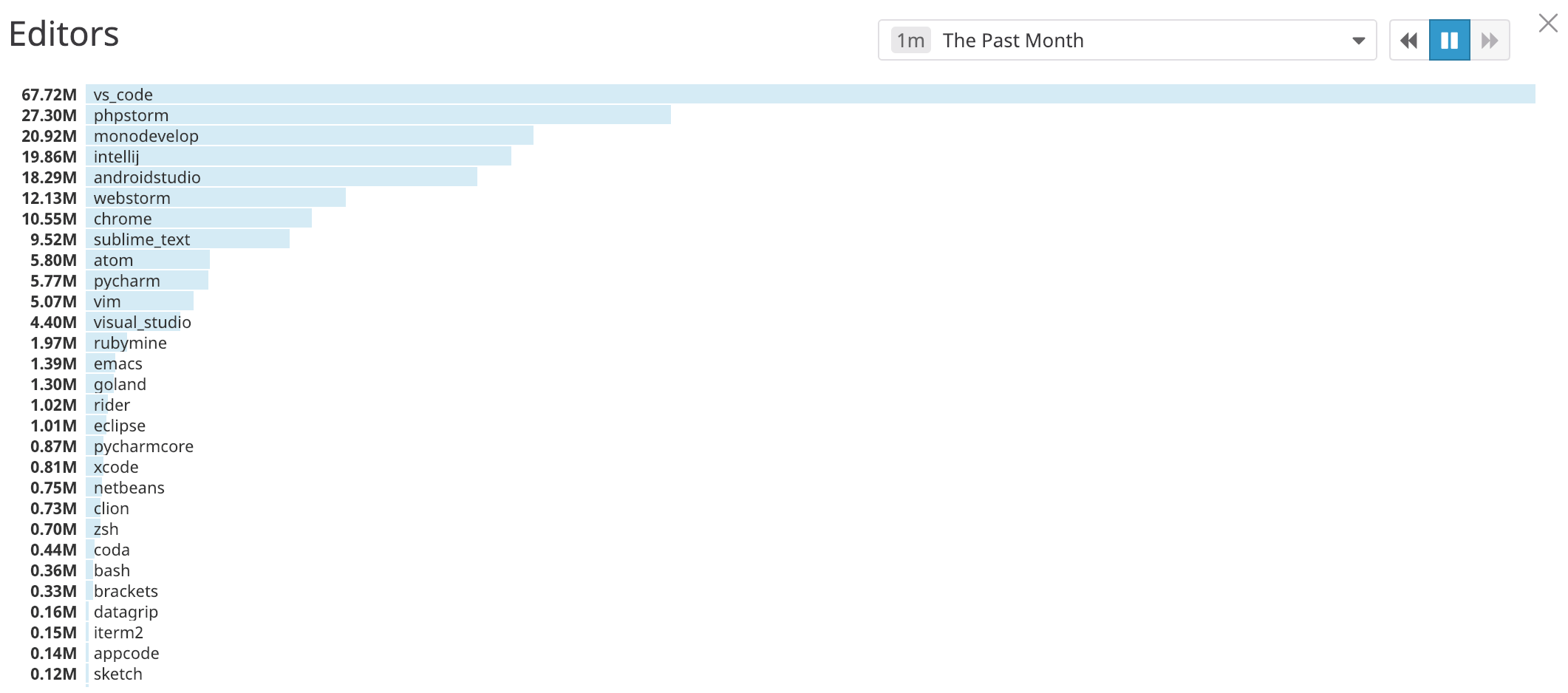
So I feel that reaching for IntelliJ vs. PyCharm vs. Android Studio is roughly equivalent to installing a particular set of extensions in VSCode. If you look at it that way, the data from the article seems to tell a different story - while VSCode has grown significantly in popularity, JetBrains IDEs seem to dominate in terms of overall usage (11.3% + 6.9% + 4.1% = 22.3% vs. VSCode's 16.8%).
Having a dedicated IDE for a given language has it's pros.
However, I use VSCode for JS/HTML development, as it has a lot less clutter, than compared to other IDE's.
VSCode is definitely fast enough for most uses cases, but I still wish it was as fast as Sublime Text, from Scrolling Frame-rate to response time.
But I miss sublimes speed it was unmatched, and the jump to symbol using @ or # in a file is worthless in vs code because it waits to calculate until you use it.
I've tried VSCode because I wanted to have UI breakpoints with GDB, I admit that vscode seems better than atom, but for performance I have my doubts.
I really don't understand why engineers choose to use JS to made a text editor. I know that js and the dom have enabled the web, but it's because there was nothing better, choosing js to do non-web stuff doesn't only sound silly, IT IS silly.
I disagree, you get fast by using good datastructures and algorithms. Yes, for the same algorithm C++ may have some perf gains but it's so easy to shoot yourself in the foot. Visual Studio itself is written in Visual C++. It's slow and a memory hog.
Most folks who are not familar with JS don't understand the internals of V8. V8 does amazing things to compile the JS down to really fast bytecode. It builds hidden classes and structs just the way you'd write C++ and them compile them to machine code. There are many instances where the C++ code won't be much faster than the JS. In some cases naive C++ is even slower.
As for VSCode, it's a testament to show you can build very usable things by using the web as a platform. Chromium's blink's engine is fast if you know what you're doing.
Sublime is great, don't get me wrong, but VSCode's extension architecture gives it a leg up. It's so much easier to write a vscode extension than a sublime extension. Typescript gives the JS world a lot of sanity.
Not to sound snarky or anything, but because of their sheer numbers the argument is that it makes them a lot closer to the infinite amount of monkeys with an infinite amount of typewriters.
The web has unfortunately made JS a very common first language, and created an army of people who know JS. Then rather than learn, say, C++ and Qt for building cross-plattform GUI, they stick to the language they know even though it leads to inferior results.
That said, I've been on VS Code for a little more than a year now and it's grown on me.
I use Notepad++ for all sorts of text related things (cutting, sorting, making 100s of julennne phrases) but not as an editor.
If there was a cheat sheet of VS shortcuts I could ditch Notepad++ completely.
It starts and runs well, and has plugins for anything I might need. The day I run into something there isn't a plugin for, it's awesome to know that I could just make one to suit my need.
As far as negatives, VSCode has times where it gets hung up and intellisense is borked for a couple minutes, but I can usually just ignore the red squigglies until it catches up. I also don't yet feel as fast as I did in IntelliJ, IntelliJ has some really great keyboard shortcuts and I could jump around and work very quickly because of it. I'm hopeful this gap will close as I continue to learn and remember keyboard shortcuts in VSCode.
For startups in developing countries $200 per seat is a lot of money... VS Code or Atom look amazing in comparison for $0
Having good tools in a fast paced environment is the key to Keep things focused on the product. I’d argue it’s more critical in a startup than else where for that reason
https://microsoft.github.io/debug-adapter-protocol/
https://github.com/Microsoft/debug-adapter-protocol/blob/gh-...
I hope this takes off. Between it and LSP, pretty much any text editor can be an IDE with little effort.
Speaking of, I had a Spark lab for school and it was too powerful for my machine, so I ssh'ed into the school's computer and ran a spark-shell from there, in an emacs split. Then with a macro, it was easy to "send region" or "send buffer" to the ssh'ed spark-shell. I made a quick script for that actually, it was so convenient: https://github.com/tbinetruy/config/blob/master/spacemacs/sp...
And that's why I love my emacs, I can just do stuff like that so easily :D
For Scala I use Ensime at work and have been playing with metals at home. The latter is still very much under active development and you'll likely have to put up with Ensime's quirks for a complicated Scala codebase.
To me, VS Code and Typescript were made for each other.
Python is just a free bonus.
If you look at the education space, many of the deployments are either Chromebooks or iPads. Back in 2012, the "learn to code" sites (like Khan Academy or Code.org) ended up building their lesson plans around JavaScript.
https://johnresig.com/blog/introducing-khan-cs/
People who were in 3rd- and 4th-grade in 2012 would now be finishing up high school. Someone in 7th- or 8th- grade would have just finished a bachelor's, or maybe be looking for their second job after two or three years in the industry.
For these folks, TypeScript/VS Code/React would be a short jump from these learn-to-code-JavaScript-in-the-browser sandboxes.
As for Go... I suspect that's the set of people who can handle Google-scale software complexity. So either former Google employees, or people who are in the kubernetes ecosystem.
They are just exploring the data they have acquired. May be they could have phrased that section differently.
They certainly shouldn't judge based on the choice of an editor or language, but 1) seeing that someone is very comfortable in any editor and any language shows they've been at it for a while, and being able to express the right answer quickly is almost as important as finding it at all.
But I use VS Code, it really is a great little editor with a good ecosystem.
The JavaScript support pulled me in, but it's a pretty decent Rust environment now as well!
I stopped using Sublime and stopped recommending it not because of price (I actually prefer to pay for things when I can) but because the community plugins for my development workflow (PHP + Frontend) is...not great. I also found the distinct lack of API documentation to be frustrating (I'm not above making my own extensions and I very much like Python)
Visual Studio code at least has good front end tooling (The PHP extensions can't handle my large PHP projects, though I am tempted to try the a paid extension on this that I heard works well in Visual Studio proper, also, Twig support plain sucks. I'm not 100% certain if this is a limitation of VS Code or the Extension but it can't find my variables from the PHP files)
I've since moved to a combo of PHPStorm (my daily driver) and Visual Studio Code for Git Merges (I prefer the way you can handle it in VS Code) and doing other misc tasks that I don't want to fire up a PHPStorm instance for.
Same reason I never liked Atom. Tooling always seemed off somehow.
Side note? If you are going to pay for an editor, I recommend any JetBrains product offering.
For frontend sublime offers a nicer experience. VCode feels slightly off but I do want to move over because it's free.
For quick development vim is perfect. If you need to make single page changes on multiple remote sites nothing is faster than dreamweaver 8. The designer/code split was always great no editor ever implemented anything to match.
The VS-Code that everyone uses is under a Microsoft License and includes close source Microsoft telemetry (spyware?) and user data collection :
Most likely there is no IP risk, but I did not want to go through the trouble of finding out precisely what data is collected, and/or cross check with our legal department.
Plenty of people at the company do use VSCode, so I'm sure eventually IT will simply provide it to us through their own software repository (as they do for Visual Studio).
However VS Code cannot block the extensions that you install from collecting their own telemetry. Even if use a version of VS Code built from source, an extension that you install could still collect telemetry of its own. Same applies to most software that allows third party plugins (unless they do some serious sandboxing/capability restriction, or only allow installing specifically vetted plugins)
[1]: https://code.visualstudio.com/docs/supporting/faq#_how-to-di...
"You may opt-out of many of these scenarios, but not all, as described in the product documentation."
So it seems that not everything can be disabled in the settings ?
Maybe in practice they're not collecting too much sensitive data, but they could just distribute the FLOSS binary with a "Do you want to send telemetry data to Microsoft -Yes ? -No ?" at 1st lunch and if we say no then we have the guarantee nothing will be ever sent to them.
As far as I now this is what is done in Atom and I find it more clear and honest than a special license where "you can opt out but we still send data anyway".
I'm sure there no necessarily evil intentions, but still there this feeling that for once Microsoft is doing a great & successful Open Source software, they must find a way to put their own terms on it and collect user data.
If you don't pay, you only get a nag screen from time to time as you save. And cracks most likely exist if you want to get rid of it without paying.
BTW, I still use Sublime Text. I gave a try to VS Code and it is really great. It has most of the things that made me switch to Sublime (from Emacs), plus some more. The issue I had was performance. Sublime is generally more responsive for me, with less subsecond but still noticeable pauses.
So I made one for it [1].
[1] https://marketplace.visualstudio.com/items?itemName=cottonh....
"Sublime Text is available for Mac, Windows and Linux. One license is all you need to use Sublime Text on every computer you own, no matter what operating system it uses.
Sublime Text uses a custom UI toolkit, optimized for speed and beauty, while taking advantage of native functionality on each platform."
Are we talking about some other sublime?
Sublime Text is available for Mac, Windows and Linux. One license is all you need to use Sublime Text on every computer you own, no matter what operating system it uses.I think the Interview Pass Rates chart makes it clear that the answer is a statistical "Yes", at least for Emacs.
At the same time, I hate and actively avoid typical tech interview processes, and I suspect my pass rate if I did a bunch of them would start out low and only grow after a while once I got used to "interview coding" (which is basically a separate skill from actual programming).
So I don't know why they see this effect. My first guess would be that it's a kind of survivorship bias; outside of the occasional splash of someone trendy inspiring some new users, using the classic Unix-y editors seems to correlate with older/more experienced programmers. Who, because they've managed to stick around as long as they have, probably can manage to get hired when they want or need to.
The same can be said for Go when Go was relatively new. You learnt [Go^H^Hnew thing] because you thought it was interesting or wanted to play, not because you had to.
As a secondary effect, editors in the likes of emacs/vi require a different mindset compared to an IDE when programming on large projects. There's no question that all IDEs in general have an huge advantage for "all things discoverability" (from project layout to built-in doc).
I personally rely much more on documentation and memorization than autocomplete, despite autocomplete-like extensions being available to both emacs/vi for quite a while. There's a steep hill to climb when approaching large, new codebases when working this way, and it definitely doesn't pay off for quick fixes.
That being said, I used anything from IntelliJ, NetBeans to VSCode and when thinking about "good editor" the first thing that comes to mind is: zero latency. If your computer is slower than you, there's a problem somewhere.
Had to use Android Studio/Eclipse for some time but it was so much harder that I kept trying to find ways to use vim even if I had to memorize or copy/paste package dependencies from Android.
I honestly wish I could use some of the most advanced refactoring tools from IDEs into vim but the way I edit is so ingrained that it's simply not worth it.
Given that they have the test info... and they're the ones deciding pass/fail... it's a bit strange they "have no idea why". Well, perhaps just this person doesn't?
Are people not finishing the projects? Do the projects have syntax errors in them? Or logical bugs? What metrics do they use for "pass/fail"?
1) are less verbose
2) don't require worrying about typing
3) have really easy ways to manipulate strings, iterate, etc., which are often found in interview style problems
Java and C# have many advantages over python and ruby, but I think that they put you at an inherent disadvantage for many interview style questions which often require you to solve an algorithmic or data structure type problem in a limited amount of time [1].
[1] This doesn't explain why people using Go would tend to pass at higher rates, but since the Go community is comparatively much smaller, there could be other factors at play there.
I don't think that the fact that it's statically typed is the problem. For example, I don't believe a competent Rust, Go, or Haskell dev would be at a disadvantage due to static typing, but rather the opposite.
In coding interviews, some interviewers want compiler approved code. That's a lot less writing with python than with C#. The problem is I'm just not as confident with python as I am with C#. If you want compiler approved board code then I've got to write it with C# and not python.
> Given that they have the test info... and they're the ones deciding pass/fail... it's a bit strange they "have no idea why". Well, perhaps just this person doesn't?
> Are people not finishing the projects? Do the projects have syntax errors in them? Or logical bugs? What metrics do they use for "pass/fail"?
Something I've noticed over time is that a good chunk of the people not too enthusiastic about their work tend to gravitate towards the enterprisey stuff like java, C# or VB while the more enthusiastic may end up in embedded, research or low level code like the guts of an OS or database.
I wonder ....
Visual studio does a lot of things for you without a CLI. Want to deploy? Right click on your project and do the UI wizard for it. I mean, even nuget has a gui.
On top of that C# comes with a ton of easy to use features from its library. Like AD integration is just a library that gives you everything you need, at least until it doesn’t and you have to write your own bits and things get hard, but until then everything is easy and it’s much easier than using an open source library for it. I think any C# programmer could use its basic functionality from VS without ever looking at its documentation, and while Django and flask integrates with AD as well, you can’t really say the same thing about them.
You don’t get that with most tools. Ironically I think the fact that .net core has moved to a more CLI sort of environment has made visual studio a worse option for it than visual studio code, but we aren’t really going down that road, so what do I care.
I do care about python support for visual studio code, and it’s damned awesome.
As you implied they are also less typically less exposed to doing the low level thing, however no one will test you if you can use the EntityFramework in the IDE while everyone will test if you can use SqlConnection, Open , Execute a query and parse the result "by hand"
In some comment here it was mentioned that the C#-tests are not good enough and some others mentioned that this company seem to favor dynamic languages. Maybe there is some truth to that.
I think it comes down to users of those editors probably are used to keeping code/libraries in their head more. IDEs tend to suggest a lot to you and if you're not used to having that happen you could get more nervous during whiteboarding rituals.
Edit: I guess this really doesn't apply as their interview process is on the web.
I saw it had debugging options and I thought that looked pretty cool but it is a bit of a mess with tasks.json and some other file I have forgotten about now. I recall I did finally get a working setup but it wasn't portable between folders/projects as the binary filenames were hardcoded and I just lost interest in fixing it.
I think the VSCode team could make this a lot smoother. I want my tools to simplify these things for me with automatic configuration like every other editor seems to be able to do. Not sure why VSCode needed a couple of json config files to know to use /usr/bin/gcc on the current C++ file when no other programmers editor does.
Huh? This has broken the world of math for me.
>tl;dr Visual Studio Code usage is rising rapidly! VS Code is now the editor chosen by the majority of engineers during programming interviews, and it appears to be rapidly taking market share from other top editors.
None of the non-SF cities is on the peninsula. They're 100% in the Silicon Valley / Santa Clara Valley.
https://wakatime.com/static/img/wakatime-editor-usage-2018-1...
That is more than VSCode and these identical IDEs are all over the place in these charts.
So what was I supposed to have learned from this article?
All "advanced" features should be a plugin so you can pick your favorites. This way, if someone comes up with a better multi-cursor system, there's no politics involved about which multi-cursor system to come to a global consensus on. Just switch your personal config over to the new plugin and get on with your life.
It would not need to be Vim, but I have only tried one Vim emulator that didn't suck and was terminal-first: emacs with evil-mode. Let that be the bar for vim-emulation.
Why is nobody doing this? I think this would appeal to a lot of people.
The criteria for me to to pay for something like this would be:
1. Terminal first. It would either have to become my main shell or open fast within my shell.
2. Vim based or with GOOD Vim emulation. Macros, remapping and all normal mode key combinations must be implemented.
3. Fast terminal<->editor loop. I don't want to wait >300ms to edit a file.
4. Actual production quality zero-config syntax highlighting, intellisense and fuzzyfinder.
Sign me up!
Unless the interviewer is a big fan of VSC and they favour other VSC users.
One caveat, development on the emacs LSP stuff is moving very quickly, so I don't recommend using ELPA/MELPA/etc. to install the plugins. I use straight.el [4] to manage my plugins, they're checked out from the upstream source and can be updated at-will. You'll also need an up to date version of emacs, ie: 26+. (That's the current release, but it's not available in some distributions ie: debian/ubuntu yet.)
---
[1]: https://github.com/Microsoft/python-language-server
[2]: https://github.com/emacs-lsp/lsp-mode
The microsoft-helper is supposed to work better, but it seams harder to setup with linux, so I hadn't the chance yet to try it.
I really liked the json config of atom. the code gui isn't my fave but it's ok.
Two other things helped me transition easily:
- click a button to edit `PATH` or whatever so that `$ code` opens up the editor from the terminal
- atom keymapping
The coffee script use in atom was unfamiliar territory for me too, so that part seemed distant.
Maybe to some. 10.2% percent for vim!
For some reason that makes me really happy even though I use emacs. I guess the (d)evil you know...
Take a scenario where Java/C# are popular and have 20 people applying for each position but Go isn't and only has 5 people applying for each position.
You'd then have a far far better "pass rate" for Go developers. But it doesn't actually say anything about Java or Go in terms of developer proficiency.
I realize that's a fair insult around these crowds, but it really does have that lack-of-polish, weird-UI/UX feeling. I know Microsoft would obviously never build an IDE off it, but I'm almost curious to see what on earth they did wrong.
Comparing it side-by-side with Xcode is certainly the easiest way to tell.
The one thing that keeps me from switching from my current IDE is the lack of Whitesmiths brace formatting. I'd pay up to $15 for a Whitesmiths plugin. Until then, I can't change. But I'll keep checking.
    while (x == y)
        {
        something();
        somethingelse();
        }

finalthing();I went through and deleted all of my unused editors a few months ago, so I wasn't able to go back and make a complete/accurate list of the ones I've tried in the past.
- increaseIndentPattern: If a line matches this pattern, then all the lines after it should be indented once (until another rule matches).
- decreaseIndentPattern: If a line matches this pattern, then all the lines after it should be unindented once (until another rule matches).
- indentNextLinePattern: If a line matches this pattern, then only the next line after it should be indented once.
- unIndentedLinePattern: If a line matches this pattern, then its indentation should not be changed and it should not be evaluated against the other rules.
They are all regex patterns. If you think your language would let you do that, I can try and throw together something for you.
Is it actually common and I've just never encountered it before?
I don't know much about the history of how it came to be that way, but it's my understanding that pretty much everyone else who's ever worked on the project came either from big iron, or had big iron in their background. Maybe that's where it came from.
I could just be used to it now, but I find it much easier to follow what's happening in the code than Ratliff or K&R.
Horstmann and Lisp aren't bad, either. They make a lot more sense than some of the other options that litter the screen with braces in seemingly random places.
The one downside compared to what I mostly end up working in is that it wastes some vertical space because the opening brace is on a new line.
One thing I noticed on Lobste.rs is that a lot of them like the old school editors. That's normal. What was more interesting was that they were constantly sharing and discussing their customizations that made them more productive. Kept making me want to have another go at those editors. I didn't since I came from Windows with big, full-featured editors that could do everything (or Notepad++ or Notepad). Still, I keep reading those comments since there's always new and interesting things people are coming up with.
In other words, I think the author is onto something worth further investigation and comparisons. Especially comparing VS Code programming to experienced folks using highly-customized, full-featured setups in the other stuff. I bet the results would be more interesting than a random person tried using Emacs or whatever.