Here goes : a few days ago the Backblaze Mac client started prompting me to upgrade urgently to the latest version (6.1.0.370). I went ahead and did that but got "Installation could not complete, please contact support" each time. Support advised me to wipe /Library/Backblaze* , reinstall, then inherit the existing backup.
Well, we never managed to get the inherit process to complete : it failed with "ERR_error_unknown" every time. And I started freaking out.
That's where things get interesting : I became frustrated with the canned responses from support and decided to delve into the client logs myself. I quickly found a potential smoking gun (in bzbmenu.log) : a spelling mismatch in an XML attribute name between the server response (support_inherit="true") and what the client was expecting ("ERROR could not read attribute named supports_inherit"). Notice the extra "s" ? Pretty obvious typo and one that could definitely explain the failure (client can't confirm that the selected backup is eligible for inheritance, bails out)
I was rather happy with my findings and shared them in plenty of details with support (including log excerpts), but instead of a "thank you and here's some free months of service !" response, I got "meh, this log file is irrelevant", and worse: no promise to escalate the issue (until I insisted a second time). They suggested updating to the 6.1.0.372 beta, which turned out to have the exact same bug.
Now, I'm left wondering if should try upgrading to 7.0 and inheriting my 6.1 backup from there. But the point of this message is to share my disappointment with this support experience. I went out of my way as a customer and spent a couple of hours researching and finding something potentially useful to the company, but had no appropriate way to report it. I even tried security contacts, but was (rightfully) told it wasn't a security issue. No word on whether they were going to pass it on to the relevant team.
EDIT: I've just confirmed that the same issue is present in 7.0.0.386. Still can't inherit my existing backup.
I would update to v7.0 - it does have a lot of minor fixes in there as well (not sure if inherit is addressed, but worth trying).
But now reading what renaudg mentioned I took a look at the log files and I see the same error:
20191008161659 - ERROR could not read attribute named supports_inherit
The XML is also shown in the log and the attribute is called "support_inherit".
+1 vote for a few free months for renaudg. :)
No hard feelings at all against the support guy, who probably has to deal with dubious customer claims all day. But it was pretty frustrating when he told me the log file I looked at couldn't possibly have anything relevant in it, when I had in fact just showed him plenty of relevant things from it :)
First, the whole annoying “Backups are broken! You must manually update” pop up every 30 mins. Any time an update requires some special procedure beyond clicking “Install now”, I view it as likely a dev failure. And providing zero context about WHY makes it worse.
Then, the stupid installer fails repeatedly. Just says “installation failed, contact support”. I do and they tell me to delve into /Library and delete the backblaze files there. Feels kludgy. Are they telling thousands of customers to do this? Or is something fucked with my install? Who knows?
Then, the stupid “inherit backup” thing stalls at 50% repeatedly for hours and uses 99% of my CPU. I finally just killed it and resolved to tackle all this mess later.
Honestly, it’s making me rethink using Backblaze at all. Who knows if my backup will even be there when I need it if this is how they run things? (And yes, I know I need to test my backups. I don’t.) I went looking for alternatives today...
Weirdest is that updates are normally automatic but now it told my dad to download the new DMG on your website, why?
Yes/No?
Source: https://help.backblaze.com/hc/en-us/articles/217664898-What-...
This is malice.
If you are still doing this to your users - your service is a non-starter. Backup service that deletes user's valuable files under some TOS excuse should not exist.
It's 6 months - and you receive notifications after 14, 21, 28, 60 and 90 days. It should be possible for the backup machine to connect to the backblaze server twice a year. I think it's reasonable.
Or should I pay for service AND do some time critical technology acrobatics to comply with confusing fine-printed TOS to keep my data safe?
With all due - I'd argue with the statement: "Computer Backup service is a backup, not an archive".
It's like saying that banking is a process of sending money to the bank but there is no guarantee that money will be there unless "customer is in good standing".
Computer backup is a process (backup) AND storage (archive). Without BOTH of these components in place the customers will be facing a big surprise down the road when their valuable data is not there.
If the computer you are backing up isn't online for 6 months, it clearly isn't that important. If it is, you can use B2 to store files indefinitely.
Internet connectivity in some parts is particularly terrible.
My grandmother's ADSL 12/1Mbit connection was never particularly reliable and would go down any time it rained for days at a time. Every 6-12 months it would go down hard and not come back requiring a visit - the techs would fiddle around, find a different working copper pair and get it going again.
Finally, about two years ago it died completely, and the Telco threw up their hands and said they couldn't fix it, there just wern't any working pairs. There will be, at some point, a FTTC rollout, but in the mean time we're getting her limping along with an overly expensive and even less reliable 4G connection. The data limits are absurdly low, so I can't afford to let Backblaze actually run backups.
But the data that was backed up prior to the DSL outage we want to keep - I'm paying the license for it, they should keep it.
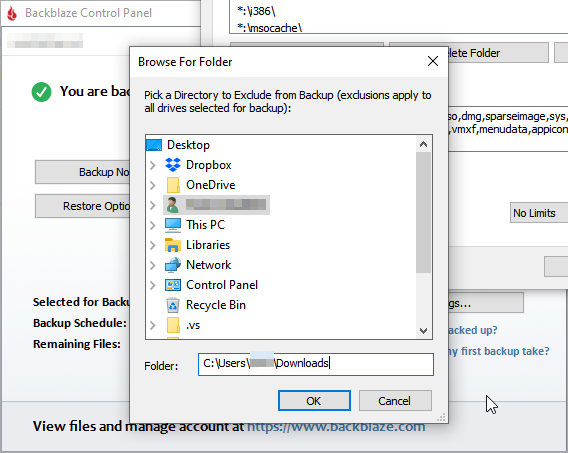
The problem: The UI for excluding directories is horrific. It uses the Windows "Browse for Folder" *SHBrowseForFolder) dialog, which requires you click down through each and every level of your directory structure to get to the directory you want to exclude. You can't cut and paste, it doesn't start from the directory you added your last exclusion in, it's just lots and lots and lots and lots of clicking.
This doesn't seem like it would be hard to fix, so I'm guessing they don't consider it broken?
If the Backblaze folks are still reading: Could you please, pretty please, with sugar on top, for the love of god, fix your fucking exclusions interface? Please?
Is there a saving grace for that browse folder interface? A certain use case where it's really good?
But it's not entirely true. You can paste full path to needed folder in input below directory tree. I've used this many many times
https://dl.dropboxusercontent.com/s/58tncadu2z7ix29/bzbui_20...
I am baffled at why Backblaze clings so tightly to the existing dialog box.
it's up there (again, for me) as one of the annual software subscriptions that's worth every penny, if not more.
In late 2016 my laptop's drive died suddenly. I tried to restore everything via a shipped drive. I'm not sure if it was because of copy on their website (at the time) pointing out that they overnight USB drives or me just expecting that's the fastest way to get my data, but I was disappointed at the turnaround. Because it was a relatively large amount of data (a few hundred gigs?) there was a "staging" process that took a day or two. It got interrupted and had to start again (a server reboot on their side?). After receiving the drive everything went smoothly; I believe the data had been encrypted in transit, but wasn't onerous to restore from. I even think I was outside of their 30-day return and it wasn't an issue (the problem wasn't my hard drive, but a cable...with no hot spares and a special cable it took longer to resolve). At work I had a similarly annoying experience with Amazon Snowball where physically locating it and "testing" it took a few days longer than expected when expecting tight turnaround...maybe I need to adjust my expectations for physical logistics.
Many years previous I noticed my music files were showing up as 0-size--my hard drive was failing. Thankfully I could pull my collection from 30 days previous and I chose a download option. It was a bit annoying that they had created a series of zip files (which makes sense), but I believe I was restricted to the web interface for downloading them which made managing it difficult.
I attempted to restore about 1TB of data (on macOS). Since I have 500mbit internet I assumed I'd be able to download it through the app, but that didn't prove easy. Even when split into smaller zip archives, the download would go terribly slow. Often, the archives would be corrupted and I'd have to re-download them.
In the end I had to order a drive to Europe (and pay the tariffs), which is a pain in the ass. (But they did return the deposit even though I missed the 30 day window.)
Edit:
Oh yea, and when you loose your data you have only 30 days to get it back before Backblaze deletes it as well! That's what happened to me right before a multi-week trip, so I was pretty unhappy that I wasn't able to download my backup in the 5-or-so days I had at my disposal, thus having to order the physical drive.
I have a pretty thorough and redundant on-site backup system these days. But I still really appreciate having a totally independent off-site backup system. Nothing makes you suddenly wonder if your backup system is really all in order as when you lose your primary disk.
It's definitely a subscription that a lot of people should have if they don't.
I ended up buying a Synology NAS (which does offer the same computer backup features + revisioning and all that), and then syncing the backup out to B2. It's not an ideal solution by any means, and I would get rid of my NAS in a heartbeat if there were a real solution for Linux desktops.
It really sucks to have had to go through all of that setup (+ have another machine to maintain) when I just wanted to get things done and know my data was safe.
Would you consider working with the community to find a better solution? Maybe offer a closed source library (a la libspotify, but for Backblaze) for the storage bits + get the community pointed in the right direction for an open source frontend for Linux or something?
I'm using Restic to B2 on Linux, Win and Mac desktops and a Synology NAS (linux based). No problems.
For my purposes, especially with Restic dedupe, plain B2 works out much cheaper than $6/pc/month would. I currently spend around $7/month total for all these.
Such a great service and I still always look forward to the emails, stuff like the drive failure rates is always a neat read!
I’ve been burnt badly by this, I wish there was a better way. I was in the habit of doing this and when I fired the drive up for some reason it failed to be backed up and the backup was deleted at their end. 1TB had to be re-uploaded on a 4Mbps connection. I know I shouldn’t have done the backup on the last day (no data had changed) but wow was that irritating.
I would archive podcasts I liked, download YT videos I found worthy of it, I had 100gb or so of 9/11 news coverage from the day of the attacks and the next few days, insane amounts of exes for pretty much every revision of every scrap of software I used in case I ever wanted to go back to an old version, insane amounts of images from where I'd rip entire tumblr accounts based around different fandoms/topics, I had half a century of Lodge meeting minutes for one of my Lodges scanned as high-resolution OCRd pdfs, entire websites I'd wget for offline (why?!) viewing etc. It's all presumably still there but I haven't turned that box on in about a year now.
Man, switching to a Chromebox was so freeing.
Anyway, okay, I'll test your trial again. :)