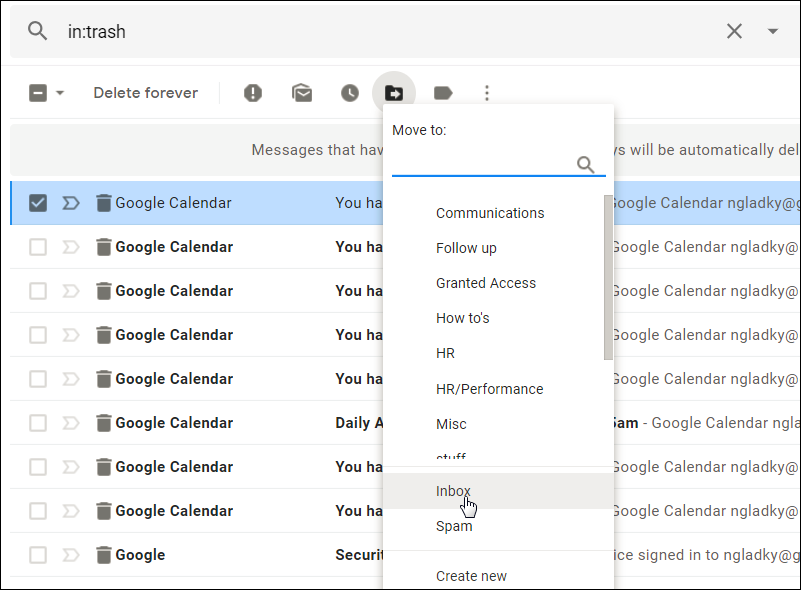
I appreciate that with JMAP, FastMail has essentially become the first entity to do labels correctly, with a freaking standard behind it, but client support isn't going to be there for many years so I will avoid it. The big upside for me is it'll take away one reason people say they can't leave Gmail.
So the issue is that any other solution would work improperly for Gmail. Client support is a huge part of the problem: If it's outside the standard, clients aren't going to handle it the same way.
JMAP, of course, fixes this.
Confused me for a moment as you can complete the first step of enabling this (changing to New Rules) using the stable client.
---
Oh, no, it's even more confusing than that. You enable the labels beta function on the beta website, but then it applies even on the main website.
I've submitted beta feedback indicating my concerns.
1. Lots of email that you can categorize.
2. Lots of users to label the email as spam or not spam.
3. Tons of code to identify classifiable features such as clickable links, the ASN from which the message originated, and so many other things.
4. Some kind of classifier that pulls all the above into a decision about each message. And make sure it’s really fast and doesn’t require gargantuan resources either, because you’re trying to provide cheap mailboxes.
Google has enormous advantages in solving for spam filtering. It has over a billion active users, enormous computing resources, and top AI talent. Not to mention legions of talented general programmers to build all the feature extraction stuff. Competing with Google on spam filtering is an unwinnable game IMHO.
And promotions box is usually just spam.
Also lately started getting spam google calendar events and they just wont go away even after reporting them as spam multiple times. I don't why is that even a feature, why can someone completely random add recurring-daily events to your calendar.
Can be fullly disabled somehow in gmail settings.
I believe I saw somewhere that fastmail's spamfilter may have a 'feature' that whitelists mails from certain senders so that spam gets through if it was forwarded via my university account.
There even was an option to tell Fastmail about these forwarding accounts, but it didn't seem to work, maybe due to multi-hop forwards.
Is that not the idea more than relying on the spam filter. Just delete aliases?
I gave up and basically used the web interface until I switched to FastMail.
Will folders ever become mandatory? If so, maybe I should finally give in and host emails myself. It can't be more painful than being forced to use labels.
The only service that does not support folders properly is Gmail and the actual problem with Gmail is that they're abusing IMAP folders for emulating their labels. Fastmail has always been very standards compliant and I don't see them abusing the standard without a way to turn the behavior off.
So I don't really understand the drama. Also note that a lot of users, including myself, are craving for labels ;-)
I've tried unsuccessfully to maintain folder/label systems over the years, and I always end up having to search my emails anyway. So why bother with trying to make a consistent folder/label structure? I'm much more likely to remember some key words from an invoice than remember which labels I would've applied.
As you mentioned, once a message is 'consumed,' it just gets archived. But the folder system (combined with sieve filters) is what makes dealing with a ton of incoming email extremely pleasant.
In addition, folders have better discoverability, whereas I find search to be finicky (looking for exact words when I only remember a synonym)
I have a similar problem with google drive. Oftentimes I will find a file that I was looking for, but I know there are related files in the same folder (maybe a spreadsheet used to generate the other document). But I can't get to the folder from the file (as far as I know). If I don't remember some keywords from the other file, I may be SOL.
This is convenient in Gmail and when I last looked at fastmail in 2014 this wasn't possible.
This was the support answer: "I am sorry, but our filters only work at email delivery time. You can't really use them on emails already delivered to your account.
However, to work on already delivered emails, I would suggest you use our 'Search' feature. You can search for emails matching specific criteria, and then select them and move them en masse to a different folder, or even delete them."
This works but makes migration/reorganizing a bit annoying
A subset of the new rules system can be applied to existing mails when the rule is created, at least when the rules are used with folders. I've not tried the new label system, but I think the folder/label processing comes after the rule matching so I'd expect it to be the same.
Once a rule is created, there does not appear to be any way to change whether it is in that subset or not.
Consider a rule that filters on who the mail is from. On the old rule creation screen, you could select whether to use the from email address or the from name in your condition. For email address you could check for containing, beginning with, or ending with a string, matching or not matching a glob pattern, or matching or not matching a regular expression. For a from name, you could check for exact match, contains, or glob pattern.
On the new rule creation screen, there are no longer separate from email address and from name options, and there is no choice in how it matches. You just enter a string--I'm not sure how exactly it uses it.
If you want the older, more flexible conditions you can get them by clicking "switch to no-preview rules". That gives, as far as I've seen, the same condition options that the old rules did. The cost, as the name "no-preview rules" suggests, is that you do not get a preview of what messages the rule matches.
When you hit "continue" on the rule creation screen for a "standard rule" (that's their name for non-no-preview rules), it brings you to a screen that shows all your existing mail that matches the rule, with a label showing what folder it is currently in. From there you can ask to further edit the selection criteria. Once you are happy with the messages it is selection, you can tell it to go ahead and create the rule.
That brings up the screen to specify the rule actions. On that screen there are check boxes to apply it to existing messages (the ones you saw in the preview) and to apply it to new messages.
When you create a no-preview rule, there is as you would expect no preview. There are also no check boxes for existing/incoming. It applie to incoming, and only incoming.
If you create a no-preview rule, and later edit that rule, there is no way that I've found to change it to a standard rule. If you create a standard rule, and later edit that rule, there is no way that I've found to change it to a no-preview rule.
Fastmail also lets you create rules by editing the sieve code text. The sieve code contains various rules generated by Fastmail internally and all the rules created from the rules you make in the Fastmail GUI. Between each section of such rules they have a text area where you can enter your own rules.
I don't know if there is any way to get it to do the preview and apply to existing thing with rules entered via those text areas. If there were I'd be tempted to stop using the rule making GUI and just do all my rules myself in sieve.
Fastmail is the clear market leader for people who don't want to use gmail or outlook, and I'm pretty excited to try their labels. I would love to see them implement answers to some of the questions the basecamp (hey) folks raised here [1], but I'm pretty confident they'll implement some of them. I also suspect that many of the things basecamp/hey want to do break interop with other email clients for editing. That is, you can read them, but not use the hey features from other clients; Fastmail may not be willing to make that trade. Super excited to see what hey do though!
Either way, building a super-reliable email service that can handle 10s of gigs of emails and hundreds of thousands of messages is not easy and Fastmail does a good job.
One thing I would suggest is to allow the organisation of labels according to when the last email was received. Today, Yesterday, This week, Last week, This month, Last month etc.
I actually run a similar product called DarwinMail [1], which was built shortly after GoogleInbox announced it would shut down in 2018.
We have supported bundles (labels in Fastmail) for about 12 months now. Through consistent iterative updates (thanks to feedback from our users) we have made huge progress.
Apart from the core (built-in) bundles: travel, finance, purchases, forums, promotions, social, updates you can also create a bundle from any label you wish.
In the backend, there is no difference between labels mode and folders mode; all of the changes are in the UI. There are no IMAP attributes or keywords (they're poorly supported by third-party clients); any email message can appear in more than one mailbox, where "mailbox" means "folder" or "label".
On disk, mailboxes are stored as UNIX directories: all copies of the message (i.e., in all folders/labels) are hard links to the same inode. Over IMAP, each can have its own metadata (\Seen and \Flagged, for example), and they'll probably appear as separate copies (depending on how your client decides to do things).
As you say, JMAP has this built in: each Email object has a MailboxIds property. When the web client (or your own bespoke JMAP client!) fetches emails for one folder/label, and then you click to a different folder/label, the client doesn't have to download that message again, because it already has it in its local cache.
This supports labels: https://jmap.io/spec-mail.html
Given that a burger cost $5, I'm more than fine with sacrificing a burger each month for private email.
The problem is that it's hard to create custom ones in Thunderbird. It involves editing about:config, and when custom ones are saved to the server, other instances of TB won't recognize them unless you edit the about:config of those instances too. Basically, it's possible but too much pain in the TB UI to be useful.
It is unclear to me how this works with IMAP clients. Are these labels still exposed as folders over IMAP?
If so, I assume messages get duplicated, just as with Gmail, therefore the client will need special hacks to deal with it, just as with Gmail.
So perhaps it's something that is coming...
[1] https://it.stonybrook.edu/sites/default/files/kb/8618/images...
Edit: typo
There are other alternatives that are cheaper and focus on privacy, reliability, etc. They may not be as famous as the Fastmail brand. Posteo (no custom domain support), Mailbox.org, Runbox, Migadu, Mailfence and Mxroute are just some of the providers out there that give Fastmail a run for the money. Vote with your wallet.
Just wanted to add my voice that I’d love to see a discounted family plan! Even if there were constraints on subsidiary accounts - it isn’t like my kids are sending 50 emails a day.
Edit: I should note I am already a paying customer with my business email.
I would love a family plan that would let me put my parents on my domain, however I cannot justify current fast mail pricing for the several emails each week
While I'll easily pay $5 for myself and a few more I'm basically forcing all emails on my domains to go through fastmail. And if I want to lend the domain name for relatives to use for email it seems like a rip-off to expect them to pay 5*$5 a month for a family with three kids.
It really annoys me that you can not use the Basic account (which regardless is very restricted) with a domain. By all means, require that the account that manages the domain at the Standard level but as it is now there is no sensible way to allow add some low-volume mail accounts for relatives or family members that aren't tech-savvy.
That said would support a family plan too. For me it’s important that they are not sitting on a free gmail account.
Another +1 here, currently considering FM for myself, spouse and/or kids, and while for a single person it's bearable, for 4 it becomes overly expensive so we'd have to look for alternatives.
I'd happily switch to a standard plan if it enabled access to a family feature.
I fully understand that there are costs, but I feel having a family plan would increase your revenue and profit.
But searching for "spark + jmap" return interesting results, haha
Edit: found that discussion on JMAP support in Mailmate: https://lists.freron.com/mailmate/2019-January/010799.html
>Switching back to Folders mode: ... Your labels will be converted into Folders.
Upon converting back to Folder mode, what happens to our painstakingly entered per-label color assignments?
As a Fastmail user, this worries me, as on its face suggesting a destructive bulk state change to all metadata of the account.
Your colours will remain intact if you switch between the two. Mailboxes can have colours too.
Basically the "Inbox" is my TODO list in a sense. And with labels I can keep better track of what is necessary for the emails/todos to become archived.
It's not for everyone, but it's worth it if you value your mail and time.
My only complaint is that the more they extend JMAP the more I want a dedicated email client that supports it, and none do as far as I am aware.