These days I'm on a 5k monitor and when having a more direct conversation in a meeting, I make a point to place my Webex video window at the top and center of my screen. (I never run it maximized, only 1/4 of height & width, so 1/16 of my screen realestate.)
I tested this setup with PhotoBooth and compared when I look at my own face vs. the actual camera. The difference is minor.
Bonus, it signals to whom I'm speaking whether I'm looking at some other window or at them. This is useful for empathetic listening.
I know there's a bunch of research on viewpoint interpolation, but how close might we be to a dedicated processor to be able do this in a laptop, or at least specialized VC monitor?
https://news.ycombinator.com/item?id=24151123https://news.yc...
https://arstechnica.com/gadgets/2019/07/facetime-feature-in-...
As for perspective shifting based upon multiple inputs - processing wise look at raytracing as would need to map each camera input to extrapolate the suface details and then map that out to the virtual visulisation. Basicly you would need to 3D map, including textures and re-render that viewpoint required.
However, do you need the whole face - you just really need to fix the eye's IMHO and eyeline contact.
But that is down to how we interact in meetings with people - try doing a video conference in which everybody is wearing dark sunglasses - that is insightful as you find people focus more upon what they hear more then.
https://www.bhphotovideo.com/c/buy/Teleprompters/ci/2122/N/4...
Huh, I guess this never crossed my mind, but makes sense. TIL.
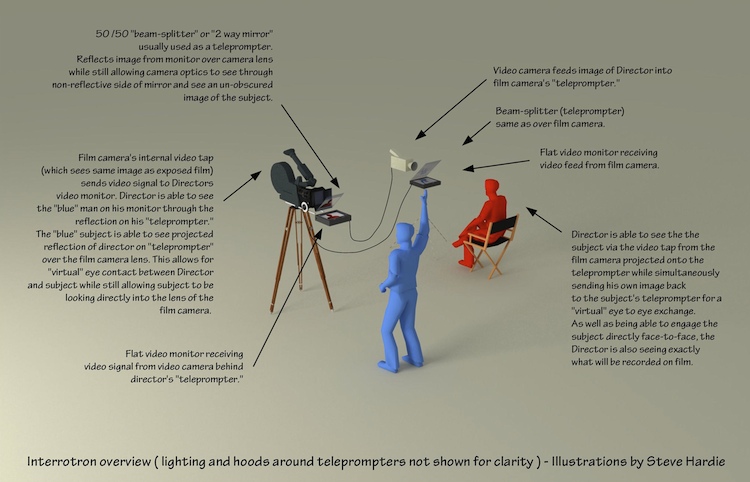
(The Interrotron)
I dunno. But at some point you can tell who's faking it. Sort of like someone who read How to Win Friends and Influence People and follows it to the letter- they use your name too often shoehorned into conversations and ask about your dog a little too early and enthusiastically with feigned interest.
Perhaps this is a cynical viewpoint brought on negatively from too many zoom webcam meetings!
Maybe I've just gotten too used to video calls...
I've found if people are just a lil bit further away from their camera they appear to be looking at me anyways.
A conference call should be like a conference table wrt how big their head should appear, once you reach that distance I really can't tell you aren't looking directly into the camera
His lightbox setup is better than his mom's, but everything else about his setup was worse.
Second, I think it doesn't look like her eyes are directed at the camera like his, because they are not.
https://smile.amazon.com/gp/product/B019AJOLEM/
The setup is to use an iPad hosting Sidecar wireless display from your Mac. Use Moom or similar screen management app that detects kicking on the new display, and pops your meeting video windows onto it at full dimensions (but not ‘full screen’ mode).
If the other person is both on video and sometimes sharing content, you need to flip the video horizontally, which isn’t obvious. There are three options:
1. Check if your display can flip the video.
2. Use SwitchResX if your graphics card can do it for that particular monitor:
If it can, great. If it cannot, then ...
3. Use the Flip Mac Window utility from here, so you’ll see it the right way around in the mirror:
https://www.freetelepromptersoftware.com/mac/
How this works is it screen captures the original window, and plays it back flipped over top of the window. That means actual buttons / icons are not moved, only the rendering of the window is flipped. If you need to navigate the window, unflip it first.
Note that 12.9” iPads only fit in this GlideGear if you re-shape the mirror brace, but the mirror is large enough for a 12.9” iPad and it looks fantastic.
I like coupling this with Logitech Brio (best) or Logitech Streamcam (good).
I‘ve used it extensively with WebEx, Zoom, and Teams.
Many laptop screens don't open completely flat, so that may not work for this particular concept.
But that's what I love most about video conferencing: You don't have to make eye contact. The only thing better is voice-only with a shared presentation space.
[1] https://twitter.com/gunnarmorling/status/1296043605459705856
1.) I find if you put the video conference window top and center of a monitor--preferably a larger one--it works pretty well so long as you make at effort to keep your eyes towards the top of the screen. This is especially important (and takes some discipline) if you're presenting from slides.
2.) The general recommendation, which is my experience as well, is that the webcam should be up at eye level or maybe a bit above. So if you are using a laptop, it should be up on some books or other type of stand.
https://www.amazon.com/Glide-Gear-TMP100-Adjustable-Teleprom...
Though lighting was always key and with the two-way mirror set-up, you will want a few more lumens to compensate for loss of that mirror in front of the camera.
Personally I'm very happy with this. Means you can tune out and keep working on stuff that matters to you when the call starts going off-track or out of your area.
1. The video itself uses the cliche "weird" baitclick.
2. Honey sponsership.
On Hackaday.
That's just sad, hackaday used to not be like that.
Guess really it's the times.