I'm trying to track them in this GitHub issue [1] but a couple people have remained more or less anonymous as they don't want to attract attention too early.
The single PCIe lane is the biggest limitation if you're looking for raw speed (350 MB/sec is kind of the upper real-world sustained transfer limit), though since the gigabit Ethernet port is on a different interface, you can still expect to get 80-100 MB/sec network transfer speeds.
Something like this, with the right case and OMV or other adequate software would be a relatively competitive replacement for low-end NASes.
I'm also exploring building a 2.5G NAS with a CM4, but the PCIe bus speed limitation is what kinda hamstrings that. Hopefully the next Pi revision has a 4x (at least) lane, like the RockPro64.
[1] https://github.com/geerlingguy/raspberry-pi-pcie-devices/iss...
I continue to appreciate the time and attention you are paying to these new boards on your blog and in your comments here at HN - thank you.
I am having trouble sourcing maxed out CM4 parts - that is, 8 GB ram and 32 GB onboard storage[1]. They are either sold out until August or October or something silly like that or they are only available in 200+ quantity.
Do you have any suggestions as to where I could source those ?
[1] CM4008032, I think ...
Anyone trying to get 10G speeds out of a high end NAS won’t be looking to Raspberry Pi solutions right now, anyway.
The real advantage, IMO, is that this helps kick off the popularity of DIY NAS solutions based on ARM hardware. It’s not the first solution in this space, but Raspberry Pi is great for taking things mainstream.
I imagine that a few years from now we’ll have an even faster Raspberry Pi to build a NAS around. These current-gen solutions might be just what we need to get the software sorted out before the powerful hardware arrives.
So a $100 5+ bay USB3 JBOD, RPi4B run over the 1G nic, and a 64-bit arm64 distro (because rasbian will die with modern SATA disks in a larger capacity JBOD) and you have a fairly reasonable low end NAS for basically the price of the disks.
(or just plug in 4 of USB3 easystores/etc and save on the enclosure).
I can easily saturate the 1G NIC which is more than sufficient for my use case.
I don’t use RAID or ZFS so neither the CPU or RAM are limiting factors.
(the Gumstix camera board is overkill for my needs)
But most consumer retail PoE switches are only .3af compliant which give 15W minus transmission losses.
The CM4 is only useful in most cases if you want to use the PCIe bus for something else, or if you’re trying to embed it in another product.
CM4 on a PoE baseboard offers far more cooling options
Wait, I thought the official CM4 breakout/dev board (the one with the PCIe slot on it) had PoE, right ?
Also it only has two SATA ports so would need a PCIe expansion card to match the four ports offered by the Pi board?
I suspect the Pi is also significantly more power efficient?
RAM is accounted for in GP's description.
Regarding the boot drive, you can either boot from the data disks (say via a common ZFS pool or a common raid + lvm) or if you're happy with a SD card for the PI, I suppose a small USB drive would do the trick.
Regarding the PSU, but you'd need a beefy adapter anyway for running 4 drives, which isn't cheap, and there are cheap pico-atx PSUs available. I bought a compact case + PSU for my board for 50 euros around two years ago [1] that's still going strong (although I'm only running a single SSD in it), so the PSU alone should be less than that.
There's of course the power efficiency question and I presume this setup would be somewhat more power hungry than an RPI. The Intel specs for the J3455 give it at 10W TDP. I have no idea how much RAM consumes, but it's likely a few more watts.
[0] https://www.gigabyte.com/Motherboard/GA-J3455N-D3H-rev-10#ov
[1] https://www.inter-tech.de/en/products/case/mini-itx-nuc/itx-...
But the key differentiator IMHO is ECC and 10G. If one picks a board like https://www.gigabyte.com/Motherboard/C246N-WU2-rev-10 it then becomes possible to put a i3-9100/etc on it and gain ECC support. Given the 8 onboard SATA ports, and a 10G+ nic in the PCIe slot, you have a NAS that can best nearly everything on the market below a couple thousand dollars. There of course is a pretty wide range of atom/xeon boards with BMC's, and all of the above including the 10G. In the past I ran a https://www.asrockrack.com/general/productdetail.asp?Model=C... which has 12 sata ports, ECC and a BMC.
But, yes it will consume more than a rpi, and CPU power rating isnt everything. Having 8+ sata ports, bmcs, 10G ethernet, etc all up the board power consumption. But on the other hand, that i3 is rated for 65W, but idles at ~5 on a modern board, which is in the ballpark of the 2-3W of my RPi4 (which only swings a watt or so, and doesn't include the USB3 hub+devices).
So, given the NAS spends a lot of its time idle, and the power only spikes (and never to anything close to 65W) when its being used, it seems the extra power is worth the extra performance. I could probably fix the max frequency at 2Ghz like the RPi and save even more power.
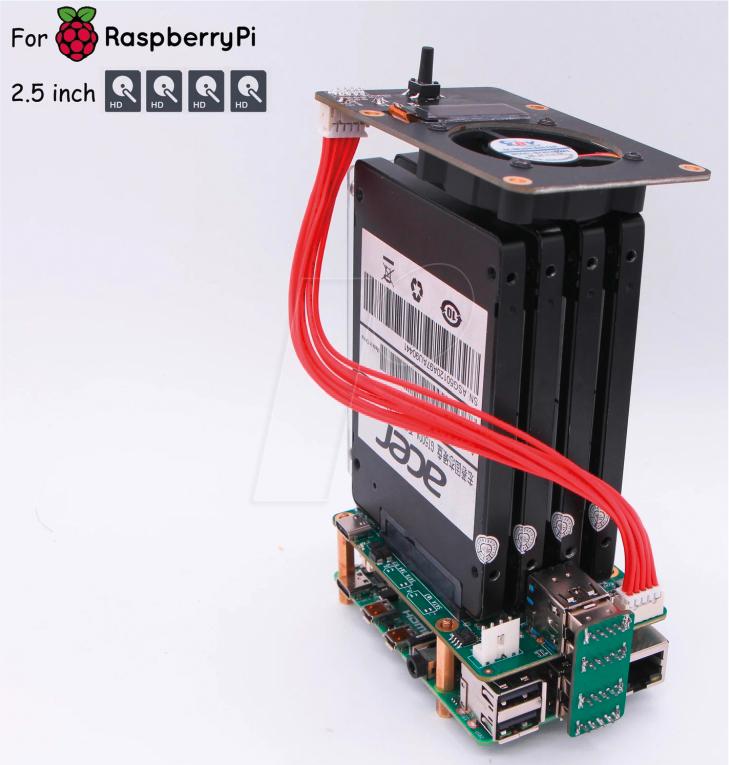
How about 2.5 inch drives? I'm thinking about: https://cdn-reichelt.de/bilder/web/xxl_ws/A300/RPI_NAS_4XSAT...
The real cost is drives, not the thing you plug them into.
I love the pi and have many of them. But their beauty seems to come out at the edge where things are low power and they replace nonsense IOT devices.
To replace a server or desktop is a stretch. That's where using a pi is death by 10,000 papercuts. The super-competitive low end PC market gives you so many things for free, like good power supplies, a wide variety of cases and silly things like power switches and a clock with a battery.
I had looked at arm options, including the kobol 64 and boards from hardkernel, but decided that paying a bit more for x86 would make things a lot easier.
It's working well so far: low power draw and near silent, allows for proper zfs on linux support, hardware accelerating transcoding for Jellyfin streams, and at a bit over half the cost of a 6 bay x86 Synology.
Raspberry Pi has inspired a lot of people to get their hands dirty with Linux and embedded systems, even if it’s not the optimal device from a pure engineering perspective.
In that regard, I’d call the Raspberry Pi a resounding success.
I think for this, it's absolutely appropriate to compare to other solutions on market. Even the official Pi foundation data sheet describes CM4 as for "deeply embedded applications".
https://datasheets.raspberrypi.org/cm4/cm4-datasheet.pdf
I would also recommend to carefully examine low-cost x86 options, they often do come out ahead given they usually include all the stuff the Pi Foundation don't supply you - a boot volume, case, power supply etc.
But I also see things like 10 node clusters with a total of 40GB of RAM, a bunch of slow cores, and materials costs of $500+. That's harder for me to understand, outside of the "looks cool" metric.
I recently tried to initialize warranty process (I bought it directly from shop.allnetchina.cn with shipping to Central Europe) but I got no replay.
I was recently wanting a NAS again, but came to the conclusion that the best bang for your buck was just grabbing a cheap mini-ITX board and processor as the price of dedicated NAS boxes was not much different and was far less flexible. Then you would have full-fat sata, even m2 for a boot drive, whatever RAM you wanted etc.
I know it's not a very exciting solution...
End of the article : There’s close to no information about the software right now, and the hardware is not available yet
It supports ECC and has 4 cable-free swappable bays plus space for an SSD system drive in the top. The bolts-as-caddy system is also a great idea.
How is the gen10 ? Can I use all four SATA drives for my raid array but still have a SSD/m.2 boot drive ?
For me, three mirrored ZFS 4TB drives are all I needed for my local storage to be available and resilient. The fourth SATA slot is the SSD in a cradle.
My long term bet for safety is offline USB mirrors on-site, Borg off-site to rsync.net (thanks!) and tarsnap off-site for the smaller stuff.
Maybe one day I’ll be brave and use ZFS to mirror the content to rsync.net? I haven’t upgraded beyond ZoL 0.7 yet but if I did can I replicate an encrypted pool to you without giving you the keys?
If you do want something like this, I think the ODROID-HC4[1] is probably a better option.
I have 8 disks hooked up to a Pi4 through USB3-SATA[1] with external 12V, works quite well in terms of reliability (had to turn on quirks mode[2] though). As I mentioned the main limitation is the single 1GbE interface, but this is just for archive data so.
[1]: https://www.aliexpress.com/item/4000001204302.html
[2]: https://www.raspberrypi.org/forums/viewtopic.php?t=245931
Although I don't think ZFS is stable on the pi just yet[1], so perhaps 4 sata drives is overkill.
I would be interested in a single sata/cm4 carrier board though.
[1]citation needed, I've not really looked...
If you really depend on your data and want it to be safe, i'd recommend spending the extra money and either getting a proper nas (synology/qnap) or go the proper diy way (aka an x86 box and truenas/unraid).
you really don't want to be in the position where you absolutely need your data but the replacement parts are two-weeks far in the future because they're travelling via snail mail or worse, relying on 2nd-hand spare parts off ebay.
edit: not to mention, the gigabit ethernet port is a bottleneck. you would probably hitting the bottleneck even by using four rotational disks.
At least, that’s how you should be constructing a home NAS if that’s what you’re doing.
The same situation can arise with a popular/managed solution like qnap/syno.
I have a DS918 and really love it (it’s one of those set it and forget it machines) but I don’t totally know how it works. It’s Linux of course, but it’s sorta a black box.
So I think there is a lot to be said for DIY as long as you are aware of the drawbacks and engineer around them accordingly.
Use mdadm RAID-10 across four spinning disks, or RAID-1 across a pair and have two slots free. If the board fails, you can plug them into any other Linux box with SATA ports available.
Most people have no better than 1Gb/s ethernet available in their house anyway. One expects a backup or restore to take a while, but also not to be interactive.
It's probably cheaper to repurpose an old desktop, but this will probably use less power, even when both are asleep.
(Also, you aren't getting ECC RAM at this price point, no matter what.)
What's a good use case for this? A house with a few laptops, a desktop and one server. Everything uses the server as their datastore. The server runs ZFS, but even ZFS can run out of luck, so you send over a snapshot to the backup device every day or three. It's insurance.
This is partially true. Most people have no better than 1Gb/sec per single computer. That means that a single pc using the full 1Gb/sec would saturate the nas network I/O and degrade performances for all other clients.
Which may or may not be okay... You just know to be aware of that.
A NAS can serve as a backup.
Not all backups are suitable as a NAS.
Now, let me restate: Most people have no networks capable of significantly more than 1Gb/s between two hosts in their house. Complaining that a backup server is also attached at 1Gb/s is not going to cause people to discover that they have already purchased 10Gb/s switches, or LACP switches, or even acquire 2.5Gb/s switches.
Of the people who have 10Gb/s switches in their house, approximately none of them are going to look at this very low cost, low performance, low power system and say "yes! this is my new primary backup system!"
I already have a beefy server at home ( it's actually a refurbished enterprise workstation, with 24 cores, but read on ).
However it lacks drives. What I ideally want is a a dumb drive bay I could buy, and then connect ( somehow ) to my existing server, so I could use its CPU and RAM.
I don't want this drive bay to have its own CPU, I just want it to hold data and transfer it over some wire. Ideally I would achieve close to gigabit speeds requesting data off of this server/drive bay.
Some options I've explored are those dumb quad storage bays that connect over USB-3. But I was worried about running ZFS over a USB interface, as well as potentially parallel read and writes with the quality of the USB controller.
And yes, you need eSATA, because the distance between cage and machine might be enough to introduce read/write errors. That's what I had, because I used normal SATA cables before.
[1]: https://www.icydock.com/goods.php?id=166
[2]: https://www.delock.de/produkte/G_61725/merkmale.html?setLang...
[3]: https://www.delock.de/produkte/G_84402/merkmale.html?setLang...
Get a decent[1] external SAS adaptor, a SAS cable, and a second hand enclosure and bob's your noisy uncle!
something like this: https://www.bargainhardware.co.uk/dell-powervault-md1220-sto...
https://www.bargainhardware.co.uk/hp-z800-z820-external-mini...
Your workstation might even have a sas controller on it already.
This might be overkill, but even with spinny disks you'll be able to get fast random io[2]
[1] subjective. If yours is an enterprise workstation you'll most likley be able to get an official SAS controller for it.
[2] well about 10 iops per drive.
Note the smaller size of RPi-etc makes no sense when you're going to host 4 hard drives anyways which takes quite some space on their own, and you need a decent PSU for the drives too, and a solid case as well, etc.
Just buy those ASRock mini-itx boards at newsegg or somewhere and let RPi do what it's best at.
[edit: fixed spelling]
5A should be plenty for normal post-start operation.