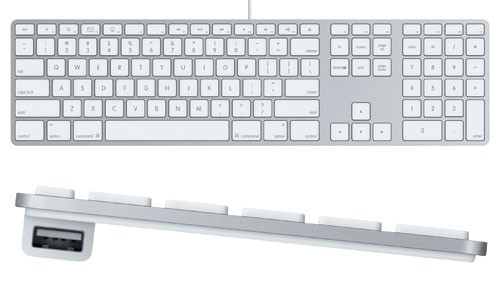
It was only sold for a year or so before the wireless model replaced it, and it's hard to find them now. What I did was to look for used iMacs from 2010, see which ones have the A1242, then ask the seller to only sell me the keyboard.
Based on the replies I wasn't the first one to ask! Seems like there are still some fans around.
I cringe a little seeing all this affection for the A1243, after having seen scads of them go into the scrap heap at my local nonprofit electronics recycler.
+1 for eBay, anyway. I've made an exception for my M1 MacBook, but generally I try to buy everything used.
AASPs were also able to order the iMac Pro space gray keyboards the same way, back when they were exclusive to the iMac Pro and weren't sold standalone.
Apple low-profile keyboards have been my keyboard of choice for over 10 years on any platform and for any use (gaming included). I know a lot of people swear by mechanical keyboards, but personally I type much faster with the low-profile keys and love the feel of them.
After all, in the life of a keyboard it probably types 10,000 characters per day for 50 years. Call that 400 Million events that need to be sent to your mac via bluetooth low energy.
The system can be entirely powered down when no key is pressed, so the only energy loss is a pre-keypress amount. That works out to about 3 Watt-hours (assuming each keypress is transmitted 3 times for interference-resistance and has a packet length the same as an advertisement). A long-life alkaline battery has a low enough leakage to last 50 years, and about the volume of an AA cell can easily power daily use for 50 years. If you want to go smaller and lighter, you could get 10 years out of a coin cell.
It would probably work out cheaper because you don't need to ship the device with a cable or charge circuitry too. Users don't have one more thing to worry about charging either.
Just got an M1 MacBook and it’s so nice to have a pretty consistent feel compared to my other keyboards.
Not surprised these are totally unrepairable by the way. Luckily they rarely need to be repaired.
* they're very durable (talking normal usage + spilling drinks a few times a year — no stuck or broken keys)
* the key labels never fade
* there's 2 low-power USB ports (I think USB 2.0?) which aren't good for much, but good enough to plug a mouse into
* it's not the easiest thing to take apart but if you get crumbs under a key, it's pretty easy to pry it up and then click it back in
Fortunately low-profile keys have been growing in popularity in the mechanical keyboard community so there are some excellent options to choose from now.
I've definitely dumped at least one cup of tea into mine, possibly even more, and it's still working perfect. It's quite bizarre actually.
It's a good one! The keys definitely have more travel than modern MacBook keyboard keys. I like its size, incline, and weight too. I'm split on the size, on the one hand it's kind of long, so it fits awkwardly in my backpack and I find myself pushing it left and right often.
On the other hand, I like having a dedicated delete key and full-size arrow keys. A version of it with the separate arrow keys but no num-pad would be perfect for me.
The USB ports aren't very good for data, but they're great to plug a mouse into. I have a wireless Logitech mouse with the USB receiver, not Bluetooth. It's easy forget it's not Bluetooth though because the receiver has just been tucked in under the keyboard the whole time.
Does anyone else get electric shocks often from them? I would get them anytime I touched the metal case of it. I never thought to google it or anything.
Oh yes. Also, many aluminum laptops when plugged in.
Aluminum computers or keyboards, steel wall corners...if it has exposed metal, I swear I have been shocked!
The tingling comes from some leakage across the transformer isolated primary/secondary but is so small that it’s not dangerous.
That’s also completely unrelated to static discharges that zap you once you touch something that can equalize the potential
0.7 mm - Butterfly keyboard
1 mm - 16” MBP "Magic" ( Scissor ) keyboard
1.3 mm - old scissor keyboard
It is only 0.3mm but it is a world of difference. And at no point would I want a 0.3mm thinner Laptop at the expense of much better typing experience.
Even Microsoft copy the 1.3mm Key Travel Design with their Surface Book.
[1] https://everymac.com/systems/apple/imac/imac-aluminum-faq/im...
[2] https://archive.org/stream/bitsavers_sunsparcSPationVer11999...
https://everymac.com/images/other_images/apple-aluminum-keyb...
Just don't look at the underside, where food crumbs, hairs that fall into the key holes are forever trapped.
https://www.reddit.com/r/VintageApple/comments/ax9hqm/got_an...
Most keycaps could be interchanged between these keyboards and the truncated one from the original iMac (M2452)[2] which I did on a couple of keyboards, mostly because I liked the way it looked. I only stopped using my 2452 last year when I decided I really, really needed a keyboard with a forward delete key.
[1] https://en.wikipedia.org/wiki/Apple_Keyboard#Apple_Keyboard_... [2] https://en.wikipedia.org/wiki/Apple_Keyboard#Apple_USB_Keybo...
I love how the AAK feels sturdy. It’s one large slab, it doesnt slide easily on the table thanks to the rubber pads. It gives a nice low vibration thud when you type on it, it doesn’t feel cheap.
However i got myself a mechanical keyboard lately. The only issue i have with the AAK is that the function keys have no separation, always need to double check if I’m pressing the right key. For gaming this can be annoying. On many other pc kkeyboards you get f1-f4 grouped, then some space, then f5-f8 etc. so it’s much easier to find them if you eg. need to pres f5 quickly.
Now I’m on a Ducky One 2 TKL with "cherry mx silent red" and what a joke. It?s WAY more noisy than the AAK. The transition was rough... but i start to like it... i guess you can get used to either, the AAK now feels a bit weird.
Anyways, long story to say only after switching away i realized just how nice these "scissor" switches feel. I genuinely never even paid attention to the small resistance of the keys, before they activate.
Then I started using this keyboard and my tendonitis went away in a few weeks and never came back. Thank you Apple.
I like the IBM model M's, too, so there's that.
My daily drivers now are Cherry Blues or Browns.