I've been using System76's PopOS with my Asus Zephyrus G14 (4800hs) as a daily driver and I really like it. (freelance/web)
The battery life is comparable to Windows (on integrated graphics mode, it has graphics switching available)at 7-10 hours with 70% brightness and balanced power settings using VScode and firefox.
The g14 has a 75wh battery vs the pangolin's 49wh, so I would expect less battery life from the pangolin despite the 4700u having a lower default tdp, since the 4800hs likes to sit at around 6-10 watts when doing non-intensive tasks anyway.
In 2021 I'm not missing any major programs. It's pretty incredible how much is cross-platform now.
I guess that could just be my sight, but the reviews for the XPS laptop vs the 4k model of the same were pretty much unanimous on the 4k variant being a waste of battery for a neglible return on image quality, so it's at least not a fringe view
Now, seriously, I find it hard to see the difference between 1080 and 4K. What would be nice is a good HDR display panel.
If the computer can only hold up a 1.5 hour battery it really doesn't satisfy the use case of a laptop, doubling the battery up to 99 wh really allows for a 3-4 hour minimum battery life and a longer battery life for non-GPU work.
For Intel based laptops built in the last 10 years basically the only thing making a difference in battery life for laptops with same CPU is screen, and battery.
Everything else is almost the same everywhere. NVME SSD + WiFi will uniformly eat 2W. Power conversion will also eat at to 500-800mW. All other peripherals combined will unlikely to eat more than 1 watt, with exception of 1GB ethernet if working full speed.
On related note - does external display works without nvidia GPU? A lot of manufactures have lately decided to hardwire external HDMI connection to descrete GPU and hence it has been pretty painful to use NVIDIA powered Laptops on Linux. :(
- What kind of external webcam do you use? Does it have any problem with any video-conferencing software?
- Do you access any streaming service (with DRM)? Any issues?
- Any issues with drivers, returning from sleep/hybernation?
Thanks!
The nvidia driver is a bit of a pain to set up, especially if you're on wayland or if you want to use displays via USB C (reverse prime does not work yet due to an nvidia driver bug, so you need to use the nvidia gpu as primary when docked). Other than that, everything works and the community (arch wiki and rog-core) provide good support for getting everything up and running. A bit of configuration and a somewhat recent kernel will be needed (it's pretty new hardware after all), but it's not that hard if you either know Linux or are willing to spend some time. I'm running this config for 8 months now, so the situation from a fresh install might be even better.
Similar to the sister comment, I came from an XPS 13, but I'm happy. The laptop is a bit heavier, but in exchange you get a lot more power, far more RAM (up to 48GB), more ports and, subjectively, a dar better keyboard. Initially I wanted to stay with an XPS, but now I'm happy I made the jump.
EDIT: One unbelievably good point I initially forgot: You can run a VM with GPU passthrough on the laptop. If you need Windows with graphics performance, especially on the go, this is an incredible advantage.
* Locks up on suspend/resume
* Locks up when inserting an external USB-C monitor
* Requires a recent kernel to work properly (5.8 or later)
* Locks up without amdgpu.runpm=0 kernel command line
* dGPU can't be turned off, so increases power consumption
* Locks up with vsync on with the dGPU
* Kernel warning on startup, but doesn't affect stability
Besides these issues (which can be worked around), it's very solid.
A side note: the build quality was extremely disappointing, coming from an XPS 13.
Thank you for the pointer. I have the exact same laptop and tried Ubuntu on it - couldn't even change the screen brightness.
This would also work for Ubuntu.
It wouldn't turn me off from System76 if the hardware were good, but it's just... bad... real bad.
System76 should take a risk and truly make an interesting laptop. leaving the standard, boring design to the big name companies.
If you want great design that matches a Mac (overall, better in some areas, worse in others), look at the flagship ThinkPad models, Microsoft Surface devices, etc. There are many laptops that have "standout design features" such as convertible designs, novel display and input options including pen-and-touch, etc. If anything, I think Macs lag behind in these innovations, although they have other benefits.
* extremely, extremely thin margins
* in general, users are pretty low-discretion, which makes it hard to meaningfully differentiate your product
* deeply entrenched competition (what % of laptops are sold at best buy/etc?)
* the users who are high-discretion are going to be extremely demanding users. They're going to nitpick over small details in both hardware and software. And they're probably going to be installing their own OS (or at least reinstalling the existing one) and will generally be more demanding of both product design and support. Also, they probably have the tech skills to correctly point the finger at you when it's your fault. Whereas less discerning users might just go "Ugh bill gates!"
Doesn't help that the "linux laptop" niche was probably a big part of this "niche laptop" market segment and Dell and Lenovo are both kinda warming back up to that niche. e.g. the newest XPS's all work great on (latest kernel) linux.
[1] https://beneinstein.medium.com/no-you-cant-manufacture-that-...
The XPS 13 competes directly with the mac in terms of (familiar but) industrial design, standout display and inner design (with the white carbon fiber) and USB-C ports for a lifetime. Stating it first, because its the most obvious competitor.
The Razer, Asus, HP and Surface flagships have clear standout designs and similar features.
The only 2 laptops that are purposely boring are the Thinkpad and System76, because they seem to cater to people who need them as work machines, first and foremost. (LG Gram is not a flagship)
I don't _hate_ the XPS 13, but I wouldn't recommend it and I probably won't be getting a 3rd one (unless they change).
The build quality just isn't there. First of all, the flexible chassis is annoying. If I pick it up on the side with one hand, it's likely to flex enough to trigger a trackpad click. Secondly, while it's pretty quiet, it does get rather hot. Third, the trackpad and mouse aren't Macbook-quality (butterfly keyboard aside). In my first one, the trackpad and battery had to be replaced. The keyboard on my current one (9300) has very mild issues (I think they reduced the travel distance and it, like butterfly, is somewhat susceptible to dust/dirt)
Not sure what I'll replace it with. Will see how the reviews for the Framework laptop are.
OEM are very risk averse. They only produce cookie cutter designs because most of their buyers themselves look for most casual buyers.
The iGPU has a hard-locked 64MB of RAM allocated to it, which means the Nvidia graphics chip is ALWAYS on, causing it to get maybe 2~ hours of battery life at best
The build quality is miserable, I ended up replacing all of the screws in the machine to make it more properly sturdy (which also fixed the case flex causing the fans to grind to a halt if you nudged the machine too harshly)
Linux support still isn't 100%. The Nvidia blob doesn't support GPU switching for what ever reason and Nouveau just causes kernel oopses
After suffering with it for so many years I finally bought an "MSI Modern 14" Ryzen laptop, which I'm moderately content with. I'll probably send the Mibook off to some people I know that work at Red Hat so they can at least improve its Linux support for those who still have it though
Seems like the reasonable choice, given that host-side USB-C is still dead in the water.
At this point Apple can design any gimmicky piece of hardware, stick their logo on it, sell it for three times the price of equivalent third party products and still run out of stock on launch. You can't beat that.
$1000 for the M1 air is not a huge premium. It's actually very cheap.
Still has soldered in RAM, unfortunately.
Apple has huge volume, big margins a very tight supply chain and a mountain of cash in tax havens. They have a lot more options.
If a seller like System 76 adds too much margin on their models people will buy a Clevo rebadged by some other seller which is a shame because System76 are adding value with their firmware and OS tweaks.
I am looking forward to the day when a company like System76 can release their own designs but without being in Apples position of fleecing customers for music, video, apps, cloud, mobile, tablets etc in a closed ecosystem it might be a long time coming.
* trackpoint + buttons (can be without touchpad, disabled anyway) * full keyboard * strong durable * removable battery * 4k screen * ecc 64-128gb * rj45 * lots of ports * hardware switches to disable: networking, camera, mic,..
Thinkpad's are move farther away each year. I hope some company will fill the gap.
Sure the above wont work for everybody, but if you are like me, you unpacked the laptop at home and at work each day at exactly the same space, where all the cables and extra monitors were.
I used to use laptop in coffee shops and outdoors, but nowadays between phone, and tablets (wel phone and kindle in my case) I almost never feel the need.
Buy silent box, mobo for overclocking and underclock it for extra silence, and throw the box under the table.
Still have my laptop, but its mostly just "backup" and in case I travel somewhere, but honestly I don't care about it as much
A laptop (xps 13 9360) for traveling or working in remote places.
Even have a yubikey on each desktop and one for travel. All storing the ssh keys.
I don't use the laptop for months, open it and update the packages and dotfiles before going for a travel and that's it. Ready to go.
Did you solve those problems? and if so how?
Sync isn't an issue. All work is on VMs, and they get backed up every day to my Synology.
My backup laptop is a 6 year old Thinkpad, which hasn't been out of it's bag in over a year.
Nope. Actually, just like with my phone chargers, I like to have a laptop charger in all the spaces I like to compute.. I like to have a charger in my bedroom, my living room and in the garage.
I used to have this for all my machines - though I now have a new HP Omen (bad ass machine) - but I only have one charger for it currently.
I havent touched my ipad in a really long time.
But here is a tip - this super light and super cheep USB screen is AMAZING to have with a laptop:
(This thing was $69 when I bought it - but its now $99 but still - a USB only monitor is fantastic.
https://www.amazon.com/AOC-e1659Fwu-1366x768-Brightness-3-0-...
What I do, is I make it the top monitor - and I have this TV Tray stand that is at the perfect level for me to have my laptop on my lap, a tray or a TV tray, and then I have the AOC monitor on this stand and I just move up to click on that mon...
And this is dope because during this pandemic, I am trying to take every free training I can get my digital hands around.
https://digitaldefynd.com/free-udemy-courses/
So I have the training vid on the top screen and then I can use whatever program(s) I need on the laptop...
Blender courses are a good example of how this works great. The point is to have the two screens stacked vertically so that you only move your eyes up and down and dont have to turn your neck...
I can't understand why Thinkpads are moving away from this absolutely perfect design in the name of... slickness?
Why are laptops with a minimal (or non-existing) touchpad so difficult to find? Once you start using the trackpoint your wrists feel incredibly relaxed at all times.
Why do so few vendors offer RJ45 ports? When in the lab, I find my self needing one almost daily.
Why this trend of including keyboards with shorter and shorter travel distance?
There was a campaign to bring attention to all these details a few years ago which (surprisingly!) resulted in Lenovo releasing the "Thinkpad 25 anniversary edition" [1] which ticked most (but not all) of my boxes and which is unfortunately no longer available.
Do people really prefer the new design trends? Am I out of touch with reality?
[1] https://www.lenovo.com/us/en/outletus/laptops/thinkpad/think...
The X61s was far closer to an absolutely perfect design, it just needed less plastic in the chassis. Things started going downhill with the X201s in the transition to wide aspect ratio displays, and X220/X230 arrived at full retard on that trajectory.
Lots of games on Steam has achievements for extremely simple tasks, such as launching the game for the first time or playing it for five minutes, and popularity of those is typically around 82.5% and 75% respectively among audiences for most popular titles.
IOW, 17.5% of PC game enthusiasts pay for a game and immediately put it on a shelf and don’t even double click on the icon. 25% reaches past the loading screen. Of all purchasers, maybe 10% reaches the final boss or end of the storyline. Potentially less.
A person who has issues with a mainstream laptop for its lack of an Ethernet port few years into ownership, who knows how many of those exist in the whole world?
Having been a user of the old X lines throughout the years the current X/T and X1 lines seem like a definite improvement to me. And I also use the trackpoint exclusively.
However I think that yes, most people (including me) prefer the new to the old. Eg.: I dislike full keyboards because it shifts my hands to a side and moves the mouse further away. I tried track points but I find touchpads superior. I don’t need an RJ45 because even if I wanted to use it, I’d much rather have it on a USB-C dongle with pass through power, so I only have one cable to disconnect when moving around. And call me crazy, even though I use a mechanical external keyboard most of the time, I actually like typing on the butterfly keyboard more than on other laptop keyboards I have and had.
They also have the T25 frankenpad: https://www.xyte.ch/shop/t25-frankenpad-kit/ and https://www.xyte.ch/thinkpads/t25-frankenpad/
> Why do so few vendors offer RJ45 ports?
I'm guessing that because laptops are portable machines, almost nobody ever uses the network port and if you need one, you can use an adapter with the USB port.
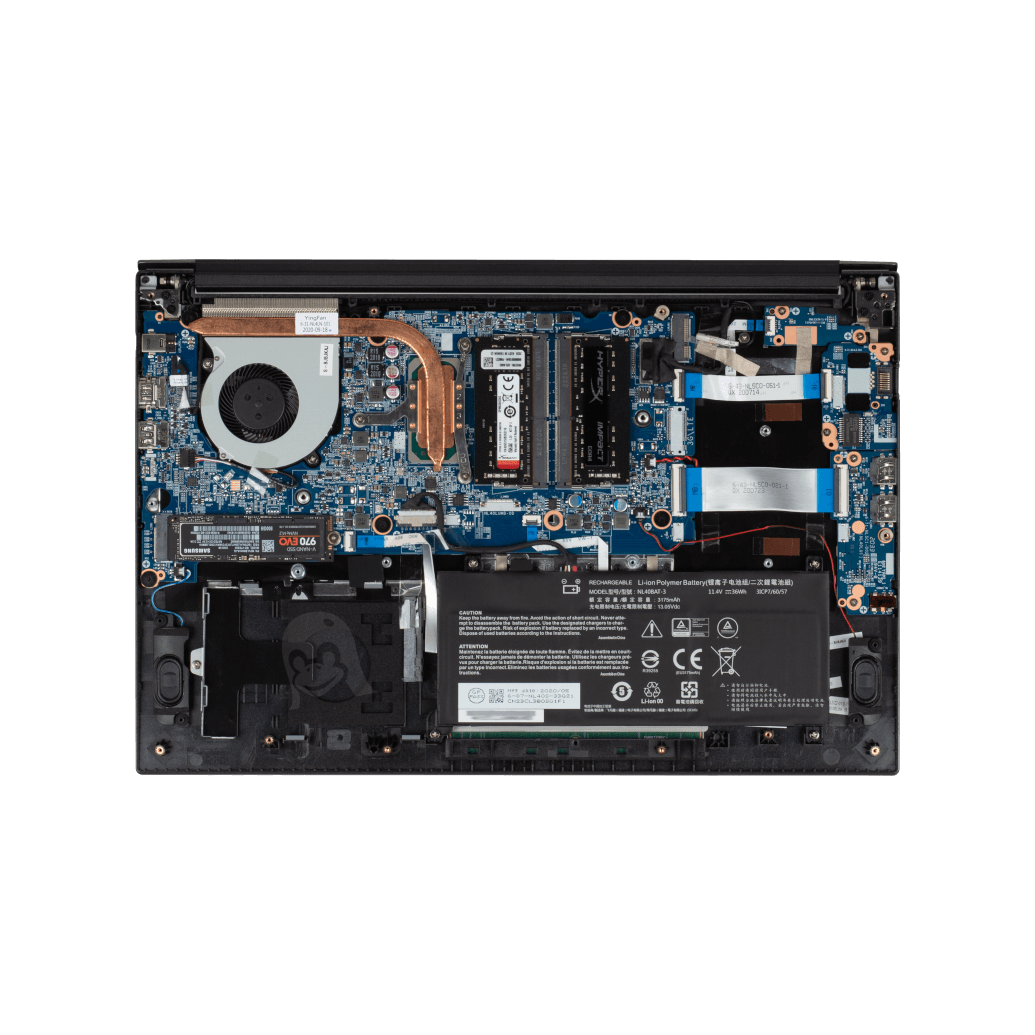
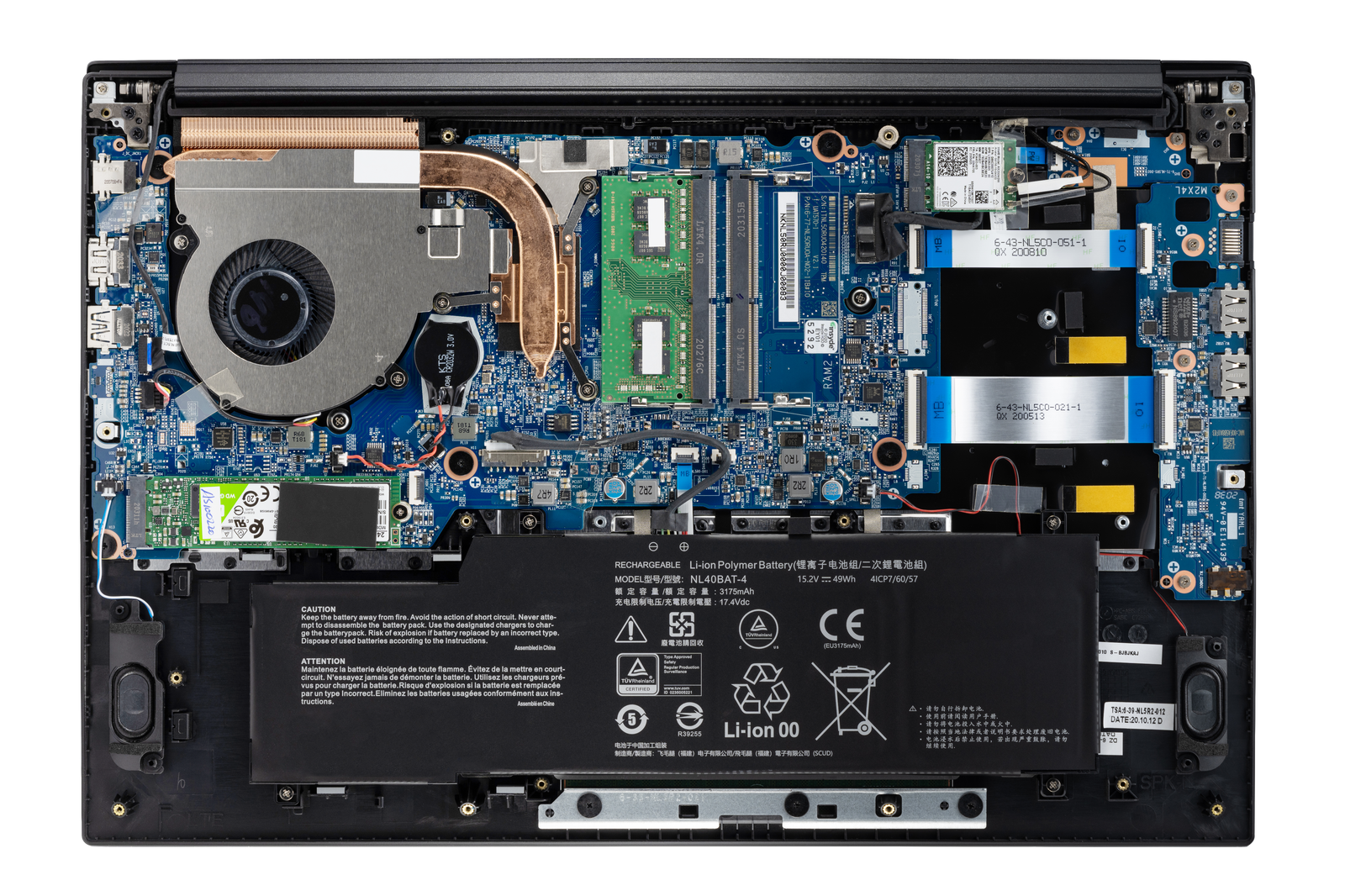
The nearly identical Clevo NL51RU/NL50RU [1] has a 2.5" drive caddy but a 36 Wh battery. Take a look at the internal photo of the System76 unit at [2]. It's the same laptop. Heck, they didn't even bother removing the boss and brass insert for the 2.5" drive retaining screw by the left speaker.
System76 is not an OEM, they whitelabel and have tweaks made to Clevo/Sager laptops. I think they do a great service to the Linux community with PopOS and driver development/compatibility to make those into machines where Linux "just works" out of the box, don't get me wrong.
This obsession with thin-and-light goes completely counter to the whole point of "Our laptops’ guts are fully accessible!". They say they've got a tactile keyboard, to fit in 20mm thin right on top of the heat sink for the high-power Ryzen processor and discrete graphics I think I'm pretty safe in assuming it's a pathetic <1mm key-travel scissor unit.
1" thick or more is not too much. You could fit in all the ports, as well as an 80 Wh battery, and cooling to run at boost frequencies for more than 20ms. You don't have to match the dimensions of a Macbook Air and be able to slice tomatoes with the wrist rest.
[1]: https://laptopwithlinux.com/wp-content/uploads/Clevo-NL51RU-... from https://laptopwithlinux.com/product/clevo-nl51ru/ [2]: https://assets.system76.com/products/pang10/internal.png
I think it depends a lot on an individual's needs. Like in my case, a recent laptop purchasing decision revolved around qualities that make a laptop particularly good at being a laptop — that is, high portability, low/no noise, little/no heat. Power and ports were a cherry on top because I already have another machine that fills those needs.
In that situation, 1" isn't necessarily too thick, but it is negatively impacting its functionality as a laptop, if only because added thickness implies added weight (especially for sizes larger than 13").
With that said, ultraportables shouldn't exist at the cost of models more oriented toward power and flexibility… they should be an option alongside more traditional laptops.
I have a thinkpad x2100 and it is a great laptop.
I am glad I am not the only one.
The laptop market churns way too much for my liking and I feel like the second I move away from my macbook pro (work) I'm going to be disappointed with the quality.
When it comes to development, my goal is to be able to ssh into my linux box and use that for most development (tmux + vim). That plus ZeroTier and I now have access to my dev machine from wherever.
Even on large codebases written in Typescript, vim + plugins are "good enough."
macbook pro + live inside an ssh terminal seems to be working well enough for me.
1) Mixed DPI is insanely bad on Linux, and that issue is amplified if you have Nvidia hardware. At least as of last month, Wayland and XWayland are basically unusable with Nvidia. Since the laptop screen is 4k, but I was using a Thunderbolt dock plugged into 2x1080p monitors, I'd have to turn off display scaling on the laptop, and, because I was stuck on X11 because Nvidia, I'd have to restart the laptop for the scaling change to take effect.
2) There was no Thunderbolt dock support for unlocking full disk encryption, so if you wanted FDE, you either had to unplug the laptop from the dock, open it, type the password and plug it back in every time you turn the laptop on, or just not used a Thunderbolt dock. This wouldn't be a big deal except I was restarting the laptop frequently when changing pretty much any display parameter.
3) There was no clear best practice for managing switchable graphics. There are options like Bumblebee that I never really figured out if they were working properly - especially for games. Then, Nvidia supposedly added a "primus-run" feature to the driver, but again, it seemed to just not work. Eventually I settled on "prime-select" but that involves rebooting every time you switch.
4) Selecting the Nvidia graphics disabled on-board audio. I had to either use USB or Bluetooth. I never figured this out despite countless hours of messing around with alsamixer. My best guess is that it was trying to direct everything over the HDMI out even though that wasn't plugged in. The Intel drivers were loaded, just every time I selected the Nvidia chip, the audio devices would disappear.
In the end, I settled on picking up an Acer Aspire refurbished from eBay. It has an i5 10400, 12GB RAM, and a 512GB SSD. I put a 1050 Ti in it without any problems. The total system ran me $500. It's much nicer. So the moral of the story is for me, if you do go Linux laptop, avoid Nvidia like the plague.
Given the number of people these days who don't even own a desktop, I don't understand why mouse buttons aren't the standard. With the XPS I can even play casual games while sitting on the couch. No need to move to a desk and dig a corded mouse of the drawer!
I never used gestures. But I seriously miss inertia scrolling. You never realize how much a pain in the ass it is scrolling web pages until you don't have it. Firefox has it, but you have to turn on an environment variable to get it and it feels a bit weird to me. Chrome does not have it all on Linux. And the way they are implementing it means that every app has to reimplement inertia scrolling on its own. Sigh. At least you can hold down the middle mouse and use the trackpoint to swiftly scroll.
They're not a gimmick if well implemented. Useful gestures are very dependant on deep software integration, however.
I accidentally spilled a glass of water on my old thinkpad w, and all I had to do was to replace the keyboard (happened twice). It also helped that I could find spare part easily online. Would it be possible with lesser-know brands? It also fell several time on the ground but never broke anything. I'm honestly very interested to know if there are laptops as durable as thinkpads.
It is so annoying to type with your hands off-center from the screen.
It is so annoying to have to type long sequences of digits without one.
I know this sounds crazy, but IME the worst part of keyboard ergonomics on mac laptops is that my hands are much closer together than my shoulders are; widening to shoulder width makes for much more comfortable typing.
I'm sure nobody will crazy enough to build a laptop like this, but it makes me wonder...
I can't remember when was the last time I had to type more than 8 at any time.
Until you experience it, you will not have the experience.
Either UHK v2 or Dygma Raise. Both are great.
If I really wanted to work on desktop I'd need to buy a car and bother with transporting it few times a week, or I'd need to buy multiple desktops and move only external SSD.
And in that case it would be a luxury, but I'd still want a laptop for occasional work and entertainment from couch.
Using a mouse is very bad for my shoulders if it's too far away from my center. Numpads are simply not an option for me, unless I had an external one in a special location.
I think the numpad users are outnumbered by the indifferent and numpad haters. I'm in the latter column.
I've sort of regretted the decision. Not the keypad part, I still hate those, but there are other little aspects to the laptop I still don't like, or didn't work quite right.
I don't know, I guess I shouldn't really complain. For all the expense, the 16G of RAM and SSD are holding up well after this time. The programmable gaming keys didn't work quite right for my purposes (I just wanted dedicated PgUp / PgDown, Home and End, with the shift and Ctrl variants), and the battery life is crap these days (glued in). It still mostly works though.
It can be important to keep the trackpad close to centered on the keyboard for easily use of both, but the screen not aligning by a couple inches is purely aesthetic.
It would be better for that keypad to be on the left side, as it interferes less with mouse use.
But, a friend of mine, was asking specifically to get a laptop with such an extended keyboard.
This looks like a good option for a 15.6" laptop.
My issue with it is that they're still shipping with those barrel plugs AC adapters, and don't appear to support USB-PD for charging on the USB-C ports.
The lack of Australian support also makes it a difficult purchase - a former colleague bought a System76 laptop a few years back and it died a few months after purchase. Having to ship it back to the US, and the associated delays means having to buy a second laptop to continue working while it's being repaired.
> Canadian customers only - covers all shipping for warranty service.
> Canada warranty two way ground shipping coverage +$65
They don't offer it for Australia.
I'd be surprised if they would - you'd be looking at air-freight, and from prior experience shipping a Lenovo laptop to Australia it was over USD$150, and that was 10 years ago - so probably more now.
Australia to the US would be even more still.
Clevo are known to be the OEM behind many (all?) of System76's laptops. In Australia they're sold under the brand of Metabox.
The System76 Pangolin tech specs[1] match the Metabox Edge specs[2] and visually match as far as I can tell identically, and neither mention USB-PD or Charging capability. Metabox specifically call out USB-PD capability on their other range of laptops, so I don't think it's an omission.
[1] https://system76.com/laptops/pangolin#specs [2] https://www.metabox.com.au/store/Edge-Range/Specs
But whatever the case is, lack of Thunderbolt is unfortunately a deal breaker. I've moved on to unifying all my docks and power chords to only be Thunderbolt. It's unfortunate because the Ryzen chipsets are clearly getting to be superior from a price/performance point of view.
EDIT: I am writing this as someone who supports System76, and has only ran Linux professionally and at home for the last 10 years.
Several reasons.
a) Intel wants licensing cash for allowing you to use it
b) It does not actually add that much to USB. You want to attach monitors? Non-Thunderbolt USB can do that. You want to attach storage? Non-Thunderbolt USB can do that. Networking? Charge your device? USB can do all that.
The remaining selling point of Thunderbolt is that you can attach an external graphics card over it. There are external USB graphics solutions, too, but they can't really compete if you plan to do high perf 3d graphics over it.
However this selling point is also the Achilles heel of Thunderbold. It exposes PCIe to devices outside the device, allowing direct memory access over it. This can be partially mitigated if the OS and all drivers cooperate and are really well written (for example not expose a memory page that contains other stuff as well).
But bottom line? I actually view this as an AMD advantage. It's a bit like Firewire was. a) it cost licensing money and b) it introduced a similar security issue while c) not actually delivering that much of an advantage over USB unless you are part of a certain niche.
Like the other comment mentioned, docks.
Yes you can theoretically accomplish everything with other ports, but I don't want to feel like I'm disconnecting my laptop from life support every time I move around. 1 Wire for Power + 10+ peripherals is awesome, and I can't go back.
Docks.
Now, I had a thin 'n' light with just 2 USB-C ports, and I could get a dock/adapter that had power delivery, HDMI, Ethernet and a couple USB-A/USB-C ports. But for high-refresh rate monitors, a proper dock will want a lot of bandwidth. Without that bandwidth, you'll have to pick your compromise on the dock.
Around January 2020 vendors are able to make their own controllers and submit them for certification. AMD doesn't have any. Intel's controllers don't have an embedded version for sale.
Was going to say the same.
Also, I will not buy a 1080p laptop. We're in 2021, give me 4K or at least 1440p or I'm not interested.
I also personally prefer 13" laptops for travel convenience. (Not that its a concern right now, but I assume one day it will be again!)
https://docs.google.com/spreadsheets/d/1NBBq9vHufU9a6d59irhR...
Because they still sell.
Back around 2 decades ago, we had a funny thing in Russia where people demanded 640x480 monitors back, and even bought, and sold them on premium because new 1024x768 monitors "make everything so tiny!"
An I agree that 1080 now is a 13-14'' display resolution only nowadays.
Also, the screen resolution and size seems odd. I'm okay with a 1080P screen... but not at nearly 16". This should be offered with a 3K or 4K screen only.
There are tons of apps, specifically in the video editing / 3D modeling space that are basically unusable without one.
When I code, I have macros tied to numpad keys. Couldn't work without them.
If all you do is browse the web and answer email on your laptop, then yeah, makes sense.
For any serious work, no numpad = no buy.
I've been doing "serious work" for my entire career, thanks, although these days I do spend more time in Zoom meetings and writing emails/documents.
What's that?
It's essentially a keyboard lacking function keys, a numerical pad, and a navigation cluster. Usually has between 61 and 68 keys, and contains an extra "function" key that acts beyond the typical Fn key to help you control layers. Every 60% doesn't have layers, but most do, and those layers are generally programmable. These days pretty much all of them use QMK or VIA firmware.
The Deskthority article for some reason mentions the Minila which is actually a 65% keyboard (which is a 60% + arrow keys).
It seems that most developers (their target audience?) love hidpi which may be one of the biggest adoption issues for System 76.
I just spent a few weeks working with them to debug a transient kernel panic with my new Thelio. Throughout the entire process, I talked to support techs with actual agency, and not just automata reading a script. Serious kudos to System76.
(The problem ultimately turned out to be a clearly labeled experimental feature I'd turned on a few months earlier and forgotten about. Ooops...)
The Thelio is my daily driver, and PopOS just fades into the background.
I agree with the overall sentiment though that it's time for a premium-designer-made-for-linux-laptop!
What is it that they're trying to do? Sell re-branded Sager laptops?
Do people actually like that kind of layout? It seems pretty awful to me. I'd prefer no numpad at all and a full size shift key with half-height arrow keys.
If I want a numpad, that's what desktop keyboards are for, or a USB numpad.
I find whether minor things like the off-center trackpad bug me tends to reflect more about my current state of mind than anything else.
How do System76 and Purism compare in terms of daily drivers? Anyone tried both and could provide a comparison?
Come on.
That could mean literally anything from Intel integrated level performance, to a proper dedicated GPU, though for the price here I'm guessing on the former ...
Vega 7 @1600Mhz
You are unlikely to see dedicated graphics paired with a U-series processor in most cases. (There are exceptions, but you'll see the dedicated graphics card specified in those cases.)
I don't want to advertise, so I'll just say - you can go to a big computer/hardware seller website and search for laptops with nvidia graphics cards. You can get a laptop with a GTX 1650 for $700, which has 3x the performance.
Also I don't understand why a laptop of that size doesn't have a 99Wh battery.
The 1080p resolution is understandable... high DPI support suck-fest can be avoided.
Yet those companies provide zero contributions, rebadge open source projects, and just re-sell taiwanese white-label computers while going great lengths to hide that and fake innovation.
if pcpartpicker.com adds a single checkbox to their searchs: "[ ] support in mainline linux kernel", it would make more good to linux support than all those companies combined.
Also, barrel charger plugs? ugh.
All publicity is good publicity, I guess...
Surely someone at System76 has to be aware of this, which begs the question, was this naming intentional? It would have to be I imagine. It seems a bit crass to go this route in the current climate.
I long for a ~13-14" 2k AMD Ryzen ultrabook. So far the screen is always subpar. I've been using 2560 resolution on my X1 yoga now for 2 years and I can't go back to 1080.
Note, I'm in UK "slim 7" here is used by Lenovo for a "Yoga" model whilst the poster mentioned an "IdeaPad". I assumed that as I searched for the latter and got the former that they must be different regional names. But, no. They're very different with very similar model names. Lenovo seem to do this a lot and it's very annoying.
[0] https://clevo-computer.com/media/image/15/da/88/CLEVO-NL51RU...
I'd expect to get dinged for GST or HST, but were there any additional surprise brokerage fees or duties?
This thing is really up my alley and I just got my first decently paying, steady software job...
Excellent machine, faster than anything else I got. But it was only a short time test balloon, I fear. Not available anymore.
Can someone comment on the pros and cons of the Ryzen CPU? Wondering how to compare the new machine to the Intel-based System76 laptops.
After just putting in an order for a Darter Pro, of course this immediately becomes available!
15.6 inch screen at 1920×1080? That’s barely OK but not great for a laptop in 2021.
I had four of these laptops - and on ALL 4 they would have screws come loose and fall out inside the case. You could hear it rattling around when you turned the machine. Two of them had one type of connector for the screen and the other two had a different connector - One got fried and on the other I broke the screen on - so I couldn't harvest parts from one to the other.
S76 wanted $90 for a new charger after one of mine failed.
I have an HP Omen laptop as my primary machine now - here is what is cool:
I had an HP Omen and it failed to power on one day - so I contacted support and they had me send them the machine - instead of fixing it, they sent me a brand new Omen which was way better than the failed unit. The design is super elegant, and it has dual NVME slots, so I have dual drives in it.
The screen is matte so no glossy reflections like my macbooks have...
Yeah - I think I'll stick with Omens for the foreseeable future. HP's support was FANTASTIC.
When my macbook pro caught fire in my sleep and nearly killed me (it was laying on my bed and I fell asleep watching a movie and the machine caught fire - something that that model was recalled for) I took it to Apple's main store in San Francisco - and they kept it for two months "analyzing it" then came back and told me that even though it was a safety issue and the machine was under recall for CATCHING FIRE, they found that one of my moisture sensors had been triggered and therefore, they were not going to replace, fix or help me.
(I had spilled a small bit of water on the keyboard many month prior to the machine catching fire)
Then they tried to sell me a new machine, or have them "replace the machine for $1,500"
A total joke. Ill never buy another apple machine nor a s76 machine again.
HP support is AMAZING.
Also - When HP bought Compaq - we had a bunch of Compaq/HP servers back in 1998 - and the support back then on those servers was top notch - and the HW design was as well. I used to rebuild those servers in minutes in the literal dark.
All the Sun servers we had, like the 650s would bitch if their case was even slightly off center and would refuse to boot.
I'm typing this on a 7 or 8 year old s76 Gazelle. It was my primary work and personal machine for 3 or 4 years and has been my primary personal machine since. I did replace the original drive with an SSD, and I think I may need to replace the fans---they're getting loud. Hardware- and build-quality-wise, I've never had any problems. (Well, ok, I killed one of the USB ports. Probably broke some of the connections.)
The one problem I have had is with the NVidia graphics, which have never worked properly. (I've got graphics acceleration disabled now.) Either it wouldn't go to sleep, or the graphics wouldn't wake up. The last straw was when I got those problems beaten into a standstill, and Chrome started somehow overriding my window manager and keeping the (accelerated) Chrome window front and center, minus WM decorations.
Sure, it's a generic Clio or something, but I've been very impressed. Never had much love for HP, though.
Can anyone else back this up? Has HP changed? I've sworn off HP products (both enterprise and consumer) because of their terrible customer service and documentation. Dell/Lenovo always offer something very similar in price and performance, and their enterprise support is fine to great.
A Legion 5 will have an Nvidia dGPU, so you have to decide if you want to run PRIME or something else and see how the external monitor outputs are muxed if that's important to you.
Compared to the latest Thinkpad X1 Carbon, I wonder how bulky the thing is. Sure display wise, it's bigger.
Would be really nice to use a proper modern DP instead of antiquated HDMI for this.
Is it using Coreboot by the way?
Of course sometimes the HDMI fails due to DRM nonsense, so that's also an issue.
And personally, I had a lot of problems with HDMI in the past. Unlike with DP.
and for under 15" it is just a waste for 90% of people.
Edit: I expect to be downvoted, and this is just my unhelpful, subjective opinion. But the font on those keys looks like one you'd get from a 90s shareware kit of 100 free fonts.
Oh, and Pop OS runs great too!
The Ryzen 5000 is out, I highly recommend either going for Asus Zephryus or wait for lenovo's mobile 5000 AMD lands.
I have a 4k monitor on my laptop but I regret that choice.
  * Concerns about power
  * Concerns about HiDPI issues / fractional scaling, esp. with Linux
  * Likes seeing pixels
* Price3/2 is the best ratio ever when writing code (after 4/3, but that’s definitely dead).
Note that for the above substitutions there often is no part number change so you have no way of knowing if the amazon/costco model will work even if it works for someone else.
I'm sure I likely could have purchased and assembled the components myself and found a more spartan case and all that, but it felt a bit like Christmas using it for the first while.