Unlike Dropbox, where filenames are searchable by name on Everything, here that doesn't seem to happen -- at least the indexing takes more than 15 minutes with UI frozen.
An interesting tidbit: Google Filestream allows mounting on a folder. Google Drive for Desktop doesn't support it yet. Another interesting tidbit: the configuration settings in Google Drive for Desktop was migrated to a JSON setting stored on a registry setting (just in case you try following the settings of Google Drive Filestream).
And Drive is one of their enterprise products.
Currently have it running on DO with daily droplet snapshots and it’s a nice reassurance that wherever happens, I can get back to a working state and never lose any data.
On the other hand, I pulled the trigger and got myself a developer license for insync. That’s a great client for Google drive and Microsoft OneDrive.
I was hesitant at first, but it works really well, and they have some neat features (ignore patterns, out of tree syncing, directory merge, etc.)
They have added Dropbox support lately.
Why does Google have this bad habit of changing product names, they do it with Chat as well.
There are multiple internal approaches to building things. Several of these approaches get funding and head count based on the amount of influence of the people who back them.
Decisions about which product to present to the public are made on technical merit with little consideration to consistency in user experience. The resulting chaos leaks to the end user.
Once a product has launched successfully, the best members (not just engineers) of the team that built it diffuses back into the main body of Google to work on other cool projects (they now have the required political momentum). Product enters stagnation phase.
In 2 - 4 years a technologically slightly better alternative is picked. No one thinks about how to make this switch seamless for their users. End users suffer even harder.
Used to work at Google.
Windows 10 supports symlinking files and directories if that's what you meant.
It's a dark pattern - don't let people use the software in unexpected ways that might take potential profit away from another service or future feature. If any use gives more value than was intended, that use will be curtailed, then properly monetized elsewhere, or simply (and more often than not) shut off.
If combinations of available settings reveal an actual bug, sometimes it's easier to take away the options than to fix the bug. But if it's simply a case that the software is doing things the developers don't want for any of the above reasons, they claim users are too incompetent to be trusted, and that they're removing the option for the good of the user.
It's a gross and vapid perverse incentive endemic to FAANG.
Good solutions exist for complexity and user configurations, like snapshots, reset to default, and so on. There's no excuse for mature software to lose configurability.
Plus, we're talking about Google here, so this new desktop version was 99% likely to have been rebuilt as an MVP.
See: some of the Chrome feature requests about making things user-configurable (off memory, related to download / execute behavior for enterprise web-launched apps), which Google closed with "Adding a setting would be incompatible with Chrome's design goals"
Exactly the point the referred poster was making. Google does nothing without monetization in mind
There does not seem to be any genuine reason to make this change a setting because the main objection is just "I don't like it" rather than "it stops me from doing x" or "it makes x harder"
It would be much less painful to just have users get used to the new behavior than to support a setting for forever. For people who want full power, custom clients exist for google drive which can work however you want.
We see a constant trend where users move towards products which just work rather than require manuals and configuration. Seems only sane that general public products like google drive should cater to this and if you want full power over everything, you have 3rd party clients, nextcloud, ftp, etc.
I see one of the comments on that page is:
« I just installed the new Google Drive desktop client (Win 10 pro) and the new virtual drive it creates triggers a non-compliance issue with ClearPass OnGuard that my employer requires (because the drive is not encrypted) and thus prevents me from connecting to their VPN. »
Maybe this OnGuard thing is being foolish, but that's no comfort to the user.
Maybe, but if corporate policy requires all storage to be encrypted and the tool to enforce that policy can't verify that whatever Google's software is doing is compliant, maybe not.
Different policies might be appropriate for software that is used by non-experts in a personal capacity and software that is part of professionally managed IT systems used for business purposes with regulatory compliance obligations. A lot of the modern trends from the likes of Google, Apple and Microsoft might make sense for the former group but they are a significant concern for the latter and for prosumer or small business users who might want to operate more like the latter but are stuck with software aimed at the former.
Painful for who?
Do you care what gold thinks, as you mine it?
No, you only care about raw cost. And if you lose some gold, but in the end save money, who cares?
Which makes one wonder, should OSS vs profit driven, think of such things the same way?
This is overstated, and blown out of proportion these days.
Many of the studies stating so are 30 years old, at a time when virtually everyone was new to computing.
As well, an "advanced" menu item makes it simplisticly clear, don't monkey here novice, even an option for 'expert'.
And these can all be hidden away, so the novice / confused cannot find them easily, such as a pref "show advanced option".
This had worked well for decades. No confusion.
The real reason this "confusion" narrative exists, is options cost money, time. It fits the preference of less work.
Sometimes confusion is the appropriate state. Companies (or at least products) often have to choose between retaining the most users (or worse, customers) and catering to a subset who know what they want and are willing to learn to use it.
Sadly Google these days always seem to go with the former, and not to care about the latter. This completely turns me off their products and ecosystem.
Google has been following this approach for years now, simplifying the UX in a way that both 1. makes the product easier to use and 2. in a way that benefits Google.
Google has merged the url bar and the search bar in chrome, they force defaults on google search, and not long ago [1] we were discussing removing detailed cookie controls.
What if the emphasis of mainstream users is overstated? I find it more likely that an organization could be shaping features to coax its users into submission to make the org's life easier.
"Yes, mainstream users want this simplification. No, we can't share the data or methodology in which we surmised this. Yes, this makes our life vastly easier, but we want to excuse it by pinning it on mainstream users."
I've seen power apps (so by definition all the users are very technical and should not be patronized) that use the same reason to cut features instead of saying outright that it's too much to support. Maybe for a big org like Google it would be an admission of embarrassment.
I can't really think of any software from a major tech company that I use frequently and that's been updated to give me _more_ toggles to customize the app. It's always to take things away.
For example on a small company we had one user that needed RTL support, this ment we create backend code to store his perferences, front end code to add UI for it and testing the feature. We implemented because for a small company each user is important where big companies or projects(Firefox,GNOME will force this minorities to go elsewhere)
For mainstream, global software this is not a niche feature but a core requirement.
Appliances shed the sharp corners.
I mean, what are you going to do, use a 3rd party client for Google's services? You're not allowed to - at least not on the same service level.
3rd party Google Drive clients have been the only type of Google Drive client on Linux for a long time.
Probably the only good graphical client is this one and it's actually pretty good: https://www.insynchq.com/
The poweruser needs to die to accomplish this goal.
Speculation, but plausible. I'd look at the broader trends, not just this one event. Rather, the series of events and the dark pattern behind it.
Because users are the product, not the customers. Time to choose a cloud provider with a different business model.
I believe, previously they just had a daemon running on the client PC that synced a local folder with the cloud storage. (Like Dropbox)
Now they seem to have switched to some sort of "fuse-but-on-windows" virtual device driver that accesses the cloud storage directly and presents it locally as a virtual drive. (Like OneDrive)
Would this make sense?
Reading the comments here and in the linked forums, it seems I'm one of the few used to how Google Drive File Stream worked, and most of the complaints are coming from people more used to the folder-based variant, which has been now shoehorned into the other paradigm.
I was very annoyed at the "upgrade wizard", it felt like of steps and very disruptive. One screen with a few checkboxes should have sufficed, perhaps an optional "advanced" button for those who want it.
Relatedly, I got more than one pop-up saying the new version was coming to which I felt "this is really not something you should bother me about before the actual upgrade".
Seriously, I haven't tried Google Drive for Desktop but I won't even bother, given their track record.
Rclone is simply amazing, the developers are responsive, it supports every backend on the planet. It's a single lightweight binary written in Go, runs on Linux, Mac, Win, x86 and ARM, every feature you could ever need, thoroughly documented… oh, and open source. I mean, what else could one want?
For power users, though, rclone does look quite nice.
But you can set a script to sync it periodically and it allows you to mount any remote as a network drive.
But of course, this is HN, a target audience that's generally to be able to use a command line tool and write a simple script.
I wouldn't recommend it on a regular users forum.
It's not that I inherently don't trust them with privacy (though why should I?), it's the constant bullsh!t and bait and switch.
And even that, I tried to pay them for something the other day (I felt I had to while I considered other options), for the pleasure of paying them, they wanted my passport, utility bill and other details. Erm, nope.
They've collectively taken a dive off the deep end.
I never felt I'd get to a place where I feel I trust Windows on a laptop more than I trust Google.
/endrant
Safe from everyone except themselves (google) of course, but then I litterally cant think of any provider/person I trust to not read stuff I put on their computer.
Not an expert here, but I believe the folder sync is technically more difficult to get right and there’s likely lot of edge cases that give you lots of trouble.
Been using this type of google drive for years now, mounts a virtual drive (with ability to always sync some folders locally + cache of contents).
I do miss the idea of my local copy being a backup of the cloud contents, and having to be a bit more thoughtful about syncing up chunks of documents and folders for being disconnected. Given how large the amount of data actually stored is, and how little gets frequently used, it makes life a lot easier.
[0]: https://www.reddit.com/r/Windows10/comments/8jx5ym/google_dr...
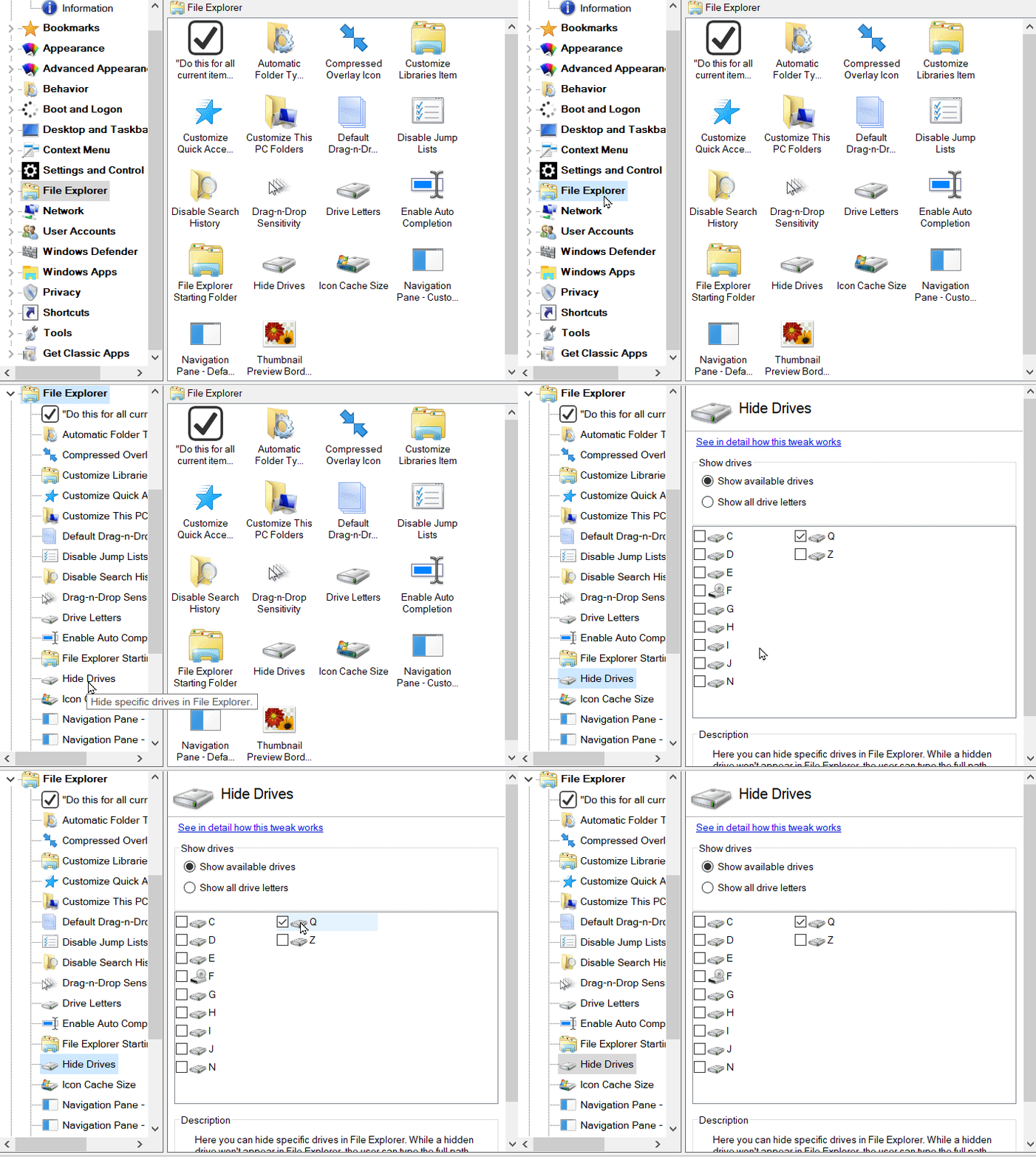
> My solution is install Winaero Tweaker. It's free and very easy to disable the Google Drive letter.
https://storage.googleapis.com/support-forums-api/attachment...
That looks like a handy tool for tweaking Windows 10. Always loved power-toys like that.
If you can't set up a server but still want a good sync solution, use Syncthing. It's a decentralized solution that doesn't require a main server, and lets you create incredibly intricate sync solutions.
To all the people who suggest alternatives, our entire org is run by xooglers and they put everything in Google Drive. I have no choice but to use this crap. To make matters worse, I cannot use any third-party client (or even roll my own) because it is not allowed by the security policy.
I'm not affiliated with them, just a happy customer
I can't see any special drivers so it doesn't appear to be dokan/winfsp/winfuse.
The easiest way to see this is to use subst to map a drive and then try to navigate to that drive from a UAC-elevated command line. (You won't see the drive since it exists in a different session.)
Mapped network drives and drives shared over remote desktop are other examples of per-user mounts.
I'm guessing this thing is probably exposed via WebDAV.
edited a bit for clarity.