In other words, it would be nice to have slices of UI behavior defined more orthogonally in a way which can be more freely layered, and it seems like this is a step in that direction.
From the user perspective, yet another widget with subtly different behaviour is very annoying. I'd much rather you add drag and drop handling to the existing widget so that everyone benefits and UIs remain consistent.
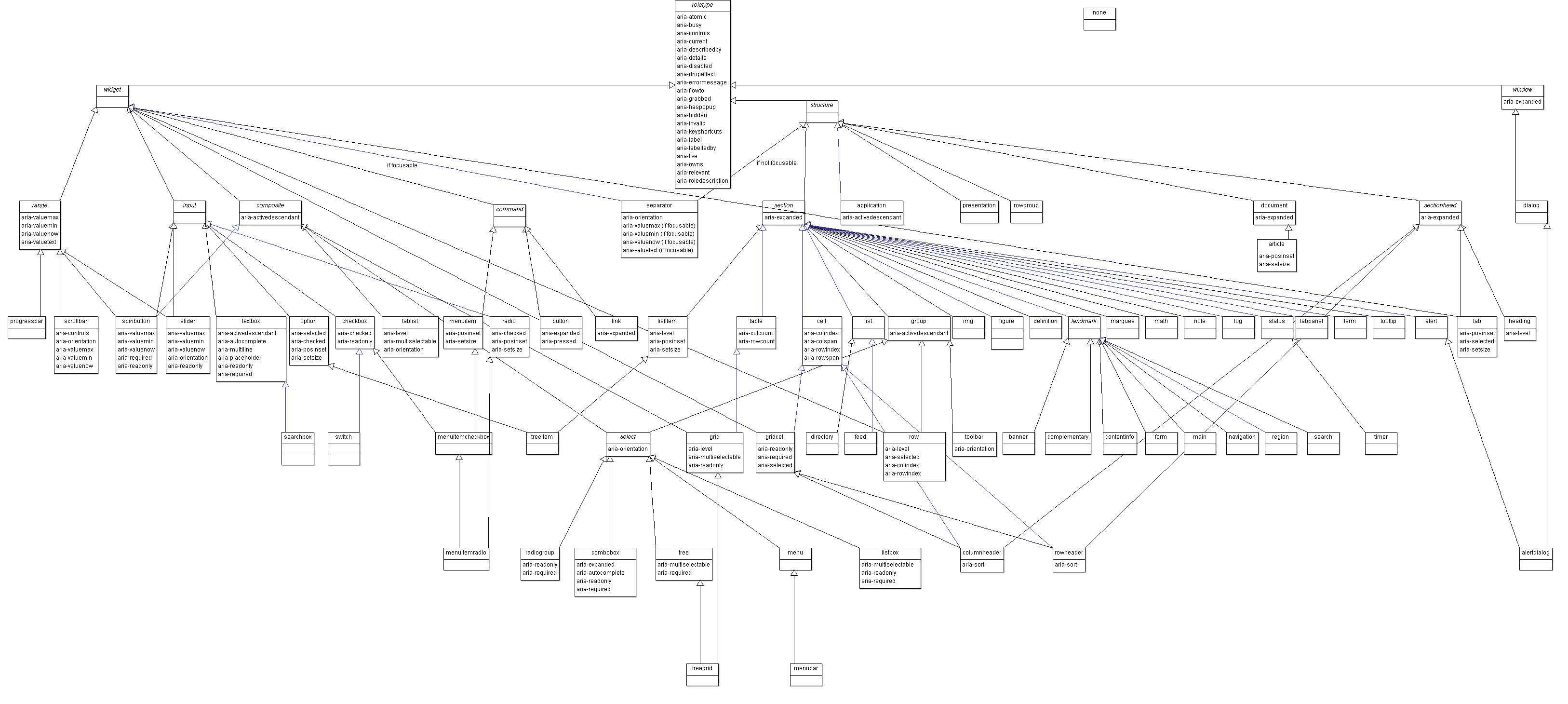
It is however quite extensive as you can see by the role definitions:
https://www.w3.org/TR/wai-aria-1.1/img/rdf_model.png
Don't know if that is still best practice, screen readers probably are way smarter today.
I work on Plasmic (plasmic.app), a visual builder for React. With react-aria, we're able to let our users build, say, a Select component visually however they want, and then we just use the hooks to spread the right props to the right elements, and It Just Works. See https://youtu.be/mPHS2zg2a8Y
Headless UI is an exciting space. There's only so far you can go with re-skinning material ui or antd, and no one should be building their own from scratch. These headless libraries give you all the interactivity and accessibility you need for your components, but still give you total freedom over how they look. It is the way!
The maintainers are super responsive+helpful on Github and really know how to engage constructively with criticism.
I really appreciate what they're doing. The combination of TailwindCSS+React Aria provides one with a pretty great template/scaffolding for building out a fully featured component library.
The only downside that I've found is that their typescript support can be a little weird in my experience, but their approach is nonetheless well considered imo. edit: https://github.com/adobe/react-spectrum/pull/1761#issuecomme... is a decent summary of what I'm referring.
IMO the community is much better served by tools that help you identify accessibility gaps during the design phase, experience your application in other usage paradigms, or audit third party packages for accessibility before taking them as dependencies. If you work with designers who love hover triggered tooltips with forms with more tooltips inside them this library cannot fix the fact that you're making a terrible experience. If you want to npm install React-ported Kendo components because you "remember they worked well with jQuery" this library will not make them accessible. Turn voiceover on, turn your screen off, eat your own dog food.
What's worse "accessibility helper libraries" like this often get used as an excuse to say "of course we made this accessible look at all the helpers in the code" but the team never actually audits to see what the experience is like (hint: your Lighthouse accessibility score does not indicate WCAG compliance), and surprise surprise they've incorrectly implemented the helpers in a way that actually degrades the experience. Then they pay my agency a lot of money to hurry up and do it the right way before the NFB lawsuit drops.
Here's a good example of deep thinking and investigative work that goes into react-aria: https://react-spectrum.adobe.com/blog/building-a-combobox.ht...
It would be cool to go back to HTML=schematics and CSS=styling.
Maybe CSS needs to become more capable tool to place divs more easily?
What's the issue now then? Flexbox is straightforward enough.
https://www.merrickchristensen.com/articles/headless-user-in...
"What does it even do then" you ask. It implements basic accessibility patterns so you only deal with high level UI elements and not have to worry about having the correct `role-` or `aria-` attributes. That and composite elements such as tabs or modals
Why no style? Most product teams have a design system and they actually overwrite the style of component libraries anyway. So better to have component libraries without style, less bloat.
If there were a standard library (adopted by all browsers) similar to the default look of iOS and Android apps, but in return you couldn't customize the look, would y'all go with that?
Give me the primitives any day.
I was looking at Alpine.js but it's pretty minimal, so I want something more full-featured to compare to. These headless UIs look useful, and some have React and Vue versions.
Some libraries will offer a ton of props to customize different parts of a component - and for some use cases, that is enough. But sometimes it is just easier to structure and style the component however you want, with custom behavior sprinkled in, and then letting a library like react-aria take care of the rest.
Try building a fully accessible dropdown from scratch in React? This is what these libraries solve.
An example from Radix UI: https://youtu.be/pcMYcjtWwVI
Headless CMSes are useful as well once you exit the realm of blogs and WYSIWYG website builders.
Some of my tweets showing how we do this:
- https://twitter.com/devongovett/status/1318600389462126592 - https://twitter.com/devongovett/status/1270410802395111424 - https://twitter.com/devongovett/status/1318676759080968193