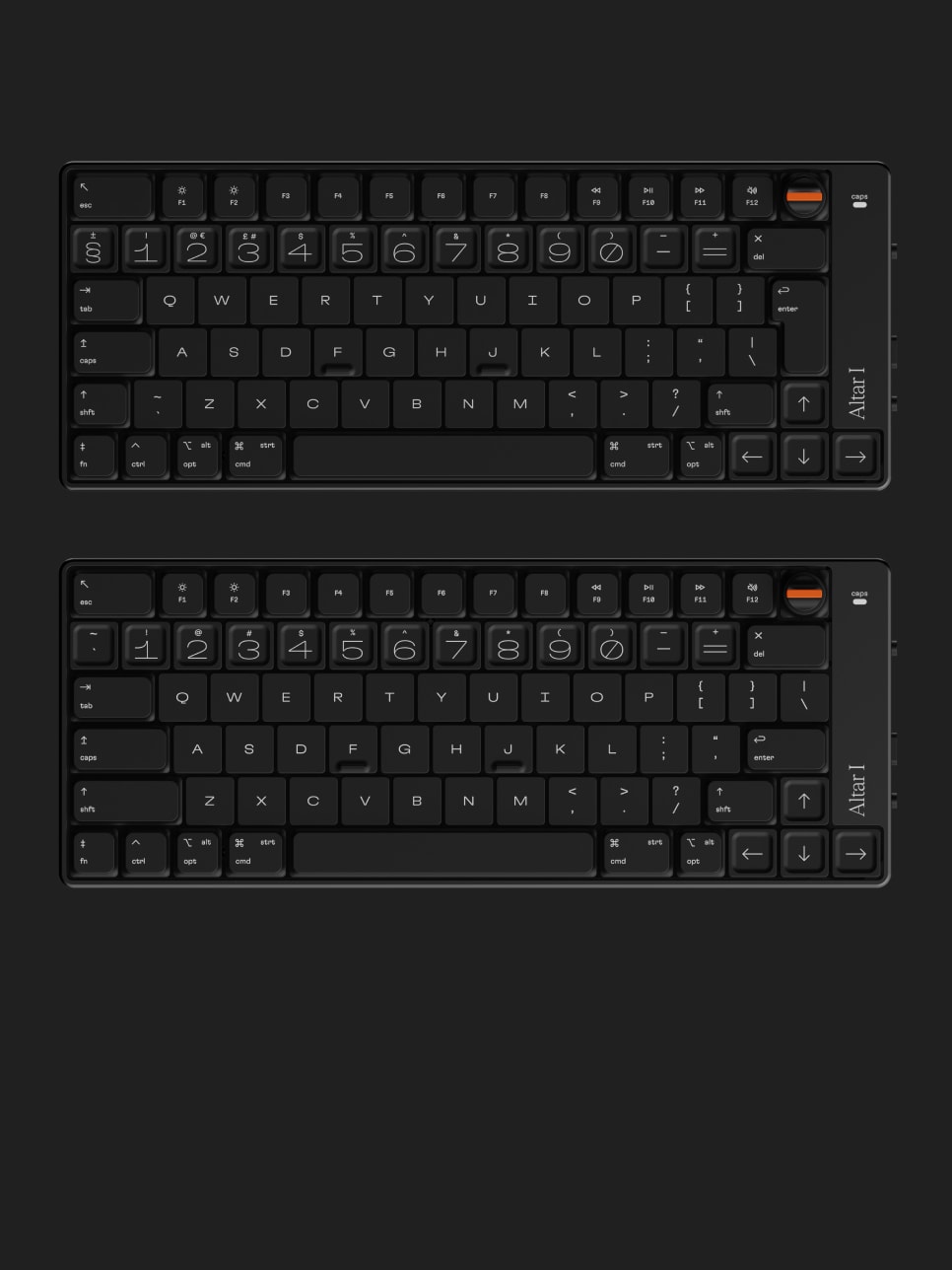
During lockdown I took up the keyboard hobby but I couldn't find anything I liked the aesthetic of. So I set out to design my own keyboard from scratch that shunned the gamer look in favour of a more minimal, serious design.
I've built several prototypes but I would love to get some feedback from the HN community.
Additional resources:
- r/ErgoMechBoards: https://www.reddit.com/r/ErgoMechKeyboards/
- Low Profile Discord: https://discord.com/invite/dBSRZ2a
- Collection of split low profile mechanical keyboards: https://kbd.news/tag/low-profile/
- "A Tiny, Ultra-Affordable Keyboard You Can Build Yourself!" video: https://www.youtube.com/watch?v=JqpBKuEVinw
A thought-experiment that may interest you coming from someone (me) who already has happily spent several hundreds of dollars on mechanical keyboards and uses them every single day:
Let's imagine the keyboard could be bought today as-is with a simple "Buy Now" button and price was no concern.
The two main reasons I would _still_ hesitate to hit that button are:
1. I absolutely and undoubtedly need to know what it SOUNDS and FEELS like. Is it linear, tactile, clicky? How much? I turned my speakers to max because I assumed you'd have some audio-track running but to no avail. Did I miss something?
2. I wish there was a 'blank' version with zero typography anywhere. Just all black. I touch-type and have not looked at my keyboard in 15 years.
1. raised/indented keys will get dirty really fast, an option without would sell me
2. 2-device pairing is great, your competitors have 3 though
3. hot-swap keycaps would be a huge sell
4. nice typography, why isn't the logo in it? take off the logo
5. replace the empty area with home => end
6. 3 modifiers on the left, 3 right please! (not 4-left/2-right)
7. options for other keycap sets later?
8. dial is too tall, removable? swappable? jog dial?
9. love the giant esc key, L-shaped enter
10. esc keycap to replace caps would be awesome
11. show me a pic of the full cable/any more details here
12. what are the feet like? foam? rubber? adjustable height?
13. neat website but moves too much, show me a boring gallery of static images somewhere please
14. add clit mouse
15. sustainable material means something to me and makes me more want to buy, really!
16. don't add LEDs, i'd rather save money
17. lmk when it's ergo (cries in carpal tunnel)
* How did you get the CE compliance? Did you literally just fork out a couple of grand and send the prototype to a lab to do it for you?
* How does creating the prototype vs. getting manufacturing going look like? Did you create the aluminium body yourself in your garage, then started getting in touch with Chinese companies to see who could manufacture it? How did you find the contacts for these?
If anyone else has tips for these kinds of things, I'd appreciate them also. The CE compliance in particular is quite daunting.
For prototyping the body, I initially 3d printed it, then moved to 1 off cnc milling. For this I mostly used Geomiq (geomiq.com), which farms it out to various countries (mostly china from what I can tell), then they make it and send it to you. I plan to have the case manufactured in the UK — I found contacts for this because I happen to work in the automotive industry in the UK currently. The most difficult part of the case will be anodising which will require a lot of trial and error.
For the plastics, they are all 3d printed for prototyping, and will be injection moulded in the UK for production.
PCBs are printed in China for prototyping. Not sure where the production PCBs will come from yet.
I can give you more detailed info if you'd like.
[0]: https://cemarking.net/ce-marking-knowledgebase/ce-self-certi...
- Excellent job
- The font choices are bold. They don’t appeal to me personally, but nice job.
- The sunk/raised key caps look nice but I’m not sure how they would perform in practice.
- I couldn’t tell from the website what the second switch on the site does. Maybe USB/Bluetooth?
- My strong preference is a key command for switching from Bluetooth/USB, and that the keyboard keep both active for instant switching. The only keyboard I’ve found that does this well is the micropython-based M60.
- I’m not a fan of the look of the dial. It sticks up too far and looks like something that could break.
I almost couldn't believe that was the cause, but when I waited for the device to turn around again, that was definitely it.
I don't even have to look at my fingers often, but I wouldn't be able to stand walking by those numbers on a regular basis. I don't think I've ever had such a visceral response to an aesthetic choice before.
EDIT: You could for example reconfigure the slider to switch between BT profile 1/2/3, and have the board auto-switch to USB when plugged in. Would take ~2min for me since I know my way around ZMK, bit more if you have to dig into how ZMK works first ofc.
Same for the pronounced bump on the home row.
The switch is to choose between one of two Bluetooth devices. I agree the placement of the USB label was confusing there.
I can't really tell if the numbers are in a different font than the rest of the keys, but if they are, I'd dislike that too. Please use a single font for the whole keyboard.
Aesthetics are a major selling point for your keyboard, so I think you need to spend more time and get expert advice about the fonts.
Finally, this is evidently a Mac-oriented keyboard, given how the control keys are labeled. If you plan to target the Windows market, you may wish to provide layouts with Windows-oriented control keys that are labeled as such (namely Ctrl, Alt, and the Windows key, or something that looks like the Windows key.)
Epomaker's keyboards also do this, at least my SK66 does. Fn+Space switches between wired/BT and Fn+[Z|X|C] switches between the three BT connections. It also flashes blue on the active connection so that you know you've switched into BT mode.
We've taken "Show HN" out of the title now.
- drop the rotary encoder, it messes up the height for packing the keyboard away.
- a 75% layout (i.e. having fn keys) is okay, but makes it a bit challenging to fit in with a 13" tablet footprint with a magic Trackpad.
- What ergonomic job does this design serve? After a year of using a similar keyboard (Nuphy F1) I find myself seeking ergonomic improvement from a split keyboard or angling (like the Atreus) without becoming too odd of a layout.
- If you're doing a custom design, can you use smaller keys somehow to facilitate room for ergonomics (angled split) while retaining a minimal design? See https://www.reddit.com/r/ErgoMobileComputers/comments/v0g89d... for some inspiration .
- I like the simple black look! Similar to you I just want a fairly simple look, but focus more on ergonomics.
If that's really a concern the correct approach would be to make the knob low-profile.
> What ergonomic job does this design serve?
This does not claim to be an "ergonomic" keyboard.
No please don't. I'm so glad this person designed this keyboard during the lock down presumably alone in a basement somewhere and not by a design committee.
I wonder if it'd be possible to offer different key caps to allow for user preference for this and font choices.
I was about to say there are so many projects like this maybe in the next decade or two the split community will grow and have more nice custom keyboards.
But who am I kidding, I'm all in on the kinesis advantage. A couple years ago I gave the Ergodox EZ a good solid try, but it just didn't jive with me, so I think I'm stuck (in a good place).
Will it work properly on Linux via bluetooth? E.g. I have a very nice mechanical keyboard from Keychron but over bluetooth it does something weird so that a hack [1] to use it in Mac mode is necessary and some key combos still don't work right for me.
On a similar note, if its firmware needs an update will I be able to do that from Linux?
It's a hard life being a Windows/Mac hater :D
[1] https://gist.github.com/andrebrait/961cefe730f4a2c41f57911e6...
In fact we are considering a software toggle (e.g. FN + ESC or maybe more complicated to avoid accidentally toggling it) that has a "Win/Linux" and "macOS" mode, but I didn't get around testing that yet.
I have one too and it does it over USB as well. Though keyboard shortcuts work fine for me, USB or not.
Anything that benefits from fine tuned 'back and forth' adjustments that settle on a value in a range.
It's often more satisfying to have 'one motion' control of these functions rather than repeated 'up down' clicks to achieve a desired range.
With a rotary, you can choose the velocity of the adjustment which you cannot do with discrete 'up and down' clicks other than through a 'hold' algorithm or rapid clicking.
It looks like the kind of thing that might get damaged. Imagine it getting stuck when opening a drawer, which someone unwittingly tries to overcome with force.
There's a split between what people online post pics of on fancy desktop setups and what people prefer to use as their daily driver. Minimal keyboards are for minimalists, and people who like to show of their setups. Just like desktop vanity posts typically have speakers, yet everyone uses headphones.
Anecdotally there was a post recently on some PC subreddit asking what keyboard people preferred, and the overwhelming support was for 100%+ keyboards. Only people who didn't WFH much, or didn't have jobs involving any data entry at all could do without a numpad.
So, make a full version? People might think they're a bit ugly, but they're popular despite people being less willing to show off a massive keyboard.
You're right about the damn 'gamer' look though. The only good thing about the gamer look is that I will trust it has decent switches in it.
I'm (mostly) a software dev for 15+ years and I've never felt the need for a numpad. I'm curious now - have I been really lucky that none of my gigs have ever involved any substantial numerical data entry? Do other devs have to constantly do that so it justifies the larger keyboard (which is off-center and is awkward to use on a laptop)?
From personal experience, I'd assume that jobs that require non-trivial amount of numerical data entry are <1% of total jobs that require a keyboard. Am I totally wrong here and living in a bubble?
(I've been 100% WFH for the past 5 years and I'm not sure how that related to the numpad / no nupad discussion?)
Keyboards are quite a personal thing, I think there's room for many different designs.
My take? 100%s are absolutely crucial for a very small slice of people. They are made to seem more popular than they are because they are the "safest" layout. Someone who needs a 100% can't use a 60%. Someone who prefers 60% can totally use a 100%. So companies make/give out 100%s, and they end up getting used a lot because of that.
That way, my mouse would be closer to the action.
I have no idea why this is not a common option.
I use the numeric keyboard only for a couple of games that use it to control the camera, and that's pretty much it.
Otherwise, the numeric keyboard just uses desktop space and causes my mouse to be further away from my hand, when typing.
I can't help but think how inefficient a programmer would be using the standard number keys. Reminds me of my dad hunting and pecking with his index finger.
I own a fullsize mechanical keyboard which I (used to) use for my personal computer, but for work I use a TKL. The only reason I have even had a fullsize at home was for Blender
From your mouth to God's ear.
Love my MacBook, but for my purposes (writing code commercially for 30+ years), the bigger the keyboard, the better. Especially once it's fully configured with macros.
If the keyboard enthusiast community ever brings back reasonably-priced keyboard with the second row of function keys that are easily programmable, I'll buy one. 3270's were awesome.
Not like there aren't a lot of "Instagram keyboards" out there but a smaller keyboard leaves more room on the desk for snacks.
I've been using the HHKB for over a year now as my "daily driver" and I absolutely love it:
* I like the feeling of the keys, and also the compactness of the keyboard layout
* I like that it connects to both my work & personal laptops over bluetooth, and I can switch between them with a single key chord
* I like that I can carry the keyboard with me to the office, and that it was simple for me to take it with me on my recent trip to Australia, so I have my preferred keyboard feeling / layout wherever I go.
Before that I was using a Unicomp Model M as my "daily driver", and while I liked it, I don't really miss the extra keys.
I guess for data entry or numeric-intense jobs it does make sense, but not for the rest of us.
I see people use Mac and Windows laptop keyboards in professional capacity day in and day out without difficulty. Aside from that, separate USB numeric keypads are still available for those who really feel the need.
Frankly, I can't even recall anytime in the last decade I touched the numeric keypad even in environments where I had a 100% keyboard.
To me, this is missing an opportunity to be ortholinear - a grid instead of the standard finger straining zigzag pattern. That’s an ergonomic feature you can fit in a low profile keyboard. I think the grid would harmonize quite well with your design aesthetic while adding another feature on top of “pretty and slim”.
I am the sort of person who buys every vaguely ergonomic portable keyboard though, looking for one that has a good balance of portable and ergonomic while still being usable. I’m waiting on the new Kenisis Advantage 360, and I have a Atreus around here in its carrying case. I found the Atreus too tricky to type on :-(.
On other subject, have you thought about a case or cover for the “toss in bag” use case? What about a pointing device like a trackpad area, or touch sensitive keys overall?
My one other critique outside ortholinear is that the large PRODUCT NAME on top of the product is a little much. Maybe tone that down?
I don't think one realizes until you try an ortholinear keyboard with some ergonomic split just how uncomfortable the angled/rectangular style keyboards are. My hands, wrists and forearms have never felt better, as someone who is typing 8+ hours a day.
if OP's on the fence, remember that this year's MacBooks don't have white lettering that says "MacBook" below the screen anymore. You don't need an icon if you are one :)
1) Do you have an estimate for cost and date it will ship?
2) What's the deal with the rotary encoder? How will it be used by default? How will we remap it, etc.?
Edit:
3) I would really like to have Home, Insert, and End keys. I'm not sure that's worth a change in the keyboard layout, but consider this: having three or four assignable keys. You can sell keycaps for them.
4) I would use this because I carry around a lot of stuff. Either having a low-profile keycap for the rotary encoder, or having some way to easily take it off or collapse it down would be really helpful.
So all the best wishes to the author.
But there are some tradeoffs why I probably not buy it.
1) I'd suggest a column of home/page up/page down/end (top to bottom in this order) on the right side, like some laptop makers do. They're very convenient. That's absolutely necessary for text editing or navigating in various windows. (Sure one can use combos, but then you must stick to the keyboard all the time.) Del/backspace probably also should be different keys.
2) Missing menu key also requires you to take mouse sometimes. Laptops can get away with touchpad. But with the minimal keyboard, that requires user to hold it more and use combos, you must leave the keyboard and take a mouse to open a context menu.
A general philosophical question (not a negative comment to this particular keyboard): do we really still need key rows to be shifted 1/4 of width, because keys needed arms underneath in the late 19th century?
https://imgur.com/a/kEEIRhf to help visualize.
I cannot imagine using anything else anymore because it is so insanely convenient to press and hold down Capslock with my pinky finger and browse around text extremely fast.
All my keyboards also map Fn+1 to copy and Fn+2 to insert text which saves additional effort to lift my finger from Fn/Capslock.
As the keyboard goes: As others have noted, it would be really nice to see this design approach taken to a more full-sized standard keyboard. I think it's necessary to have some kind of tactile thing between function keys - a gap, a bump, something.
  - the text is too big
  - Add padding to text and images
  - Add space between elements (look crowded)
  - too much moving stuff: Loose the marquee text
Anyhow, just realized: no page down, page up, home or end keys? What? No.
As others have mentioned, the Teenage Engineering influence throughout is evident and welcome. I've long wished they would take a stab at an OP-1y TKL.
While I don't love the typeface(s?) you've chosen for the keys, I respect your commitment to what I'm sure you knew would be a polarizing choice.
Don't cut any corners in the manufacturing, please. I'll buy the shit out of this, even at a premium price.
This looks like a mini mech keyboard done by Teenage Engineering, in the best kinda way. I'm not saying it looks derivative, but I wouldn't be surprised if they saw this and wish they made it themselves. They don't hold a monopoly on this look, need, and aesthetic penchant to go in this direction.
I'm more of a "full-size keyboard with numeric pad" typa person, due to my need for hot keys in After Effects. If you (and your team?) ever made one of those, I'd be on it. I bet a buncha other designers would as well.
Perhaps a larger board or separate numpad could come down the line if there is enough interest.
For folks curious about keyboard manufacturing, Jesse from Keyboardio wrote an entire crash course on it with his Model 01 Kickstarter updates: https://www.kickstarter.com/projects/keyboardio/the-model-01...
While I was considering it saw some other Logitech keyboards that had a knob for volume control/etcetera, which I feel like it would be a much more sane approach regarding the low profile aspect than this 'rotary encoder' thing. Also, as someone said, some lateral buttons would've been awesome.
I like this design (though I feel like the typography choice was terribly unfortunate) and I can see the appeal for the low profile. But also agree that home/end/pgup/pgdown keys are a must.
Though for some reason when I tried the Bluetooth connection with the Mx keys it had a noticeable lag for each key press, versus the instant response with the propietary wireless connection with the dongle. However the usb-c alternative connection with this one seems like it's a great thing to have.
[0]: https://www.keychron.com/products/keychron-q6-qmk-custom-mec...
USB Bluetooth dongles fluctuate a lot too, I think it depends on the chipset used (and it's software stack).
I'm a US layout MX Keys owner right now, so the key caps minimal profile is awesome for me. Definitely miss the big enter from ISO layouts.
Don't care about the num pad like my accountant wife does, but the full size arrows and del/insert I do care.
home/end/pgup/pgdn I can live with a combo using the arrow keys.
In the Netherlands, most brands seem to default US layout, but some (most notably Logitech and Apple) still default to ISO, with a thin vertical Enter. Even "International English" (Apple) or "International American" (Logitech) tends to be ISO. Fortunately Apple offers US English in their online store nowadays (but not in any physical stores). But for Logitech AFAIK it's impossible to get an ANSI US layout in Europe without importing it yourself from the US. Worst thing is, most of their marketing still shows the US layout, and many retailers have no clue about different keyboard layouts nor what they're actually selling.
As someone who often carries his keyboard around in a backpack, I think this part can break very easily.
My only other hopefully constructive criticism is without feet to raise the angle, some people might find it uncomfortable. However it's possible that being so slim and low actually makes the tilt angle less of an issue, I'm not sure!
But overall, yeah, people split around mac/60, tkl and full. No idea why keyboard makers tend to fix on only one of them. Budget reasons - yeah, but isn’t it strange to cut off large parts of potential customers.
That being said, if I were in the market for around this layout, I'd be all over your design. I think you nailed it. I especially like what you did with the arrow keys, in that they don't stand out from the rest of the keys so you can get creative in that area easier. Around this form factor pretty much everyone (I never had a <9" where it didn't drive me nuts) somehow seem to mess up the arrow keys so props.
If you'd be able to offer even more enthusiast-targeted layout variations than iso/ansi (which is already neat) that could get really interesting, I think. You'd surely build brand fast. But I also see how that could be unfeasible while keeping price within range for the non-hardcore.
Things like that I think it comes down a lot to what market niche and scale you're aiming for.
I can see how this could go well as-is in a Kickstarter.
EDIT: Oh, one thing actually: I'd consider adding a dongle option. Bluetooth can be a hassle at times and a verified compatible reliable (be it BT or some other protocol) plug that Just Works whatever is running on the host is great. So I don't have to scramble for a cable to get into the boot menu.
Will it be possible to pick switches, or will it be hotswap to change them later? This says linear, but I'd much prefer tactile.
I'd echo the other comments about the rotary encoder looking fragile too.
For now it is just linear switches but it may be possible to offer a choice of switches down the line. I'll look into it.
Being in the peanut gallery is fun, so I'm going to echo a few common points.
- I love the dished keys. Would be a neat feel I think to do all keys like that
- staggered is the past, ortho is the present and future
- separate delete/backspace key is great (maybe fn-bksp can do this?)
- I would give my left toe for a trackpoint on a low profile portable keyb.
- I love the novelty/utility of the rotary encoder, but the high profile of the knob kind of defeats the low-profile. A jog wheel or knurled knob would be perfect
- I like all of the font choices - in isolation. Yes even the numbers, which are getting some heat. What irks me is the inconsistency of the fonts. I count 3-5 distinct typefaces. It would be very iconic if you used the number font on all keys. It screams ART and makes it stand out from bog standard keycaps.
- I know split is hard to engineer, but it's worth mentioning, because that would really knock this out of the atmosphere.
I quit like the tight, minimal look. the variation in key heights and the concave number row keys seem like excellent positioning features.
Honestly, I've used so many keyboards in my time that I'd be quite happy to adapt to this layout and give it a go. It would look great along with my minimalist tower.
Questions:
Does it have feet to provide tilt? It was unclear from the website, but as best I could make out it does not, only lays flat on the desk.
Is it backlit? I would assume 'no' since it isn't mentioned, but the picture of the low profile switches made me second guess, and backlit keys are fairly standard these days.
Are the low profile switches pluggable? I haven't checked in detail but I imagine that manufacturer makes something like blue and brown variants of that switch and I like to have different switches in some places, would be nice to swap out without busting out the soldering iron.
Can the bluetooth module be (truly) disabled or deleted? It could be considered a security issue. I would prefer to avoid bluetooth in a desktop setting.
Otherwise, thanks for posting, this looks pretty sweet. I've signed up under the waiting list.
I'm not sold on the typograhy for the numbers, it seems a bit overdone.
The rotary encoder seems a bit pointless, I wouldn't know what to use it for other then volume perhaps?
Could the aluminium base be replaced with more of the recycled plastics? If you are going for sustainable, that seems more sustainable then milling one of the more energy intensive materials we have, even if it recyclable. If I spend a lot on such a nice keyboard, I would hope it lasts long enough that recyclability is not the most significant. ( Disclaimer: that is 100% based on assumptions about materials etc).
I tested out using the encoder for other things like zoom in/out but I haven't found anything where it felt more useful than volume.
In regards to the case, the aluminium case gives the device a reassuring heft. My preference would be to make it out of some % of recycled aluminium but this is proving hard to source in low volumes.
Personally I think what the OP has achieved is very impressive. The design looks beautiful, and there's a very "Apple-esque" feel to the website. I love that sustainability has been made a requirement as part of the design.
I think some of the other comments give good feedback about the website, the most important of which is that some more photos with the entire keyboard in the context it's used (maybe sitting in front of an iMac) would be really to understand its actual size.
Well done though OP - I like this a lot.
I don't find the criticism demoralising. Quite the opposite, it means people are engaged, which I love. I tried to create a product with a strong design and as a result it's quite divisive. That's okay. Good, even.
I put this thing up on the internet and asked for peoples opinions... and that's what I got. Lots of opinions! Many of which are valid, and I will take back and work on.
At the end of the day the site got a lot of traffic, lots of people expressed interest in the product and I got lots of feedback. It's a win-win and I am very happy.
As the time I write this, this link is at the top of the front page and there are 414 comments. People are interested.
But I couldn't deal without the trackpoint, which I use regularly for simple mouse actions even when I have a mouse just inches away. Also my right pinky actuates the emacs "meta" key using the key immediately below "/" (it's the RCtrl on the Lenovo), and on the Altar I that key is offset from the row above, which would be a muscle memory collision[1]. And there are no volume control keys mapped, which I find I use very regularly in the post-pandemic world of constant online meetings. (But it does have display backlight buttons? Why?! You don't use external keyboards with laptops. Seems like a weird choice.)
(Also, a nitpick: the backspace key on the US layout is marked "del" on the keycap. I REALLY hope this is a typo and that the key doesn't send Delete instead of BS when pressed!)
Beyond that though, this really does look great, and if I wasn't wedded to the thinkpad keyboard I'd definitely consider it. But... I'm a really small market, and even I'm not quite onboard.
[1] And this is the primary reason why I've stuck with Thinkpads for more than a decade. This isn't a standard key position, but Thinkpads (not even Lenovo generically, most of their other keyboards mess this up) do it best for what I want.
The numbers look ugly IMO, and they are also a lot bigger than the letters.
Other than that, it does look quite good.
The OP did an extremely impressive job, and that's what matters in the end. I can totally see them selling a lot of these.
Except the whole site was screaming THINKPAD! at the top of its lungs at me. Which, again, isn't a bad thing. I'm typing on a thinkpad and have a mbp right next to me.
It's a lovely design.
I’d also imagine that one is prone to bump into the rotary knob if one is not fully conditioned to that keyboard.
I applaud the T-shaped cursor block and the full-sized function keys, although it would be useful to color the function keys differently in groups of four (cf. the standard PC layout).
I’d also rather do without an Fn key, as it messes up muscle memory from regular desktop keyboards.
I like the idea of using different key shapes for the number row and the cursor keys for tactile recognition, although I’d have to try it to see if those shapes are any good for actual typing. I feel that slightly concave keycaps will always be the best.
The traditional keyboard standard may not be perfect but it used to be standard. I had muscle memory that served me. Now my client laptop, employer laptop, personal laptop, home gaming/photo desktop, media computer, etc all want to have wildly different, completely unique layouts, usually with massive compromises. "you just have to get used to it" assumes I'll have a single keyboard for prolonged period of time but that is simply not the case for me. I need the dedicated home/insert/pgup/pgdwn block because I use it every minute. I need function keys in easy blocks of four so I don't hunt for f5 or f9. Layout should be a solved problem, or let's work on making a better layout standard, but each keyboard having its own layout is a personal nightmare.
I've been using the HHKB keyboard [1] for over a year now, and I absolutely love it. You simply have to re-map your muscle memory for "PgUp" to be a chord (involving the function key naturally). I'd argue it's probably faster as a whole, because your hand has less distance to travel.
> I’d also rather do without an Fn key, as it messes up muscle memory from regular desktop keyboards.
I haven't had a problem switching between the HHKB and other keyboards; but in any case, the portability and the fact that it can have multiple connections means you can just use the same keyboard everywhere.
[1] https://www.hhkeyboard.com/uk/products/hybrid-type-s
Edited to add the reference
Whilst I always used a full keyboard with a PC, for the reasons you give, the Mac has practically all of those things mapped to cursors + meta keys so your hands don't need to move from the normal typing position. I now see the extended bit of the full keyboard as dead space that makes me reach further to get to mouse/trackpad. But as you say, everyone is different.
Unfortunately a friend spilled coffee on mine, and it's hard to justify buying another one at >£100. And it's often out of stock whenever I do manage to justify it to myself!
[Vortex Race 3]: https://spotonpccases.co.uk/product/vortex-race-3-mechanical...
I'll bite; how useful is the Menu key really? Is there something in your workflow that is benefitted by having it? Totally agree with Home/End/Insert/Delete being required on any keyboard I use.
My laptop has Home/End/PgUp/PgDn as the Fn function on the Arrow keys, and its actually really good. So good I've actually setup other machines with the same shortcuts wherever I can.
As someone who recently switched to an Ortholinear layout, it's not nearly as bad as you think. I got messed up when switching back to a standard layout for the first maybe week or so. After that I can switch between either layout with absolutely no problem. While you may be different, you're probably underselling your own muscle memory.
> I won’t buy a keyboard without separate Delete and Backspace keys, without Home/End/PgUp/PgDn/Insert keys, and without a dedicated Menu key [0], for any kind of serious work.
This probably depends on the work you do. I've found myself using those keys all more often and faster when I bind them to alpha keys with a modifier. As someone who types all day in VIM, I can bind Home/End/Pgup/PgDn/etc. to keys that have analogous functions (i/a/u/d respectively), which has been great for me.
Initially I experienced some difficulty getting used to the lack of cursor keys, delete, escape. But with a short bit of time (couple months) I find I don't miss them anymore, and in fact appreciate the closer vicinity of these keys now.
However, the key thing is good layers, and buttons that can access them. The left half of my space bar gets to my main layer.
It's so good that I now find it annoying to move my hand to get to the cursor keys.
60% also means the mouse is a lot closer for me.
I don't get the appeal of low profile, and these days I think I'd want a split.
I know, you gotta fake it 'til you make it, but I think it's important to be honest with your customers. We've all seen plenty of speculative designs that sound perfect because they never end up having to meet reality by actually getting manufactured. Is this another one?
This will most likely not be the final PCB revision as we still have ideas for improvements, but it should prove that the board is more than a design study already.
And I agree about your conclusion that this level of detail making it close to dishonesty, rather than faking till you make it.
Hopefully you're wrong.
And it isn't ortholinear.
The layout is designed to 1880s specifications.
Will you share plans for self fab with an alternative key organization?
If it doens't fit your preferences or use-case then you are not the customer but it seems bizarre to focus so much on the sizing.
Personally, I'm typing on a Matias Mini Tactile Pro right now, and I suspect my dream keyboard would just be one of these with a design that didn't feel stuck twenty years in the past. I alternate between this and a Vortex Race 3, I think it is, with Cherry MX clears.
My biggest complaint with the Altar I isn't the layout, it's that it has no switch options, and I don't want a linear switch; that alone makes it Not For Me. (I also don't particularly like the choice to make GIANT NUMBERS; the marketing copy talks about being "typographically balanced" and I think, "But is it?") But it looks like a nice keyboard, and kudos to the designer for pulling it off.
I always kind of figured the mech scene was popular with tech enthusiasts but I guess it's still a niche regardless.
Anyways, this is a really nice looking keyboard. It's also really nice to see a custom mech made for macs, but I do agree with other comments that outlined how hard it is to actually take in the keyboard. There isn't just a normal full on picture of it.
One thing that bothers me: The Keychron K3 doesn't have a dongle. So unless your computer has booted, you need the cable (e.g. hard disk decryption)... As far as I can see it, the Altar I has a similar design.
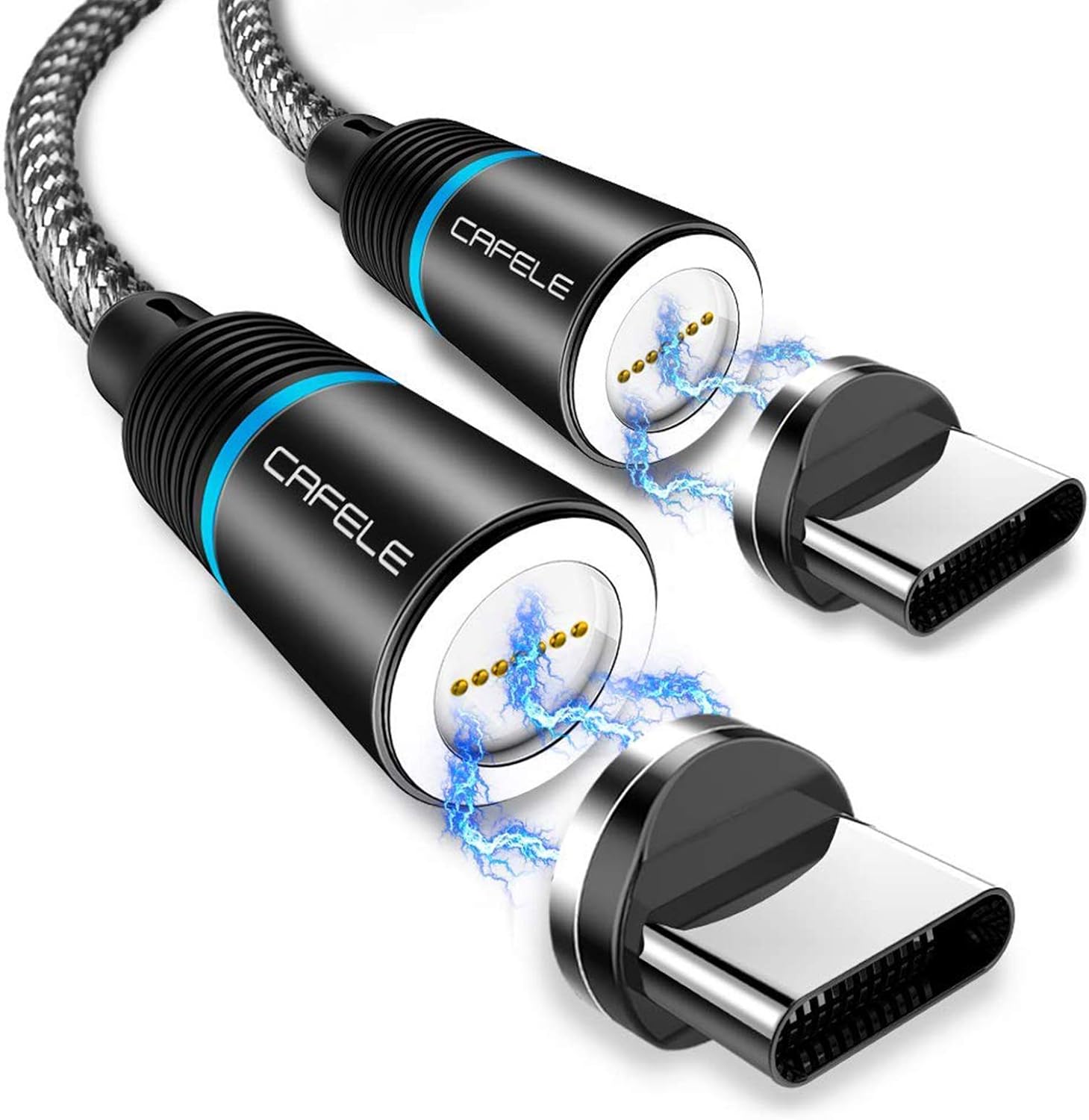
To have a better cable experience I bought a magnetic usb-c cable [1] and wondered why they don't ship with such a cable, because I enjoy it so much.
[1] Not exactly the the same model, but something similar: https://images-na.ssl-images-amazon.com/images/I/71dPOUWPPxL...
- Kudos for including the function keys. As a person who really dislikes the chording required by keyboards without them, I applaud your decision to include them.
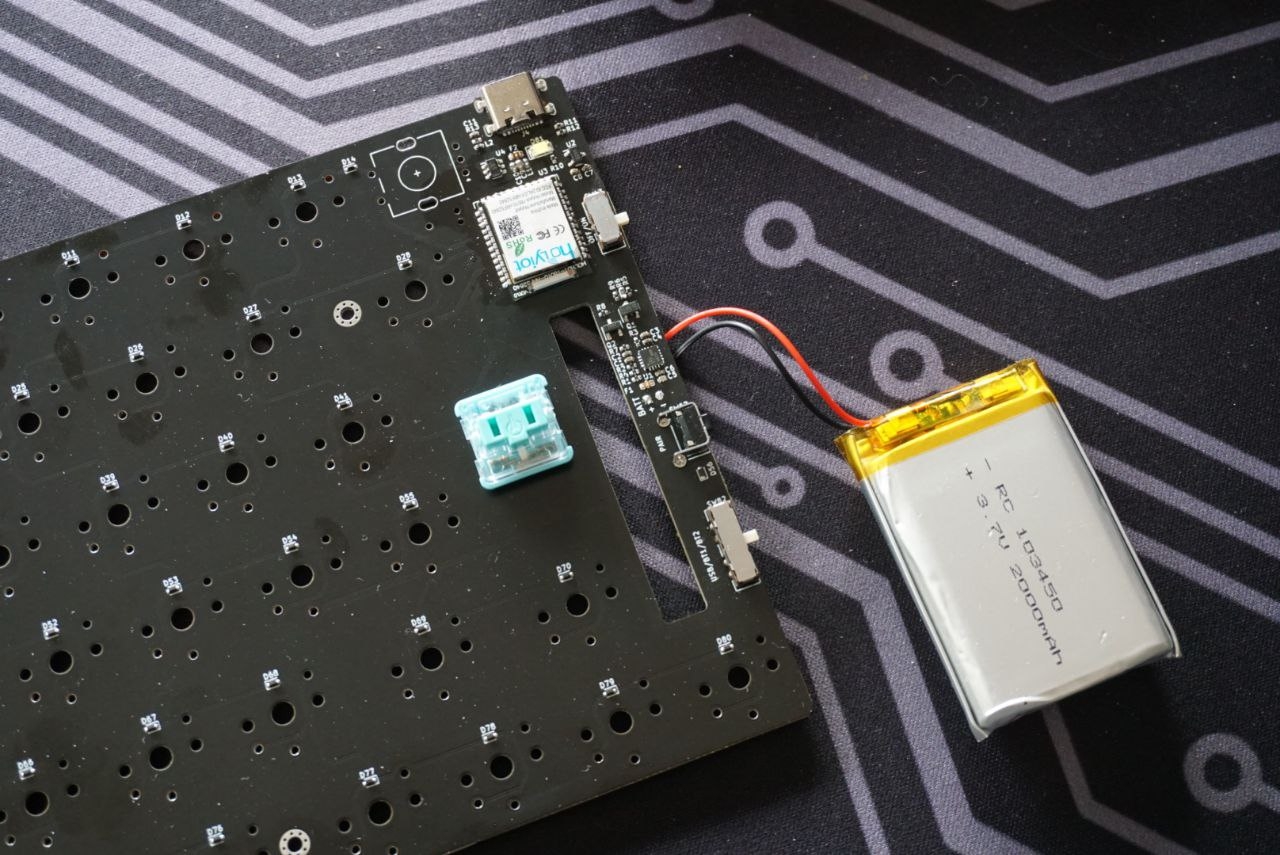
- I'm curious as to how or whether this keyboard can have maintenance done to it? Given that this is likely not inexpensive, I would want to be able to replace key switches that fail. The same goes for the battery, which is likely to wear out sooner than the keys.
- My own preference only but I generally have no need of Bluetooth keyboards, preferring a wired USB connection for reliability. I hope that they will consider a less expensive version that omits Bluetooth functionality.
Aside from that, it looks like quite a promising product and I'll be looking forward to hearing about the price.
I'm aware that I'm a (perhaps tiny) minority here, but I patiently await the existence of a split-key ortholinear/ErgoDox layout with this kind of build quality and low-profile keys. My ErgoDox EZ is ok, but I'm still bitter about the manufacturer refusing to replace or even discount a deck which stopped working after 26 months (24 month warranty), and it's fairly thick and hard to transport.
Just putting that out there, the Keyboardio can't keep keyboards in stock and the two offerings from the EZ company sell briskly, I think the split-key ergonomic market is underserved, but it is much smaller than the 'normal' layout keyboard market.
I'd say it's hard to differentiate yourself in the standard-layouts game, except you clearly have! Best of luck.
- nice design, something I'd love to have sitting on my desk
- like the raised look of some keys -- would have to try them out to see what it feels like
- really like the look of the rotary dial, BUT having something stick out does make it harder to slip into a pouch/bag. Also, thinking about the ergonomics of that, you have to lift your hand, move it away from you into the right corner and do a twisting movement. Not a speedy enough action to get much use, IMO. A scroll-wheel would be easier.
- pairing with 2 devices is great (essential these days)
- split keyboard is a deal-breaker for me personally; helps avoid inflammation in my shoulders / wrists (I use a Logitech K860)
- programmable f-keys?
- backlight would be very helpful at least along the f-key row (even for touch typists)
(edited/reformatted; can we get markdown in HN, please?)
I've gone through a few different mechanical keyboards including things from Ramaworks and every time I get fed up with the bulk, the tedium of lubing switches, finding good key caps _with_ the legends I want, and then trying to get things as quiet as possible without super mushy key presses. If this can solve that I will buy one instantly; and I've signed up for the waitlist.
The design of Enermax Aurora Micro Wireless rocks, I used it for 10+ years, although its trackball is of abysmal quality.
On a laptop the number pad is deadly because the screen and the keyboard are fused together and to have the touchpad / spacebar aligned with the axis of the body all the laptop is shifted to the right.
On desktops I seldomly use the number pad but as I can shift the keyboard to the right so I have no problem buying keyboards with it. Unfortunately it moves the mouse further away and makes it more uncomfortable (timewise) to use.
If I'll ever use a desktop full time again I'll buy a USB touchpad and keep it where it rests on a laptop and use the mouse for games, not every year.
The ZMK firmware allows you to assign or map a wide range of keys and functions to it. The inclusion of an EC11 encoder has become a go-to trend, especially in the keyboard building community, and adopted by the established players. However, it is mostly a bit of novelty and redundant after a while and probably only gets used for the obvious media controls.
>I'll buy a USB touchpad and keep it where it rests on a laptop
You can acquire macropads in a plethora of configurations, from a single key to matrix of keys, only limited by the choice of MCU. All built using either traditional [key]switches and/or mix of encoders. The popular firmwares (QMK, KMK or ZMK) allow you to map the afore-mentioned, so you can choose to enter long IP addresses, purpose it for macros e.g Illustrator, Premiere, Blender, Ableton, Autodesk, Eagle etc., or just use it for regular cut-n-paste type jobs via the use of layers.
Presumably thats configurable, but people usually use it for volume control which is quite nice to have
I love that it's a proper UK mac layout. This is so hard to find in the mechanical keyboard world.
I'm not sure about the mix of key profiles. I'm sure you've tested it (or are testing it) but I think a version where every key had the same profile as the modifiers would be stellar.
The rotary encoder is cool, but sticks out way too much. I'd buy a keyboard like this to be portable, and the encoder gets in the way of that.
I'd love a ctrl keycap to replace the capslock as I always map that, but that wouldn't be a dealbreaker.
The spacebars on Apple laptops are shorter, on my current Apple laptop the left end of the spacebar starts between the X and C key and extends to the boundary on the right between the M and the < key. This is much shorter than the keyboard in the featured article. This allows me the use the option and the command keys on each side of the keyboard with my thumbs. Its a bit awkward, but much better than almost all full sized keyboards with really long spacebars.
The Moonlander, Kinesis Advantage, Keyboard.io, and the Truly Ergonomic Cleave keyboard all give the thumbs a few easy to use keys. These can generally be bound to Ctrl, Alt, Backspace, ESC or other keys commonly used when doing programming. I've got a number of these keyboards and I much prefer them. Just having a split spacebar would allow Vim or Emacs users a convenient leader key.
One other point, I place very little value on media keys and analog value controls. I'm mostly typing while coding, adjusting volume isn't something I do except when playing games or creating media assets and even then it comes up very rarely.
I have an OLKB preonic. And I used QMK to significantly modify my layout. I started out with the modified Colemak - but the re-arranged the keys to move keys which require the index finger to move to the side - on the QWERTY that would for example be G and H . I moved B and K forexample where Z and X are on the Qwerty - and moved Z and X to the number row. The numbers itself appear as a layer when i need them.
Peter Norvig has an article called mayzner : https://norvig.com/mayzner.html - i wrote a program to analyse the frequency of bigrams/trigrams, 4-grams and then programmed them as shortcuts to the keys - using the lower / raise
This means i can type conversation as : con ver sa tion - where con is a trigram , ver is a trigram and tion is a 4-gram. s and a need to be typed out.
my needs : 1. MCU should have more ROM for writing the new preonic has 64KB. 2. Columnar layout - Split keyboard would be ideal.
Reasons for more ROM - you can program a lot more common words in it and Columnar layout would be easier on the fingers.
I've checked out a lot of keyboards - The Iris is good - but the ROM is only 32Kb. The Moonlander is too expensive for me - i cant justify the price to myself right now.
This keyboard also lacks volume up/down controls.
I wonder why? I understand the lack of backlight control (I don't think this keyboard has a backlight?) and leaving out mission control and expose since those keys have changed every few years in macOS. But volume control is a strange one to omit. Maybe that's what the "rotary encoder" does? This webpage does not make the purpose of the rotary clear, unfortunately.
Moreover, it's strange to use different function keys for these functions for... no apparent reason. Especially if you're not going to put any primary function on F3-F8, why not stay consistent for muscle memory reasons?
I'm also curious if this keyboard HAS to use bluetooth, or if it's capable of wired control via the usb-c cable like my keychron. I hate bluetooth lag, so that's a dealbreaker for me. This webpage should clarify.
This keyboard looks pretty nice, otherwise. As someone who doesn't care to ever use page up/page down/home/end keys, I'll definitely check it out if something ever happens to my K2.
- Your website looks beautiful.
- I immediately wanted to own one.
I signed up for updates, but it would be good to get a feel for how far along you are in the design and production process.
Yeah it looks nice and may feel nice for the first 30 minutes and may fetch some nice compliments from the co-workers.
but i would want a wide comfortable and ergonomic split keyboard instead, which won't push me to slouch and force my wide shoulders in an uncomfortable position for the next 8 hours. split keyboard and a trackball mouse are must these days with all kinds of wrist, shoulder and back pain problems.
Maybe it's a deliberate decision to filter only for people who are really interested in a keyboard like this, but I wouldn't buy a product from someone who has made the website design choices that you have.
Also, what is pricing like?
I don't care about clickyness, or what switches does it have. This keyboard is the first I've seen that has a design that will actually allow finding keys by touching and feeling them, not by looking at them. The difference in the shapes of the different key groups is huge for me.
The only thing that I miss is the space around the reverse-T of the arrows. The space that Macbooks have around the arrows is not a "wasted space," it has a purpose: it allows me to position my fingers on the arrows just by touching and feeling. Maybe consider adopting the half-size of the arrows and leaving the left-shift where it should be.
Another note: I don't use Windows much, but when I do, the key in the lower left corner is hard-wired in my muscle memory to Ctrl. Ctrl is the key that is used the most in Windows, so I often need to find it quick, in that corner. Maybe consider a Mac/Win switch (fn-control-option-command for Mac, Ctrl-Fn-Windows-Alt for Windows).
I want to love the kaihl low profile chocs, but after testing the brown ones I still prefer rubber dome. Did you have the chance to try the new sunset ones? From what I read I'd give them another chance (https://splitkb.com/products/sunset-kailh-low-profile-choc-s...)
also any chance for a future ortho version?
I know you're only at prototype stage, but visually I'd say the giant numbers are a bit jarring, and having some but not all of the Fxx labels displaced from centre on the function keys depending on whether there's a symbol there too looks a bit strange.
- low profile, fantastic
- not full size. Numpads only get in the way!
- mechanical keys
- rotary encoder. Useful for everything! Fl studio, moving pixels in vegas, audio knob etc.
- i don’t mind the font, but perhaps a version without any typography would be nice.
I hope they’ll ship to Norway.
* I don't miss the arrow keys at all actually; if you haven't tried it, you could experiment with getting rid of them and seeing how you feel. That makes all "cursor move" operations consistently chorded (with the fn key, naturally).
* The HHKB allows you to connect to five devices simultaneously: 4 bluetooth devices and the USB-C connection. It allows you to switch between them with a single key chord (Fn-Control-<N>). I've found this really nice now that I'm forced to use a company laptop for my main work, as I can keep my personal laptop up and switch between them very quickly. A switch would be OK but would probably feel fiddly and annoying by comparison (and there's a risk of it wearing out if someone switches too often).
Other than that, looks like a cool addition to the solution space -- good luck and I hope it goes well!
The different key surface shapes are something that's missing from most keyboards. I created a very ugly but more usable Moonlander Mk1 by changing out several of the keycaps with other shaped caps from different sets. It makes a world of difference in being able to touch type, especially since my fingers are not super long (and I have to move my hand a little to reach some keys).
It's funny, the aesthetic of this ElectronicMaterials keyboard reminds me of Teenage Engineering. I always wished TE would get into keyboards...
People (myself included, and probably many on HN) will pay a lot for a premium keyboard. This is especially true for those of us who type enough that we start having hand/arm problems. It's a quality of life matter, and spending several hundred or more is reasonable if the benefits are there. (Not all expensive keyboards provide real benefits worthy of their price.)
You'll have a hard time pitching this to some "hard core keyboardists", but don't forget that this keyboard is for you, not for them. If you don't want an ergonomic layout, or split and tenting, or an ANSII enter key, or Cherry keys, then so be it. This looks like a great project and a very good implementation.
I think the placement of the up arrow to the right of the shift key is great, as they are normal-size keys. Lenovo gives the arrow keys standard width but only 3/4 height so they feel too small.
The raised and sunk key shapes probably feels good in real life. Another way to get tactile feedback and know you fingers are in the right position.
I subscribed to your waitlist, and plan to purchase one. Well done, thumbs up!
I got bitten by buying a non-gaming mechanical keyboard, thinking that for office/coding use gaming features were unnecessary. If I type my password at natural high speed, it nearly always transposes letters due to not refreshing fast enough. No such issues on a 1000hz gaming mechanical board
Very pretty otherwise, but no numpad = no interest here.
Oh and I really like the idea of having a physical switch for multiple Bluetooth paired devices.
The grain on the videos is poor and I'll work on that.
The finish of the materials is not finalised but to give you an idea, the case will be a semi-satin anodised aluminium. It will likely be more matte than, say, a Macbook. The plastic will be a matte PBT type hard plastic.
- Why are the numbers larger than the character glyphs? Feels a bit "preschool", imho.
- What exactly is the "rotary encoder" for? It's a "feature" I haven't seen on keyboards before, and given it extends so prominently... I would be careful with travelling with this device.
- talking about travelling: a built-in battery means I need to charge this thing. I'd personally much rather have a standard 2xAA battery compartment for power cells I can get basically anywhere and not charge my keyboard.
- I love the mechanical slider for selecting BT channels.
- from a design perspective: If you use a serif font for the logo, and none for the key descriptions, this leads to some level of optical chaos. I'd go for one or the other, but not both.
I would have bought it outright if it was available.
Do you have an estimated time when it will be released and what the price would be?
Aesthetics resembles me a mix of Apple and Sinclair (especially Sinclair QL), two of my favourite design perspectives with a breeze of eighties. Linear switches another plus point for me. Maybe a different font for alphabetic keys would be nice and consistent with design, font of numerical keys is very good and maybe a good candidate for alphabetics too, nice typewriter era lines. Other than these; recycled materials, aluminium monobody, low-profile keys, etc. nice touches for me. I'm sold. :-)
I hope all goes well!
Another thing I can point out is that all of my Bluetooth keyboards support three devices for some reason (and yes, I do have some of them paired to three machines).
That said, I would love something like this, but with a (60%) Planck layout. I don’t mind the lack of keys at all, and actually wish for less as long as I can run QMK/ZMK (which is a great feature to see).
Then the case, the keycaps and all the other logistics; impressive!
Feedback: I think hotswap is a great idea (not sure if feasible with low profile) because it can cater to different preferences (I'm looking forward to use silent tactile). Also split always seemed very nice when I tried it, especially while standing.
Looks are good. However, as someone using that thing often for 12h a day, I care much more about how it feels
- The numbers are too large, they break the consistency of typography.
- The rotary encoder sticks out too much. Rotate & move to the end of the enclosure, and mostly occlude it, like a mouse scroll wheel?
- I would prefer Page Up/Down and numpad.
Make sure the spin on the 360 view is user-controllable, and get rid of the marquees. A hover animation on the sections would only be expected if they're interactive. Text is needlessly large.
Everyone else has covered my qualms about the keyboard itself, but I'm legitimately not a fan of anything besides it being USB-C and made of aluminium, so I'm clearly not in the target market (I'm happy with my Model M and Das Ultimate) =b
Best of luck!
It drives me nuts they are not bluetooth!
I'd buy this instantly.
BTW, I think surprisingly little overlap between hacker community and mechanical keyboard community.
- maybe you can move the fn key to the left side since it's a rarely used modifier. For programmers Shift is most important, then Ctrl and Alt comes. They must be wider to be easily found by touch.
- does it come with backlight? that's a must have!
Please design a keyboard that one can reprogram the keys directly on the hardware (caps to ctrl and the like).
Also where you can program macros and save them into profiles. That way, emacs keys would work everywhere.
I came here just to say this. It's highly disappointing that a product is announced without any info on how much it could cost. That's the critical factor that will determine if the product is worth any consideration.
The Planck is compact, durable, & programmable...however what's missing is an ortholinear programmable travel keyboard with a full assortment of keys & durable low-profile switches.
I note in the specs you mention kailh red linears, but tactile switches in the blurb up top, will there be a choice between linear and tactile?
I'm not sure I'll get one, but I like the site design - it feels almost pornographic.
As for the pornographic comment, that's the best compliment I've got all day!
[0] https://teenage.engineering/products/op-1/original/overview
A 75% version of this with PgUp/Dn/Pos1 etc. a flat dial/knob would actually be perfect - anything planned in that direction?
Tangential: i really like the mac keyboard (laptop and magic) and while it took about a month of regular use, i now prefer my mechanical keyboard. I was skeptical i ever would.
Why not keep the font consistent (or the same size with only a change in weight) throughout?
One option I hope you will provide--that I hope is easy enough that you would actually consider--is to provide a key cap set that is completely blank, or is very minimal. I don't need anything printed on my keyboard, and I would prefer to not see such a gorgeous keyboard with all that white printed on it, especially the number caps.
Good luck with the launch/release. As someone who designs keyboards, I think the design space outside of the "core hobbyist" market is super interesting. This looks like a great keyboard that would look great on the desk of people who value aesthetics, ergonomics and good design.
I'm a big fan of your principles and the overall presentation of this project.
They've been missing from laptops for a while now, but the absence at least makes sense there.
I see a lot of cool designs for keyboards (like this one), but they are usually Windows only and then also chop off the numpad and navigation keys.
Like someone else said, it's not easy to gauge the size of this one from the graphics on the landing page.
I'm using an MX Keys with the Logitech dongle, it's slick without any lag (except sometimes when I have multiple Bluetooth connected things nearby + 20 visible Wi-Fi networks from my neighbors, then I can just make sure the dongle is closer).
But using the Bluetooth mode it's only as slick connecting to MacBooks, or to specific Wi-Fi/Bluetooth cards (AX201 is fine, The original Broadcom is shit).
A couple minor things regarding the website:
* It's super zoomed in for some reason/spacing could use some work
* The "about" page is pretty barren when the text is shrunk to a more reasonable size (50%)
Two quick questions:
1. The specs mention Kailh Red switches (linear) - is there any chance this would be offered in other types of Kailh switches? (e.g. Blue etc.) 2. These look like custom keycaps - does this mean that standard mechanical keyboard keycaps won't work on it? Or do you know if the keycaps on these are interchangeable? If not, would you offer them with say, blank keycaps?
the rotary is a great idea but if you only have one maybe make it so you can spin it with a finger instead of turning it.
what did you use for modeling and rendering software and what did you use to create the website in terms of languages/frameworks etc?
My only other feature request would be a USB port for a yubikey.
Found the Nuphy Air75, which is a few grams lighter but not as design-y. Clearly there must be some new, low-profile key switches hitting the market making these thin keyboards a possibility.
Anyone recommend a wrist rest?
The letters and numbers on the keys appear to be painted on. My experience with such keys is the paint wears off, and by then you'd better know how to touch type!
A feature I'd like to see is being able to clean the keyboard without ruining it. Best would be if I could run it through the dishwasher.
The Rotary Encoder is a dealbreaker for me though. I want something slender that I can easily slip into a case or backpack. If it was optional, you'd have a customer!
edit: in fact, you have better shots of the keyswitches you're using and your theoretical recycled bottle than you do of the keyboard itself. It's baffling.
I particularly love the ideals on the About page.
"Everything is black" "Well paid workers. Good working conditions"
This is a product where you can so clearly see the thought that went into it (partially because you tell us how much thought went into it) and it shows.
Beautiful work and congratulations.
That being said, it's a work of art.
I would pay around $150-200 for the keyboard though.
Back in the olden times of the early 21's century they made good mechanical keyboards with good tactile feel.
Now they ship laptops with paper thin fragile keys.
Thanks for design a great product to help fill the void.
I look forward to buying one.
The dial functionality can be achieved easily with layers
I would expect it to be more ergo in the keys layout
It reminds me a lot of the OP-1 from Teenage Engineering [1].
I like this a lot and would consider buying if the price point was right. The only change I would like to see is a smaller font size on the number keys.
Congrats and good luck!
Cons: not very ergonomic. (compared to e.g. squeezebox or dactyl-manuform)
Not the keyboard for me, sure, but still a great product!
Can you put a picture on the web site showing the entire keyboard without it moving? I'd like to look closely at the layout, but every image is either cropped or fleeting.
--
Love the design - would really like to try it out, IMO - I hate when sites have no cost info. At least put a ball park price on the page.
The only thing I see missing from the design is spill-proofing?
  OS support
  Apple MacOS 12 (Monteray) and up
Microsoft Windows 10 and upI like the idea of a high quality compact keyboard.
Edit: if you are interested in ever doing a webar thing, check out modelviewer js. If you want help with it let me know.
I guess it is nice for the people used to the Mac keyboard layout, but it is really not for me.
Did you consider an option for a more ”traditional“ layout?
As for the logo, that’s a vanity thing. I know you’re very proud of making the product but if you put a stupid logo on front it kills the minimalist vibe and reduces the practical low key expensive style to just another “RBG in the next model haxxors”. It’s a keyboard, let it be a keyboard, with a simple model number, and add your brand logo to the back of the device. Let the product sell itself.
Uh-ho just looked again and saw it was made in the uk. never buying it
I agree that it makes the keyboard less portable though.
The knob does make it less portable though, definitely.
Why not?
The general design is audacious. It kinda reminds me of the retro-looking IBM computers (AS/400 series)
Super exciting product. Good luck!
Looking forward to the release
Signed up for the waitlist. I'm interested in the pricing.
The only huge space for improvement is to find very ugly letters that match or even outpace the elevated ugliness level of the numeric buttons. If that even possible.
the rotary button has no value imho but I can just break this off for the sake of being constant with the mackbook keyboard layout :) cause you know muscle memory
You've already got the thinkpad palette on a modern form factor, all that's missing is the central, red nipple.
Not sure how I feel about a coiled c-c cable. That might be too hardcore for me.
All in all, great design!
Really amazing work, I'm blown away. Well done.
b) Wait, there are low profile mechanical switches? I always thought mechanical keyboards were impossible for me as I far prefer flat keys than the giant keys with gaping valleys between them. But apparently that’s not necessarily the case? Now I want to try one out.
I do use a TypeMatrix2030, if you need some more inspirations.
Also, I am not a big fan of the red knob.
Do you have any photographs of the real thing?
It has two BT connections, so each half can use one connection.
Then it will be my dream keyboard.
Will you make an Ortholinear version, and
Is it hotswappable?
Looking forward to getting one.
Will there be a 10-key version?
CTRL should be in the corner.
> Please don't post shallow dismissals, especially of other people's work