Is that correct? Does #010101 use the same energy as #FFFFFF or do darker shades still use less energy?
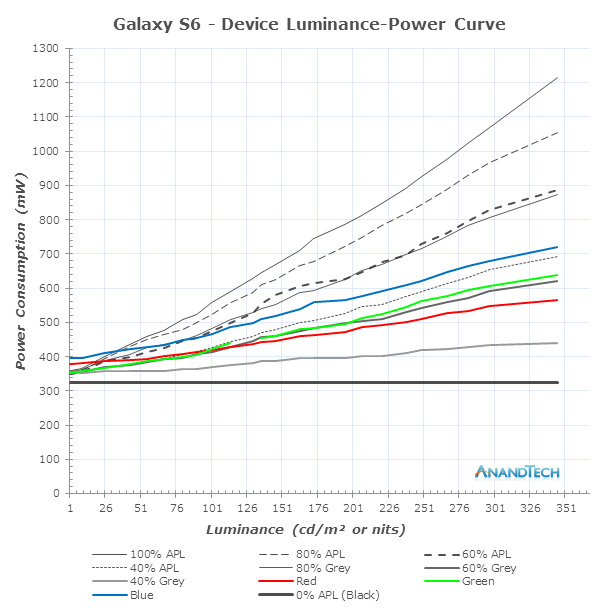
See this chart: https://images.anandtech.com/doci/9394/luminance-curve.png
From this article: https://www.anandtech.com/show/9394/analysing-amoled-power-e...
What’s actually true that most people don’t expect is that OLED displays often use more power than LCD displays even with very dark content.
That was my question, thanks a lot
The only way to get good numbers would be to take several OLED TVs, a few LCD TVs, and measure their power usage at the outlet after calibrating them to be as close as possible, then running through several different test playbacks.
In discrete LEDs the datasheets will typically have a table or plot of luminosity (candelas) vs current through the device, and you can figure how much current is needed (and therefore how much power is drawn) to reach a target luminosity. Brightness (nits) is a measure of the luminosity over an area. The tables in the datasheet of an OLED display unit are a bit different but the principle holds.
Now going from RGB color space in the digital world to the actual current draws of individual LED cells is not a 1:1 or even linear relationship, so while you can say in broad strokes that #ffffff will draw more power than #000000 it's not as straightforward for the rest of the color gamut. The reason to keep that in mind is that the "brightness" (or saturation, if you're in HSV instead of HSL) is not equivalent to the physical brightness of the display.
I'm guessing it's a combination of yes and no. OLED screens save power on black colors because it can completely shut off the pixels responsible for illuminating that portion of the screen. If you have a slightly brighter color than pure black, the diode will turn on but not at full-brightness.
Technically speaking, you probably stand to save the most power on a purely black background. You're still saving power on other dark colors, but it's probably more noticeable with pure black.
Energy Aware Color Sets
From the “Applications and Results” section towards the end of the paper:
“Figure 9 documents the energy consumption of the three images of Figure 8. Energy consumption is measured according to our energy model from Equation 1, using various grid sizes. The most prominent observation is the substantial energy savings achieved by colors chosen according to our continuous optimization approach. Across the different grid resolutions, we save on average 41 percentage of energy compared to using ColorBrewer colors.”
I switched everything to the dark mode, not because I like it, or want to save the battery, but because I afraid that the pixels will burn out.
When the laptop is booting it uses the full brightness, also some bootable Linux distros use the full brightness, as they lacking OLED-aware display drivers.
I also enabled auto hide for Ubuntu 22.04's taskbar, not sure for to do it for the topbar.
I use a very low brightness levels ~ 15%, otherwise the colors are too vivid for my taste.
I think dark mode on OLED somewhat saves the batery, but I'm not sure how much. I didn't measured it.
Is #010101 effectively #FFFFFF or does it actually use less energy the darker it is? With LCDs we know it is the former, but what about OLED displays?
So you are confirming that the statement is actually wrong. The darker a pixel on OLED, the less power it uses. Right?
I mean the display panel A might be 20% more efficient than display panel B, but connected to a power supply that is half as efficient as B's.
Good luck.
Mind you most "dark themes" in computer programs aren't using 100% black, but some shade of grey or green.