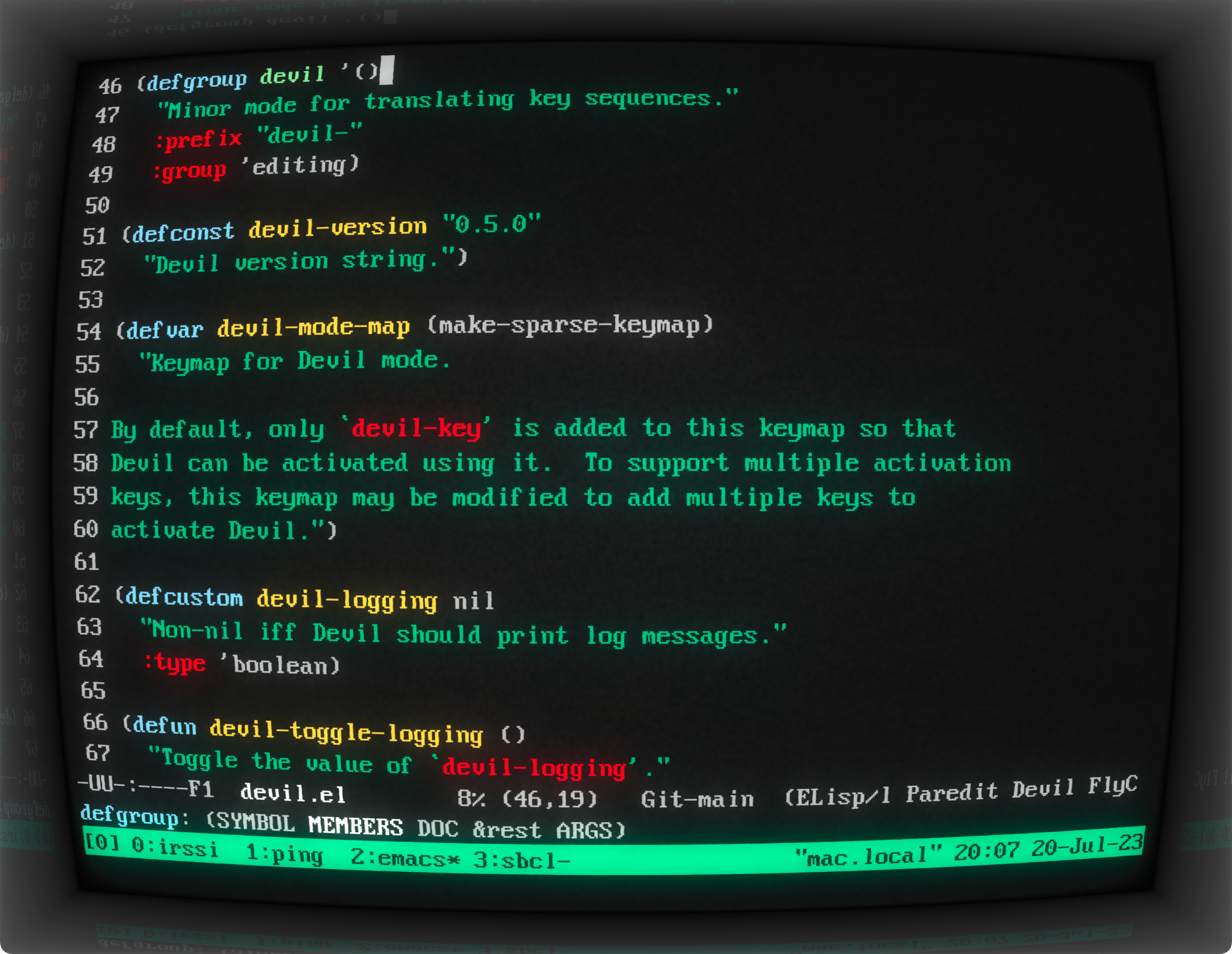
2018: https://news.ycombinator.com/item?id=17413911
2015: https://news.ycombinator.com/item?id=9093545
2014: https://news.ycombinator.com/item?id=8399461
Someone in 2024 please continue this list
For a retro Android game I maintain, I use the term "Gratuitous Eye Straining Effects" in the settings page. It needs to be toggleable, because I can only tolerate it for a short period. My naming was inspired by k9mail's settings called "Gaudy visual effects". May as well have some fun with words when implementing such effects.
Seriously, so useful for floating window managers, it’s a simple and obvious form of transition, significantly better than what window managers have ended up at these days (if anything).
(Then I switched to i3, and more recently Sway. Not sure I’d appreciate wobbly windows in tiling window managers, though maybe with gaps (… which I’ve never understood the appeal of) it might be better.)
It warmed my soul. It's the only thing I really miss since switching to i3.
I have set it up, and the appearance is similar.
The terminal effects are configurable. I disable the settings named Burin, Glow Line, and RGB Shift to get a crispy and distraction-free experience. The RGB Shift setting is disabled for most built-in profiles anyway but enabled for some profiles like Vintage and IBM Dos. By the way, the Vintage profile is quite amusing. Many settings are cranked way up in this profile! The text is blurry, and the incessant flickering of the screen creates an unsettling impression that the monitor might break down any moment.
A nice little detail I like about cool-retro-term is the reflection of the screen on the glossy frame of the monitor. If we increase the Screen Curvature setting to 50% or more, we can quite clearly see the reflection of the top line or bottom line of the terminal on the frame.[1]
In case you haven't noticed it, the app is named cool-retro-term and it is abbreviated to CRT. The app icon[2] is also "CRT" written using large letters followed by a large cursor. Guess what else is abbreviated to CRT? Yes, "cathode-ray tube" of the cathode-ray tube computer monitors.
[1] https://susam.github.io/blob/img/cool-retro-term/2023-07-20-...
[2] https://github.com/Swordfish90/cool-retro-term/blob/f157648d...
I actually asked GPT3 to write the code for me. I'm not a SWE so I'm not sure how well it did, but it works!
Add these to the body style:
    text-shadow: 1px 1px 6px #8aff00;
    filter: blur(0.3px);
    background-image: repeating-linear-gradient( to bottom, rgb(0 0 0), rgb(0 255 76 / 7%) 3px, rgb(100 100 100 / 23%) 7px );
Admittedly the Unicode private use area icon sets look a little bit out of place in a retro terminal, so let's just call it futuristic retro terminal :)
Burnin: Off
Static Noise: 8%
Jitter: 18%
Glow Line: 1%
Screen Curvature: 10%
Ambient Light: 42%
Flickering: 12%
Horizontal Sync: 15%
RGB Sync: Off
Font: JetBrainsMono Nerd Font Mono
Font: #0ccc68
Background: #000000
Brightness: 59%
Contrast: 72%
Margin: 78%
Frame size: 39%
For those unfamiliar with CRTs, you could adjust the value of some components. These adjustments could affect things like the beam brightness, sharpness of the picture, horizontal and vertical synchronization, and geometry of the screen. Typically this was done via user accessible knobs on the front or back of the monitor, though some were only accessible after opening the case. Adjusting these knobs is better described as calibration, rather than changing settings, since you were adjusting the physical properties of components that directly altered analog signals.
(Can also confirm that heavily used terminals definitely show degradation.)
Only reference I currently found: https://twitter.com/AdamRedwoods/status/1677878315284316161
What I am looking for since some time now is a way to create these effects in good quality in a compositor. It would be much more convenient that way. Free and open would be cool, but I'd also pay for it. Does anyone know if there is a good plugin that works with Nuke, Natron or Blender?
If you're suggesting Cathode might be ripping off Cool Retro Term, I think Cathode[1] (Jan 25, 2011) predates Cool Retro Term[2] (Nov 22, 2013) by almost three years.
[1] https://www.macstories.net/mac/cathode-is-a-vintage-terminal...
[2] https://github.com/Swordfish90/cool-retro-term/commits/maste...
They implemented a library map on them that allowed you to zoom in to see a depiction of an atom, or out to see a depiction of the universe. Really blew my mind as a kid.
    xbps-query -Rs retro
    [-] cool-retro-term-1.1.1_1          Good looking terminal emulator which mimics the old cathode display
[snip...]https://packages.debian.org/search?keywords=cool-retro-term
I have it installed here and rarely use it (daily driver is urxvt), but it occasionally pops up when a GUI program wants to launch a terminal and by whatever configuration mechanism they use these days prefers cool-retro-term in favor of the urxvt :)
And then we had Linux on PCs and that was so much better nobody wanted to use the terminals again if they could avoid them.
Sometimes I like to have a process like htop running and easily find the window on my desktop by making it look different than other terminals--this works great for a use case like that, it's unmistakeable what terminal is running the process you want to monitor.
Not only was something that we could use, it was quite often the only option, as the IBM X Windows thin terminals were quite often busy with people playing either dungeon like games or talk sessions, splited across 4 xterms.
That is why I don't get the CLI revivalism culture, I lived through the days it was the only option.
It crashes deliberately on exit. Because in the era it's simulating, that happened a lot with terminal programs.
Not necessarily terminals, but certainly terminal programs.
Why is software deployment so hard these days, despite all the effort that is poured into package managers?
(or Linux early boot up messages)