> You would be better served these days using LSP and treesitter
Could you elaborate? How do I transition from etags to treesitter? Suppose I'm working on a dynamic C or C++ project where I might need to regenerate the tags daily.
With the latest release 29.1, emacs comes with an in-built lsp client - eglot[1]. So you need to (a) Set up clangd or some other lsp server for c++. Make sure it's accessible from emacs (use something like exec-path-from-shell to get your shell paths into emacs) (b) Set up your project for clangd - this involves generating a compile_commands.json which basically lists the full compilation invocation of each and every file in your project. CMake has options to do that and likely many other build tools or maybe use something like bear[2]. (c) Enable eglot (install the package if needed on older versions of emacs) and configure appropriately.
I also use projectile for project mgmt though emacs now has something in built for that too.
I can post my configs if that helps.
[0] https://clangd.llvm.org/ [1] https://github.com/joaotavora/eglot [2] https://github.com/rizsotto/Bear
… to LSP: You don’t throw your tags away. If you run an LSP client it will add an “xref-backend” transparently, so Emacs will get all references and definitions from the LSP server. If you turn off LSP mode, Emacs will fall back to the etags backend. I don’t think you need any configuration for this to work.
Treesitter modes do not implement an “xref-backend” AFAIK.
> Suppose I'm working on a dynamic C or C++ project
Most beginners are not, that's my point. Those technologies are fine if you need them, but the vast majority of beginners are working in dynamic languages like JavaScript and Python. Any modern tutorial using Emacs for code should be about programming in those languages (and elisp).
Honestly the best way to learn to use Emacs today is probably not using it for code at all, but org-mode and plaintext editing. That way you can learn the editor and not get bogged down in creating/configuring IDE features.
You're at a bbq and someone invites you to a ski trip in 5 months, you need to check your schedule so you whip out your laptop to check the org calendar?
I just don't get how people can function putting "everything" into org.
I dont want to see it die out an I really hope someone does come up with a tutorial that can draw novices in or at least can show them the real power of Emacs and get them excited enough to want to learn to use it.
More recently I've been reading the Org manual (1), which like Spacemacs opened my eyes to Org mode's capabilities: literate programming and code blocks that modify the source document captured my interest, along with table and spreadsheet capabilities.
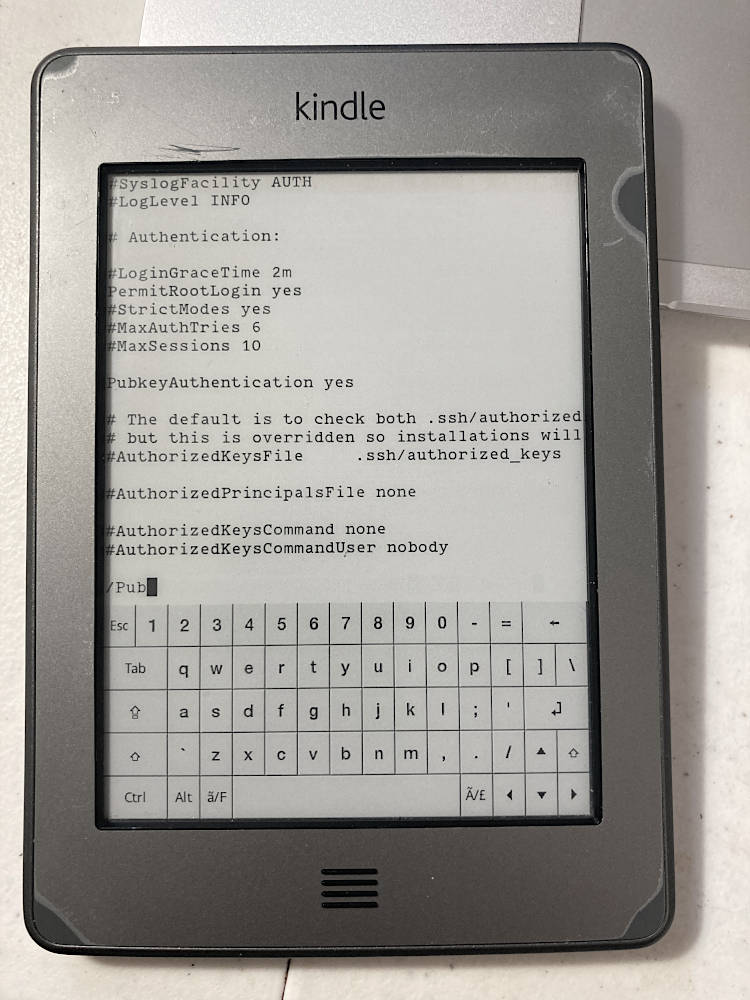
I still use nvim all the time in the terminal; vi knowledge is essential, as it's the best editor you can be sure to have on a UNIX-like system. Case in point: Today I used vi in kterm on my jailbroken Kindle Touch to edit usbnet's SSHD config (2) and I can't imagine a more efficient editor (3) for an eInk device.
P.S. My favorite thing about Emacs is the help system. Being able to look up a function or what a key does with a few keypresses is fantastic!
1: https://orgmode.org/org.pdf
2: Now I can use `scp` or SFTP from my laptop and or iPhone to add books to my Kindle while it's connected to my iPhone hotspot
At the time I much preferred vim’s approach of being an excellent IDE. I didn’t like Emacs’ approach of being… everything. However, being able to browse the web, check email, read ebooks, use the terminal, interact with JIRA or GitHub or Notion etc etc, all within my IDE really does have its appeal.
But I’ll always love vim and nvim, I think every software developer should learn it
What is better about vim? Evil mode in emacs has the same keybinds you're used to. Extensibility and customization is 100x better since everything is lua, instead of trying to twist viml to do what it wasn't meant to do. Unless you just want to use base vi on every machine you ssh into, it's hard to find ways vim is better.
My main reasoning is precisely the opposite reason as your sibling comment mentions - I have no interest in my editor supporting barely tangential things like web browsing, email, etc. The ability to spawn a terminal is nice (and mine can do so), but my terminal (Kitty) can also easily split itself and switch context between nvim/terminal so it's not critical.
So rather than the install section being "out of date", I would say it is more conservative and may reduce the probability of users' first Emacs experience being buggy.
Lately been using it with native comp. Also solid.
Written about it a few times:
https://xenodium.com/emacs-plus-with-native-comp
Also it appears --cocoa is no longer a valid option even on the default HB emacs, so it is out of date anyway.
https://github.com/d12frosted/homebrew-emacs-plus/blob/maste...
I found Emacsclient is a perfect match to my situation and I simply started from empty init.el. It was annoying in the first a few days to set up LSP, counsel, org-mode. But after about 3 days, everything became very natural and I have been using Emacs ever since. I made a lot of elisp in my init.el to set layout, do automatic actions, etc.
I am not a long time user yet so I can speak for the "learn" part: just use it and you will pick the skill up.
I tried emacs a few years ago, but I didn't stick with emacs for more than a couple weeks, if even. I had already been using vim for many years before that without pain, so I could not find a compelling reason to switch.
Then I transitioned to doing a lot less in C/C++ and more in Python, Java and shell scripting. I used Pycharm and Idea for a while as I got the licenses at work, eventually I tried Vscode with all the plugins, LSPs etc. I tried emacs again at the time. I liked the much better customisability, but I hated the fact Emacs was no faster than vscode on large codebases with lsp.
Eventually neovim with treesitter showed up and I embraced it as a nice quick editor. Then I heard emacs 29 has treesitter too so I decided to give it a try. Why? I was relatively happy with neovim, but certain things bugged me. I wanted ability to have different fonts and font sizes and other things.
So I started looking into emacs again. I wanted to learn the "emacs way" as opposed to the evil mode so I stayed away from distros like doom emacs. I set up treesitter (including for extra languages like hcl) an extra color theme and I'm happy enough to pursue it further this time.
Last time I was really impressed I had two remote dired buffers open (using tramp mode: „C-x f“: ssh:user@server.com:/foo/bar), one on server A and one on server B. Then I selected some files to copy (using „m“) and then hit „C“. Emacs then recommended the server B location automatically, I hit enter and it copied the files from A to B. Nice. You need „ dired-dwim-target“ (Do What I Mean target) set to true for this to work. But I use this trick regularly two run test queries on production machines.
So you don’t even need a complex configuration for easing many of your daily routines.
How to learn Emacs - https://news.ycombinator.com/item?id=3821531 - April 2012 (7 comments)
This article has an interesting perspective. But, beyond Emacs built-in documentation, my favorite content to learn Emacs is the book Mastering Emacs and the System Crafters' YouTube Channel.
Oh my. I really genuinely tried to watch it... But it's impossible for me to not fall asleep after 20min. The guy on the channel really should invest in some person that could cut 10 min of content out of each of his 2h live shows and make a short snappy video. Like what the primagen is doing. I think he would get 10x the audience.
The actual content he has is very interesting, but the barrier is the length of it.
We used emacs in college and that was the last time I used any text editor serverside besides vi. Am I missing out?
Emacs is a great extensible platform for writing textual applications that happens to come with a mediocre text editor. If you like automating things or enjoy having development environments that fit you like a glove, you'll want to learn Emacs - it'll pay off in a few years. (this describes me)
But not everyone fits that description, and that's totally fine. I know many software engineers who have been working for decades in vanilla vim, and they're still incredibly productive. VSCode, too, comes with sane out of the box defaults and a large extension ecosystem.
There's probably an analogy to be made here between flexible languages (Lisp, Haskell, C++ kind-of) and inflexible languages (Python, Java) - some people really want to develop DSLs to perfectly express their problem, but others are ok with a slightly awkward mismatch due to a rigid language, and are still incredibly productive and happy.
(however, aside from practical use, I find the design of Emacs to be quite beautiful and inspiring, and encourage you to take a look at it anyway when you have some time)
When working on certain projects, I'll sometimes write a code snippet of elisp to handle some task I find myself doing a lot (things like "fold all fragments of this bespoke file format which includes some string"). The fact that Emacs Lisp is a "real programming language" is nice, and the way that it's very easy to inspect what a certain key command does means that you can very quickly set something up.
This lower barrier to entry is nice for people who really want to make things very close to right. Things like "set up a custom error checker based on this validator command and add highlighting to the text based on it" is as simple as setting up something in flycheck and setting up some regular expressions.
So I think it's interesting for people who like IDEs but want it to be easier to mold and understand, more than people who have a simple text editor but want "more".