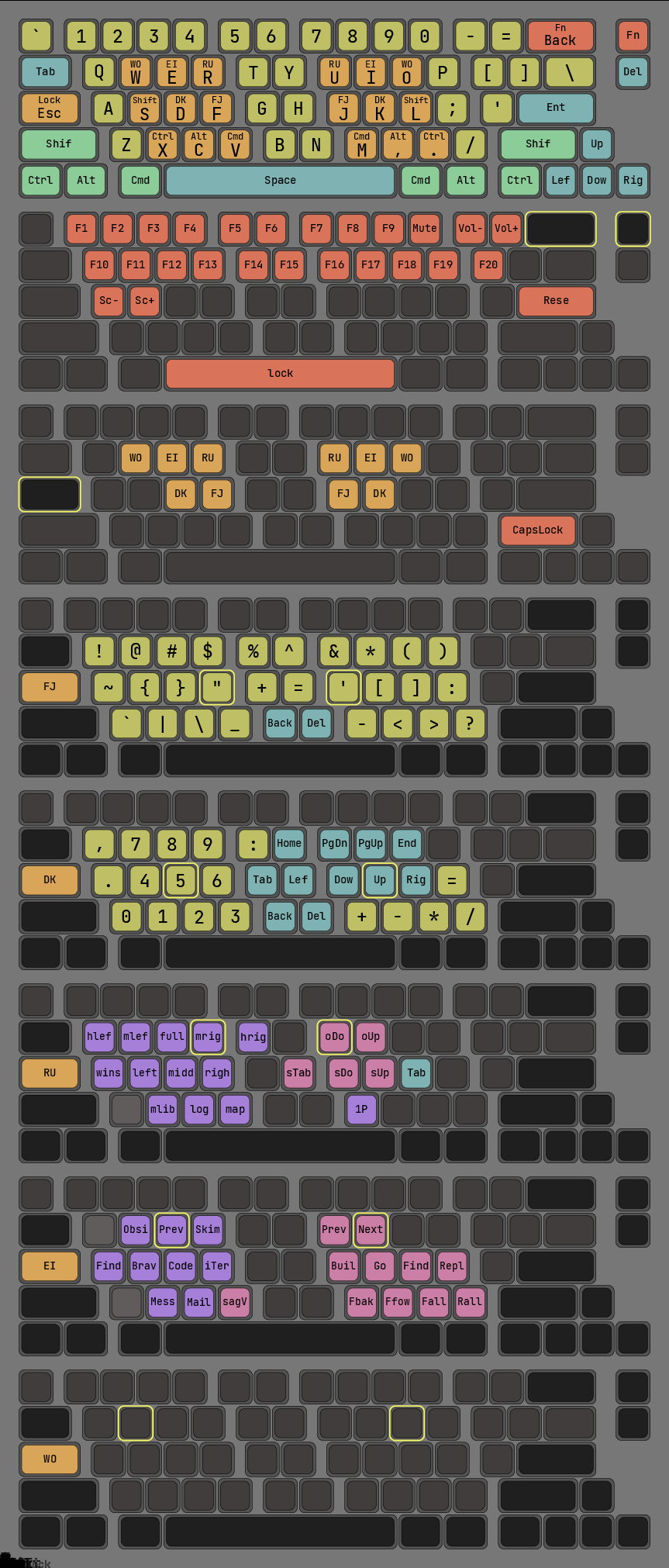
https://github.com/trevorjay/Handler
It's chorded, (based on the https://ardux.io/ layout), but I don't think chorded is really that hard to learn if you're actually willing to give it a week or two (which you have in any situation where you need a one hander).
The key (ha) I've found is that you want the keys to be as easy to press as possible while providing feedback. The Twiddler, https://twiddler.tekgear.com/ , is great for this as it uses light tact switches, but it has reliability issues.
This is a great project. Of all my one-handed experience, I never got to try a FrogPad because of the expense. Having a software implementation of the FrogPad is awesome.
https://www.stavros.io/posts/keyyyyyyyys/
Wildly impractical, but super easy to build.
Oh no! That's so sad to hear.
I was overjoyed when the new BT model came out; I was finally going to get to do the thing & get good at this. A couple years latter I actually made an effort to really learn it & get a little competent. For whatever reason (allegedly more coder friendly) I almost immediately adopted TabSpace layout & printed up a half dozen key map graphics so one would always be at hand.
It was a fun time but I never committed hard enough. I'm also just shocked how effective & capable I am at writing on a touchscreen. I'd tried some more code-oriented keyboards for coding, and this was a while ago but they lacked most of the intelligence/helpfulness of a mainstream touch-keyboard & weren't something I could hard adopt. In the meantime, the mainstream touch-keyboards forever annoy me; I really wish long presses could offer a lot more options but we seem forever consigned to be flipping between screens to get a special character or two.
I'm super excited to hear of Twiddler / one handed users in the wild. That's crazy awesome that you build your own! That it only takes 8 keys is a feat!
TBH, the the Twiddler layout is probably superior (though not by much). I went with eight traditional keys because it could be hand wired. The Twiddler approach is basically limited to soldering directly to a board, with all the issues therein. After about six months or so I would get debris caught under one switch or another and the Twiddler is basically welded shut. :/
Speaking of design issues (and talking about the BT). I highly recommend using a Nice! or other wireless/BT microcontroller. Not only is it more convenient but cable strain is a real issue on most microcontrollers. If the Handler has a design flaw, that's the biggie.
I’m curious if you have ever looked into the Tap Strap 2? I recently got one and it looks promising with preliminary testing but I haven’t invested much time learning and configuring it yet.
Just giving a preliminary skim of the website, it looks like their alphabet doesn't include meta characters like CTRL, ALT, and WINDOWS? Is there a more advanced mode? When you customize things, is that done on device (just sending keystrokes as a Bluetooth keyboard) or do you need special software on the device you're interacting with? Learning aside. How accurate has it seemed so far?
Answering your questions, split into pros and cons:
## Pros
You can customise the layout, including meta keys like control/alt/windows. I think the "more advanced mode" is basically just designing your own layout.
It's honestly very accurate for a keyboard that is basically just tapping your figures against a table. It definitely misreads the odd input (or perhaps more accurately, it is sufficiently easy for me to waggle my fingers wrong), but it doesn't make so many that I'm really bothered by it.
I had an issue with the firmware on mine when I first got it, and the support team were super responsive. I really appreciated this.
The Android/iOS app is well designed for learning how to use it -- it comes with an excellently pedagogical typing tutor.
If you're curious, I'd definitely recommend giving it a go. IIUC the WPM most folks get with it is about equivalent to to other one-handed-keyboards, ~50 or so. I've found learning it to be pretty easy. (Substantially easier than learning a new layout on a regular keyboard, for some reason.)
It connects as a bluetooth keyboard, no special software required.
## Cons
Customising layouts is unfortunately a bit of a chore, being both tied-to-the-company and requiring additional devices. The layout must first be designed through a webpage on their site, which you need to log in to using your account. Then you need an Android/iOS device to actually connect to the TS2 and push the layout.
## Worth knowing
You have essentially five layers: default, double tap, triple tap, shift, and switch. Shift and switch are pretty similar to layers as you'll find them on most ergomech keyboards. However, the double and triple tap layers work by inputting the key corresponding to that chord on the default layer, then detecting that you're doing a double/triple tap, then inputting backspace, and then inputting the key corresponding to the chord on the double/triple tap layer. So if you'd like to use it for something like vim, then that first input might actually mean something! If that will affect you, then in practice you can't use the double/triple tap layers, and you only have 60% of the real estate to fit your custom layout into. That is just enough to fit basically a whole keyboard -- I've got a custom layout that does this -- but it took me some careful thought for how to cram all those keys into such little space in a logical way.
The big 'however' here is coding. I also have a one-handed mouse from Elecom. Not switching between mouse and keyboard to navigate, combined with macros being less strain (basically no hand travel and sticky meta keys) means I'm faster editing code to the point I just eat the prose cost (or use my phone keyboard/dictation to compose longer prose).
How much do you use the mouse when navigating? Do you have something akin to vim combos or do you use mostly mouse? What kind of macros do you have?
I found the opposite solution also works:D A combination of keynav, a tiling window manager, and ex. vimium[0] make reaching for the mouse pretty much optional:)
[0] The key feature is a hotkey to quickly select links with the keyboard.
https://matias.store/products/half-keyboard
The Matias Half Keyboard is based on a theory that our minds mirror each hand, so by holding the space bar to access the missing half keyboard, we already know what to do. I was skeptical. Recognizing that we're modal (do we even recognize that telephone keypads and numeric keypads are different, or do we just use them without thinking?) I decided to learn Dvorak on the half keyboard while continuing to use QWERTY on my full keyboards.
One day, on a lark, I tried Dvorak on a full keyboard. I could, easily. The mirror theory holds.
The software itself was buggy as hell (I learned just enough ObjC to get it kinda working), but even so the mirroring concept worked perfectly for me. It was basically no learning curve (full QWERTY to half QWERTY), and I only took a slight hit to typing speed. The first thing I did was prove it out by building another bit of software to relaunch the first whenever it crashed, and then worked full time with it for a couple months. Typing was never quite as subconscious for me as it is with both hands, but it was as close to that as I could imagine.
I was once emailing with a customer and saw their email signature included apologies for typos, on account of a broken bone/arm/shoulder. As the customer lived nearby, I asked if by chance he had broken his right side, but could use a Matias left-handed keyboard I had laying around (from the days when it was cheap). I loaned it to him for the rest of the semester. I hope to loan it out again someday, to someone else in need!
I came out of the mechanical keyboard rabbit hole with multiple Leopold FC660C Topre switches (there's no going back to any mechanical switch) and Hasu replacement controllers that support QMK.
Here's an out-of-date version of my layout, heavily using tap-hold to access multiple layers:
https://raw.githubusercontent.com/Syzygies/log_folders/maste...
Chording never took for me, but one-finger-each-hand concentrated near home row is such an obvious way to quadratically expand the address space. The Matias space bar was certainly an inspiration for this, though everyone uses QMK tap-hold for purposes like this.
Ha, same here. Seems like they discovered that the mainstream demand for this is quite low, but the reimbursement potential for ADA/HR purposes was much higher.
In the end, I found a blog post about someone who just built a customized Karabiner-Elements bindings, where the keyboard layout is all the same for the "left-handed keys", but if you hold the spacebar the "right-handed keys" get mirrored to the left making it acessible to your left hand. Releasing the spacebar without a second key just inputs the spacebar as usual.
I customized that a little bit more to get some other keys in the places I wanted and set out to practice. Within a week I was typing at 60wpm comfortably when measuring at Type Racer. I normally type at around 120wpm, so I was pretty happy with the result. In my IDE I also have been using VIM bindings since a decade, so moving around it wasn't any trouble. I adapted myself to use the mouse with my left hand which wasn't also too difficult.
It cost literally zero and I only needed to "re-learn" typing the mirrored letters, and even then, it wasn't as hard because it's just mirrored and your brain quickly adjusts. No need to learn a complete new layout.
Edit: Here's the Karabiner-Elements customized binding I used as a base: https://github.com/qubist/mirrorboard-mac?tab=readme-ov-file
Sure there are places that will sell switches in lots of 5 or 10, but it’s really nice to be able to swap out and experiment and see just how much heavier works for a given key.
My actual ideal would probably be something more like a layout that aimed for equal perceived (instead of actual) force. So basically heavier towards the middle and lighter towards the outside, but done mindfully of kinematics and ergonomics.
So 80% and less keyboards also don't work. I use a huge keyboard with numpad, the keys of which I remap to very common functions so I don't have to use combos for them :)
I wonder if I'm just weird or if this is a common thing.
The FrogPad-inspired part is the firmware/layout for only one hand and the labels in the relegendable keycaps.
There are also a number of existing eye tracking input systems, but I think that kinda sucks / is limiting.
I'm aware of tongue-activated joysticks for people that are unable to move their bodies. Maybe look into assistive devices of that variety.
At some point I need to start doing some machine learning stuff. I'm intimidated to get started, and it feels like there's better tooling emerging. Also, I don't want to go Nvidia so it feels like I'm starting out in Hard mode. But some day I need to pick something like Keras and do some basic ML image processing or what not with my Radeon rx580, if it can.
A special voice-code. Like Thufir Hawat did in Dune (the old one).
Because I can talk way faster than type. And if we could just iron out the bumps. Remove ambiguities and such.
Surely that's been done.
(Or even more specialized, for writing java...)