Are there any details available? Dimensions, charging, etc?
Actually, this can be used as a presentation clicker, right? There you go, business expense.
I should turn on international shipment, but Stripe doesn't support auto calculate rates. CNC machined from aluminum. USB C. I did test it with powerpoint just now, works!
I noticed you've been adding additional information in response to many comments, which led me to believe you might be the creator of this doomscroller. However, I didn't see any mention of you being the author.
Typically, on Hacker News, when the original poster is not the author and the author discovers that one of their works is trending, they promptly join the discussion, usually starting with "author here.."
This isn't a strict rule but more of a best practice or convention.
Anyway, excellent work!
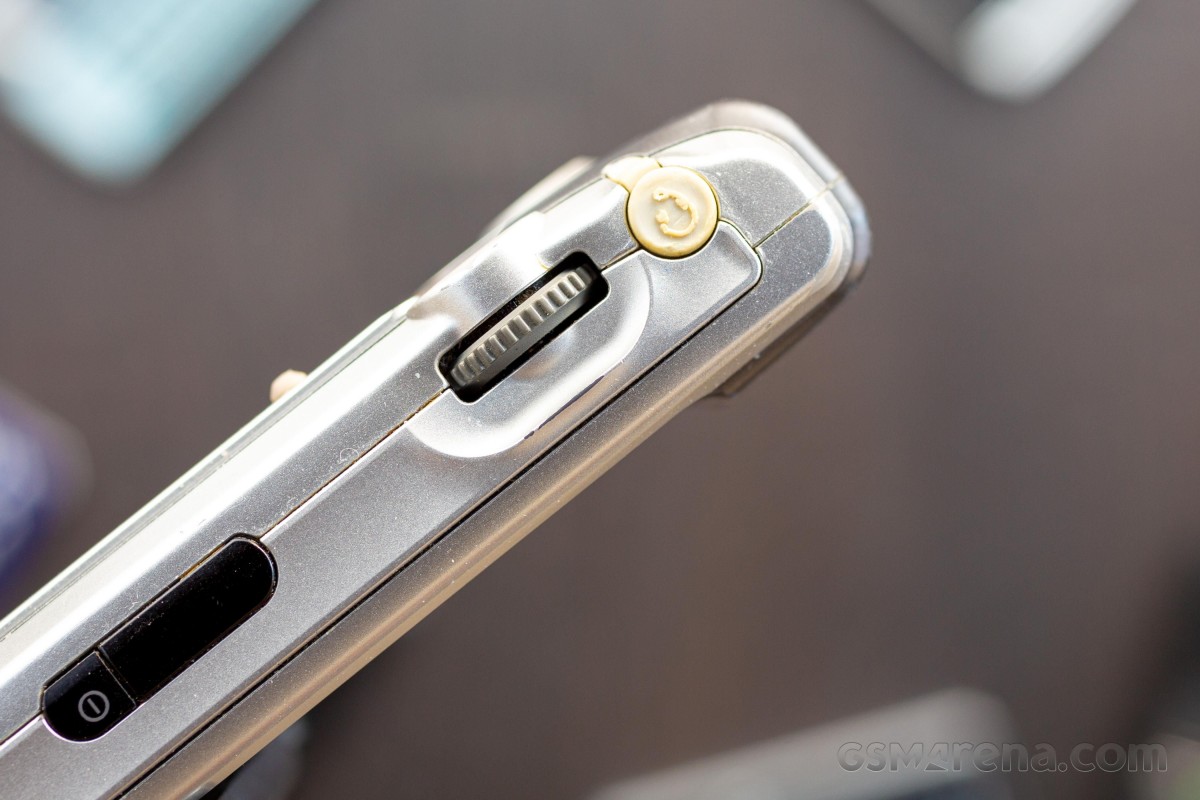
lateral scroll wheel. awesome phone:
https://fdn.gsmarena.com/imgroot/news/21/08/sony-ericsson-p9...
I’ve only ever had first-party Palm handhelds, but the scroll wheel (Sony had some nifty name which is eluding me) always seemed very appealing for single-handed use.
Non sequitur: Another long forgotten device that still bounces into my thoughts every so often is the Psion REVO. 8MB RAM, 36MHz ARM processor, and full QWERTY keyboard that fit into your (back) pocket —- better paper specs than the hand-me-down 386sx I was using a few years before! One of these days I’ll dig though storage and see if I can resurrect it.
There also used to be some lovely touchpad tech called "chiral scroll", which allowed for iPod-like scrolling. No idea where that went, patent hell?
Given how fp sensors are capacitive, this should totally be doable. Several phones (including my pixel 5) allow using rear fp sensors for opening/closing the notification shade.
> "chiral scroll"
Aah.. I miss that on my framework laptop. I had it on my old HP ProBook in the Synaptics settings. Chiral and (1 finger) edge scrolling were amazing. I'd suggest using ZMK/QMK and a touchpad from mouser if anyone wants to DIY one today.
Which speaking of, there is a niche there for a product that I think is actually realistically doable at small scale. On Android, most book readers can be configured to flip pages with volume up/down, which is extremely convenient for one-handed reading. No such luck on iOS, though, where those buttons cannot be taken over by apps. It would be nice to have some kind of case for iPhones that incorporated dedicated page up/down buttons along those lines, just connecting to the actual phone via Bluetooth and presenting itself as a keyboard.
With software detection of coherent scroll sliding, filtering out grip holds, bumps, and other irrelevant activity.
But noooo! Apple stuck a touch sensitive screen on a keyboard! No justice.
edit: Sorry, thinking out loud. A quick Google search confirms that my phone already has this feature in settings. Unfortunately, the gesture is mapped to showing/hiding the notification panel, instead of screen scrolling.
The only more modern take on that that I know of was Marshall's "audiophile" Android phone [0] from 2015, which had a side scrollwheel for volume, but not sure if it was used for navigation.
0: https://m.gsmarena.com/marshalls_new_smartphone_is_every_aud...
I've been thinking of removing the scroll wheel from my media PC's mouse to make doom scrolling harder. Love to see the innovation in going hard the other direction.
Now I am wondering if you can connect a bluetooth mouse to a phone to achieve the same effect, albeit in a less convenient package.
I think actually there are a couple of DOOM ports for the platform.
That would be an awesome idea, as well as calories/kilojoules burnt and/or brain cells destroyed.
Edit: I’ve got usb c and usb a versions, I mean stuff like https://images.app.goo.gl/7t7SCs945yyxinsM8 when I say dial. Still messing around with what sorts of enclosure etc for the overall device
After many iterations (and neck injuries) I've found the best position for me is simply laying horizontally with a normal sleeping pillow. Then using a stand with an arm to hold the device at the perfect position/distance (I use progressive glasses).
Typically I only lift my arm to scroll to the next page. But sometimes I skim sections of technical books and keep my arm lifted to move quickly. Holding the arm up for 5-10 minutes becomes annoying.
Edit: or BT ... scroll: https://news.ycombinator.com/item?id=40099700
They are the teams eyes and ears, continuously maintaining the indespensible information grounding signal. A streaming infinite scrolling HTML connection to the garage, from the real world.
You just need to first click on the scroller element and then you can start dragging it. And start by dragging up, not down. Otherwise the refresh might override the interaction
Protip, there's $10 "VR" controllers thats basically an analogue stick with a ring finger hole that does this already, in more ergonic way.
If this was implemented as a Bluetooth mouse with just a scroll wheel, wouldn’t you get support on all recent operating systems for free?
(I'll copy and paste the text here, as I don't know how much you see of this text logged out)
> Why couldn’t I just emulate a standard mouse and scroll smoothly? Sounds easy. Unfortunately there is a holdover from two decades ago in the way mouse drivers are written into USB. Because mice used to use low resolution encoders, a single “detent” event would be about 22.5 degrees. Hard coded into the kernel level of Android and Windows is the instruction to interrupt this single detent as a 40 pixel scroll for generic devices. This is what results in the chunky style scrolling on a PC.
> Only recently have specialty devices like the Logitech mice used custom drivers to bypass this and offer high resolution single pixel scrolling instructions. Unfortunately these drivers were not rolled into the Android kernel, so even when I sniffed the BLE traffic with Wireshark and impersonated a Logitech device, I wouldn’t get that silky smooth scrolling on mobile. No go.
> The slightly hacky workaround was to go one level deeper than the standard Arduino libraries.
> A quick description of how USB devices work. HID stands for Human Interface Device and is a protocol implemented over USB protocol. HID devices do advertise their capabilities through the HID report descriptor, a fixed set of bytes describing exactly what HID reports may be sent between the device and the host and the meaning of each individual bit in those reports. For example, a HID Report Descriptor may specify that “in a report with ID 3 the bits from 8 to 15 is the delta x coordinate of a mouse”. The HID report itself then merely carries the actual data values without any extra meta information.
> My goal was to use a customized descriptor to send the byte package of a one finger touchpad with absolutely coordinate system and 1 button to the host. This way I could perform the digital emulation of a finger making contact with the screen, performing a Y axis movement while remaining in contact, and then lifting off the screen before reaching the top. This movement would have to be repeated hundreds of times seamlessly to provide the illusion of smooth scrolling.
> Additional complications arose from the fact that Bluetooth low energy has a minimum latency of 8milliseconds, with most hosts negotiating an even slower rate such as 20 milliseconds. Simply blasting commands at a few hundred hertz doesn’t work.
> The internet is filled with unanswered forum questions about how to do all of this. I think I’m probably the first one to achieve a working implementation of this particular smooth scrolling solution. This single problem occupied much time than the rest of the project combined. No doubt that Logitech or Apply could achieve a more elegant solution. My hope is that a big company takes interest in Doomscroller takes it off my hands.
If that's the case, why does audio work so badly? (I'm guessing there's a list of exceptions that BT supports natively, none of which work.)
The only downsides are price & lack of click.
Think about those who reads in transport, if you will take a BT mouse that there are high chances that some unwanted clicks will happen all the time.
In the EU it's illegal to sell without external certification if the product is a medical device, is made for children or contains a radio.
Certification will typically cost you $5,000-$15,000 depending on which lab you use.