When your packet leaves a router at some-pop-some-port-wherever, that fiber isn't usually the same piece of glass that plugs into the next hop. There's a whole chain of amplifiers and possibly multiplexers that handle it between here and there.
Some of those provide reliable transport service, giving you the illusion of a fiber that never breaks, despite backhoes doing what backhoes do. Some of those shift the wavelength of your signal, letting you use cheap optics without troubling in the nuances of DWDM that packs your signal alongside dozens of others onto the same long-haul fiber. Some of those just boost the signal, along with all those others on the same fiber.
But what all those machines have in common, is that none of them speak IP. None of them touch the payload. None of them are capable of decrementing a hop count. They're "part of the wire" as far as the packet is concerned.
In my experience, this leads to two types of network engineers, separated by their understanding of these underlying realities.
The explanation is great for a toy network bu in today's Internet the vast majority of routes are going to be asymmetrical and that requires running traceroutes from both ends and interpreting the results to find the faulty hop.
The author also doesn't cover equal cost multipath (ECMP) which is everywhere. With ECMP you have multiple ports that lead to the same. Next hop and packets are hashed based on some part of the fourtuple, sometimes five tuple including the input Port. In order to track down the faulty link, you need to pro each and every one of the ports which requires that you use a higher level protocol like UDP. Using icmp in this case will not show you an issue some percent of time, providing false negatives which makes it less useful.
You don't think about the life of the electrons going through your processors when you code.
Traceroute is a view at a certain level of abstraction. It also doesn't tell you if your packet was delivered using ethernet, wifi or a token ring. It just doesn't matter.
There's an analogy to networking there, too. You don't necessarily need to know how wave-division multiplexing, BGP, or DNS work to communicate over the Internet. For some categories of problems, though, a little bit of knowledge allows you to punch just a bit above your level.
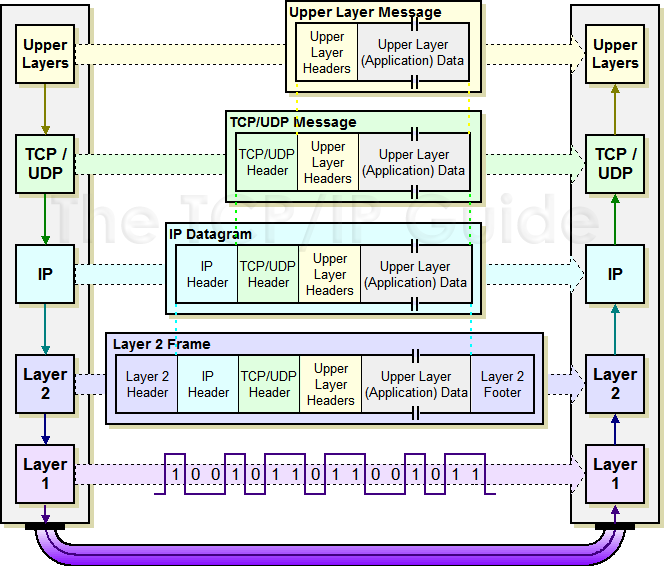
I don't know if it's missing in people's course work or what, but I've had to use http://www.tcpipguide.com/free/diagrams/ipencap.png many a times to explain how stuff like VPNs work, correct statements like "firewalls don't have a routing table, firewalling is layer 4", explain things like MTU and payload size, or why certain traffic doesn't go beyond a broadcast segment normally.
Personally I think this is one of the better visualizations.
Both asymmetric routing and ECMP routing are visible from L3. In the latter case, the routing decision can utilize some L4 data, so some L4 frobbing to get useful data points in practice is necessary for useful real-world diagnosis.
I agree with others that the OSI model is a good metaphor and a framework for reasoning about networking, but it is far from perfect, and the reality for those designing and operating network protocols and devices is messy.
MPLS is admittedly invisible and there isn't a thing you can do about it in the same way that you can't expect traceroute to give you a view of the switch ports it went through on a LAN. Of course it is useful to understand and keep in mind the fact that there may be, sometimes huge, gaps in your traceroutes. A sudden huge jump in RTT from one hop to the next can be confusing when trying to understand and troubleshoot a network issue.
There’s a reason the network layer abstraction is so strong, and an analogy to CPU ISAs here that have a similar strength.
TCP, similarly, doesn’t tell you when packets are deduplicated/resent/reordered/etc. — that’s just not part of the presented abstraction. Want that? Use UDP.
"Is the digital loop carrier doing any IP-level routing?"
"No, but..."
DWDM protected waves, MPLS, etc, are all out of scope when someone does a traceroute, finds their traffic is going to Europe asks me about it, and then I see a local upstream has picked up Cogent as a transit provider, and Cogent is preferring their customer routes over routes from their Tier 1 settlement free peers.
But this article is very much a primer, it's using the unix format of traceroute and talking about ICMP.
Traceroute is what we have, and its mostly enough as you can say at which hop things went wrong, then its up the ISP to figure out what devices they need to look at.
You're a single consumer, or a small business? Your dialog is limited to "Yes, I switched the router on and off. Yes, my local network works. No, I can reach the website over my phone, this is your problem".
Repeat three times, then get the inevitable reply of "it'll be up again in the next 24 hours".
Unless you're a network engineer, this really doesn't matter.
we get by fairly well assuming l1 is working as designed when the light is on and not throwing errors.. at least on day-to-day ops. planning/sourcing is a bit of a different thing.
one note to your point though, back when people were still regularly picking up OC3s or doing frame relay or whatever, it was certainly more day-to-day to understand these things, but cant really fault anyone since most of that junk has gone away and we’re left with the happy ethernet handoff. especially in small scale DC/enterprise. cloud, too, made us care less.
What's wrong with that? Certainly, someone with a complete picture is "better", but it is effectively two different types of problems. Do they need to be combined?
But when something is broken, troubleshooting is a different animal. When people make assumptions based on their abstractions, they can waste a lot of time chasing a problem that can't exist, because the abstraction hides several more layers of complexity. Their mental model of the problem relies on a fantasy which they may not even realize is a fantasy.
It's unlikely for someone to accurately diagnose a fault that's several layers below where they're operating. Understanding that their abstractions are abstractions, and knowing when to hand things off to another layer of engineer, is critically important.
I mention it here because people aren't generally tracerouting things unless they suspect breakage somewhere. It's a troubleshooting tool. But people whose mental model of the network _only_ goes as low as the IP layer, are unlikely to do anything useful with traceroute unless the fault also happens to be at the IP layer.
You should write up a blog post where you had to debug some weird gnarly issues. A lot of us higher up the tech stack are pretty far removed from the signals level issues you're talking about but would love to hear about a low level debug session!
It is human stacking of the OSI model. The person in the ditch repairing the line probably doesn't care about traceroute, but the person with traceroute probably should care about what happens in the ditch.
For example, I think it behooves every software engineer to have a general grasp of how CPUs work, what speculative execution is, how CPU caching and invalidation works, etc, but the average webdev doesn't really need to know this, and might run into some abstraction breaking implications only a few times in their career, while debugging a tricky bug or performance regression.
I imagine something similar is true for network engineers. Likely many can work for years at a time without worrying about fiber signal repeaters, other than that one weird packet loss issue that ends up getting traced back to a marginal optic in a cable vault somewhere.
Of course, none of this applies to the compiler engineers or the people who build the physical network layer. They are in the "second type" of engineer that actually needs to understand this stuff in depth in order to do their jobs on a day to day basis.
I am reading the connotation into this and asking about it. 4 paragraphs of talking only about tech and then it diverged into a personal statement at the end.
Traceroute also doesn't show VPNs or other transports.
But it shows the TCP hops and the timing, thus gives me the tools to see who to call or which routing table or wore to analyse or fix. When doing that I got to lok at that connection.
[0] https://archive.nanog.org/sites/default/files/traceroute-201...
On a different subject, why are people writing blogs about topics that are in the "literature" already?
[1] https://github.com/fujiapple852/trippy?tab=readme-ov-file#ud...
Traceroute and mtr didn't use enough ports to show the issue clearly.
I'm learning as I'm going and my goal is to come up with a way to build secure/beyondcorp/zerotrust-style networks using only existing tools and established tech, unless absolutely necessary.
Tools I'm using include wireguard, iptables, nftables, nginx, ping, traceroute, and nmap.
Which articles, books, authors, or repos must I read and which concepts must I understand?
Trying to find real knowledge about this stuff online is a nightmare!
Ask HN: Good book to learn modern networking? - https://news.ycombinator.com/item?id=38918418 - Jan 2024
Ask HN: Best Books for Modern Computer Networks - https://news.ycombinator.com/item?id=39501933 - Feb 2024
Ask HN: What is a good book to learn about the network stack? - https://news.ycombinator.com/item?id=18506651 - Nov 2018
Feel free to submit a PR if you disagree:
Is there simply a total lack of understanding of how networks work in the tech community?
A couple years ago I was bringing a Java programmer up to speed on some C code just to learn they had no idea what a call stack was or how it worked. They were familiar with the stack as a data structure, but had no idea how a CPU worked or that it has a stack pointer register.
As long as the abstractions don't leak, I guess everything is fine. I mean, I can't really tell you at a physics level exactly how semiconductors work. At best I can hand wave an explanation.
That said, the lack of even hand waving knowledge about how the internet works among professionals who use it every day continues to surprise me.
You can do a lot without knowing anything about routing, and very little about protocols. And all those network people always seem grumpy, why learn about it if you don't want to be grumpy. ;p
Edit to add: how networking works in reality and how networking works in books and coursework tends to be quite different as well. GeoDNS and Anycast IP are a big conceptual jump for people who only understood networks from coursework. There's also a common assumption that routing protocols favor least distance routing which is certainly not the case. I may be obsessed with path MTU problems, but that's a real hard concept to explain to experienced tech people with slim networking knowledge. Also, a lot of people seem to believe the OSI model is fact and not a model of the world; it's not unuseful, but there's lots of hardware and software that operates at more than one OSI layer simultaneously and people stuck on a rigid model can have an incorrect view of the world which impedes their problem solving.
Why would it be any different if you're developing a CRUD application with a bunch of SREs / datacenter engineers on the line? They are very good at abstracting networking away from software engineers.
The difference between networking and programming is when you call a function it will actually do what you say, every time. In a network you can waste hours and get absolutely nowhere.
I've been in IT and software for 25 years at various levels both as a job and a hobby, and I can confidently say that networking is the biggest waste of time, most frustrating, and least rewarding aspect of working with computers. No matter what I try to set up, it never, I mean never works the way I want it to. And I've done plenty of projects to get a healthy sampling, some of them include NFS/CIFS, RDP, DHCPD+PXE, VPN, IPFW, BIND, iptables, SMTP/IMAP. Working with anything networking is absolute hell. Every single time. Guaranteed.
The hardest part of configuring the services you list is not the networking, but all the non-networking topics you need to be familiar with: zone file syntax; cipher suite selection; OS-specific security policy and permissions models; PKI administration; PXE ROM peculiarities, etc.
Once you're confident with arp, addressing/subnetting, routing tables, and a few other tools like netstat and `dig` you can quickly eliminate the network as the cause of the issue and focus on grokking the application itself.
When I went back to big tech it really helped me out just knowing basic things about networking. For example, my manager joked that people should have to take an intro to DNS as part of their on-boarding to big tech.
I don't fault people for not knowing either, it was just never really a priority and the point was you shouldn't have to care. You should become an expert in your business domain and spend time solving business problems. Whether or not that was the right approach is up for debate though.
https://www.cloudflare.com/learning/network-layer/what-is-mt...
how-did-i-get-here: "A tool/website/article by @kognise about how routing on the Internet works."
Site: https://how-did-i-get-here.net/
    $ traceroute youtube.com
    traceroute to youtube.com (142.250.114.91), 30 hops max, 60 byte packets
     1  10.202.10.88 (10.202.10.88)  0.384 ms  0.356 ms  0.342 ms
     2  10.202.35.103 (10.202.35.103)  36.386 ms  36.370 ms  36.325 ms
     3  10.202.32.4 (10.202.32.4)  36.301 ms 10.202.32.3 (10.202.32.3)  36.301 ms 10.202.32.4 (10.202.32.4)  36.287 ms
     4  10.202.32.2 (10.202.32.2)  0.764 ms  1.279 ms  1.250 ms
     5  lo0-0.gw2.rin1.us.linode.com (45.79.12.102)  0.610 ms lo0-0.gw1.rin1.us.linode.com (45.79.12.101)  0.663 ms  0.650 ms
     6  ae62.r22.dfw01.ien.netarch.akamai.com (23.203.147.40)  0.986 ms  0.881 ms  0.837 ms
     7  72.14.204.254 (72.14.204.254)  1.164 ms 72.14.198.98 (72.14.198.98)  1.153 ms 142.250.47.248 (142.250.47.248)  2.926 ms
     8  * * *
     9  209.85.251.24 (209.85.251.24)  1.082 ms 142.251.71.114 (142.251.71.114)  1.302 ms  0.950 ms
    10  142.251.234.214 (142.251.234.214)  1.267 ms 216.239.58.16 (216.239.58.16)  3.296 ms 142.251.66.192 (142.251.66.192)  20.440 ms
    11  108.170.228.86 (108.170.228.86)  1.161 ms 108.170.228.82 (108.170.228.82)  4.548 ms 108.170.228.81 (108.170.228.81)  1.746 ms
    12  108.170.231.7 (108.170.231.7)  3.484 ms 108.170.229.87 (108.170.229.87)  3.071 ms 142.251.70.211 (142.251.70.211)  2.938 ms
    13  142.250.236.158 (142.250.236.158)  2.298 ms 216.239.51.220 (216.239.51.220)  27.388 ms 108.170.233.60 (108.170.233.60)  2.001 ms
    14  142.250.224.27 (142.250.224.27)  2.085 ms 142.250.224.25 (142.250.224.25)  1.994 ms 142.250.224.23 (142.250.224.23)  2.558 ms
    15  * * *
    16  * * *
    17  * * *
    18  * * *
    19  * * *
    20  * * *
    21  * * *
    22  * * *
    23  * * *
    24  rr-in-f91.1e100.net (142.250.114.91)  1.997 ms  1.981 ms 1.967 ms
(To save people excited to see if I've leaked something important some time, this comes from my Linode-hosted website's box, not my home connection.)
For it to be hitting "the Internet" you'd expect to see hops on a Tier 1 carrier like AT&T, Lumen, etc. and/or an ISP like Comcast, Spectrum, etc.
It could be because they were filtered at the boundary of the network. If source IPs are private (RFC-1918 or carrier grade NAT space), those ICMP messages should get dropped. This is Best Current Practice (BCP) 38, if you wanted to read more about it.
Ever want to know why IPv6 is so important? This is another reason why. Troubleshooting networks without globally significant IP addresses on the intermediate hops is a real pain.
I'm in South East Asia -- are you sure?
I’ve reported similar things to my isp and they’ve changed their lock prefs to send the traffic via a different peer and bypass the problem.
This is said like it is a bad thing…
traceroute itself was wrapped by a perl rpc wrapper and then a perl www cgi script would take a list of hosts and then reach out to all of them to ask them to traceroute each other, then a java applet would render an interactive graph that you could rearrange as you saw fit.
interesting learning: internet routing can be asymmetric!
No. This is not what this output means.
People should not read more into what traceroute says than what it actually does.
* * * means that traceroute did not get an ICMP time exceeded for that probe. that's it. It says nothing about if you can actually reach the destination.
We were genuinely told, as a class, to watch this video to learn how the internet worked.
https://www.youtube.com/watch?v=RhvKm0RdUY0&themeRefresh=1
Good times!
Edit: the less someone knows about your internal topology the better. Security through obscurity does work.
As a layer.
There are a lot of good talks on Tracert.
This one is pretty good:
https://www.youtube.com/watch?v=jGYAW5z6BJc
The article OP links to is only talking from the perspective of an internal network. Tracrt in a 10. network is boring info.
In the vid I posted, he gives you really good common advice about using tracert to show you actually the physical layout of the path:
https://i.imgur.com/LxN9Mr4.png <-- Using the DNS name of the router is great, because us network nerds like to use naming conventions in a graph format: so you can tell that its edge router number N at location B in City X and using tracert - you get to see the national networks the packet hits.
THen by seeing the carrier, you can also see where there is not just a change in carrier, but also that indicates that at that location is a datacenter....
You can go onto DatacenterMaps and find out who/what/where a DC is....
(There is a really exceptional tech talk on tracert thats quite long that goes into bitlevel detail of weaponized tracrt - but I cant find it)....
---
WRT DataCenterMaps -- There was an HNer that posted about mapping nuclear facilities (active and decommissioned) - and by using his map, the UnderSeaCableMap and the DataCenterMap - then by looking at shipping supply-chains for components used_by/made_by/received_at companies that are either Data Centers, or NVIDIA - we could track where large scale AI componentry is being installed into what data centers, which are fed by which Nuclear Power Plants, who have to report on their Consumption Graph - and which Cable Infra is likely feeding each DC.
We can see where AI traffic flows - and by using tracert at a deeper level - we can see exactly the AI's Physical NeuroNet' - and find a way to measure its power consumption and physical footprint.
---
HNer @externedguy "..built interactive map of active & decommissioned nuclear stations/reactors"
https://news.ycombinator.com/item?id=41189056
(I correlated the Nuclear reactor locations with DataCenters, undersea cable endpoints (which will be near both nukes and datacenters)
As they could be layers - and we track shipments and we can see where AI consumes:
---
...if we add the layers of the SubmarinCableMap [0] DataCenterMap [1] - and we begin to track shipments
And
https://i.imgur.com/zO0yz6J.png -- Left is nuke, top = cables, bottom = datacenters. I went to ImportYeti to look into the NVIDIA shipments: https://i.imgur.com/k9018EC.png
And you look at the suppliers that are coming from Taiwan, such as the water-coolers and power cables to sus out where they may be shipping to, https://i.imgur.com/B5iWFQ1.png -- but instead, it would be better to find shipping lables for datacenters that are receiving containers from Taiwan, and the same suppliers as NVIDIA for things such as power cables. While the free data is out of date on ImportYeti - it gives a good supply line idea for NVIDIA... with the goal to find out which datacenters that are getting such shipments, you can begin to measure the footprint of AI as it grows, and which nuke plants they are likely powered from.
Then, looking into whatever reporting one may access for the consumption/util of the nuke's capacity in various regions, we can estimate the power footprint of growing Global Compute.
DataCenterNews and all sorts of datasets are available - and now the ability to create this crawler/tracker is likely full implementable
https://i.imgur.com/gsM75dz.png https://i.imgur.com/a7nGGKh.png
[0] https://www.submarinecablemap.com/
[1] https://www.datacentermap.com/
----
And 8 months back I posted:
In the increasingly interconnected global economy, the reliance on Cloud Services raises questions about the national security implications of data centers. As these critical economic infrastructure sites, often strategically located underground, underwater, or in remote-cold locales, play a pivotal role, considerations arise regarding the role of military forces in safeguarding their security. While physical security measures and location obscurity provide some protection, the integration of AI into various aspects of daily life and the pervasive influence of cloud-based technologies on devices, as evident in CES GPT-enabled products, further accentuates the importance of these infrastructure sites. Notably, instances such as the seizure of a college thesis mapping communication lines in the U.S. underscore the sensitivity of disclosing key communications infrastructure.
Companies like AWS, running data centers for the Department of Defense (DoD) and Intelligence Community (IC), demonstrate close collaboration between private entities and defense agencies. The question remains: are major cloud service providers actively involved in a national security strategy to protect the private internet infrastructure that underpins the global economy, or does the responsibility solely rest with individual companies?
(There was talk on this topic recently in the news)
EDIT:
If you like this sort of networking - then courses/material like this are great:
https://www.youtube.com/watch?v=Ih3KgQnT6T0 <-- network recon, scanning, countermeasures - failryl vanilla, but concise.
---
I still cant find the defcon-style talk that really dives into tracert sorcery....
traceroute uses udp to a high-port for discovery, not icmp-echo.
Even the network diagram at the beginning is not very good. Can you create network architectures where 10.0.0.1 and 10.0.0.2 are not layer 2 adjacent? Yes, but they’re fairly complex and would imply that a lot of other necessary information is missing from the diagram. And should you use such an architecture as an example to explain traceroute? Absolutely not. It’s hard to imagine someone with even a CCNA level understanding of networking coming up with this.
Wackiest network I've seen in a while, and I've seen some real winners.
I do agree that its bad but not for the same reason. On the diagram it looks like router IPs are their loopback IPs rather than the link IP, as we know a traceroute response comes from the interface the packet came in and that IP is used in the response. Seems like the creator tried to simplify the diagram and excluded linknets but made it more confusing instead.
Source: https://support.microsoft.com/en-gb/topic/how-to-use-tracert...
> The TRACERT diagnostic utility determines the route to a destination by sending Internet Control Message Protocol (ICMP) echo packets to the destination
anyways, the type of packet does not really matter.
my apologies if this misconstrued my point about the lacking quality of the article.
Heres why: Lots of calls from people complaining their application is not working because the network is broken. Look! at! this! traceroute! supporting! my! complaint!!!
Yeah, it is because udp from any to any is blocked on the firewall for good reasons while icmp traceroute is open. And be carefull because -I specifies the outgoint interface on some os, not the use of ICMP.