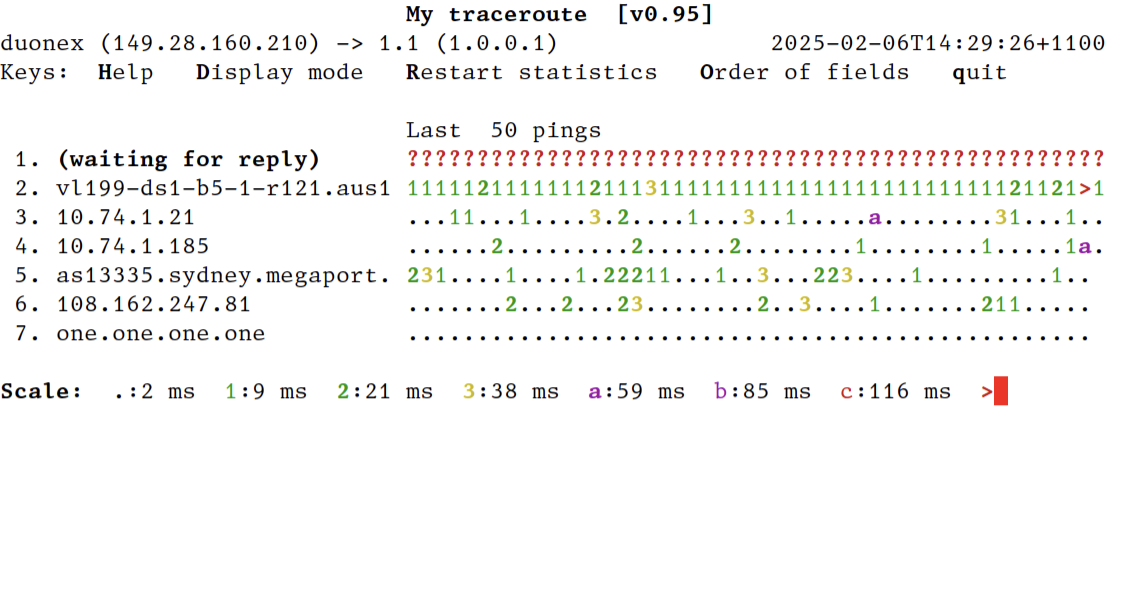
You can make mtr start in this view with --displaymode=2 (direct command line arguments, `mtr --displaymode=2 …`; or shell alias, `alias mtr="mtr --displaymode=2"`; or set environment variable MTR_OPTIONS=--displaymode=2).
Screenshot of this mode: https://temp.chrismorgan.info/2025-02-06-hn-42924182-mtr-dis...
—⁂—
¹ 1.1 = 1.0.0.1 = Cloudflare public DNS, a convenient nearby public internet endpoint.
I like the work https://fasterdata.es.net/ does. They provide clear guides and set expectations if you want to get more bandwidth out of a connection.
sudo apt install mtr-tiny
One thing I've not understood is why will some hops have consistently lower ping times than hops farther down the chain in the same trace?
Is it indicating that the router is faster at forwarding packets than responding to ping requests?
https://archive.nanog.org/sites/default/files/traceroute-201...
Exactly this. In most “real” routers, forwarding (usually) happens in the “data plane”. It’s handled by an ASIC that has a routing table accessible to it in RAM. A packet comes in on an interface, a routing decision is made, and it goes out another interface - all of this happens with dedicated hardware. Pings (ICMP Echo requests), however, get forwarded by this ASIC to a local CPU, where they are handled by software (in the “control plane”).
You’re really seeing different response times from the two control planes - one may be more loaded or less powerful than another, regardless of the capacity of their data planes.
Maybe the only thing I've explained more in my career than this is why it's ok that your Linux box has no "free" memory.
Beyond that technicality, your guess is often right... Routers will frequently prioritize forwarding packets over sending the TTL exceeded packets tools like MTR use to measure response times.
Obviously you know, but for anyone else reading, a modern traceroute tool (like mtr) can send icmp, udp or tcp, on generic or specific ports. Indeed the default for mtr on my laptop is to use icmp.
However, it could also be the case that the routing back to you is significantly different, so you can have a much longer path to you from router N than router N+1.
This is more likely to happen on routes that cross oceans. Say you're tracing from the US to Brazil. If router N and N+1 are both in Brazil, but N sends return packets through Europe and N+1 sends through Florida, N+1 returns will arrive significantly sooner.
I believe most of the time this is the reason indeed. Answering an ICMP error to a TTL expiration or to an echo request is very low priority.
This latency in error message generation may even be a better signal of the router load than the latency of the actualy trip through it.
Incidentally, if you suspect you yourself are this, I can't recommend any book more highly than Michael W. Lucas's Networking for Systems Administrators. Don't be fooled by the title - the whole idea is to get you to the level where you can talk to a network engineer without looking totally clueless, and no farther - an excellent stopping point.
I would recommend it handily over, say, my own Intro to Networking class in college. And yes, `mtr` is mentioned by name in it!
I'm 100% sure the only reason so many programmers know how NAT works is because NAT breaks video games.
Yeh. There is a very achievable level of knowledge about networking that's enough to make a lot of practical problems solvable.
Like, my practically acquired patchwork of knowledge about subnets, routing, some DNS, some VPN tech, maybe some ideas of masquerading and NAT'ing is easily enough to run a multi-site production environment across a number of networking stacks. And I wouldn't really call these things hard. I don't like people who are like "I don't know networking" once you say "routing table". The hardest part there is to understand how things are often a very large amount of very local decisions and a bunch of crossed fingers to get a packet from A to B. Oh an no one thinks about return paths until they run a site to site VPN.
But just a few steps beyond that is a cliff dropping into a terrifying abyss of complexity. LIke I know acronyms like BGP, CGNAT, ideas like Anycast DNS and kinda what they do, but it turns into very dark and different magik rather quickly. I say if we need that, we need a networker.
... and filesharing, from the days when bittorrent was huuuuge.
MPLS don't have to hide routers though, up to the operator, even if they do it will give you idea of where things went wrong and you can contact the correct people. Load balancing links is either lacp or ecmp, first case doesn't really matter and in the second you'll just see multiple responses on a hop. Neither really had any impact on how useful traceroute is and doesn't really mislead.
That said, in practice for the majority of end users, they will not be directly impacted by asymmetric routing, if only because so many services are now cloud-based and the major cloud devices are direct peered with all of the major ISPs at regional meeting points in most countries. As an example, on my connection in Denver on Comcast, going to most applications in AWS will enter the AWS network /in Denver/ and without traversing any transit provider, meaning effectively my traffic never goes across "the Internet", it goes from Comcast (my provider) directly to AWS (the provider for the application).
While it's always good to be mindful of the complexities of real-world routing, for the vast majority of common use cases now, entry-points to the target application are so widely distributed that the most impactful routing is inside the private network of the cloud provider, not across the larger Internet.
Disclaimer: Opinions are my own.
https://movingpackets.net/2017/10/06/misinterpreting-tracero... (discussion at https://news.ycombinator.com/item?id=15474043 )
The other issue with packet loss is the tool doesn’t handle ICMP properly in the first place. A ping flood to an end to end host like 1.1.1.1 shows 0% loss, but when I use mtr to do flood like pinging it shows my wifi router with 100% loss. If I ping flood my router I get 0%.
It’s genuinely a bad tool and you should really just be keeping ping and traceroute separate as they do completely different things.
If you run it in TCP or UDP mode you can even nail down the physical interface that's erroring in a LAG/LACP bundle due to being able to manipulate the 5 tuples very well.
I'm also curious about the flags you used for ping and mtr that showed you this discrapancy.