Here's what I figured out (YMMV):
---
For UI design
Books aren't that helpful, you have learn by doing.
Instead, for theory Treehouse offers a primer on HTML, CSS & UI design which provided a great foundation, they have courses on things like colour theory. Really really helpful.
Practice. I designed & launched a bunch of complete web apps, each one with a landing page + full functionality. Each attempt had a visible improvement in UI & UX over the last. I got tons of great feedback and encouragement (you're gonna need it) from forrst. So I'd highly encourage posting there and asking for feedback (tell people you're learning).
Learn Photoshop.
Check out Sacha Greif's ebook on UI design http://sachagreif.com/ebook/ it comes with a PSD and has a great intro into UI stuff.
Check out Lighting & Realism In Interface Design by Mike Rundle (developer + designer) here http://designthencode.com
Get a bunch of freebies from dribbble and deconstruct and remix them to your taste.
-----
For UX
Watch this https://peepcode.com/products/ryan-singer-ux then watch it again. Ryan Singer is an absolute UX god - he understands how to navigate the problem space very very well.
To really improve UX measure how people use what you make (mixpanel, click tracking) & conduct user studies - watch people use an interface to really understand what works UX wise.
I started looking into useful material to help improve my non-design skills, because well... they are non-existent.
I started with Twitter Bootstrap but I don't think it is the way forward if you want to learn design the proper way. I recently bought this book: The Non-Designer's Design Book (http://www.amazon.com/Non-Designers-Design-Book-The-Edition/...) and would warmly recommend it to anyone who wants to put one foot or their whole body into the design world.
I now try to spend more time analyzing the design of websites, brochures, menus, etc. It is very fun and I believe it is my observing and analyzing other peoples' work (mistakes included), then practising, that you can improve your eye(s) for design.
But of course, just like with everything else you get better by actually doing, not just reading about it. Still, I think reading case studies like this can at least show you good design is a logical and iterative process, and anybody can master it with some hard work.
You've got to get away from people who say "We can't do it the way Google or Amazon does it because they're big and they can afford it." You've got to think instead "Google and Amazon are big because they did things right."
You've still got to think about (small) scale though.
Back around 2000 I was interested in user management and authentication and back then the main challenge across the industry was conversion rate, and it was very good to imitate what Yahoo did.
A few years later, Yahoo's signup and login process had become quite complicated because they had a notoriously foolish user base that was vulnerable to fraud and phishing. If you imitated them you'd quadruple your development costs, kill your conversion rate, and get your email box flooded from people who forgot their passwords.
(Funny, Yahoo started to go downhill around they time they did this!)
So look at the leaders and think about what they do critically. Don't listen to voices that say "we can't afford it" -- you can't afford to have employees that are lazy like that or for that matter, to be working for a project manager who won't do what it takes for your projects to succeed.
Here's an analogy with physical fitness. If you want to reach "competition level" fitness you don't just watch youtube videos and read books. You have to practice. And if you practice alone, you'll never hit competition level. You need formal TRAINING. You need an experienced professional giving you advice, critiquing your performance and stretching your abilities. You need them to help you track your own performance, to become acutely aware of your weaknesses and focus on them relentlessly.
A lot of organisations don't get this. A few books, a conference and a spot of mentoring doesn't turn a team of front end developers into UX designers.
But, if you can find a mentor, that is always the best way.
there’s a huge wealth of knowledge out there in just looking around you. my approach (not a pro at all) when designing anything really is just to look for cues from others. there are a lot of resource-rich players that have invested a lot in UI/UX design, and, the great thing here, is that much of the pay-off from those investments is freely available; just look at their products.
this is especially true on the web where it’s so easy to find and compare sites or apps related to what you’re doing. if you take the time to examine them closely and look for commonalities, you’ll generally find many of the more successful sites share a lot in common when you get down to fundamentals (though they may look and ‘feel’ very different). the ‘artistic’ aspect of UI/UX gets the majority of attention (and, in my opinion, is the hard part to master), but what makes or breaks a design is usability, and that you can learn fairly easily.
at the very least you end-up with a product that works; and this is the most important element in UI/UX. from there you can learn to perfect it and make it look amazing, but that takes time and experience.
Do it : repeat.
If the best chance for practice you have, is on personal projects - so be it.
Find sites for inspiration. Design is ALWAYS changing. Things you're just getting sick of now (chunky buttons, ribbons, page tears etc.) other designers first saw a long time ago - those thing slowly saturate the design community before they're everywhere.
Browse Dribbble.com every day.
When you have to design a site, use sites likes patterntap.com, and uiparade.com to see great examples of slick UIs.
Most importantly, "eat your own dogfood." Use the products you've made, non-stop. Just keep testing and testing. If things feel weird, or unnatural, iterate, and eat more dogfood.
Design should never be something someone gets "right" the first time - its an iterative process of learning user behavior based on what does or does not perform well.
This diagram[1] shows the facets of UX exceptionally well. In the same vein, this article[2] defines UX accurately.
[1] http://uxdesign.com/assets/Elements-of-User-Experience.pdf
Ignore the ugliness and you'll find practical advice in the reports and Alertbox articles although his opinions are sometimes controversial and shouldn't necessarily be followed to the letter. Nevertheless they'll undoubtedly increase your awareness of the variety of user types out there and encourage you to think from their perspective, which is ultimately what good UI design is all about.
To put it another way, I've never had a problem finding what I was looking for on his site.
edit: here's another example of what I'm talking about: http://37signals.com/svn/posts/3215-liveauctioneers-an-unlik...
Read everything on Jakob Nielsen's blog about Usability: http://useit.com/
I've found you can achieve quite a massive improvement by simply spending a decent amount of time thinking about / working on / testing your UI.
Draw sketches, think about usage patterns, explain how things would work on paper, ask random people to try out your designs after you're finished implementing them, get feedback, identify actual usage patterns and optimize for them. Repeat.
If possible, become a user of the product. It helps a lot.
The second most important thing is to copy other people's good interface designs. Or less harshly put, use existing patterns, especially those widely accepted by users. Check out popular websites and applications, see how they solve your current UI subproblem, copy their solution, perhaps improve upon it. Read about UI patterns and when to use them.
note: We're trained to think that copying is bad, originality is good. In UI, the reverse is true - by copying you save time on user training as users are already familiar with the design. There is nothing shameful about copying other people's good UI design (and I don't mean the visual aspect of it)
Of course, this is not really a substitute for proper training - but quite often its a really good first step which we seem to miss .
http://www.quora.com/What-are-the-most-influential-UX-design...
Also, create a bookmarks folder (or even just a regular folder on your Desktop) just for collecting UX/UI designs that jump out or appeal to you. Either bookmark them, or take a screenshot, and use good, descriptive tags (e.g "Search Results", "Dashboard", etc). Then block out a small amount of time each week(I usually spend like a half hour or so over Sunday morning coffee) to review them; ask yourself why you like the designs/patterns, what appeals to you, why its effective, how could it be more effective etc. You'll start to recognize patterns and develop a sharper eye for effective UX/UI design throughout the web.
Finally, accept and embrace the idea that good UX/UI design is very much an iterative process, it's OK (and actually pretty common) to not get it perfect the first time around.
http://52weeksofux.com/tagged/week_1 http://www.uxbooth.com/blog/ http://uxdesign.smashingmagazine.com/ http://www.alistapart.com/articles/
As far as UI goes, spend a lot of time on design sites such as dribbble and try to identify patterns and discover the purpose of them on your own. UI design becomes more engrained when you discover trends (and their purposes) rather than simply reading about them imo.
– Start by reading "Magic Ink" by Bret Victor: http://worrydream.com/#!/MagicInk
– Now you understand that UI design is actually graphic design, so start with graphic design fundamentals. They are: Drawing, Layout, Typography, Color, History.
– Drawing: understand how images are created on a canvas. Includes concepts of how to use line, shade, and color to create forms, volumes, depth, etc. Art historians talk about "color and line" in painting. Understand the distinction. Pick up a used copy of Janson's History of Art. Peruse some other books about drawing. Go to the museum. Whatever you come across. Have fun with it.
– Layout: I haven't found a great resource for this. You can have a look at Grid Systems by Josef Müller-Brockman, which set the tone for layout in the 20th century. Making and Breaking the Grid is a modern spin on grid-based layout. Read about book design since that's the oldest and most developed layout system. You can start with Wikipedia: http://en.wikipedia.org/wiki/Book_design. Generally pay attention to how websites are arranged. Is there a top-bar or a side-bar? How many sections of content are there? What is their relative proportion? How does the layout relate to the borders of the browser window? Take some time to investigate 'responsive design'. Understand what it means to design from the content out rather than from the edges in. Understand the fact that book design has a rich set of systems of proportion while web designers completely ignore this for the most part. Look up 'golden ratio typography'.
– Typography: there are a number of well-regarded classics on typography. The Elements of Typographic Style is great. But you should start with this: http://webtypography.net/. Then check out the Wikipedia entry and Google around for blog posts about typography. Once you understand the basics, then attempt an in-depth text. The most important thing to understand is that typography can be used to create structure. People who do not understand this use lines, planes, and volumes to create structure around content. A good place to learn about this is in Edward Tufte's The Visual Display of Quantitative Information (as well as its sequels). He vigorously recommends removing as much "non-data ink" as possible. Beyond structure, there is the issue of choosing typefaces. Let me just get this one out of the way: serif faces are not significantly easier to read than sans-serif faces. Beyond that, understand that typefaces are created by designers for different uses. Use typefaces according to what they're designed for. Understand how typefaces are used to create a stylistic feel, to evoke associations, nostalgia, emotion. Understand that some typefaces are expressive and some are not. The web so far has favored non-expressive typefaces. Now that we have @font-face and Google Fonts, people are going crazy using different type-faces will-nilly. Web design will evolve. Watch the documentary "Helvetica".
– Color: there are many resources on color, but the study of color is an endeavor that can last a lifetime. There are a few things to understand about color: what it is (light frequency / a sensation), how it is modelled (Newton vs. Goethe, HSL/RGB, color spaces, Pantone), how it is created, how colors are combined, the fundamental nature of each hue, and psychological meaning of color combinations. Start with the Wikipedia entry. For more scientific information, check out the IESNA handbook. Understand the difference between Newton's and Goethe's studies of color and how current theories descend from those. After them came Maxwell, Helmholtz, and others. Munsell's text is responsible for much of the exploration of color in early modernist painting (impressionism, etc.): http://www.gutenberg.org/files/26054/26054-h/26054-h.htm. Study color combining by way of texts from the early 20th century by Albers, Itten, etc. But, as others have mentioned, the only way to truly understand color is to use it. Try different combinations, see what they do. Ask questions like: why are most websites blue? Why aren't websites ever yellow? Beyond cultural associations, each color has a fundamentally different nature and use. It's not just a spectrum. Why is red so special? Notice that blue and yellow are, in Goethe's theory, the fundamental colors from which all colors are created. Does this have something to do with their neutrality? The sun is yellow, the sky is blue, the ocean is blue... what does it all mean? Why are the road signs green?
– History: web design didn't just come out of nowhere, though most web designers are uneducated and the tools have been very primitive up until the last few years, so it kind of seems that way. Find a copy of Meggs' History of Design. Understand what it is, where it comes from, how book design is the father of graphic design. Then, something crucial to understand: that web design is constrained by the concepts of the past, which were developed in a world with different constraints. Do you know how graphics were created before computers?
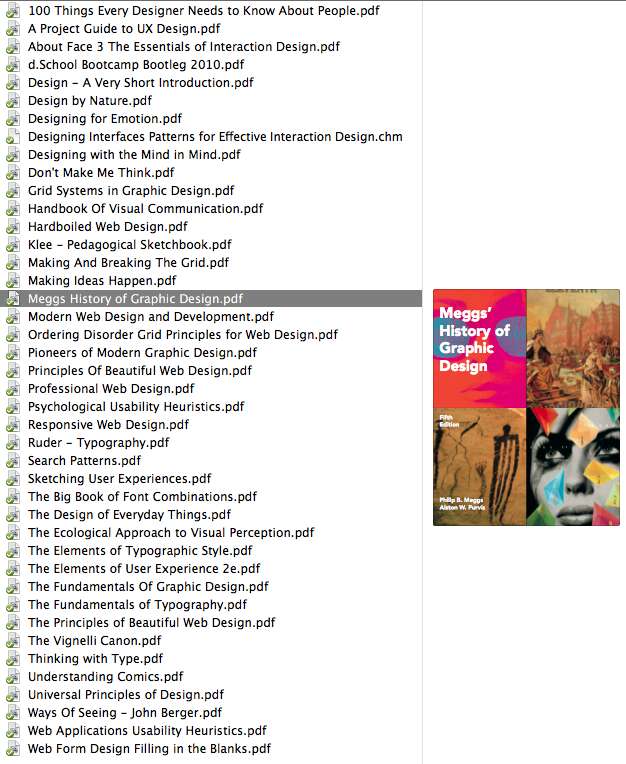
Unfortunately there is no good book that gives an overview of all of this material. You need to piece it together. Here's a screenshot of my library of design books: http://img823.imageshack.us/img823/7795/screenshot20120731at.... Plus you should have a library of design inspiration. I have mine spread out between LittleSnapper and ZooTool right now. Evernote is another good way if you can stand all the visual noise in their interface. Other people use Pinterest, etc.
What you should take away from this is that UI design is actually part of graphic design, which is a relatively old discipline (though still young compared to, say, architecture).
On the other hand it can be said that UI/UX rather encompasses graphic design since UX brings in the notion of user-centered design from HCI, which has its own history in psychology and the US military industrial complex. Two great historical reads here are MIL STD 1472F: http://www.hf.faa.gov/docs/508/docs/milstd14.pdf and The Ecological Approach to Visual Perception by J.J. Gibson (from whence the concept of "affordance" comes). The classic synthesis of these ideas can be found in The Design of Everyday Things by Donald Norman. Bill Buxton is another person to follow in this space. A modern synthesis of UX is About Face 3: The Essentials of Interaction Design.
EDIT: fixed links
— Start by reading "Designing with the mind in mind" by Jeff Johnson (http://www.amazon.com/Designing-Mind-Simple-Understanding-In...)
— Now you understand that UX design is actually cognitive psychology + sociology. Of course, most cognitive psychology/sociology books will only be slightly relevant to UX design. Here's a short selection to get you started:
— Don Norman, Design of Everyday Objects
— Don Norman, Emotional Design
— Brenda Laurel, Computers as Theater
— Kim Goodwin, Designing for the Digital Age: How to Create Human-Centered Products and Servicesa
— Bill Moggridge, Designing Interactions
Bonus:
— Raph Koster, A Theory of Fun for Game Design (meant for video game design, but has a lot of lessons that can be applied to good UX)
For UI design, I'd also heavily recommend "Semiology of Graphics: Diagrams, Networks, Maps" by Jacques Bertin, and anything by Tufte. These titles are more about data visualization, but most UIs need a way to visualize data in some shape or form.
One point that msutherl forgot in his fantastic comment is animation (as in, 2D animation). UIs are not static things, and animators have spent decades understanding how we react emotionally to animations (Good introductory read: http://labs.oracle.com/techrep/1995/smli_tr-95-33.pdf). Good animation in a UI makes a whole lot of difference— Apple knows that (http://watchingapple.com/2007/06/are-apple-ui-designers-lear...).
For this, only one resource: "The Animator's Survival Kit", by Richard Williams.
Excited to check out some of the stuff I haven't come across there.
On a side note, your bookshelf link is broken (it contains a > at the end). It should be: http://img823.imageshack.us/img823/7795/screenshot20120731at...
E.g., he draws a distinction between mere UI design and interaction design: UI design is just layering another abstraction (the interface in question) on the underlying software architecture, whereas interaction design starts with what the user wants to accomplish, and adapts the underlying pieces to enable that.
Note that this is not a UI book, or even really all that much of a UX book, but it does make a great argument for the importance of user interaction.
Like you, I wanted to improve my design skills, so I coded this up over several weekends.
Thanks!
You can view some past issues here:
http://seriffed.com/issue/6/ http://seriffed.com/issue/5/
If you have any ideas on how I can improve, I would love to hear them.
If you're interested in web standards and design, http://www.alistapart.com/ is also a great site to follow.
I highly recommend reading David Kadavy's "Design For Hackers": http://designforhackers.com/
Highly recommend to take next class when it starts in September.
There were lectures and assignments built around design heuristics, different aspects of prototyping and you have to design your own application as part of the course grade.
Might be a little dated but it was really influential a few years back
Looks like you're in Houston, so: http://www.uxhappyhour.com/hou
Widely adopted UI Patterns for solving UX Problems: http://ui-patterns.com/patterns
search on slideshare for UX / Usability presentations for Devs
Also, Smashing Mag has occasional great articles on design patterns and ux.
http://www.jeremytunnell.com/posts/books-on-user-experience-...
Be a better problem solver first (more so a UX Designer). You should not just start working on being a better UI designer without knowing what context your work will exist in. Specialize in UI later.
A quick overview on how to be a better UX designer - Figure out and write down in minimum words the goals and reasons for undertaking the exercise
- Figure out the main types of users you are designing for (don't try to design for everyone). Find out what relevant mental model they already have.
- Break down the problem via concept maps (involve others to brainstorm).
- Sketch several solution hypothesis using flow diagrams (boxes containing major concepts connected to each other) (involve others to brainstorm).
- Compare these flow diagrams and identify the best hypothesis to develop and test first. (Failure is okay)
- Now do UI design for each aspect of the selected flow diagram (as you will know how each page/area in the flow diagram works with the entire picture, you'll know what to show the user when.)
- Do not try to complicate your test by adding features/distractions that are not extremely crucial.
- Put in some love and care. Ideas that spawned from your brain have the possibility of giving so many others so much joy.
(Hint* For a lot of products it is about making MOST users get engaged for the LONGEST period. For many others it is about solving a user problem in the Simplest+Quickest+Most-Painless+Most-Joyful way possible.)
A bit more on how to be a better UI designer
- Go back to the basics and learn how humans sense, how the brain perceives, and what makes us get ideas, form opinions and take action. This is a big part of what UX and UI design is about (this is useful to understand and remember too - http://en.wikipedia.org/wiki/Gestalt_psychology#Properties)
- It is also about having a two way conversation between an interface and a human. Follow protocols of a decent and efficient conversation. Empathize. Introduce if you haven't met before. Maintain a flow. Be focussed on the goal. Don't distract and value their time. Be terse. Don't disrespect.
- Know that content is always more important than the user interface. Strive for harmony between what you have to say with how you are saying it with the best UI for that purpose). Use the help of a copy editor or a technical writer. Ensure they don't write more than is needed.
- Learn about the medium and context you are designing for (e.g. how users use computers, web etc)
- Learn about the existing UI patterns that you can leverage
- Browse a lot. Note down what you like, store it as a pattern in your head. Note what irritates you and think about how it could be done better for more users.
- Practice. A Lot.
- Get hold of a good designer and sit next to them. See them work. See how they make their life faster and easier while designing. Optimize your workspace continuously. Look out for new tools that can help your workflow.
- Generating consensus around the flow and UI solution is your job. Get the stakeholders to see the way you think.
-Don't use Colors initially, they derail conversations quickly as humans are prone to judging colors instinctively. Use grayscale and rough way of doing stuff first. Finalize (visual design) after that.
- Ensure that the colors did not change the flow of user's attention on a page.
-Figure out if the flow of user's attention on a page is the way you intend
- Grab five people, give then some basic context and do RITE (http://en.wikipedia.org/wiki/RITE_Method ). Don't listen to all feedback. Designers usually give feedback based on heuristics. Try to get more designers to give you feedback.
- Use web based tools as often as you can. It is easy to share your work and get feedback quickly. There are tools for getting feedback online. But have a meeting at least once initially to explain the context and thinking behind your design decisions.