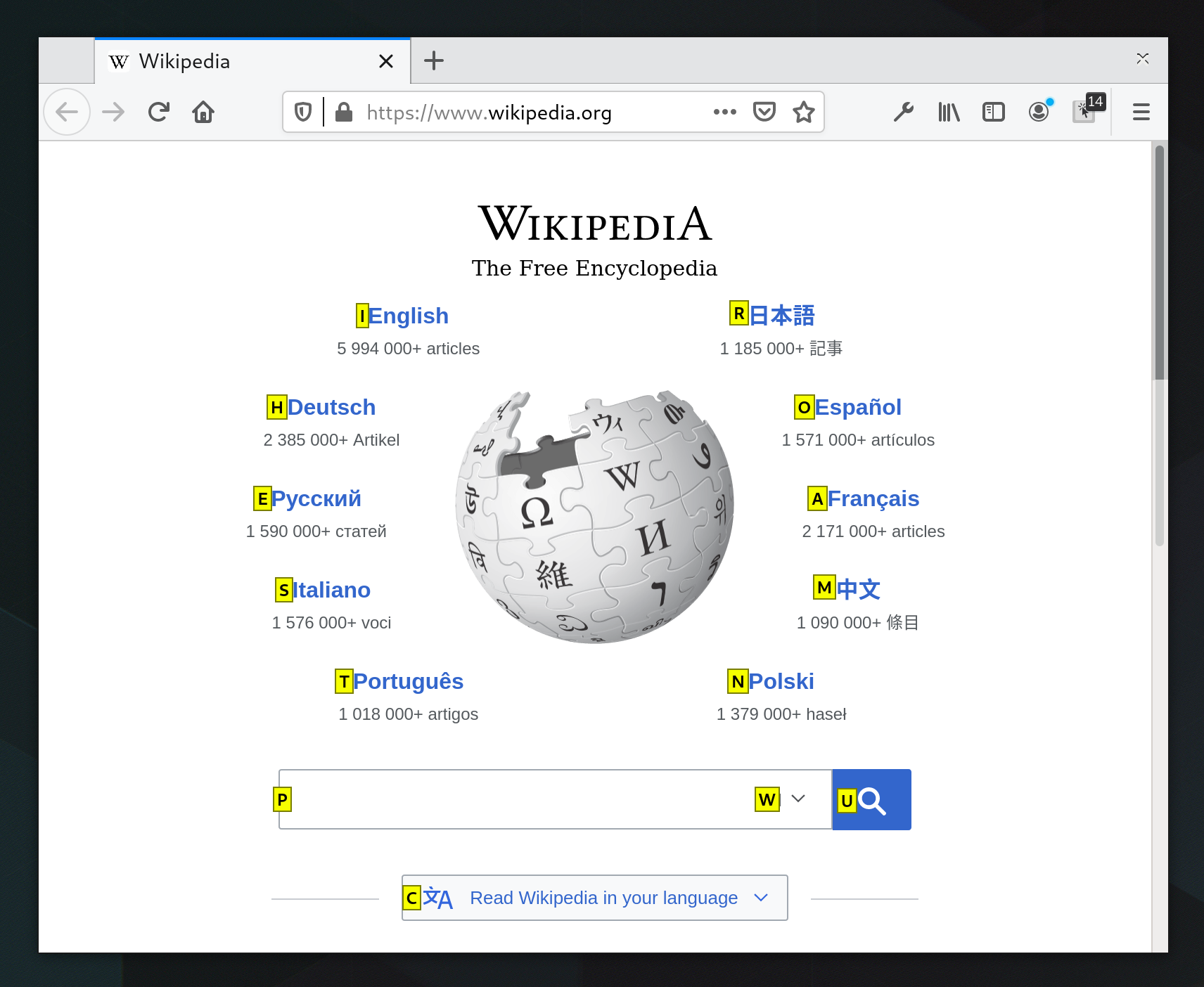
Mouseless as well for navigating anywhere on the computer without a mouse -> https://mouseless.click/
ShortCat uses the accessibility API to put Vimium-style keyboard links on buttons and text fields in any app.
I find that Vimium works faster in Firefox than using ShortCat to click around websites, so I use both, but ShortCat technically should do everything (clicking-wise) that Vimium does.
[0] https://tridactyl.xyz/about/
edit: added url
    map gf LinkHints.activateOpenInNewTab count=999999
    map go LinkHints.click direct="focused" mode="newtab-active"
    map gb LinkHints.click direct="focused" mode="newtab"

    map gm toggleMuteTab
Share your interesting options.
First, hint mode: https://github.com/rvaiya/warpd#hint-mode-alt-meta-x
switching to normal mode: https://github.com/rvaiya/warpd#normal-mode-alt-meta-c
PageUp/PageDown do not work correctly on sites that have a permanent topbar (some of the content is never shown). Cursor up/down often does something unexpected (for example in Mastodon, if you use PageDown several times and then cursor down, you will get yanked back).
I think it is a sad regression. Not everybody is able to use the mouse and its scrollwheel!
Rarely, I find a page that doesn’t use the document scroll area, but makes its own which is not focused, and so you have to focus that (by Tab as many times as necessary, or by clicking) before you can scroll by keyboard. But that’s rare.
Long ago, Firefox started compensating for sticky headers, reducing the amount it would scroll the page by, and it mostly works well, though it’s not flawless. I don’t think I’ve observed the same feature in other browsers. One amusing situation that can arise is when the header disappears when you go down and reappears when you go up, so that repeating PageUp and PageDown yields net movement in one direction.
—⁂—
¹ End, but not Home, which is Fn+Left on my laptop, but the Left key hasn’t worked for over a year now. I’ve contemplated replacing the battery and keyboard, but the laptop’s falling apart in enough other ways it doesn’t quite feel worth the investment…
<Multi_key> <h> <r> : "—⁂—"
At one point since then I came across another person on HN that had independently settled on the same three characters (em dash, asterism, em dash).
In my personal dialect of the lightweight markup language I’ve been making, —⁂— is even the syntax for a horizontal rule. :-)
Apparently no one else was interested in it. I still use it daily.
Only applies to public and commercial services, though.
The lenovo keyboard with its trackpoint and mouse buttons is a kind of solution to this, but IME scrolling is still a PITA as it needs two inputs (switching to scroll mode while moving the trackpoint)
Tab+tab+enter
Now, with the summary, it's:
Tab+tab+enter+tab+tab
This feels like it may be a bug, but at the very least it’s not a recent regression—I tested Firefox 44 and it shows the same behaviour. (44.0 is the oldest version I can run now, apparently. I tried 4.0 first, the first version with linux-x86_64 builds, which I have run successfully in the past, I think even in the last year, but now all versions before 44.0 are crashing on startup.)
Firefox: https://addons.mozilla.org/ko/firefox/addon/vimium-c/
Chrome: https://chromewebstore.google.com/detail/vimium-c-all-by-key...
* not exactly the same with Vim
https://amun.pl/blog/post/working-on-windows-with-keyboard-o... (Sorry for missing images, I accidentally deleted them when messing with containers backups)
I mention the BrowseCut chromium plugin over there, which made navigating all kinds of pages, a total breeze.
Expecting questions if the BrowseCut extension works with Duolingo. It does not. Although, I have not had issues on any other pages.
The issue is with any JavaScript driven on click events tags. Some sites even have their <a> tags not responding to keyboards events, because they have a hash href, and a JavaScript handler to redirect.
The web is beautiful place.
I think browsers should also come with headingMaps [0] and landmarks by default for all websites. With a keyboard shortcut to access them, navigation would be great (assuming websites have a semantic DOM).
[0]: https://addons.mozilla.org/en-GB/firefox/addon/headingsmap
(YAHE) https://gitlab.com/jpallari/yahe
(BTW, does anyone here remember extension called »Hit-A-Hint«?)
This doesn't seem to work with English International keyboard.
Since there is no tariff adding <div> in react code, even my teammates are using these as pseudo buttons. As a user, I cannot even tell if it's a button or not. The cursor usually doesn't change or becomes "I-beam" (text selection). Only way to understand is click random places and wait for mysterious stuff to happen.