Telling people the height ratios between them followed the golden ratio was a very convenient way to shortcut the bikeshedding and get to "aha, very nice"
The trick was it didn't follow the golden ratio at all because the golden ratio is not some magic number that leads to balance and peace - lighting, rounding, color, and visual strength all dramatically outweigh it
In a way it's anthropologically (and linguistically) interesting that such a bigram can gain this kind of status as a result of marketing, essentially. Probably having 'gold' in there helps. Maybe the app could have optional modes for completely new magic numbers:
- The Platinum Proportion - The Gilded Fraction - The Silver Symmetry - The Coveted Correspondence
I wish this was still a priority for modern Chrome. Just because screens are bigger now doesn’t mean I want to waste that space.
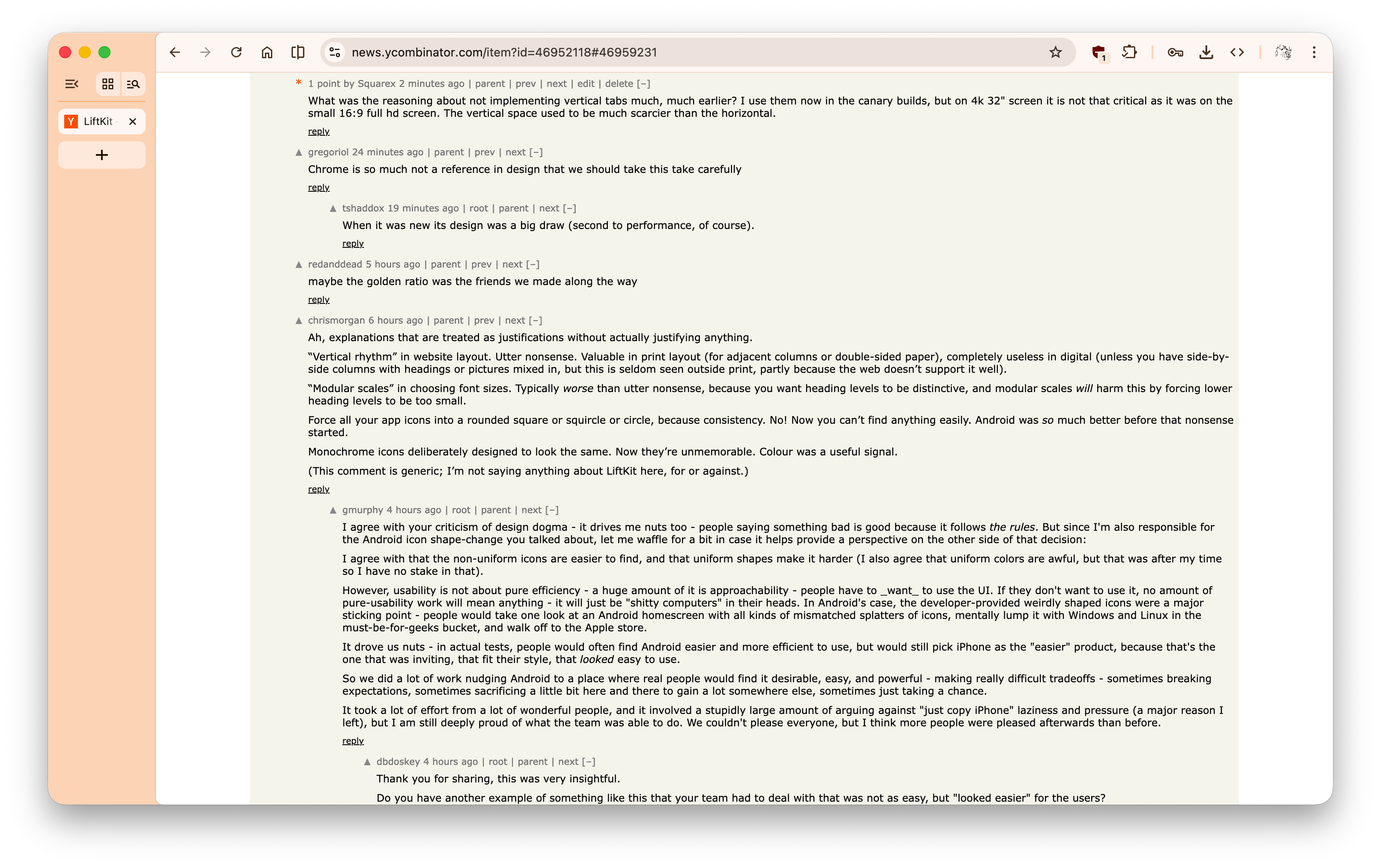
“Vertical rhythm” in website layout. Utter nonsense. Valuable in print layout (for adjacent columns or double-sided paper), completely useless in digital (unless you have side-by-side columns with headings or pictures mixed in, but this is seldom seen outside print, partly because the web doesn’t support it well).
“Modular scales” in choosing font sizes. Typically worse than utter nonsense, because you want heading levels to be distinctive, and modular scales will harm this by forcing lower heading levels to be too small.
Force all your app icons into a rounded square or squircle or circle, because consistency. No! Now you can’t find anything easily. Android was so much better before that nonsense started.
Monochrome icons deliberately designed to look the same. Now they’re unmemorable. Colour was a useful signal.
(This comment is generic; I’m not saying anything about LiftKit here, for or against.)
I agree with that the non-uniform icons are easier to find, and that uniform shapes make it harder (I also agree that uniform colors are awful, but that was after my time so I have no stake in that).
However, usability is not about pure efficiency - a huge amount of it is approachability - people have to _want_ to use the UI. If they don't want to use it, no amount of pure-usability work will mean anything - it will just be "shitty computers" in their heads. In Android's case, the developer-provided weirdly shaped icons were a major sticking point - people would take one look at an Android homescreen with all kinds of mismatched splatters of icons, mentally lump it with Windows and Linux in the must-be-for-geeks bucket, and walk off to the Apple store.
It drove us nuts - in actual tests, people would often find Android easier and more efficient to use, but would still pick iPhone as the "easier" product, because that's the one that was inviting, that fit their style, that looked easy to use.
So we did a lot of work nudging Android to a place where real people would find it desirable, easy, and powerful - making really difficult tradeoffs - sometimes breaking expectations, sometimes sacrificing a little bit here and there to gain a lot somewhere else, sometimes just taking a chance.
It took a lot of effort from a lot of wonderful people, and it involved a stupidly large amount of arguing against "just copy iPhone" laziness and pressure (a major reason I left), but I am still deeply proud of what the team was able to do. We couldn't please everyone, but I think more people were pleased afterwards than before.
Same applies to sessions on Fluent or Material designs, and how they end up on the respective OSes.
It does now.[1]
[1]: https://developer.mozilla.org/de/docs/Web/CSS/Guides/Grid_la...
We didn't ship them because they were only a mitigation of the too-many-tabs problem, not a solution, and they didn't really fit our model of 'tabs are titlebars'. They were also never going to be default - most people did not have that many tabs, and we had a very strong opinion was that we shouldn't have configuration - it was better to very strongly execute on one vision we loved and risk losing people (but hope the quality would bring people along), than to execute and support multiple directions poorly.
The world has changed a lot since I last worked on Chrome ten years ago, so as an outsider I'm excited to see what the team currently attempting it can do.
The whole minimalism/flat movement from iOS 7 and Google's Material and Microsoft's Metro crap was frankly a lazy and weak copout, a give-up on trying to make nice looking UI that could also be functional.
Why is it that sci-fi has always had such beautiful UI since Star Trek but the real world is still so boring?
LIFTKIT IS FREE AND OPEN SOURCE. The website's just out of date.
https://github.com/Chainlift/liftkit
Most of the feedback folks are providing here was raised about 6 months ago on Reddit and is actively being worked on. You can check it out here: https://www.reddit.com/r/webdev/comments/1m41arx/i_spent_18_...
KNOWN ISSUES INCLUDE: - Docs are a nightmare, screenshots are ridiculous instead of real components - Components are inaccessible spaghetti
CURRENT PRIORITIES: - Rebuilding with radix primitives - Improving docs
TO LEARN MORE: - This youtube video explains the gist of the system (though it's also a little outdated) https://www.youtube.com/watch?v=r1DANFZYJDw
I'll reply to folks as best I can.
I love the project -- even if I agree with a lot of the critique in this thread. Critique that is very high quality, professional feedback that you should take as a very big compliment.
I think every Front End developer or designer dreams of this idea(+) at some point, but you're the madlad who actually did it. It feels like you've posted an implementation of everyone's baby and tugged at our heart-strings ;)
It's fantastic, keep going.
(+) a truly consistent design system that Just Works. See GEB for why not :(
Check out Base UI (or React Aria) instead.
Compare like with like, not a badly colored and low contrast version of the competition against yours.
edit: wait are you on light mode or dark mode? I work in light mode where mine are lower contrast but i swapped to dark and now it's reversed.
(Not unrelated: answer from Andrei Herasimchuk at https://www.quora.com/Why-does-Adobe-Photoshop-differentiate...)
Also: I can't work out which image is which. Taking the first image as an example: we've got MATERIAL-STYLE on the left, and LIFTKIT on the right. But what's the left? Does this mean that when you drag the line to the right, revealing the left image, you're looking at MATERIAL-STYLE? Or does this mean you see MATERIAL-STYLE when you drag the line to the left?
(This might seem like pointless quibbling, but this thing bills itself as the The UI Framework for Perfectionists.)
I admit I don't do web stuff, so perhaps this is hard to do. But I think it's the ideal. Before/after comparisons are very easy to assess if you can flick between the two cases and let your eyes show you the differences. The value of having an image that's part one and part the other (and two completely separate parts!) seems a bit questionable.
(My line of work means I'm unlikely to end up a customer, so you don't have to pay attention to my opinions.)
Don't even have a button. Just put both items next to each other.
OTOH, I'm on touch screen (iPad/iOS26/WebKit) and it didn't go up and down, it went side to side.
As other feedback, the dumpster fire and deprecation warnings in the docs make me want to try this. I find builder-to-builder candor refreshingly helpful, treating your doc reader like an actual partner instead of like a euphemism. Appreciate your same candor throughout these comments.
Chainlift > Agency Services > Team menu option seems inert.
I'm not on LinkedIn all that much but I'm there.
I see it a lot in photography, to show before/after processing - but what you want to be able to quickly compare are the same part of an image with and without the processing applied.
One of the photography tools I make is a LUT viewer/converter - and while I didn't have the slider at first, I guess it's standard enough at this point that people asked for it and I added it.
But I made two additions to it that make it more useful IMO:
- have labels on the left/right top corners, so it's immediately clear which version of the image you're looking at
- click and hold on the image to preview the full unprocessed version; release to revert to the view. That makes it easy to quickly compare the two versions of the same spot of a photo. (similar to what you suggest, but non-latching)
I have a video of it in action here:
Suggestion to devs: put the label “material-style” in the lower left of its image and “liftkit” in the lower right of its image, and cover them appropriately as the slider moves, and then it'll be clear which framework the current image (or portion of it) belongs to.
For me the better image appears on the left.
The left image has the icon in the centre of the radius and the right image has it in a random place.
You don't have to use it though. The system works with any scale factor. 1.618 is just the default.
This video explains in detail how the system works with lots of visual aids.
LiftKit's free forever to anyone. It's just early stages and bad.
The idea was that if a company wanted to hire us for direct support, we'd do that. But the problems are: [A] no enterprise in their right minds would use this thing in its current state and [B] "us" is me and I don't have time to do that anymore
I wouldn’t trust a framework that requires me to involve myself with JavaScript, nextJS, and React, also… but I am generally of the opinion that a framework pitching itself as a UI kit, must pretty much not be a plugin for a web browser…
That calculator is for agency services. LiftKit itself is free.
Good luck! I always wanted something like this, too.
This design system really deserves its own site.
To be clear; You don't HAVE to use the golden ratio. You can set your global scale factor to anything you want in /liftkit-core.css. I just use 1.618 because I like it.
Not sure if this is irony or not.
That said, it still looks good.
The only real reason I use phi is because it's very useful in asymmetrical typography scaling. At small type levels, differences in font size are more visually apparent than at large sizes. In other words, 14px vs 16px looks more noticeable to me than 38px vs 40px. So, my goal was to find a rem coefficient that would provide large jumps at large sizes, but I could also use the square root of it to derive smaller increments. I tried phi on a whim one day and realized I liked it.
I also went to apple's HIG and looked at the type specs for MacOS and put them into a spreadsheet. I found that the proportions of line height to font size hovered around 1.272 (which is the sq root of 1.618, or phi). Then I found similar patterns in the ratios of difference font sizes to each other (I think. It was back in 2022).
I also did a bunch of personal tests where I'd try to eyeball line heights and padding and stuff without snapping or looking at the metrics, and my preferences kept landing around golden ratio proportions. Biased? 100%. But I haven't got access to focus groups, and every time I asked my boyfriend to try it for me he'd be all like "please get a job you promised you'd work on your resume today"
So then I looked into other research. I can't find the study because I unpublished the article where I linked it, like a dumbass, but studies have shown that laypeople can tell the difference between abstract art based on rules like fractal symmetry and the golden ratio versus art made by children or animals at a rate of about 60% accuracy. Im on my phone right now but if you're curious I'll gladly look it up for you. I took that to mean "well, if we're entering an age of AI generated interfaces, then eventually we'll need to distill the essence of what looks good into certain mathematical principles so that there's a quantifiable "baseline" for quality that models can rely on. Golden ratio!" (Note: I do not know how AI actually works)
Finally, I got obsessed with that damn material button. There were ads on BART for some Google thing showing a button and it just looked off center to me. It haunted me for weeks. I couldn't stop looking at it. So I thought I'd try finding a reliable way to achieve the correct optical offset, but programmatically, so a designer wouldn't just have to do eyeball every button every time.
So, it's not totally baseless. But it's not a magic number either.
I had to dig through the docs and get to the installation instructions just to find out that it's React only.
It looks great, but I'm always confused why design system folks wouldn't base everything off web components, which work with almost any framework.
So having it for React/NextJS isn't an affirmative decision. It's just the only thing I knew how to do at the time. After the first launch last summer I had a couple folks reach out to help port to SvelteKit and Vue, but you know how it is. People get busy.
I don't even know if the golden ratio itself is that magical, but I do see a lot of value in picking one ratio and sticking to it everywhere.
You know what gets lift? Correct spelling (inscrutable)! Unless they chose that word specifically to misspell but that's meeting more than halfway.
[1] M3Pro, Firefox. No, I'm not trying in Chrome.
/s
1. Clean, expressive interface, 2. Extensive documentation.
That being said, good on you for shipping! I would like to try it just for the mystery factor.
What a weird joke of a company is this.
I don't think the authors realise the extent to which their product, which looks well made and useful, is being completely undermined with this nonsensical pseudoscience.
It's just a rule of thumb, that's all. I just went crazy on the copywriting because I thought I'd need to in order to get the kit to stand out.
I have now been extremely informed that this is not the case.
I don't think that's the case - or at least, not well-designed studies. There's nothing to suggest that people prefer 1.618 more than 1.61 or even 1.6, and probably not 1.5. It's like if we found people like the colour blue and then claimed that people like the shade of Mary's veil or something.
He has a cool YouTube channel too. Check out “The Secret Science of Perfect Spacing”
https://youtu.be/9ElrcTtAxzA?si=kbAzQDGQSCCqymTO
Party on
I'll stick to LLM design, thank you very much