my 10M datapoint uPlot benchmark runs in half the time, for both pure js (fake data gen) and canvas workloads (chart rendering). check out the console in [2].
however, i'm still waiting for the performance assessment in devtools to improve so i can get an easy summary as i can in Chrome.
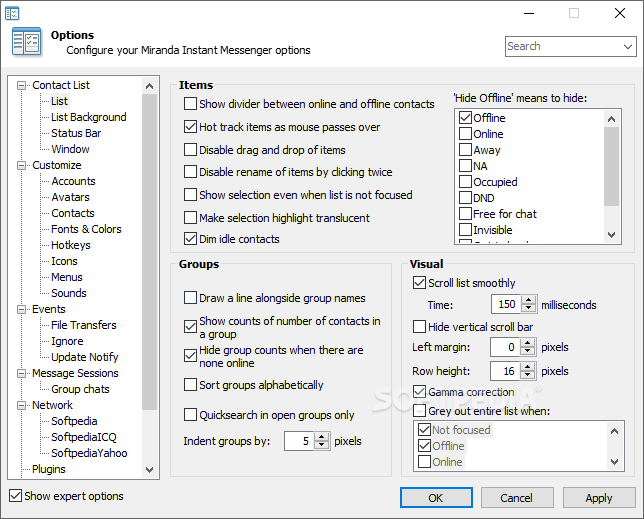
also, better default form input styling would be nice. it's so...Windows 98....but i'm on Windows 10. :\
[1] https://github.com/krausest/js-framework-benchmark/issues/68...
Google and Microsoft seem to agree with you, but I totally don't get it!
If the website doesn't specify a style, my browser should fall back to a design that matches my OS, not whatever the browser developer thought was pretty!
And if Windows is coming back and telling the browser to use Windows 98 styled buttons, Microsoft should fix Windows!
i think that's the canned WONTFIX response for every bugzilla issue ever closed about it in the past, what, 7 years?
I'm almost positive that Firefox doesn't use OS-native controls; they've specifically styled their controls to look the way they do, so yes, this is a Firefox problem, not a Windows problem.
>Polymer.version
3.4.0
Polymer uses v1 WCs since Polymer v2
YouTube Studio doesn’t suffer from these problems.
Designing a development process that naturally achieves a malicious outcome is just as bad as actively making malicious decisions: https://www.zdnet.com/article/former-mozilla-exec-google-has...
https://www.youtube.com/watch?v=zR7LOtMix9w&t=155
"A lot of people ask, 'Why? Why treat [other browsers] this way?'"
"Why? 'cause f*ck 'em, that's why."
Does anyone have any hard numbers to validate this? Or are we just random outliers?
On Windows, Firefox currently uses Windows APIs to draw the form controls, scrollbars, &c. where possible, and imitates the style in the places that there is no native API for it.
https://bugzilla.mozilla.org/show_bug.cgi?id=1381938 introduced a new style, available behind the widget.disable-native-theme-for-content pref. I’ve been using it for the last three months and reporting various bugs and problems. https://bugzilla.mozilla.org/show_bug.cgi?id=1615105 is tracking the remaining work before it can be turned on by default.
My opinion: the new control styles are… fine, I guess; but they could do with some not-flatness (especially for buttons), and increases in size and padding are seriously problematic on many existing sites.
Browser: (trial 1 prep, trial 1 chart), (trial 2 prep, trial 2 chart), (trial 3 prep, trial 3 chart)
Chrome: (649, 347), (638, 343), (618, 358)
Firefox: (353, 307), (358, 307), (361, 308)
Safari: (281, 264), (287, 258), (309, 262)
> Would love to see how Safari handles your benchmark!
i don't have access to a Mac, so you won't get this from me!
Anyone with a security background or someone who has thought through this more: what are the implications of making the OS level authentication the default, and then only ask to make a master pwd if there are no OS level login pwds? Is one or the other more secure?
I used to think Firefox trying to protect the entered passwords made some sense, but I've been convinced it isn't really such a good idea. Better would be a full profile being protected (with all files encrypted), or just rely on an OS level lock screen for inactivity lockout.
I'm not sure if the current system actually prevents recovering the passwords. Do they require this authorization even to use a show password option on a website or the equivalent effect via bookmarklet-style javascript? I suspect they don't and it doesn't try to protect from intentional theft only casual viewing of passwords. This might still be valuable for some people, but it would be more valuable to fully protect the profile. I worry that people will think they are more protected than they actually are and that this effect will be increased by the use of system login credentials.
Also, IMO the list of sites that you have passwords for should be treated as just as sensitive as the passwords themselves. I think as is you can often see the sites with accounts, visit them, and have the current password autofilled into the old password field of the change password dialog.
The "generate password" option is great, even though personally I would make it 21 characters rather than 15 (there might be an option for that?). IMO, no one should ever choose a password.
On mobile OSes, capabilities are enabled by default. Even Symbian already had such. OpenBSD utilizes pledge to minimize impact.
On many linux distributions this is not the case as yama ptrace_scope is enabled by default.
That being said, I do think that these features will overall lead to better password hygiene for people who do not have access to the kinds of info we have (especially where FF warns about passwords shared across sites; that's a feature that iOS does fairly well; in KeyChain, they show a warning label next to a password shared between multiple sites).
P.S. The point about securing a list of sites that you have passwords for is fantastic as well.
Edit: punctuation
I mean, at least they're trying, I guess. Still seems to me like lipstick on a pig.
I'm still trying to figure out what UX problem the expanding bar was intended to address.
I'm using up-to-date Firefox, but I toggled the about:config flag to get the old address bar, figuring I may as well use it while I can. Here is what the address bar looks like for me:
Focused: https://i.ibb.co/TWDw9WL/Screen-Shot-2020-05-05-at-5-30-57-P...
Unfocused: https://i.ibb.co/QHd0SBm/Screen-Shot-2020-05-05-at-5-31-01-P...
Do you not see the blue focus outline? It's pretty thick!
edit: just remembered because it happened again. I'm not sure if it's related but I often find now that when I type "n" the bar doesn't autocomplete "ews.ycombinator.com" with the rest of the text highlighted anymore. It still goes there if I hit enter, though.
I'm just so perplexed by the whole thing.
I have a browser profile that is used almost exclusively for amazon content as well. The most visited links in that profile are amazon.co.uk and prime video but the only "most frequent" links it would show were on twitch and the occasional youtube page I visited to find trailers for amazon hosted videos.
When I went to about:config and toggled the four "update1" bools to false, amazon came back in my "most frequent" links.
Pretty strange, eh?
Edit: so I just installed 76, and switched the four "browser.urlbar.update1" bools that enable this back to "true", and again, any amazon.co.uk links are removed from the list I get when clicking on the empty urlbar.
I don't really care about the ugly styling, but since this is a navigation feature I use extensively, I'm turning the whole thing off again. Hope they fix (or document) this before the choice disappears!
Normally (in my setup) it shows a list of "most visited" urls.
The new behaviour is to still show this list but omit any amazon.co.uk (and maybe other, I have no idea) urls.
Completion works as expected as far as I know.
My "new tab page" is always set to just blank page and has been for years. I dislike all the fancy new page stuff and just set it to blank page on initial install.
The sites that show up in the urlbar dropdown are frequently visited ones, same as the ones that show up when I turn the "update1" stuff off, or the ones prior to ff 75, just not sites containing amazon.co.uk.
So while I don't doubt your information, it doesn't make sense to me as an explanation. Maybe not having any sites in a new tab page is some kind of corner case that exposes a bug. It's weird that amazon is specifically affected though!
My GF hates it because it partially obscures the bookmarks toolbar on any new tab. So her everyday usage is impacted where she opens firefox and clicks a bookmark. She hated it so much she looked through reddit threads and modified her about:config to make it go away, which is really saying something.
I just hope they don't remove the disable recipe.
(about:config browser.urlbar.update1 -> false)
Edit: Actually, nothing works on Dev Edition anymore. No matter what I toggle, the stupid location bar expands when you click on it.
And who knows, maybe Mozilla is right—but I wonder if they've actually done large-scale feedback gathering. This isn't the sort of thing you can suss out just from looking at analytics.
But the problem with the current about:config flag is it's actually changing the entire code pathway, and is going to be removed in a couple months!
https://windows-cdn.softpedia.com/screenshots/miranda-im_12....
The picture you posted is a positive example. An example on how to customize the software you use.
Possibly the same as removing navigation arrows from the context menu if text is selected, i.e. to annoy long time Firefox users like me?
Certain features should be compile time options, default off and then we could make a UX-designer edition with all the crazy stuff just line we have developer edition.
Then I and everyone else could continue you use the old ux that actually worked very well ;-)
> With this change, you can now join Zoom calls on Firefox without the need for any additional downloads.
In particular the graphics layer is being rewritten (the WebRender project), and exciting new developments are coming these days (in particular usage of the OS compositor to composite some bits of the page, that saves lots of watts).
This is particularly important for video calls, because often you're playing back multiple videos at once, so any inefficiency when compositing video is made worse.
Other things that are coming is to implement new ways to signal temporal or spatial scalability (telling other peers that videos flowing should be lower/higher fps, lower/higher resolution), this will also help.
We're continuing the work so that jitsi works well in Firefox, there are a few things remaining, but less so than a few weeks back (I'm more on the audio side, and those issues are mostly signaling or networking related).
I guess it's time to boot it up and check.
>>> CVE-2020-12387: Use-after-free during worker shutdown
>>> Impact: critical
>>> A race condition when running shutdown code for Web Worker led to a use-after-free vulnerability. This resulted in a potentially exploitable crash.
And:
>>> CVE-2020-12388: Sandbox escape with improperly guarded Access Tokens
>>> Impact: critical
>>> The Firefox content processes did not sufficiently lockdown access control which could result in a sandbox escape. [On Windows]
So a sandbox escape and a way to be in a position to need a sandbox escape.
Perhaps it's the same as the Chromium one reported here recently? https://news.ycombinator.com/item?id=22945630
And if you care about what's in it just read the release notes.
But either way, I don't think this is a particularly important issue.
Calling it Firefox 13.17.6 is not an improvement.
Let the latest version be called Firefox and then adjust the previous versions to Firefox -1,-2,-3,-4,-5.. -76
I have been saying this from the day this was announced, so not sure this is "eight years late" or an eight year old unresolved bug.
>If one of your accounts is involved in a website breach and you've used the same password on other websites, you will now be prompted to update your password. A key icon identifies which accounts use that vulnerable password.
this is great! thanks :)
- Sending tabs between devices does not work. It sometimes arrives 12 hours!!! later
- Google Cloud Console has some UI issues on Firefox
- Twitter input field behaves extremely strangely when you enter an emoji and try to edit text afterwards
- I don’t understand why some html elements have a different appearance and default css attributes on Firefox mobile vs desktop
It doesn't work on my window 10 instantly but it works for osx and ios.
The work around for my window10 machine, for me at least, is to click the hamburger and click on my account name, then click sync now.
My personal annoyance, on macOS:
Cmd+Click a link: - Safari, opens in tab in background - Chrome, opens in tab in background - Firefox, opens in tab in background
Shift+Cmd+Click a link: - Safari, opens in tab in foreground - Chrome, opens in tab in foreground - Firefox, opens in tab in foreground
Cmd+Click a bookmark: - Safari, opens in tab in background - Chrome, opens in tab in background - Firefox, opens in tab in foreground
Shift+Cmd+Click a link: - Safari, opens in tab in foreground - Chrome, opens in tab in foreground - Firefox, opens in tab in background
For some reason it’s different for the bookmarks. I opened an issue https://bugzilla.mozilla.org/show_bug.cgi?id=1597910, because really there is no actual reason to make them different, but it was closed on the basis that it might disturb the muscle memory of some users. But changing the entire menu bar is completely fine?
Here is a cut of what was introduced in Firefox 76 (copy&paste)
Integrate fluent-rs, a localization system: bug 1560038 (shipped in Firefox 76)
Why Rust? Performance and memory wins are substantial over previous JS implementation. It brings zero-copy parsing, and memory savvy resolving of localization strings. It also paves the way for migrating the rest of the Fluent APIs away from JS which is required for Fission.
I have a respectable (2x8 core xeon, 164gb ram) workstation running linux and I have many tabs/windows open with various references spread across virtual desktops optimised for tasks (work project 1, 2, education, personal project,... etc).
I've experimented with various extensions that pause tabs and currently use tab wrangler to auto-close tabs but it still gets slower to respond with ~50 tabs open across all windows. Sometimes I check the firefox & system task managers to see some basic reference tab (i.e. blog post) taking most of the CPU...
It would be great to be able to aggressively throttle inactive tabs or even pause them completely so only ram is used.
Some options around this use case would be much appreciated. Responsiveness under (almost) all conditions is much more important than raw benchmark throughput. Near instant tab resuming would be a huge help towards this goal as well.
Are the passwords stored remotely if you have multi-device profiles?
Edit: I asked because I see that some of the updats are related.
I just love this browser more and more
Those were the two main things that made me use a separate password manager app in the first place.
You get 3 fields: url, username & password.
I think that's a fair choice though.
E2E encrypted with your Mozilla account password. If you forget your password and lose/reset every device that you have firefox installed on, you will lose the database. The firefox lockwise app is a login db replicator/ui for devices you don't want a full FF install on.
I've been using it for years since, again, its just the normal save password function that's existed for decades. Completely frictionless experience. The UI, accessible through the menu or about:logins, has options now to manually add/edit/copy logins. And it suggests auto generated random passwords when creating new accounts.
Also, the old Firefox had a way of clearing all saved passwords from the Options menu. This is now gone, you can only delete a single password at a time. You need to enter the following URL into the Firefox browser, which will let you clear all your passwords: chrome://pippki/content/resetpassword.xhtml
I personally use KeePass, but I like having the passwords saved in Firefox so that they are accessible on all my devices.
For every device I have logged in with Firefox sync it just works as you would expect.
Have been for >10 years now. It feels kinda icky because of how close the passwords are to every website I visit, but the convenience of having passwords auto-fill enables me to auto-delete cookies of most sites (reduced tracking without compromising on convenience) and not hesitate to use a strong password. I've heard of way more bugs in third party auto-fillers than in Firefox' own, but that notion is of course not scientific proof.
I do think that if you want real security, you need to have the passwords on a separate device (for example on a phone) since malware has been known to keylog and steal password databases. Keylogging is not really possible on a phone unless you grant the offending app some very odd permissions. Whether a separate device is worth the hassle for you depends on how big you judge the risk for the accounts you'd store in there. Not using autofill or browser integration also helps in case there is some security issue in that, but I'm not sure how much that really helps (most browser bugs are aimed at running code on the host anyway) and how much it's just a nuisance.
No: Mozilla have access to your passwords if you use the Sync feature.
They encrypt your passwords with a key encrypted by a key generated from your Firefox Account password, and you enter that password on a web page they serve from servers they control. At any point they can start or stop serving malicious JavaScript to one, many or all users logging in, and steal your master password, then use that to decrypt your stored passwords.
Yes, they could also target users in Firefox itself, but that would leave traces in the Firefox binaries, and users should not automatically install Firefox updates the way they 'install' JavaScript on every page load.
If you do not use the Sync feature I believe that the password manager is okay enough.
Sometimes a small pop-up windows opens and ask you to fill your password. No other indication of which tab, which site, of even which Firefox profile opened it. It is not always the active tab. Also after unlocking it remains unlocked indefinitely.
Lockwise itself works nicely, it is just a reskinned version of the usual password manager.
Before you commit, you might want to know that there is no export feature.
This is a very intriguing bug. How could it be affected by running on a network drive?
Right click on a picture -> search google for image Right click -> Translate page
Everything else seems smooth enough.
Translate Now: https://addons.mozilla.org/en-US/android/addon/translate-now...
Which is the reason I believe Google Translate cannot be used to implement this functionality by third parties. (like how DDG cannot use google's search results)
Just go to Youtube.com, right click the search box and click the "add keyword" menu item. Then choose a keyword you want to use to trigger a Youtube search (I use yt) and confirm.
After that you can search Youtube from anywhere by just typing "yt cute kittens" in the address bar and hitting enter.
After Firefox 3 (which introduced site specific zoom feature) you can set the below config option for old behavior
Edit: That doesn't look like the config I'm thinking of. That appears to change to zoom for the current active tab, rather than per site. The config I'm thinking of changes zoom for every site
I generally loath automatic updates, but IMO web browsers are the one place they make sense. If you need something a bit slower, consider switching to Firefox ESR!
I'll reiterate my recommendation for ESR, it's Firefox but for people who want less frequent updates. :)
0. https://ftp.mozilla.org/pub/firefox/releases/68.8.0esr/ 1. https://winaero.com/blog/disable-updates-firefox-63-above/
Both Firefox and VSCode take about 3 seconds to install updates on my PC, so it hardly matters anyway.
> Sorry. We just need to do one small thing to keep going.
> Firefox has just been updated in the background. Click Restart Firefox to complete the update.
> We will restore all your pages, windows and tabs afterwards, so you can be on your way quickly.
I was in the middle of something. I had a thought, a question occurred, and I wanted to look something up on the Internet real quick. So I hit ctrl-t for a new tab. But that isn't the "new tab" command right now. Firefox has entered into an invisible quasi-mode that remaps ctrl-t to "restart firefox". But not quite. It actually remaps to a command that locks firefox like a grab: it's unusable, it refuses to load and display any more pages until I click that "Restart Firefox" button.
Interrupting my flow by remapping keyboard shortcuts to non-dismiss-able modal dialog with one button ("Click here and only here you idiot monkey" is what that says to me) is super-arrogant. It's patronizing and disrespectful. Saying "sorry" before you shove me doesn't make it any better, it just sounds obsequious.
I switched to Vivaldi yesterday. (The opening-a-tab thing today that I'm currently bitching about was to find something in my old history in FF.) I don't actually like it any better but it hasn't spat in my face so far.