I do not put my pictures in the ~/Pictures directory for fear of what the newest app will do to “improve” them for me. I fully expect it to apply lossy compression to my files without asking. This is after Photos or whatever it was called at the time mangled the dates on a bunch of my vacation photos to 10 years before the actual trip.
Oh and have fun when your photos are automatically uploaded to iCloud to save space locally then silently deleted from iCloud to... save space? My sister lost her first year of baby pictures to that one.
Same with ~/Music after iTunes wiped out a bunch of carefully curated metadata. Yes, I did want that album art.
I fat-fingered some key combination in Messages recently and got a prompt confirming I wanted to delete the entire conversation history. I consider myself lucky it bothered to ask.
I can add “view a PDF” to the list of things likely to leave me holding the bag.
It was Cmd + Delete/Backspace before.
I submitted something yesterday where Big Sur completely breaks DSC for all non-Apple monitors (and in some cases, even those).
Oof.
Funny how things change.
iPhones used to/will(haven't had the pleasure in a year now) bother you quite heavily if you're at your iCloud storage cap to either upgrade or clean it out. Not a stretch that some users might not think long enough about the consequences.
[1] where 'Linux' stands for any supported Linux distribution
I think we need a multi-image container format. It could be something that's literally a bunch of jpgs/pngs/pick your poison in a tar container, and given a new extension. OSes would open it and present it as a gallery in order. There's no value in a non-ocr'd PDF existing. For OCR'd text that gets more complicated, but it feels like we should be able to come up with a common denominator that doesn't have the legacy of a binary format derived from postscript in the early 90s.
For example, I personally like to purchase books that are in PDF format, not epub/mobi. I want to rely on professional typesetting from the publishers, not some front-end engineer's vision of what the ebook should look like and how it should be presented to the user. It works only for novels and long form reading where typesetting is not critical. Basically any book that also has a good audiobook version works fine with epub/mobi since visual formatting is a non-issue. For everything else - programming books to research papers, PDF is great. Can PDF format be improved? Sure, but the level of adoption and its widespread use is more important than fixing copy paste and content migration aspects of PDFs.
What I absolutely DO NOT WANT - is web page like format with auto-flowing text and something that fits to the screen with user styling/typesetting. That IMO defeats the purpose of what the container is supposed to do, i.e. contain and not leak. It should most definitely have fixed physical dimensions (or pixels).
Sounds like you want the PDF/A standard for archiving: https://en.wikipedia.org/wiki/PDF/A
It forbids embedding audio and video and JavaScript, requires embedding all the fonts, forbids encryption and patent-encumbered compression. It's basically the PDF format with the most regrettable features stripped out.
I, on the other hand, do not whatsoever trust publishers. PDF runs software and that means that everything under the sun including malware and DRM can run on PDF -- and indeed that has occurred many times. It should be a non-starter for anyone who actually values the ability to read their content on any device they want.
If you are using something like an e-reader, or a smartphone, the PDF layout often doesn't translate well. Typesetting is also normally also done for ePub/Mobi, but the layout is tailored to the format of the device that the document will be read on. Although there are times when publishers just take the PDF and click 'convert to ePub', which isn't ideal.
There are also other advantages to different formats, when talking about things like programming books. As an example, working code snippets for web formats. I am thinking of things like Jupyter notebook when I say this.
As others have mentioned there are also a number of security risks associated with PDF.
I can't deny there are several books I have read in PDF format however.
“Warning: Unfortunately, however, non-PDF versions have also appeared, against my recommendations, and those versions are frankly quite awful. A great deal of expertise and care is necessary to do the job right. If you have been misled into purchasing one of these inferior versions (for example, a Kindle edition), the publishers have told me that they will replace your copy with the PDF edition that I have personally approved. Do not purchase eTAOCP in Kindle format if you expect the mathematics to make sense. (The ePUB format may be just as bad; I really don't want to know, and I am really sorry that it was released.) Please do not tell me about errors that you find in a non-PDF eBook; such mistakes should be reported directly to the publisher.”
PDF is abysmal for books though. 1) You can't scale fonts to fit various screen sizes. 2) It's waaay more expensive to interpret and render, so it affects battery life.
cries in random PDFs that end up being printed with letters spaced by 1 cm
I would love it, though, if PDF included this as something that's always entirely optional.
Sometimes I want to read something just as formatted. If my display is big enough, and the formatting has any importance, I probably want that.
Other times, my screen is smaller (phone) or the wrong shape (small laptop), and I'd rather the text confirm to the device rather than vice versa.
Also, sometimes I use my arrow keys to scroll as I read to keep my place (like a line-oriented instead of page-oriented bookmark). So just because the device is capable of it, I don't necessarily always want page-oriented original formatting because it might have two-column text to deal with or top/bottom margins that serve no purpose for me.
So that it's very very hard to read on mobile, or in a small width window.
> For example, I personally like to purchase books that are in PDF format, not epub/mobi
exactly the opposite. I want to be able to properly reflow it in a narrow window side by side with another tab on laptop, often for technological books.
sigh These kind of ignorant statemens really annoy me.
The massive part of PDF spec is dedicated to editable features (annotations, form filling and digital signatures) which are used by massive industries daily because it brings them a lot of value. It's REALLY not that hard to think for a second and remember why having a single file which can be:
- Edited, annotated and commented
- Approved with explicit markers
- Digitally signed by auditors and reviewers with tamper protection
- Rendered on anything that has a semblance of interactive UI with graceful degradation
- Archived on any kind of file storage
is insanely useful and valuable for massive worldwide industries.
As this article shows, a trivial operation on the core text, like "remove a blank page", is still very hard and pretty easy to get wrong.
I think having general Turing-complete power in a document format is a horrible idea. It's a pity we ended up with it. Something like OpenOffice's presentations ("odp") is also a single file which is layed out per page, and can be annotated, commented, approved, edited and so on, while not being Turing-complete.
As for multi-image container formats, I think we already have that: cbz/cbr. Just a zip or rar archive with images in it, to be displayed in order by name. This 'format' is in common use already for scans of comic books. There are numerous viewers you can use to open and browse these files. Something to consider though; accessibility. A screen reader needs to use OCR to read these files to people with impaired vision. PDF files aren't fantastic for screen readers either, but they're much better than just a JPEG. I'd love to see some sort of subtitle system for images (I think mpv could probably overlay a subtitle sidecar on a still image, but that's not widely supported. Text-based subtitles formats are easy to wire into text to speech though.)
Would love something like that with svg allowed inside to support vector drawings.
Which makes showstopper bugs like this a very unfortunate.
But then again, it's been common knowledge that you shouldn't upgrade to a .0 release...
I've tried all of the commands you've mentioned, and so far it's worked without a hitch.
You have a PDF of a book and you need to export the pages of a single chapter to a new PDF.
Or you have 30 different PDF's that you need to combine into a single one.
Or a full-color large-filesize scanned PDF that you need to convert to a smaller-sized black-and-white one.
Or you need to copy quotes from a PDF to paste somewhere else.
I could go on... PDF's are documents, and normal workflows involve all sorts of conversion and rearrangement and processing of documents. That's the whole point.
The "bunch of jpgs/pngs/pick your poison in a tar container" format you describe exists in a fashion: Comic Book Archive, a format meant for and mostly used for comics. It consists of a compressed archive which contains sequentially numbered "pages" which can be JPEG, PNG or other image file formats. For pure image documents it can be used as a replacement for PDF but since it does not support text it can not be used for scanned OCR'ed documents. DjVu [2] does support a text layer but that comes at the cost of complexity, it is far from the simple container you propose. Since an OCR'ed text layer needs to save not only the text itself but also the location on the image for each character I don't see any way to avoid complexity here.
[0] https://www.pdflabs.com/tools/pdftk-server/
DjVU can have text layers as well, and I think SVG too?
Because PDF is supposed to be like electronic paper and you normally can draw on a paper original.
In an ideal world OSes and apps would be better equipped to separate data and metadata and work with multi-stream files. Every file would have different kinds of pure data (e.g. scanned picture and OCRed text), metadata (e.g. title, author, ISBN/etc IDs, ToC etc) and user-generated annotations in separate streams. But our actual world is not ideal, we mix everything into one stream for every document and allow the apps modify it every time we view it.
If you don't want to break something, just don't try to edit it. That can't be enforced anywhere but at the individual user level.
Even proprietary formats in first-party software have this problem. Hell, plain-text editors have this problem.
I've never wanted to edit a PDF, so personally I'd rather the feature was gated behind a menu option or something so you had to deliberately ask for it.
I mean, you can say that the second PDF is a different PDF that has only been written once, but you can say that about literally any edit, "write once" no longer means anything if you think about it that way.
I’m not sure that is what Preview does though.
You've just described the .cbt format!
.zip is better, at least that has an index, but at the end of the file, so it's not linearly streamable.
For what it's worth, .pdf is structurally ~the same as .zip; the index is at the end, and blocks are compressed individually.
Choice of archive format matters :-)
I'd rather view that PDF is an electronic clay tablet. You can put any text or image on it, but once it's formed, you better not try to alter it, lest you break it.
WTF? why does viewing a manual - and I only used navigation like page up / page down - cause modifications?
Hahaha. Quite a lot of people around me think that PDF is a collection of JPEGs glued together (because they mostly see PDF as scanned non-OCRed docs).
Some of use work in print publishing and being able to edit PDF's is critical.
Oh no, I've seen acrobat screw with it too
We need a format that will still be readable 100 years or more from now, and .PDF serves that purpose.
It's a lot of little things, like in Catalina where opening up the sidebar for annotations (comments) seemingly randomized their order. (Big Sur, fortunately, fixed it to be page-order again.)
Or how printing a PDF from a website (in Catalina, also seemingly fixed in Big Sur) would look right on the page... but if you copied and pasted the text from the PDF to somewhere else, something like 10% of the glyphs were scrambled ("lik3 thZs"), like some sort of character table corruption.
Or reading a PDF with Books on my iPad, maybe 10% of the time bookmarking a page... doesn't bookmark it. Or removing a bookmark... doesn't remove it. Or a handful of highlights you just made have inexplicably disappeared the next time you open the file.
Or whenever you open the PDF in Books it remembers which page you were on. Except sometimes it doesn't, so you can't really rely on that for saving your place.
Or in Books, if you select some text to copy but accidentally hit the adjacent "select all" in the pop-up menu, and you're dealing with a 400-page PDF, it just locks up and you have to restart it.
Or in Preview if you want to convert a PDF to black-and-white, there's an option for it but your PDF will balloon in filesize to 10x larger or something.
I mean, I could go on and on. It's weird, because Preview is an incredible app, really. But it really is like they build it and then never bother to test if basic workflows reliably work.
As I understand it, that's a form copy protection trying to prevent exactly what you're doing.
[1] https://bugs.chromium.org/p/chromium/issues/detail?id=112849...
If you want your PDF to render the same everywhere, you have to embed font information (even if that font is something like Arial, which is available almost everywhere, as ‘almost everywhere’ isn’t ‘everywhere’, and because there are zillions of variations on Arial)
You don’t want to embed entire fonts, though, certainly not if a PDF uses only a few characters of a font.
The memory wise cheapest way of embedding a font leaves out the table that maps glyph numbers back to Unicode code points. If you do that, the PDF reader guesses a 1:1 mapping to ascii/Unicode.
Subletting means you can’t extract all glyphs in a font from a single file, but AFAIK, that’s just a side effect.
I guess this bug drops such a table, or messes up that translation table.
You get a grey rectangle.
My iPad would be the perfect device for reading PDF books especially technical and maths text books, if weren't for the Chinese torture of whether it will remember your page the next time you open it or will I have to scroll through until I recall where I left.
I've never used any editing features in Preview (I mean it's called "preview" so...) and reading the title I thought this meant it was mangling files even by opening them which would have been super scary.
As for non-Acrobat software mangling PDFs after editing... Well that's much less surprising. I've even had Acrobat mangle stuff in PDFs after editing...
I understand the (fairly common, in these comments) viewpoint that this is the fault of the "third-party program", but since the PDF is readable up until Preview touches it...I find it hard to come around to the viewpoint the third-party program is relevant. Readable bytes -> Preview -> unreadable bytes is my mental model so far.
Edit: absolutely unacceptable this is downvoted to -4. I've observed for a couple months that participation in Apple-related threads, outside indignation that Apple was involved in the discussion at all, gets down to -5 before getting back to -1 a day or two later. No matter what tone is used, this happens, and it makes the problem even worse in the long run. Been here 10 years, always been a _slight_ problem, but over the last year, it's virtually impossible to participate without continuing to slowly destroy my 11 year old account. Not sure how much longer I can keep trying.
PDF is not a bitmap, it’s a script like HTML or JS.
People understand browser incompatibility but some how this is unconscionable.
For one, your "mental model" is off because you assume that the first part of "readable bytes" is accurate. Without actually seeing the PDF in question, you don't know if the "readable bytes" are actually corrupted and Preview is fixing them to make them readable. That would mean that Preview is actually correct in its behavior and the source document is what's flawed.
On the tail end of your mental model, then, is another assumption which is that this results in "unreadable bytes" but that's not accurate either. The PDF that results from a save in Preview may be accurate to the PDF specification and is perfectly readable as a PDF in any PDF application/reader. What's no longer readable is the extra content that was originally in the file that may not have been saved correctly, in-spec, or may have been corrupt to begin with.
A big hint as to what's going on here, now that I've had some time to review this, is that the "corruption" happens consistently - the letter "a" is always replaced by the same "corrupted" character, the letter "b" seems to be consistently replaced with the same character, etc. That points, in my opinion, to a lookup that's no longer correct. What side of that lookup is bad is hard to say without seeing the file in question.
There's a big difference between "read-only operation is mangling files" vs. "PDF writer is buggy".
Keep trying, just with a new account every few months are so. HN has no privacy controls, we must add our own.
If the behavior changes, that's not on me, that's on Preview.
I don't have any issue with this today on my Mac, but I'm glad I didn't upgrade to BigSur. I almost did.
If you're not going to do the work to figure out what the corruption is, at least include the two PDFs so other people can look at them and see what happened.
I'm sorry, but last time I checked neither Apple nor ABBYY pay my salary. I really don't understand these takes. If Apple or ABBYY want my PDFs, they should be able to find my email address rather easily. Your tl;dr version of the post is completely unfair. I publicly criticize Apple because they are breaking something that potentially affects a lot of people who are unlikely to even know about it, and they are doing it for at least the second time now. If you don't think that's worthy of criticism, I don't know what is.
I also love how so many people assume I didn't already talk to support and file radars. I guess you had better luck in the past than me, but I can assure you, these options aren't always as useful as you might think they are.
This is a fair bar for conversation, in person or online. One can be more demanding of a public write-up.
“ABBYY says they don’t support Big Sur yet, that’s fine. But Apple didn’t tell me that I can’t upgrade to Big Sur when I use ABBYY. I’d be a lot less angry if there was a changelog or release notes from Apple where it says there is a known problem with OCR’ed PDFs in Preview. Their software is broken, they need to tell me. I don’t care if it only worked because they had workarounds for super shitty PDFs that ABBYY possibly produces, I just need my OS to keep working for me.”
It is very difficult for me construe a situation in which this would not be considered errata in Preview. Even if ABBYY is writing unusual PDFs, it's popular enough software that this issue will be encountered in the real world multiple times. Having to deal with unusually formed PDFs is just a general trait of writing PDF software. If you consider it a non-issue that your software writes corrupt PDFs when the same situation is handled correctly by Acrobat, no matter how unjust you feel the cruel world to be, you should not be in the PDF business. There's a reason most PDF viewers only present a highly constrained feature set, and it's because writing a capable PDF editor is very difficult. Apple has decided they are up to the challenge, and in this case has failed.
As a general rule, if your software package opens a file fine, then writes a broken version of it, seems to all the world like a bug in your software package.
The idea that this behavior in a PDF reader can be excused because the software that generated the PDF was not approved for the operating system the viewer is running on per the vendor... kind of stretches credulity. I don't usually inquire as the OS used to generate the PDF when I receive one.
However... it sounds like the issue is that FineReader is storing the OCR'd text in the metadata in a way that's not part of the official PDF spec. So, it sounds like Preview is able to open the file by ignoring that metadata and then, upon save, is storing the metadata back, as normal, which then corrupts the OCR data. This reminds me a lot of when people would store metadata like this in MP3 files to include things like album art and booklets. Normal mp3 players would ignore it as just metadata or bogus data but opening it in an audio editor would do this same thing.
I'm not sure who the "blame" lies with in this case because Abby FineReader probably is writing this stuff in a non-supported way but Preview really should just ignore it rather than trying to correct it. It's very likely that the OCR text, post-save, is actually bits from the document itself rather than from the metadata.
Nobody is saying that. The suggestion is that the software that generates the PDF produces corrupt documents.
The fact that the vendor of that software doesn’t approve it for Big Sur suggests that they might be aware that there are problems.
"...I just need my OS to keep working for me. This bug could hit me without even owning a scanner at all – someone sending me a PDF that I then unknowingly break before archiving it. That’s the part I’m mad about."
And secondly, that hypothetical could well be using broken software too. We really don’t know how bad the PDF’s ABBY produces are, but as someone who owned this scanner and the software, it’s fairly obvious that the software is barely maintained.
It really isn’t Apple’s fault if someone else is producing bad files that they happened to previously tolerate, especially if that somebody isn’t maintaining their software.
Those PDFs could have been buggy all along, and only now be showing up due to improvements in preview.
It’s possible that Apple broke preview, but having seen how poorly maintained ABBYY is, I wouldn’t be surprised if it was producing malformed PDFs that just happened to work on older version of preview.
Now, some algorithms and routines may be more robust and allowing than others. Maybe, an innocent refactoring attempt just lost that critical bit of robustness, required to deal with that particular format produced by this particular application.
For example, consider an XML-based format, where a particular application delivered a malformed document, like a missing closing quote for some attribute. Most XML interpreters will churn happily along with this, but, after a rewrite of some routine, an application just ignores the malformed tag with the runaway string. Did it break XML? Or did it just fail to interpret a malformed document, it had somehow been able to deal with thanks to some extra robustness present in the previous version?
Considering this hypothetical case: Should that application be improved by an update to regain its previous robustness? Yes, absolutely. Is it a bug and is the vendor to blame? Probably not. Mind that this might be quite well what is happening here, as well.
It’s not obvious the bug is in preview. The bug could easily be in in ABBYY’s PDF generation code.
To be fair, I’m not arguing that this is the case. I’m arguing that it just as easily could be as there being a bug in Preview, which is also possible.
[1] PDF is one of the strangest file formats I've worked with. It is a bizarre mix of binary and text, and some of the other design decisions are also perplexing.
Do you by chance have a "definitely strangest" file formats? Just curious if something out there is vastly weirder, or more perplexing, than PDFs?
Redaction is huge in governments that have gone digital. Gone are the days where you print the paper, black it out, and then photocopy it.
I have worked with PDFs for a long time, and if you ever wanted compatibility, you had to use Adobe Pro, since there were so many bad PDFs with weird embedded stuff that only Adobe could read properly...because it was initially created in Adobe sigh
All other products try to catch up, but they can't clean up the mess that Adobe has left behind.
Consumers get a product and they still have to go on Mac to use it.
My current solution is controlling a floating mpv window to open image, video or audio files as they are selected. This works well for A/V but not so well with other sorts of documents.
MuPDF is a great FOSS application and my go-to PDF reader. It lacks fancy annotation, and doesn't even have great text selection and copy/paste, but it is really fast, and has fast search, manipulation, etc.
https://developer.apple.com/documentation/pdfkit
Whether that could itself be open-sourced is an interesting question. (My concern would be that parts of it might be covered by Adobe NDAs.)
There will be ports to windows and linux in under a month.
Is it as easy as CMD+Z? No. Is it data you can never get back? Also no.
Now I am using PDFGenius and never looking back.
I upgraded to Catalina when it hit 10.15.6, and I watched for the year since the release all the comments and posts about the horrible things it was doing to their computer, files, apps, etc.
Apple supports the latest 2 versions of macOS. Always be on the "previous" one is my advice. Since my family and friends started following it, they are much happier and more productive.
Let the masses beta test.
I don't know very many pieces of widely used / actively developed software that stayed static on X.0.0 for more than a couple weeks after release or so.
That said, the author of this article is clearly an ass, and i have a hard time being sympathetic.
Assuming the pdf is actually in spec, which it's probably not, this shouldn't be happening. That said, if the 3rd party app vendor says the pdfs they generate are broken in big sur, that should tell you, they may be broken other places as well, and it's probably not apple's issue.
"""But Apple didn’t tell me that I can’t upgrade to Big Sur when I use ABBYY"""
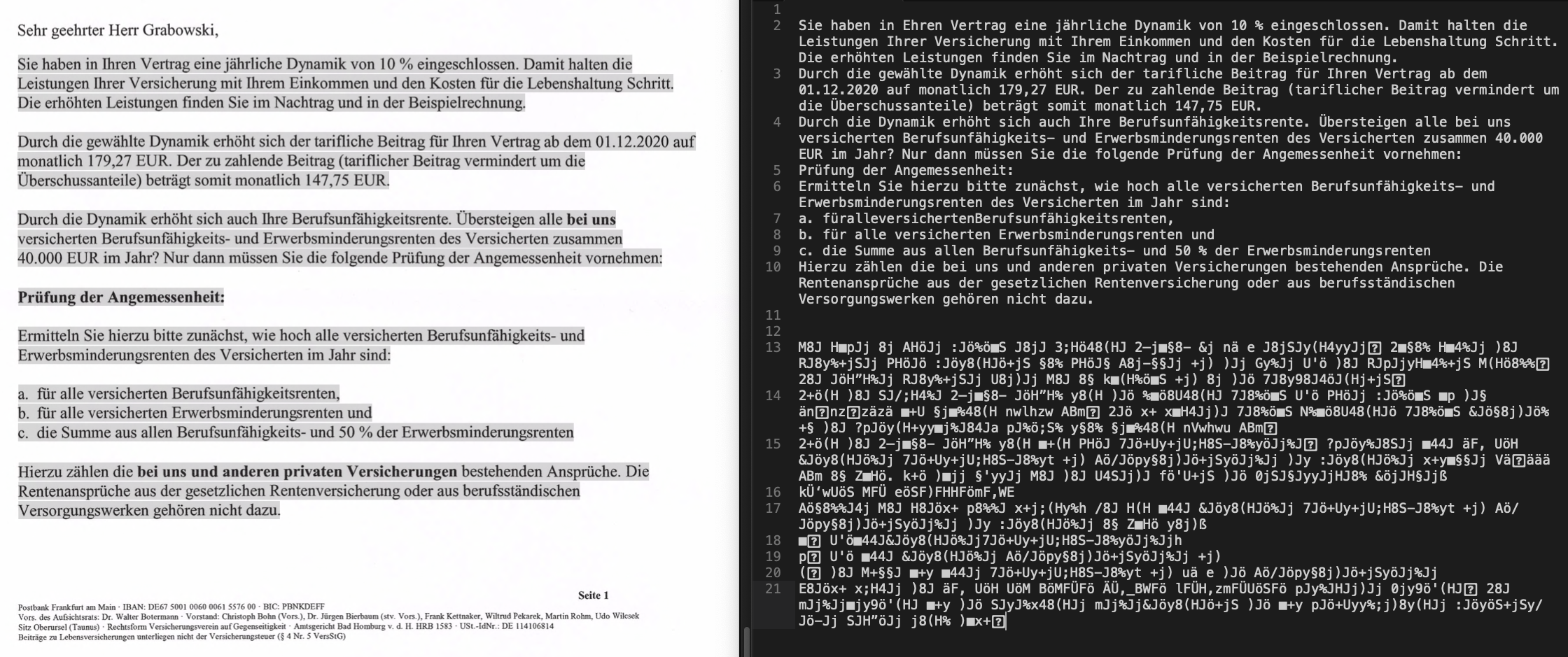
However, there are exceptions, for example the first ‘b’ on line 10. It becomes an ‘ä’ on line 21. I guess that’s because that is bold text, and thus a different font.
I'm the kind of person who tends to randomly click on things as I read them. In other PDF readers, this is quite harmless. In Preview, it starts editing the PDF. 99.9% of the time I have zero interest in editing or annotating the PDF I am reading. And then when I quit it asks me if I want to save a copy. I never wanted to change it to begin with!
(Maybe it is time I found another PDF reader...)
Here's a direct link to the 2,240x939 image: https://annoying.technology/media/previeweatingpdfs.png
It's not a one-click downgrade like the upgrade is, but I don't know of any OS with that feature.
Sometimes you can, sometimes you can't. Going from Mavericks to Yosemite for example is one-way because it includes a non-backwards-compatible firmware update. Going to Catalina is also one-way because it changes the file system from HFS to AFS.
And iOS is famously non-downgradable.
Unless they got a brand-new M1-based Mac. Macs usually don't install versions of macOS prior to their launches.
PDF is not a bitmap, it’s a script like HTML or JS. People understand browser incompatibility but some how this is unconscionable.
I don't think this means Preview changes the files just by opening them.
I tried installing from source, changing the gl library etc. But it was the same.
Am done with Apple for now. M1 is a bit tempting, but I guess I will wait for the technology to mature, buy a Macbook Air, and run Linux on it.
I really like mupdf so it was a big nuisance for me to lose that.