Also, on another note, I've read this engadget article about how other companies tried to build an upgradeable laptop and failed but I see Framework as a different kind of beast for one simple reason. This is their only value proposition, they don't have an alternative. In a very "Innovator's Dilemma" kind of. way, Dell and other big manufacturers have their main lines with higher margins and/or volume that really drives their attention and money, so any new innovation that takes more than 1 to 3 years to mature gets cut pretty fast. For Framework is kind a kind of "burn the ships" moment, they don't have anything else to turn to, so they have to keep pushing. I really hope they shine (and don't get acquired)!
(My initial guess would be that it will require at least that the laptop be powered off, or will force it to power off when removed, because from what I understood the cooling fans are in that module).
https://www.reddit.com/r/ErgoMechKeyboards/comments/skf2sx/l...
I use my laptop for my work software engineering but since the pandemic have gotten back into gaming a little. I’m on an old Xbox and it’s showing its age but I don’t game enough to justify buying a whole gaming PC. If I can plug a GPU into my work machine and play some games? Now that’s compelling. The fact that it wouldn’t have all the cringey “gamer” decorations you see on the average gaming laptop would be a bonus too.
(all that said a Steam Deck is probably still the more compelling purchase for me in that regard, I’ve been eyeing one for a while)
Isn't one of the advantages of Framework that you can swap out parts, so it would be much easier for them (theoretically) to build a gaming version of the laptop.
See this HN comment from the founder: https://news.ycombinator.com/item?id=35289229
Yes, there is. We have four in our family, since ~2018, and three of them continue to run without issue. The main weak point for the 4th one has been the hinges and case. It happens to be a later model so I think the company 'value-engineered' it to have a shorter lifespan.
My partner and I both have frameworks, but mine has had a lot of issues with the track pad and theyve never experienced any.
Don’t like something? Fix it!
And more importantly, I love what you are doing for the industry overall. The idea that I can swap out my display from glossy to matte on a laptop that I've already owned for a while for less than $200 is pretty amazing. I wish you a lot of success.
You have been able to configure that behavior (sleep-then-hibernate) on any Linux system that supports S3 for a long time (years and years).
At the same time, Apple now uses a kind of sleep similar to 'Windows Modern Standby'/Intel S0ix: https://macreports.com/why-does-my-mac-get-notifications-whi...
No matter what else they do, the arrow keys tell me they are fools who should not be trusted! (Hyperbole, sure, but only a little.)
Otherwise, could flash programming be unlocked to facilitate flashing third-party firmware?
Is this how the GPU module cooling will work? (a poor mouse drawing of my best guess based on the pictures)
I currently use a TB3 eGPU case and the massive overhead and OEM bugs are slowly making that real PCIe link worth it.
I wish you spent more effort in fixing it at the software level, whatever it takes.
Specially in cases like this, there is just an empty space there. Why not put 2 more keys?
ThinkPad also makes them full sized keys, that would be even better. But just having empty space? Why?
It's the same with mechanical keyboards - I can't use these compact 75% keyboards where arrows/Pg Up/Pg Down/Home/End are flush with other keys; but a bit "exploded" layout, with just a bit of space between arrows and the right column keys is perfectly ok with me
What I really hate is that combination of full size/half size arrows on modern laptops, put there just because some designer hate empty space.
(I have an ASUS ROG Zephyrus G15, 2021 model, GA503QM. It has a larger-than-necessary gap between Esc and F1, slightly-smaller-than-ideal gaps between F4 and F5 and F8 and F9, and sadly no gap between F12 and Delete. It also has another row of four keys higher still: XF86AudioRaiseVolume, XF86AudioLowerVolume, XF86AudioMicMute and XF86Launch1. Kinda funny how XF86AudioMute is relegated to Fn+F1. I’m really not looking forward to whenever I switch to a laptop without a dedicated mic mute button, it’s wonderful. I honestly wish they’d added another couple of buttons on this top row.)
ThinkPads has slightly enlarged arrow and page keys that I think are perfectly usable.
A key can be disabled.
An empty space can't be filled with a key.
Same. After falling in love with this layout, I just refuse to buy a keyboard that doesn't have them. These 2 keys alone are at least 50% of my decision to refuse to even bother with Apple hardware (the lack of OLED being another good 30%)
I fail to understand how people can accidentally hit a Page key instead of a arrow key, if they know touch typing and use the little bump on the Down key (like the F ahd J key) to reposition their finger.
In the worst case, they could disable these keys. Meanwhile, I have to suffer their non existance, or even worse: a ridiculously large left and right key, with a minuscule up and down key.
Thinkpad-style? Sure! Ortholinear? Why not!
This makes it easier to make a "DIY hack on the side", not needing to manufacture a complete keyboard.
This means all of my laptops are usually Lenovos.
I should try the Page Up / Page Down config.
[1]: https://frame.work/blog/introducing-the-framework-laptop-16
And as keyboards get thinner, trackpoints lose in quality. On linux it seems the software side is also not as good as before with libinput.
So I'd be really surprised if any one new on the market would go about making keyboards with trackpoints now.
Pre-covid I'd made do with whatever garbage keyboard and garbage monitor $job dumped in front of me, but almost by happenstance I ended up with a 16:10 monitor and an IBM M4-1 keyboard, and surprisingly it is an enormous improvement in work environment and I'm actually somewhat more effective at $job. (And I should have known this -- I "grew up" using IBM F / M or Focus fk-2002 keyboards that these days sell for actual money on the used market; spent a decade in front of enormous tubed workstations, etc, but normalization of deviance is a real thing)
Anyhow -- perhaps with framework's more modular approach they'd be able to make a form factor with more depth in the case to allow for a "real keyboard". Or more likely I'm just asking for a manual transmission station wagon. Safety Yellow please.
I'm trying to decide whether my next laptop will be a Framework or a Thinkpad. If the Framework was available with a pointing stick, the decision would be made. If the Thinkpad wasn't, the decision would be made. The other things that have attracted me to Thinkpads are repairability and Linux support, but Framework does those better.
I'm on my sixth Thinkpad, and there are definitely more out there with the same preferences.
https://www.notebookcheck.net/Lenovo-promises-TrackPoint-wil...
They removed it from the ThinkPad X1 Fold and got enough negative feedback that it was reintroduced in the ThinkPad X1 Fold 16.
What wouldn't surprise me is that they fuck up the trackpoint (e.g. by making it thinner). The Z16 laptop has a newer TrackPoint without dedicated keys, for example, and the newer T14s have flat keys.
I always use tables that my elbows rest on the table.
I'll probably pick one up.
Like, the space to the sides is useless here, but if you could split the keyboard and move that space to to the middle - well, know you've moved one step closer towards more ergonomic typing! Or better yet, you could move all those pinky keys there so that instead of moving your right pinky to hit backspace you'd just move your right index finger
The huge space is also a waste
etc., etc.
We’re showing a prototype of an LED Matrix that can be used for low res information display, but other things like a row of extra buttons, a narrow LCD, a capacitive slider, and others are possible too.
As a sibling comment noted, it is also possible for a module developer to create a full width keyboard with a different layout.
Perhaps there could be alternate tall hinges and a thicker bezel filling the gap to make room for discrete keyswitches without sacrificing thickness for normal users?
But am very glad to hear there is at least potential for innovation here!
I would have been a lot less critical about the touch bar if it hadn't replaced the function key row though. That one is mandatory for me, and there was more than plenty room on MacBooks to have both at the same time.
This makes sense if you realize that it's a choice between keyboard girth and thin-ness; you can either have the keyboard on top of the ports, or you can squish the keyboard to the side and be potentially ~4mm thinner. Or just don't have ports.
I'm starting to think that the future of laptop keyboards is the old thinkpad butterfly design: https://www.youtube.com/watch?v=nRVJCtREW38
I mean, even with the same width, moving backspace between halves has no impact on the ports, where is that useful innovation for the few of us that make typos?
Or replacing the spacebar with a few thumb keys - that is also port-effect-free
- I would love an option to have upwards firing speakers where flex/numpad space goes instead (one on each side).
- please improve the bass in the speakers. according to notebookcheck's review, framework speakers have poor/near 0 bass output.
- please offer either a 1080p or 4k screen option on the 16". 1440p-ish screens with DPI scaling hackery is no fun and often leads to blurry UIs.
Under X11 with KDE, or under Windows, that's no problem whatsoever. 144dpi isn't any more hacky than 96dpi or 192dpi.
It's only macOS, Gnome and Wayland that require 1x or 2x scaling (which is absolutely mind-bogglingly ridiculous, and anyone that contributed to that or encouraged that should be banned from ever touching UI code again).
It’s certainly not as painless as fractional scaling on Windows, where only truly ancient/esoteric programs pose issues typically.
My vision at computer distance isn't great in general, usually on a 32" 1440p display for desktop use. I generally can barely handle the micro size of higher res on laptops.
Though would like this on a smaller laptop, 14-ish inches seem to be the sweet spot.
I currently use an iPad and Atreus, but having this in clamshell form would be pure utopia.
That clearly won't work, as one could get free computers ... but what is the situation in getting reimbursements of Windows-tax?
Anybody else remember Windows Refund Day? Some OEMs actually did offer a refund of around $30-50, which was the cost of an OEM license at the time. Although many court cases around the world have since then ruled that you don't have a right to claim a refund for unused OEM licenses.
Not really. Windows 11 Pro retail is $199 today which might sound steep but in comparison Windows XP Pro retail was $299 in 2001 which adjusted for inflation would be $500 today. Ouch!
Windows 95 retailed at a whopping $205 in '95 or ~$400 in today's money, while a retail Win 11 Home is $139 now.
So Windows has actually gotten massively cheaper, which is weird considering that OS complexity, update frequency has increased and SW dev salaries and expenses have gone up since then.
Anyway, I'm not sure if anyone really buys Windows at retail prices. Enterprise (subscription) and OEM costs are much lower, and for personal use you can buy OEM keys off eBay or AliExpress for a few bucks.
The opaqueness of Windows licensing for "pro" devices makes us assume that there are heavy discounts, which massively depends on the manufacturer- framework could not be at a size that gives them preferential pricing (even if we assume that licensing is cheaper for other companies).
I can say that it is more ordinary for end users to get discounts rather than OEMs, unless there is a lot of negotiation (including bundling crapware, as we well know) in the tech industry when it comes to bulk licensing.
Is it legal? If it's not, isn't it easier to just use crack? E.g. pirate KMS server.
The dream would be to have 6 expansion cards in the laptop 13. 4 really is a bummer for a work laptop, it's definitely not enough for me… And while you can easily carry other expansion cards and switch at will, it's kinda like carrying adapters, you easily forget them.
Demand better of your manufacturers.
I don't personally feel like the framework 13 needs more than 4 expansion bays, but I'd love to see expansion cards that use Thunderbolt to offer (for instance) two USB-C ports, or a USB-C and a USB-A. (There are some experimental unofficial ones attempting this.)
If those were available, my four expansion bays would be one Ethernet, one HDMI, and two 2-USB port cards.
It surprises me especially that MacBooks seem to be targeted at professionals, like creators and creators always have lot of stuff with USB plugs - like MIDI keyboards, MIDI controllers, external audio interfaces, mouse, drawing tablet, external hard drives - but MacBook only has like 3 sockets, despite being super expensive.
I'm not sure more than 4 ports is _extremely_ niche use case especially for a work device, but yeah I get that most people would be okay with it and I understand Framework's choice.
Left side: * barrel jack charging port * HDMI * microSD slot * USB-C (also usable for charging) * Gigabit ethernet
Right side: * USB-A * 3.5mm jack
Even discounting the microSD slot and the barrel jack, this is 5 ports. On a 11" laptop.
Granted, it's not exactly thin, but I really don't care.
1x charging port, 1x Thunderbolt/USB-C, 1x USB-A
And on the right side:
2x USB-A, SD-Card reader HDMI, headphone/microphone jack.
On a 14" laptop.
For a work laptop, I can't wait for a replacement part to arrive from who knows where, I need a technician next day at my place.
After decades of sticking exclusively to ThinkPads, these new Frameworks look very appealing. I'm not expecting Apple-like build quality, but the customization and repairability is unparalleled in the market. I'm willing to give up the TrackPoint and nice keyboard for that (pretty much the only reasons I stuck with ThinkPads for so long), and I'm almost certain there will be a TrackPoint module somewhere down the line.
I don't like Windows, and am so-so about Mac, so that probably leaves Ubuntu, which I already use outside of my day job.
Are these the kinds of laptops I should buy? Or are there other recommendations?
My biggest issue by far with the Framework 13 is that the battery life is really bad (at least with linux). Less than 2 hours of normal use is not really workable. Will this one do better?
main url should be canonical https://frame.work/blog/introducing-the-framework-laptop-16 which redirects to local urls (which of course also are likely all in english for the blog post) and was shared earlier
not to mention the main product page shared days ago
My assumption is that the I/O modules are compatible and nothing else.
The silver lining here is that Framework keyboards are replaceable in theory. I'll wait until a proper keyboard gets released.
Seems gone. I can't say I've personally ever used it, so that's probably why it's one of the first keys to go, but I know that doesn't help you.
> Where are the Home, PgDn, PgUp, and End keys?
They're available via Fn+Arrow Cluster.
I rely on it heavily and I'm sure many others do to. I wish framework included the key in their study as well. Ether way, no menu key == no buy from me.
Ideally, page up and down will be next to the arrow keys (look at a Thinkpad keyboard), but off to the side is still better than not existing.
But personally, I was really hoping for a 13-inch convertible with touch and pen input from these guys... Maybe next year?
... however, every time I've put my faith in "this technology is modular and you will be able to extend/upgrade it way into the future", I've been disappointed. The worst offenders are CPU manufacturers who assure us that "Socket N" will be their new CPU pin format for, well, a good long time, and then two years later we move to "Socket N+1". The same thing for RAM. My experience that expecting an upgrade path via physical interface re-use with new components buys you at most 3 years, sometimes only 2.
Framework appear to building the actual components into their self-design modules, so that they control the physical interfaces. This seems like a step up but if the company remains small then the chance of not being able to upgrade again in a few years because they're either out of business, or are not packaging the components you want, seem fairly high. The fact that the designs are going to be open sourced is great, but I don't see that as a strong hedge against this problem.
CPU upgradability was never a real selling point except for ONE use case - when. new socket came out, buy the cheapest reasonable CPU early on, and then just when it was about to cease manufacturing, buy the best you could get; would give you a year or two extra.
RAM and disk upgrades USED to be very important; but I haven't really "felt" the need anymore.
I've signed up for the newsletter. My personal laptop is getting pretty old now. Really hoping it's not going to be a Fairphone price–performance+usability ratio, but I'm most definitely going to consider this as my first option!
How do expansion bay modules change the laptop’s thickness and depth?
I too wish they'd answer this more clearly or show more pictures to give a proper impression, but it seems it covers the back and under-side, so if extending thickness presumably they'd cause the keyboard to tilt accordingly, and extending the depth would just mean more of it would hang out the back.
This article seems to show of what I assume is the GPU expansion with a "larger butt" [2]
[1] https://github.com/FrameworkComputer/ExpansionBay
[2] https://www.msn.com/en-us/lifestyle/shopping/framework-annou...
Thinkpads have had extended batteries like this for years, for example:
https://sm.pcmag.com/t/pcmag_uk/photo/l/lenovo-thi/lenovo-th...
That same laptop can take a slim battery, so you can choose your runtime vs form factor. Imagine doing the exact same thing but with small and large GPUs instead of batteries.
Does anyone know what the protocol they use is? I'd assume for the keyboard it might be usb. So maybe all I'd need is to solder a flex-adapter to a usb plug and 3D print a case.
Framework 13 has a resolution of 2256x1504 (3:2)[0]
Any chance the display can be swapped for a 16:10? Otherwise it's a no go for me.
Intel processors of this generation are just not energy effiecient and run too hot.
> now available with AMD Ryzen 7040
Still only preorder, but you can buy it with AMD now.
I just need to check if it'll work with my Thinkpad Thunderbolt 3 dock (or something similar, I can buy another dock) to output to 2x 4K (actually 3840x2560, so bigger than 4K) monitors. I can currently both power my Thinkpad, and connect all the peripherals, with 1 USB-C cable. It's not something I'm willing to forgo.
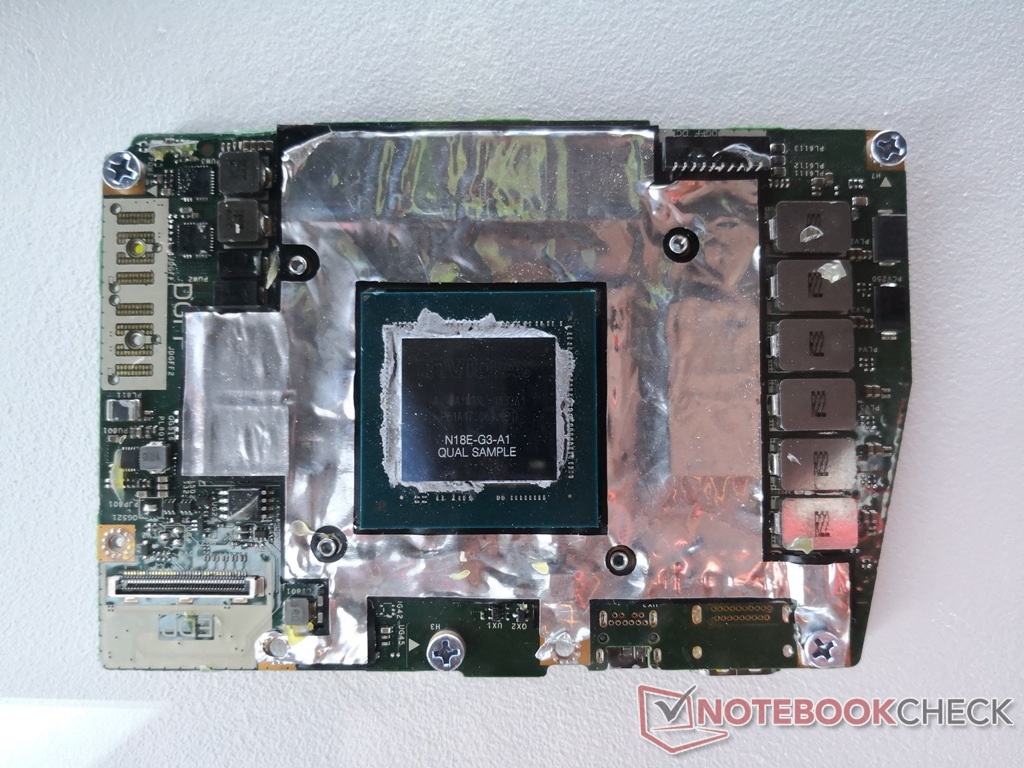
However, Dell changes its notebook layout every two years, so these GPUs are not upgradeable after two generations (so a 7530 could be upgraded to a GPU from a 7540, but not a GPU from a 7550, released in 2020).
It's going to be interesting how Framework adapts the connector for its own use. The Dell cards are fairly high-powered; in the most recent 7770 (17" workstation), the RTX 3080 Ti and Quadro RTX A5000 cards may draw up to 130 W.
Some examples of previous and current DGFF discrete cards (all by Dell, for Dell notebooks) are here[2][3][4][5]. Notice the difference to the previous mobile GPU connection standard, MXM 3[6], which was used by Dell in its Precisions until 2018, when it changed to DGFF, HP in its ZBooks until about 2020 when it changed to a soldered solution. Other notebook ODMs like Clevo and Tongfang still use MXM cards in their desktop replacement notebooks. I'm not sure if Clevo still sells these monsters; they had a 780 W power brick, itself heavier than many slimmer notebooks.
[1]: https://notebooktalk.net/topic/873-precision-7680-precision-...
[2]: https://imgur.com/aMal40L : Quadro P3200 (Pascal), Quadro RTX 3000, Quadro RTX 5000 (latter two Turing)
[3]: https://www.notebookcheck.net/fileadmin/Notebooks/News/_nc3/... : GTX 1080? in Dell Alienware Area-51m
[4]: https://dl.dell.com/content/guides/public/Html/precision_756... : new form factor for 7X50 and 7X60 generations
[5]: https://dl.dell.com/content/guides/public/Html/precision_767... : newer still form factor for 7X70 and now 7X80 generation
[6]: https://i.imgur.com/Exp6w0g.png : MXM GPUs
I’m not certain, but I’m under the impression that the ANSI layout is more common than ISO: that, potentially simplifying a tad, ISO is used in Europe, JIS in Japan, and ANSI everywhere else. (I have experience in Australia, New Zealand, India and the United States, and they all use ANSI.)
I'd like a chinless 16:10 or 3:2 goodness (or 4:3), even if it was at a hefty markup.
UPD: it's a 16:10 display, but the chin is still ugly.
By the way the current trend is to install wide, but low height screens. What's the use of such screens? For coding, reading articles or working with documents height is more important than width, but manufacturers lower the height and extend the width.
Regarding keyboard layout, it is designed poorly: it has small Up/Down keys (easy to hit the wrong key) and it doesn't have Page Up/Down and End/Home keys which are necessary for coding or working with documents (but it has useless CapsLock key). What is the intended use of the keyboard? To post short messages on social network sites. They seem to copy the layout from toy laptops without much thinking about the target audience. They claim that "Whether you’re a gamer, developer, heavy Linux user, creator, or have other performance-demanding work, the Framework Laptop 16 is built to be customized to your needs.". No, your keyboard doesn't match the needs of those audiences (except for gamers and vi users who can program even on a calculator).
Also, many non-Latin based languages have more that 26 letters, but the keyboard doesn't offer additional keys for those letters, and two additional keys to switch to Latin and non-Latin layout. Nobody seems to care about this. Not Apple, not Framework, nor ordinary laptop vendors do not want to adapt keyboards to non-Latin languages and think that 26 keys should be enough for everyone.
That’s news to me, I’ve been doing it for years.
I only look at my laptop's display and use its keyboard for coding under extraordinary circumstances when I need to do some work from somewhere else (meeting room, conference, visiting a client, on a train) and most of those times I just need to quickly fix or review something, so basically any display and keyboard will do....