>Why? I can tell you why: because Apple hates display modeset flicker, and switching modes between ProMotion on/off causes a modeset flicker, so of course they made it so that is stored in nvram somewhere and applied when the screen is turned on during early boot, so when macOS boots it doesn't have to flicker again.
>And they didn't test it with older OS bootloaders, so display handoff/init just fails catastrophically with those when this mode is enabled.
Ran into one recently that was high-rez graphical. It needed a USB mouse to change critical settings because the tab order for the onscreen widgets didn't work.
Anyone responsible for creating graphical EFI config screens should stop writing software for the good of humanity.
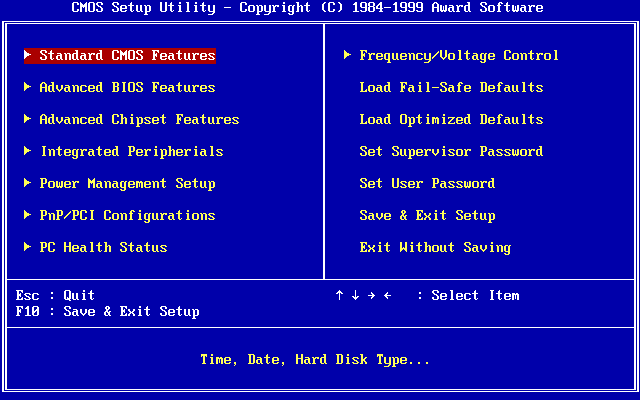
https://upload.wikimedia.org/wikipedia/commons/0/05/Award_BI...
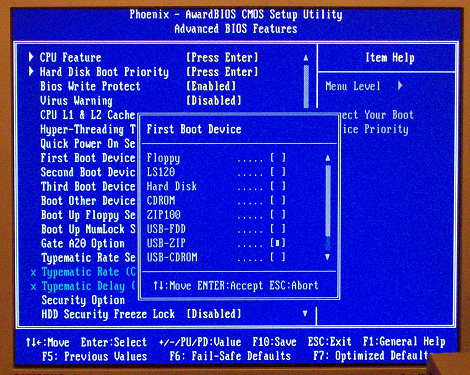
https://liveusb.files.wordpress.com/2010/05/awardbios-firstb...
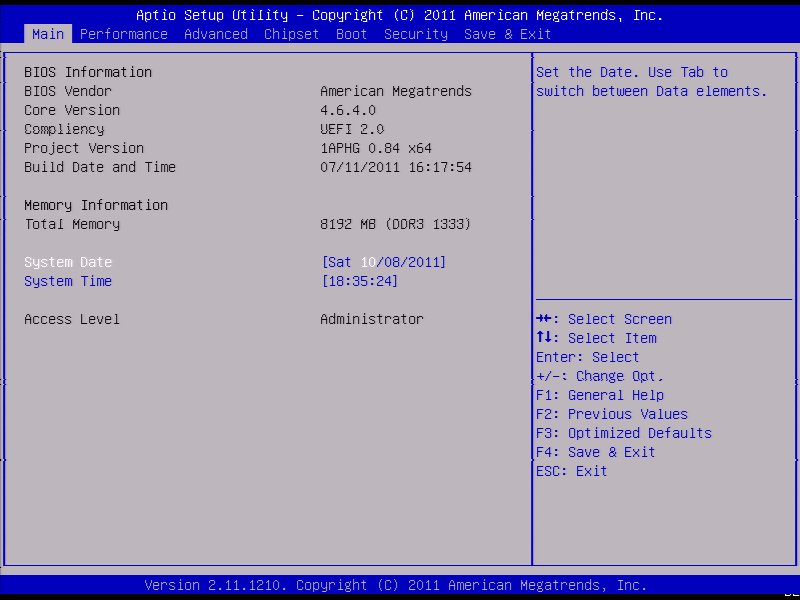
And the simplified crap with tabs that often came with prebuilt PCs but later seems to have spread to others too:
https://cdn.staticneo.com/a/Intel_Sandy_Bridge_Z68_P67/S%20B...
UEFI actually lets you provide both touchscreen-capable bells&whistles gui, and a text UI for the frankenstein VT-UTF8 standard (essentially, VT-220 compatible with UTF-8, kinda like linux console) - all in mostly one codebase.
There's a standard UI description language which is used to specify menus, options and values (and how they are written into nvram), which is then interpreted by text mode interface driver (enabled when you connect over serial port) and graphic mode interface driver (where you can drop all sorts of graphical bells & whistles).
It's also how you can integrate menus from add-on cards into firmware setup.
Besides, there’s nothing to prevent you having a nice graphical boot configuration while still having a text version as a fallback (which is exactly what Intel Macs do)
That said yes, there’s no reason why there shouldn’t be a low rez textual fallback.
Got into the temps, realized that the CPU fan had been plugged into an AUX fan header instead of the CPU header.
Fan was spinning, wouldn't have thought to check if the EFI wasn't crashing.
I'm completely joking of course. I completely agree with you, I miss text-only mode. The modern Dell one stinks, the Asus one stinks...I have no data, but I'd be shocked if Gigabyte or ASRock were any good... :(
As an analogy this would be sort of like rebooting the OS in place while preserving all the running apps, network state and USB connections without resetting anything.
These kinds of things are possible, but have lots of corner cases.
I thought this wasn't really a problem anymore.
I do recall my last motherboard had an option for a splash which was centered in a black screen, so you could basically display it at native resolution with no stretching and it would look great and seamless. I wish every motherboard had that splash option now.
Thank god someone does. Hate how jank plugging monitors in just because some engineers thought “meh, good enough”.
Don’t think I should be seeing things flicker anywhere in my life with the computing power we have today and yet many consider visual nails on a chalkboard as acceptable.
I've come to embrace the flicker and the systemd messages. It's just a boot, it's in the order of seconds in this day and age, I can't even tell you what the initial reason for my obsession was.
The first reason that comes to mind is battery life. That's probably the most broadly applicable use case.
But also, if I was still doing e.g. frontend web development, I would want to confirm that my css animations looked nice at 60 hz.
Edit: My first use case is likely wrong, thank you to replies for reminding me Apple uses adaptive refresh down to 1 hz.
These might seem unrelated, but:
* There's a `defaults set` setting that allows you to speed up the transition animation length from 1 second to 0.5 second, which is huge because that transition is extremely poorly implemented (it leaves the windows on the workspace that you're leaving activated until the transition is complete, so you start typing and it's on the other screen you can't even see any more) and VERY SLOW
* That setting only works if the refresh rate is 60Hz, and it completely fails to do anything if ProMotion is on, because for some reason the animation length isn't programmed to handle the different refresh rates.
So having ProMotion off relieves frustration.
Would be nice if I could force my MBP to run at 100Hz for PAL Amiga/C64 emulation - or even better if emulators could/would change the refresh rate at least when running full-screen.
(Actually, since Sonoma, I can manually set it to 50Hz, but there's no fixed refresh rate options above 60Hz, just 'Pro Motion'. Previously, the refresh rate setting seemed missing entirely on my M1 MBP)
On Sonoma I can select 24, 25, 30, 50, 60, 100, 120 Hz, in addition to "Variable (40-120 Hz) refresh rates for my LG C2 display. When selecting 50 or 100 Hz, scrolling in (PAL) C64 emulation in VICE becomes much smoother, but not perfect. However, when I enable variable refresh rate and switch to fullscreen mode, VICE can perfectly synchronize the refresh rate and scrolling/animations become butter smooth.
Admittedly rather niche use case.
...and I bet that's exactly the attitude Apple had when implementing things, which lead to this mess.
The computer was connected to a Thunderbolt Display during the update which I assume had the same effect of changing the refresh rate to something other-than-ProMotion that the linked article mentions. I had to do a DFU restore from another Mac and then run the macOS Sonoma installer from USB, which thankfully detected the existing install and did an in-place upgrade, preserving all of my data. Nothing else worked.
I also wasted far too much time trying to get the DFU restore to work before discovering that you cannot use a Thunderbolt cable — it has to be done using a plain USB-C cable, otherwise the Apple Configurator simply won't detect the other Mac.
I would have expected a Thunderbolt cable to be required, if either was. This is quite surprising to me. Usually, the more capable (higher bandwidth) cable works if one isn’t supported. I’ll hope to remember this is I ever find myself reviving a bricked Mac in the future.
My understanding is that all complaint USB USB-C cables should work for USB 2.0, even USB4/TB4 cables, but active TB3 cables might not hook up the USB 2.0 pins.
> A supported USB-C to USB-C charge cable, such as the one sold by Apple (may not be available in all countries or regions) or a supported USB-A to USB-C cable
> The USB-C cable must support both power and data. Thunderbolt 3 cables aren’t supported.
[1] https://support.apple.com/guide/apple-configurator-mac/reviv...
Anw, I followed a video by Mr. Macintosh and managed to get mine up and running, whew.
See Also: entering bootloader mode in android devices
I would really advise against having anything connected to the Macbook during upgrades, except the charger...
In my mind, when we pay that ridiculous Apple premium on RAM and storage, we pay for excellent quality in SW/HW. They also need to deliver that quality.
I've run into such horrific bugs during pretty normal use that I don't think this anymore.
These days it's just a bunch of wannabes trying too hard to be him.
(I think it is ridiculous that the system works in that way, especially for a company that hasn’t needed investors in over a decade, but it is what it is.)
It's obvious that it's some incompatibility between 13.2 base system and 13.6 install. Apple quality is atrocious these days. One would have thought they would test the most basic scenarios before releasing their x.6 software.
And worse of all, there's no official (or even unofficial, at least I wasn't able to find one) way to create USB boot installer without another Mac or to DFU restore Mac without another Mac. Do they think I live in Apple Store? I don't have other Mac. I was able to DFU restore with libimobiledevice, god bless its creator, but it really should not happen. Windows or Linux are so much more transparent compared to macOS.
Conversely windows, just got a USB stick in the drawer I can boot off.
It goes further than that, on many motherboards even a failed firmware update can be fixed through a random USB stick from the drawer, you just need the right BIOS file to put in it.
How far we’ve fallen.
Linux as well. Will probably work better than windows on older hardware
I'll need to get an external drive, back everything up, then do a DFU restore on my M1 Max MBP to get it upgraded to Sonoma.
Good luck with that.
If there's a documented problem that affects your hardware model and the given software versions, they're extremely unlikely to try to charge you for anything.
I had to spend 6+ hours on the phone over multiple days with a senior tech support staff to make it happen, but at least it was eventually resolved and I didn't pay anything for it. Obviously it wasn't a documented problem because we troubleshooted everything possible before replacement.
Just today I had an experience that was so Kafkaesque it felt like a mean spirited prank, and because they never fuck up this badly, I had no contingency plan for one of the times it matters a lot.
Any advice on how to get the “we fix things for loyal customers by doing what’s required” people on the phone would be appreciated, but based on the runaround, infinite hold Ferris wheel the primary support line apparently is now, I’m not getting my hopes up.
Maybe the newest group of programmers and engineers are dealing with a very complicated code base? Maybe no one fully understands everything involved until something breaks?
On the software side, I tend to tolerate more security risk (within reason) to delay updates until a consensus emerges that they’re robust, because I’m not a high value target to anyone north of “script kiddy” and run a tight ship on the easy stuff, so the EV of an abruptly unusable work machine vs. getting pwned weighs heavily relative to winding up in the crosshairs of anyone sophisticated enough to exploit a recent CVE. My online banking is properly 2-fac’d, if anyone wants to read my browser history or email and cares enough to go ti that trouble, I’ll want them that I’m not important enough for it to be worth the trouble.
This would clearly change if my work went back to having demanding security requirements, but it doesn’t just now.
It’s really the customer service, fulfillment, Apple Store experience (it used to feel like stepping into the least stressful room in the mall and now it’s a zoo).
I was affected by this and like many users the problem was fixed after replacing the I/O board. In my case, I did it myself using a $10 part from Ebay since the machine was well out of warranty at that point.
https://forums.macrumors.com/threads/macos-big-sur-update-br...
https://forums.macrumors.com/threads/macos-big-sur-update-br...
https://forums.macrumors.com/threads/macos-big-sur-update-br...
/troll
But my Google Pixel phone used to brick itself all the time, I think twice in the two years I had it.
About two weeks ago I'm sitting in a hotel room with the air on bed with the lid open. I grab it by the screen to slide it closer to me and the screen shatters from the light pressure of my finger.
There are instances of both these things happening to the Air all over the internet. At first I really liked the M1 Air, but it has now proven too unreliable for me.
Premium™
Shame to hear the build quality in the latest is so poor.
Do you really think users want graphic mode selection on boot? What percent of Mac users have alternate bootloaders or even know what that means.
A lot of commenters need to do some time in the proverbial trenches and support a fleet of devices at a large company. See if users really care about the things you think they do.
> Once System Firmware is updated to the macOS Sonoma version, if the display is configured to a refresh rate other than ProMotion, that system will no longer be able to boot into older macOS installs nor Asahi Linux correctly. This includes recovery mode when those systems are set as the default boot OS, and also System Recovery at least until the next subsequent OS upgrade.
That can and will absolutely affect regular users, even if they don't 'care' about it or 'know what it means'.
No, that seems pretty super-user to me. The average user goes forward in versions, not back, and rarely has two at the same time.
Here's a play-by-play scenario.
1) Grandma is prompted to update to Sonoma, and so she does.
2) But note that the installer does not update the recovery partition.
3) Laptop reboots, and grandma sees an Apple logo for exactly 2 seconds, and then the screen goes black. Manually rebooting results in the same thing, every time.
4) Grandma now tries to roll up her sleeves and see if she can fix it. She googles around, and discovers that the she should be able to get into the Recovery OS and maybe fix things there... but when she tries to do that, same thing: apple logo for 2 seconds and then black screen.
How did I come up with this play-by-play? Well, because today I was said grandma.
Where does this involve the average user going back in versions of their on volition? That's the whole point of why this bug is horrible: you get no say in the matter. You upgrade to Sonoma, and depending on your refresh rate, you can't boot into your OS. Wanna use the Recovery OS? Too bad: that's too old to know to use a functioning refresh rate settings (because the installer left the old Recovery OS version in place), and instead it uses whatever was set in NVRAM (or similar) from when you last configured the refresh rate.
Wasted today using another MacBook to update the Recovery OS via DFU (using Apple Configurator), and now I'm reinstalling Sonoma from that recovery, and praying that this will unbrick my laptop for work tomorrow.
Normal people don't care about it, talk about it, or think about it, but may come to rely on it - or have it used by a 'Genius' when something stops working. It affects them.
This issue can occur to any user who wants to have two macOS versions for whatever reason. Not that extraordinary especially between creative professionals
Issues on Sonoma appear most often on dual-booting macs: https://support.apple.com/en-us/HT208891
Ventura upgrades can also bite you if your display refresh rate is set to anything other than ProMotion, for unclear reasons.
The doc is on the Asahi Linux wiki because their developers discovered this issue, but it's not unique to Asahi. In fact, running the Asahi Linux installer can detect whether your mac will be affected by this issue, even if you ultimately choose not to install Asahi Linux. See the article for details.
Any time I start a new video project now, I save it instantly because Command+S still works, but if it opens the Save As dialog then it frequently won’t.
https://trixter.oldskool.org/2006/02/02/computing-myth-1-sof...
Well dang, I just upgraded yesterday, too. Fingers crossed that nothing breaks...
Something stinks in this thing.
Or does that mean wait for 14.2?
Definitely shoddy QA on Apple's part. Also, your sample size is too small. Everyone works differently and it takes a certain set of settings/workflows to trigger this compatibility issue.
However, this is such a great write up, very thorough with root cause, mitigations etc.
Keep up the good work!
Like, you press Launchpad, and it just ... doesn't open. sometimes. This kind of rancid stuff you would expect on Windows (i.e. after upgrade to Windows 11, half our laptops can't right click on the desktop sometimes) but it never used to happen on OS X.
We've gotten to point with the huge number of abstraction layers (and now AI as well) that troubleshooting what causes system to do what it did, has become so unwieldily difficult to diagnosis.
I had Ubuntu installed in a second partition and it refuses to boot ever since I installed 12.5.1 on it.