Note: This isn't a shill for NextDNS; I love these kinds of projects and think they absolutely should exist, but NextDNS just happens to be one of those dead-simple SaaS tools that is an insanely good value.
I don't know what problems you had with your Pi that resulted in 10% downtime, but that sort of hyperbole sounds a lot like shilling. Cases of SD card corruption are 99.9% due to the use of underpowered power supplies - just buy the official Raspberry Pi power supply if you can be bothered to search for a proper 2.5-3A USB power supply.
> At $20/year [...]
At $20 a year, I could buy a RPi Zero 2W and an SD card to keep as a spare every single year and have enough left over for a celebratory Sheetz sandwich. PiHole + WireGuard + $15 RPi Zero (once off) are unbeatable.
I run a bunch of local services on RPis and a decade-old Mac Mini. I love having the control over things, but I don't pretend I don't spend a decent amount of time maintaining it. I only run things that don't need to be highly available, so something like Pi-Hole is off the table. The last thing I want is for our DNS to go out while I'm sleeping, and my partner has to wake me up because she has work to do.
You mention SD card corruption as the only reason why a RPi-based service might fail, but there are plenty of others: botched updates, random hardware failures, power supply issues, and likely other things I'm not thinking of.
And even if a Pi-Hole can keep three nines of uptime (I'm skeptical of this claim), many people will find significant value in giving someone else money so they don't even have to think about digging into fix a problem for the rare occasion it happens. Suggesting that a particular home-hosted solution is "unbeatable" is meaningless; "unbeatable" in this case is a subjective measure, and other people will value different things than you do.
I like the convenience and the fact that I’m blocking about 4M domains.
My TV is also forced to use it so ads don’t update on Android TV.
Not sure if NextDNS supports custom domain lists or not.
I have an automatic WireGuard VPN set up on my devices to VPN into my home network when I'm not connected to my SSID, so my local DNS still works remotely.
My primary problem with Pi-hole or any other DNS-based blocker is that it silently breaks things. YouTube stopped saving my spot in videos. I couldn't click through on any link that involved a tracking service.
These things accomplish their stated task well, but leave behind an insidious trail of browser errors, broken pages, and broken apps without ever indicating to the user what the cause of the problem really is.
DNS just isn't the right tool for fixing shitty UX in the browser DOM or a mobile app. It's a happy coincidence that it works more often than not.
For the price of a single Pi, I can get NextDNS ad protection for _all_ my devices for multiple years. No matter where they are.
Exact same setup for me also.
I also run Tailscale since I have run into some remote networks that blocked wireguard's port.
I also had my banking app stop working one day. Never could get it working. Eventually I just got fed up with having to switch vlans or to mobile data to check my bank and got rid of the pi-hole.
The blocker on PFsense eventually had the same issue.
Realistically, I was probably running too many overly restricting blocklists for my actual needs.
But, I also don't want to fiddle with messing with the out of the block blocklists that also caused me issues.
The one (fairly huge) issue that I have is that it cannot handle captive portals when its enabled on my iPhone. So if I'm joining the wifi on a plane, etc, I need to remember to turn it off. This means that I cannot recommend it to my non-technical friends.
The portal would unapologeticly mitm the server response with a redirect to the portal login page.
The domain needs to exist (to pass DNS) and not have HSTS, but otherwise any address will do.
Other than this problem, Pi-Hole has always been great
I ended up with Pi-Hole on local network (manual DNS tied to Wifi SSID), NextDNS as default/fallback on other networks.
ControlD has worked well for me, outside a few UI complaints I have with their site. I do have some concerns with trust as I don't know much about ControlD, and I'd rather use the most trusted service for this.
I'm seeing ControlD as much more feature-rich and the service is evolving faster. I also personally like the UI a bit more vs NextDNS. Prices are comparable.
Alternative and free for private usage is to set DNS to:
dns.adguard-dns.com
UPDATE: it seems the old one was dns.adguard.com (which was blocked in some countries)
    94.140.14.14
    94.140.15.15
    2a10:50c0::ad1:ff
    2a10:50c0::ad2:ff
One advantage over Pi-hole I noticed is I can return NXDOMAIN which makes more sense to me. I didn't see how I had that option with Pi-hole.
I just checked, and the generated unbound configuration comes in at 218000 lines, so takes a moment on my Celeron J3060 class router when loading unbound.
I could do the same with "vanilla" DNS (udp port 53) as well, but I don't.
Pihole can't, easily, do Dns vis TLS/QUIC etc without 3rd party stuff being bolted on etc. Adguard Home is a single binary, it's great.
Turning it off occasionally reveals the horror of the un-ad-blocked internet. I never forget to turn it back on.
Generally prefer local solutions but gave up on Pi-hole some time back after recurring issues. Currently using client-specific adguard; however the centralized management with nextdns is enticing.
1. Dishonest people might try to debate intentionality. But forseeability is indisputable. The privacy issues created by ECS were known when it was introduced by Google. If ECS is truly for performance _that benefits the user_ then it stands to reason that it should the _user's_ choice whether to send it. That is, ECS should be optional. This is not merely a personal opinion. It was a consensus. See: https://yacin.nadji.us/docs/pubs/dimva16_ecs.pdf AFAIK, NextDNS, like Google and OpenDNS, will not allow any user to disable sending ECS.
For example, Cloudflare when it launched 1.1.1.1 decided not to send EDNS subnet and they have claimed this is based on privacy grounds.
Whether anyone cares about privacy is their business, not mine. And whether anyone believes ECS improves peformance for them is for them to decide, not me.^2 Here I am just presenting some facts for consideration. Anyone is free to disregard these facts.
2. When considering "performance" we might differentiate between performance in requesting the resource the user is trying to access versus performance of ad servers or tracking servers. Needless to say, ads are not the resource the user is trying to access. And tracking is not even a resource. The speed of ads and tracking are obviously very important to Google, the company behind ECS. When we see a campaign for a "faster internet" from so-called "tech" companies such as Gooogle and Facebook we should keep in mind that "the internet" as envisioned by these middlemen is an internet full of advertising and tracking. As such, "faster internet" does not necessarily mean better speeds when downloading a resource. Ads and tracking are the not resources that users are intentionally requesting. They only serve to add delay and impede the user's retrieval of a desired resource. Hence the need for "ad blocking".
Personally, I do not use third party DNS services, i.e., shared DNS caches operated by third parties. Historically these shared caches are the source of various problems. There are plenty of alternatives available today what with the enormous advances in network speeds and local storage that have occurred since the days when shared DNS caches were a necessity. For example, all the DNS data I use is stored locally and served from loopback addresses, either in the memory of a forward proxy or from authoritative DNS servers. Requests never leave the computer. (NB. PiHoles send requests to upstream third party DNS providers by default. Unless the parent commenter changed the PiHole's i.e., dnsmasq's, configuration to use a local DNS server serving locally stored DNS data then requests would by default be sent to the internet. In the case the configuration is changed to point to a local DNS server serving local DNS data and the user is satisfied with DNS-based blocking, like what NextDNS provides, then the utility of a PiHole would be questionable. Just omit DNS data for ad/tracking servers. I have been doing this for decades; I began using DNS for "blocking" before "adblockers" or PiHole existed.)
I'm not entirely sure why AdGuard is giving this away, and maybe I should look into that, but seemed like a relatively low-risk decision to go with this for now. And I can't say enough about how much more pleasant using things like the NYTimes app has been without the obnoxious ads.
I thought i would need a second dns server behind it, but i could add all the rules I need right into adguard home. It even supports DoT and DoH upstreams, which is still not a thing with many home routers.
Edit: here are the docs: https://github.com/AdguardTeam/AdGuardHome/wiki/Configuratio...
Disclaimer: adguard claims not to sell any customer data.
They already have many other commercials products and I guess also the default filter rules are very good because of their experience in the domain.
But I think you can use it completely without the AdGuard servers and use other filter list sources.
Here is my reasoning. I can read up the documentation and set it up and get it working. I'm going to brag to my friends about how my home network has no pesky ads and stuff. They will ask me to “Set up for me, Set up for me.”
I cannot help them maintain, even if I do set it up for them, so -- I'm going to say, “You know what, instead of that complexity, they have a simple app-based setup that just works for just $29 a year for your whole family.”
See, I just got five of my friends to download and buy the service in that dinner party.
I believe this is the same philosophy of todays' tech Startups -- have an Open Source Product but build a commercial business on top of that.
PiHole supports Conditional forwarding
MacPaw lists Russian-developed software as a risk because the government can access your data at any time — this is self-hosted open-source software though.
The FSB can’t just access your local server with an arbitrary court order.
Therefore this doesn’t feel like a legitimate concern but more like Russophobia, which I understand but also think is utterly unasked for as I know first hand how much Russian developers are suffering from the stupidity of their government.
1 - https://thesmarthomejourney.com/2021/05/24/adguard-pihole-dn...
2 - https://thesmarthomejourney.com/2023/02/12/adguardhome-sync-...
Qs: this says “ Technitium DNS Server is an open source authoritative as well as recursive DNS server”
Are pi-hole/Adgyard also recursive DNS server or just a blockers?
Edit: I’ve been using pi-hole for ages, trying to figure out if this has any advantage.
PiHole isn't natively recursive, but you can easily set up a service alongside pihole on the pi (or in another docker, if your pihole is a container) called Unbound which provides recursive DNS.
https://help.nextdns.io/t/q6yq4xy/nextdns-stops-working-prop...
Does anyone by chance know if this is a known issue with AdGuard or even Pi-hole?
IMO vanilla private relay is much neater and simpler if privacy is your goal. It uses Oblivious DNS over HTTPS [1] which is pretty neat.
To trade some of that privacy to reduce ads setting up encrypted DNS restores filtering control. This does mean you then need to funnel those queries somewhere likely less oblivious though. Current setup I'm playing with in the homelab uses Adguard Home for filtering. This then forwards to a local Unbound instance acting as a recursive resolver with strict DNSSEC [2] and QNAME minimisation [3]. End result is the DNS traffic is still open, but does not all go to any one single entity (apart from my ISP, which can see TLS SNI anyway).
[1]: https://datatracker.ietf.org/doc/html/rfc9230
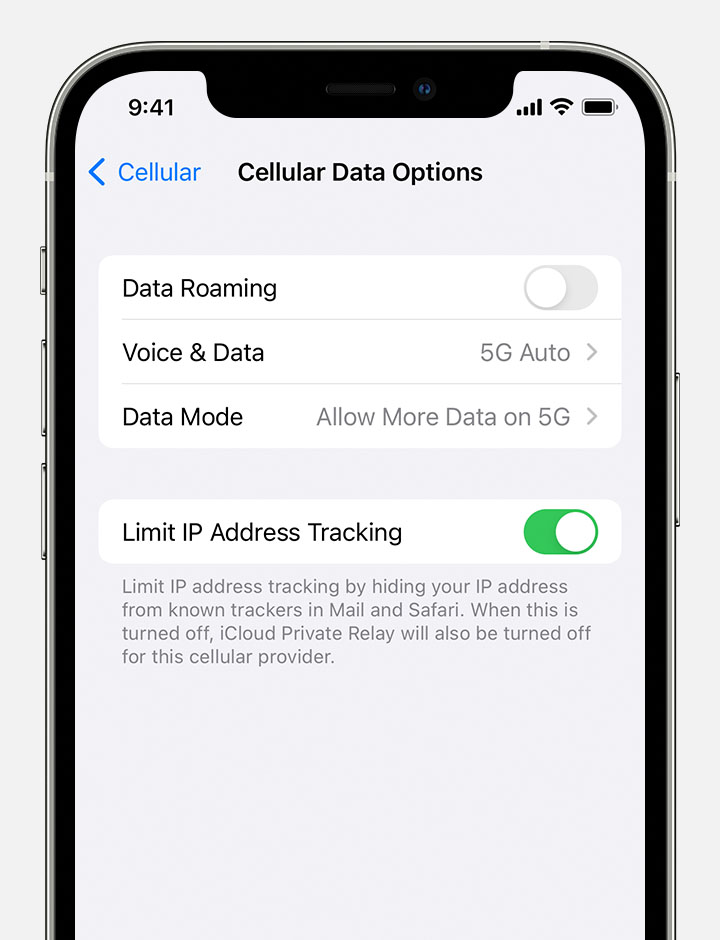
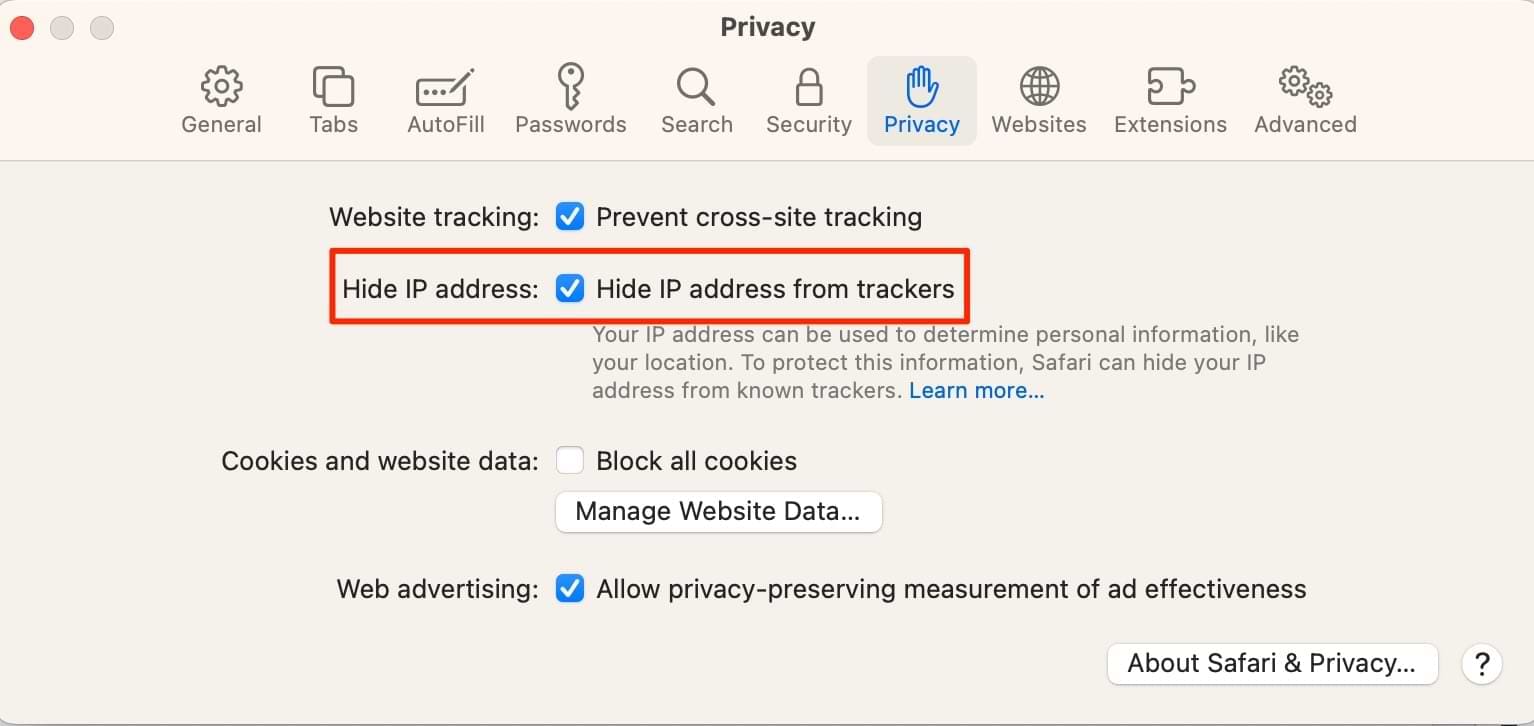
I'm referring to the "Limit IP Address Tracking" option[2] in Safari/iOS and "Hide IP address from trackers" option[3] in MacOS/Safari
[1] https://support.apple.com/guide/icloud/set-up-icloud-private...
[2] https://support.apple.com/library/content/dam/edam/applecare...
[3] https://appletoolbox.com/wp-content/uploads/2014/02/Hide-IP-...
What is the point of the latter?
Side note: it’s always DNS…
For example if the box with Adguard Home or pihole crashes, can you configure your router or your devices in a way that would instead go to say cloudflare or google DNS?
A recurring script attempts to resolve a domain from Adguard every 30s, and if that fails, the NAT rules are disabled and the router would handle the DNS directly.
Downside to this approach is AG doesn't have client IPs, since they all come redirected by the router. I think DNS has a way to tag original IPs, but AG doesn't support it. I just use multiple DHCP configs to hand out AG directly to devices that are bad actors (and not critical), and critical stuff gets the method above.
I do adblocking with a browser extension. The adblocking has more context, can modify the page, and has easy UI integration for debugging and turning it off.
What else are DNS blocklists for? Clients except browsers?
For the record, on my desktop I use systemd-resolved (for DNSSEC) and dnscrypt-proxy2 (for encryption). On my router I run unbound as recursive resolver for other devices.
On my phone I use quad9, and adblocking via Firefox.
If you look at the logs from your media box, (whether that is your TV, Roku, or whatever) there's a massive amount of tracking that gets sent up.
Combined with Tail scale I can even block ads and tracking on my devices when I'm not home.
All my devices are plain Linux distro machines, or Android.
There's so many places other than "the browser" to see ads, to even question that seems like not really having knowledge of what the Internet is used for in 2024. Edit: Sorry that's a bit rude, I just meant maybe you don't use it the same way a lot of others do. Sorry for sounding obnoxious and rude.
DNS blocking doesn't stop stuff like ads in Instagram, or Youtueb etc, but it certainly helps in a lot of other situations like Ads in the Imgur app etc etc.
I understand that many people use apps and smart TV sticks, but I'd forgotten that many have ads. I use some apps, but none that have ads.
My family use apps but say that they appreciate targeted ads.
The value is not just that I can block at the network level rather than the application/device level, it’s also that I can see what random connected devices that aren’t general computing devices are trying to do. If they have hard-programmed DNS servers, blocking 53 for any device besides my Adguard server quickly solves that.
In all fairness, when I have some time and can invest in decent hardwares, I might go back to AdGuard Home with one of the paid services as backup for travel, and for the other family members.
Pi-Hole works really well but once-a-while, when I'm traveling, it will decide to act up and it's a whole IT support with the family over phone for minutes if not hours. I'm not smart enough to setup a secure enough tunnel and the like, and haven't read up enough on the topic. This follows similar pattern with AdGuard Home.
NextDNS, AdGuard DNS, Control-D are easy and just works, especially with the devices that the family uses. I think I bought one of those AdGuard Lifetime license, so I use that to block client-side rendered ads in conjunction with either AdGuard DNS or NextDNS or Control-D. Right now, Control-D is doing pretty good with my test-drive.
Edit: The other reason is that many websites such as the Governments’, Banks (at-least in India) seldom works with Pi-Hole or AdGuard Home. With the other tools, I can turn off for a while, and go Internet-Naked and do the transactions, pay the insurance, etc.
I currently use a vanilla LibreWolf which has uBlock Origin and reasonable defaults out of the box for this reason.
My only other line of thinking is that a combination of DNS, IP and in-browser blocking could be more effective than just in-browser alone.
AdGuard Home: Network-wide ads and trackers blocking DNS server - https://news.ycombinator.com/item?id=33387678 - Oct 2022 (113 comments)
Show HN: AdGuard Home – an open source network-wide ad blocker - https://news.ycombinator.com/item?id=18238503 - Oct 2018 (2 comments)
How would this fit into using Wireguard? Or, how would I go about that? It seems like there might be something conflicting about running both, but I am very new to it all.
[1] It is actually running their FriendyWRT variation which came with the precompiled drivers for getting a Realtek USB wifi adapter to work, otherwise stock OpenWRT would work as well
I currently use browser based blocking and find a lot of sites don’t work at all. Typically SPAs.
But if I have to use them, I can disable the adblocker in two clicks. How does that compare?
I recommend using only one list, rather than a combination of several. I switched to the https://oisd.nl Big List, which has been great... although it did break GitHub yesterday. That was the first breakage since I switched, and it was fixed when I reported. But still, keeping an eye on it.
You could go for one of the Lite blocklists for the network wide, family friendly (non-breaking) list.
Yet, DNS-based blockers have a limited usefulness at this moment as some major ad-providers started using the same primary domain for serving ads. For example, YouTube, partially Google, Yandex. I guess they cover everything with top level load-balancer and then route internally to specific service ingresses
But, you get used to what sites break and decide if it is worth bothering to fix it or not.
I can disable my pihole by opening a browser, navigating to pihole and disabling it.
I don't know much about how adtech works, but if I were Google I'd provide ad blocking detection to all of my clients. And it should be pretty simple to detect if parts of the network that are essential to my ads are being blocked.
Where are you seeing that? The only reference to OpenWRT I see is in the "Projects that use AdGuard Home" section which links to a different project.
Otherwise that's a misleading title - this is a PiHole alternative.
My own devices are covered, I definitely want full filtering even when not at home and my devices are completely hackable, but I'm wondering if such a tool would be a convenience for other people using the network in particular with less hackable devices, and people likely to use my network are likely totally uninterested in ads, but I don't want this to be a pain.
With Pihole running on a tailnet all my devices use it by default as long as they're on the same tailnet. That way I have seamless ad-blocking even when I'm on cellular data or my friends' wifi networks.
I currently have a different machine dedicated to pihole, but it would be intriguing to have something built in. I would imagine split DNS and firewall rules would be simpler this way.
Disclaimer: YouTube is still very affordable in India, our family subscribe to the YouTube Premium.
My LG A1 does not hardcode addresses. I also rooted it to prevent updates from doing so in the future.
I'm running it in a docker container and then pointing my router at it.
It comes with all the limitations of using a HTTP Proxy in today's world where SSL is everywhere.
The primary use case for these is for blocking ads on devices that don't allow running a real browser and yet still shows ads, such as "smart home" devices, TVs, etc.
Why not? Or why not use both?
> The primary use case for these is for blocking ads on devices that don't allow running a real browser and yet still shows ads, such as "smart home" devices, TVs, etc.
What about non-browser apps on mobile devices or even desktops? Lots of apps have invasive ads and are unlikely to offer an extension api to block them with.
Because DNS-based blockers aren't visible to the browser, so they just look like HTTP errors or worse, and cause a variety of misbehavior. They're much more likely to produce errors that feel like the site just doesn't work. They can't distinguish between requests to different URLs on the same server, and many sites distribute both ads and content from the same servers. So they're always either going to miss ads or break sites, or both.
Browser-based blockers can block some URLs while allowing others, in addition to many many other improvements like substituting no-op scripts for things the site expects to call (preventing sites from hanging because they're waiting on tracking, for instance).
> What about non-browser apps on mobile devices or even desktops?
Ignore "download our app!" prompts and stick with mobile websites wherever possible; Firefox Mobile has excellent adblocking via uBlock Origin. Look for ad-free alternative apps. If that isn't an option, purchase ad-free paid apps.
Simple answer: don't use those apps. Do you really need them?