I saw some people have the same issue [0] in the past, and it’s not really been fixed either [1].
Your comment and seeing that there are bug reports about it prompted me to think more than 5 seconds about this usability annoyance. I found a cool shortcut on Thunar: holding the control key + right click anywhere (including on a file) will bring up the right-click menu, from where I can create a new folder, paste, open in the terminal...
That's XFCE's Thunar solution to this problem. It was just not easily discoverable, but it's a good enough solution according to me, as I don't mind using the keyboard. Maybe it's the same on Gnome's File or Nautilus or other file explorers softwares, I don't know.
Edit: looking at it more closely, in Thunar the ctrl+right-click will show the "create new folder" option only if no file is selected. Otherwise it shows the contextual menu of the selection (hence the create new folder would not appear). So basically we have to unselect the files ... by clicking on an empty area (so back to square one) ... or we have to know about another keyboard shortcut (the "Escape" key) to clear the current selection before doing the ctrl+righ-click. Not ideal either.
I can see this making sense for a touch-first design and I can appreciate that focus for BBC news website, however focusing back on software like gnome it seems that similar aims crept in trying to make it serve multiple input methods at the same time and how you could have variations on the UI for touch or mouse (and you could also make assumptions about the screen and viewing setup and what's appropriate)
There is an image showing the right clickable areas on the issue you linked
https://gitlab.gnome.org/-/project/1/uploads/50ac36ab40f9049...
It would be better to have these common tasks in a separate menu item in the icon bar where they are always available, in addition to the context menu when right clicking on empty space in a window.
But you're right it's debatable. A matter of preference. I guess I'm just in the camp of "more explicit is better than implicit". And I'm willing to pay the verbosity cost (having a longer menu in this case). The alternative seems like a complex decision tree to me: Am I in list-view? Yes. Is my folder full of files? Yes. What menu do I need, depending on the task I want to accomplish? I want to create a new folder. Ah, so I have to find some empty pixels to conjure the menu with that option...
In GNOME Files they are! It’s the folder menu - the one that’s connected to the location bar.
It isn’t the most beautifully discoverable of menus, but it works well, and it’s worth noting the menus have been rearranged a bit in 47.
And which icon shall have this menu ? Points and lines are already taken. /s
too many tabs and i cant right click the top bar and reopen a closed tab, or whatever
the small empty spot between the tabs and the minimize/close buttons, provide a different right click menu
i would love the empty area right click menu despite if we clicked on a file, like Blender shows all options for Vertex/Edge/Faces (each right click menu arranged horizontally) if you have all of them selected on Select Mode when editing objects
You can tell you're on the gap when no item is highlighted.
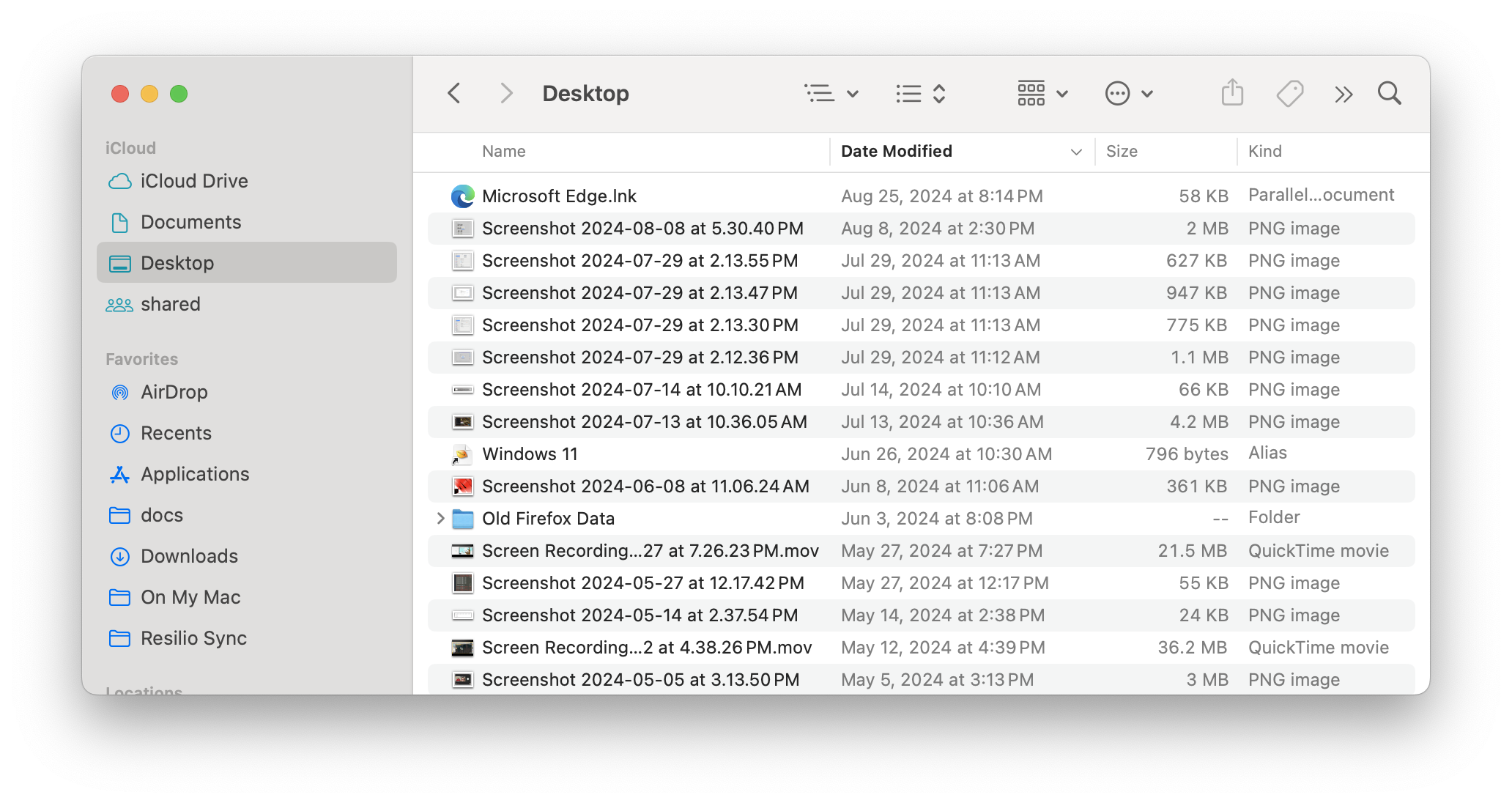
Consider the current macOS Finder:
https://a.qoid.us/20240907-finder.png
Finder's design is extremely similar to GNOME Files! And so the inherent downsides of the design language are present in Finder too, such as it being harder to drag windows around or click to activate windows.
But macOS does avoid most of the UI papercuts the author points out. It's not perfect, but let's go through the list.
- View Options: Finder has a similar-looking icon that does the same thing. But in Finder, the little arrows on the right of an icon are always part of the same button as the icon itself. Finder doesn't use split buttons in the way the author complains about.
- Help: The macOS User Guide explains all the icons and what they do. But you don't actually need to go that far, because macOS has a feature where if you click Help and start typing, it will show menu items (from any menu) that match what you typed. In this case, if you start typing "list", it will show the "as List" menu item, which achieves what the author wants. (I guess I should point out that macOS does have a menu bar at the top of the screen, and all the actions you can take by clicking icons can also be taken through the menu bar.)
- Tooltips: Finder doesn't have tooltips for the locations on the left pane, only for the icons in the toolbar. Even there they take a while to appear.
- Navigation: I'd ding Finder here because there is no location bar at all (only an 'open by path' dialog that's kind of buried). Even going to the parent directory is not exposed in a particularly obvious way. Still, at least Finder doesn't have something that looks editable but isn't.
- Scrolling: macOS has hidden scrollbars by default, but they stay at the right of the window. They don't jump to the left like the author is complaining about.
If you don’t believe me, fire up https://macos9.app on a machine with a mouse, and try organizing / browsing some files.
These days I’m in love with Total Commander (yes I mainly use Win+WSL2), but I know of several TC style File Managers are available for the Macintosh)
And i do know that TC was cloned/inspirere from ’mc’ (to give credit…!)
- Where is the ability to easily split/tab for side-by-side directory comparison?
- Every directory is opened in a new window, which makes everything even more jarring
- (Do I just not know how to operate the window manager?)
- Is the not grid-aligned icon position saved? This seems like a long-term usability nightmare.
- How can I create something other than a directory?
- Where is the location bar?
Then again, I'm not familiar with old OR new macOS, so I might have a similar first experience with the new finder.
What I found nice is the UI/UX consistency. Modern systems don't really have that anymore, with all the accumulated partial UI overhauls and different UI libraries.
So is Gnome Files, and in very similar ways.
In general, Apple has lost its UI mojo in the last decade or so, macOS shouldn't be used anymore as an example of a good desktop UI.
It always makes me laugh when some people believe the marketing of Apple saying that their OS is the most ergonomic when it is totally not the case.
Things like creating a new folder is a nightmare, if you are in the kind of a tree view and try to create a folder or paste a file, it will end up in the top parent folder.
When you sort by recent date it does not make any sense: you have files from the most recent to the oldest, but for a given day, like the last day or week, they are ordered in the opposite way (oldest to newest).
There are hundreds of other stupid decisions like that.
In the same way, who had this brillant (ie stupid) idea that the enter key will edit the file name name instead of opening it? Using a major keyboard key for an operation that you rarely do!
So MacOSX is going also downhill in GUI design. Good to know. /s
Meanwhile both: cramming so many controls into title bars there's nowhere left to click to move the window.
I recently spent a week with OS X 10.5 on a G4, I think it was peak desktop.
There is no way you can accidentally format a device.
Also, people who want a quick way to poweroff can change the behavior of the power button to ... poweroff instead of suspend.
I agree that ctrl+L is a weird shortcut in a vacuum, but it's one I've known for 15 years, originally from using browsers. And it always makes me happy that Windows and Gnome (and Nautilus, which isn't the gnome default but is still present) all share it, which is nice for old/power-users.
(but actually, on re-read, the complaint may not be with the shortcut at all, and purely with the "no other way")
There's something in the room (I think it's an elephant), but not mentioned in the post, which is that the current Gnome UI is very Windows 11-like, while screwing up a lot of the details (hover-text, location bar being clickable).
(After using Gnome with 14.04 and 20.04, I had stability issues in 22.04 and am now happily on XFCE; long-term stability ftw)
In fact, it is sometimes entertaining to imagine that somewhere in the depths of the GNOME cult compound, they keep a single individual, who is legally blind, physically incapable of using a keyboard, simultaneously belongs to all demographic groups that are traditionally underrepresented among computer users, and has in fact never used a computer themselves but was shown a few things on an iPhone by their Gen Alpha great grandnephew. All these factors combine to turn this person (affectionately referred to as Mother Gnome by those in the know) into a utility monster of UI design, so that it becomes an absolute moral imperative to design things to appeal to them, at whatever expense it takes.
But GNOME team did say they have done tons of ux studies long after SUN.
Accessibility is about making the UI usable for everyone - that happens to include handicapped people (who often do require specific accommodations, such as reduced animations, TTS, zoom, color filters...), but that also includes power users (who e.g. need to do some specific task often enough, that they might benefit from the UI being scriptable), people who sometimes need to use a computer late at night (automatic dark mode), people who need to stay focused on a specific set of tasks (do not disturb with per-app notification filtering that syncs across devices), etc etc etc.
It's this "oh it's for the handicapped" mindset that makes UIs unusable for everyone.
After that I find it a bit rich to complain that one has to use a keyboard shortcut (even as others have said that's even incorrect), especially for a function that requires using the keyboard anyway.
I also find the arguments about no up button and the list view unconvincing. The list button was immediately obvious to me from the screenshot (and I don't use gnome or any filemanager) and I actually appreciate a window that does not put lost of buttons that present duplicate functionality everywhere (and it's harder to hit? What argument is that, by his own admission he's been using computers for 35 years, but can't use a mouse to hit a path?).
This really just reads like one of the typical rants where someone become somewhat proficient with some system, now considers themselves a "power user" and expects everything else to work exactly the same. The same people often complain that terminals break with "standard shortcuts" because they can't copy with ctrl-C...
It’s your comment that’s the rant. OP has actual data from decades of research they are applying.
Quoting myself: https://news.ycombinator.com/item?id=41303387
I’m increasingly of the opinion that I hate almost all novel interaction patterns in user interfaces. UI components and flows should stick as close to common patterns / system defaults as possible - and no, your app, whatever it is, is not an exception
1. "you are not the users" - certainly when talking about many apps like a file explorer any user is a user - not all users.
2. "Disheartened by tech community dismissal of basic human cognition" and "decades of research" without actually citing and ideally elaborating on research that many times is targetting very narrow scopes.
If we are at opinions, I really dislike this absolutely tone-deaf attacking of GNOME that is always happening under these threads. There is criticism, and there is blind hate. There is definitely places to improve, though, but the style of writing matters.
It wouldn’t even occur to me that the icon could be a toggle (both because it is not rendered as one, and because I’d expect more than two view options).
Or using some assistive technology like dictation. Or be using a phone where there's a way to type but no way to press ctrl (althouth the UI on a phone should be judged along other lines).
It does break with standard shortcuts. And worse, there's absolutely no consistency between terminal applications on which shortcuts to use. It's a mess, and complaints are warrented.
Now, Super-C vs Ctrl-Shift-C (across the UI), we can argue about.
Otherwise I never would've known it is possible to activate the path textbox with a keyboard shortcut.
A UI needs to be both easy to use and discoverable. If "power users" have trouble discovering where the features they need are, why do we think the rest of the UI is easy to use/discoverable for everyone else?
(Although TBH I rarely use UI, and normally just use the terminal, except when upgrading the firmware of my keyboard, in which case I use Jade's file manager).
It was immediately obvious to the author as well -- it was the first thing they clicked on! Or rather, they clicked in the little arrow next to it, that looked like it was part of the same button. When it brought up something entirely unrelated, they very reasonably assumed that it wasn't what they were looking for.
If I type <ctrl>-s filename <enter>, then I expect the current file to be saved with filename (perhaps with an extension appended).
The gtk-2 behavior was to start searching the list of files/directories when you type filename, then select whatever is highlighted when you press enter.
Anyway, I’m not going to install gnome to find out.
It’s not surprising the file browser is as bad as described in the article. After all, jwz’s cadt (cascade of attention deficit teenagers) model of software engineering was meant to explain the behavior of the gnome project.
Then why do you care?
In GNOME Clocks:
- You cannot set the name for a timer when creating iy. You need to set the time and start it first, then either pause and reset it or wait for completion. And only then the text field for timer's name appear.
- Timer sound is just a single bell that's easy to miss when you are busy with something like cooking. No repeats, no additional dialogs or highlights. Just a single notification and timer resets.
Nautilus (Files):
- Does not focus a file/folder for keyboard navigation after entering a folder using keyboard navigation (arrow keys and Enter). Maybe I'm missing something,but that's my experience with resorting to mouse or pressing Tab.
- "Open in Terminal" opens folders only in GNOME's default terminal. There's no way in GNOME Settings to set the default application for terminal either.
GNOME Weather:
- The width of hourly weather graph/chart is limited. Even if you have a big monitor and will maximize it, you will have to scroll horizontally to see the further than ~10 hours.
Nautilus (or gnome-files, whatever it's called now) can't do a quarter of the stuff Dolphin can.
For some use cases and some users that's fine. For others... not so much. I mean, imagine if you took out 80% of the buttons in photoshop. Could a pro still edit a photo? Probably not. But the UI will be clean.
GNOME UI, and now Gtk since 2014, is not written with people who use the keyboard in mind. That's it's biggest UI weakness.
But GNOME is highly (primarily even) keyboard-driven. The meme since 3.0 is that it's built for touch first, but nobody who's said that has ever used GNOME on a touch device, it is a nightmare. GNOME's primary controls are through keyboard shortcuts or the occasional broad mouse gesture that has a faster keyboard alternative.
Equally, it's accepted that a bunch of today's Gnome apps have title bars with controls inside them. I don't think it's that jarring that if you don't click on a control accurately and then start dragging the mouse, you're going to move the window.
Though there are already TONS of critiques to GNOME (hell, even I have written some stuff about them here) and so much has been said about it that saying something else seems like a waste of time in my humble opinion. Its devs won't change their mind because they have a laser-sharp vision of what they want to achieve. Its users won't change their mind because they like it and feel at home using it. We the people that don't (or no longer) like it won't change our minds either because it can feel really strange, confusing and even limiting.
It's been more than 10 years since they went to that route but they will do little to nothing about that because, as the author correctly asserted, "it's also a project that's very vocal - opinionated, as the saying goes - about how to do things." So either you like the GNOME way of doing things or you just can go somewhere else. Which, again, it's a bit contradictory taking in account their "Our software is built to be usable by everyone" motto.
If you're a power-user that likes having many toolbars, don't use gnome, there are other amazing DEs made for you
The main strength of the Linux desktop is its diversity
The problem is that Gnome has infected GTK to the point that it's really hard to avoid all their (imo) poor design choices (like lack of menu bars, hidden scrollbars, dialog dismiss buttons on top right) if you're using a GTK based DE like XFCE.
For me personally Gnome UI and UX is cleaner and simpler than MacOS. At the same time there are awesome community extensions that can fine tune Gnome behavior in ways MacOS users can only dream about.
I have used Gnome 2 before and while I was a bit skeptical at the launch of Gnome 3, I have embraced their approach and Gnome is currently my favorite DE by far.
I really wanted to like KDE because they implemented some technical features (fractional scaling, VRR, tearing support) years before Gnome, but it's too bloated and outdated for my liking. I rather live without some of those Wayland features that KDE support than loose the clean and less distracting looks and workflow of Gnome.
Gnome made a hard decision by going this direction and lost some users along the way, but I think that in the long term it has been worth it and has pushed Linux desktop further.
Modern one is an unorganised mess full of artifacts.
Just like trees, you can date an app by counting how many toolbars it has
That's what happens when 20 PMs overrule each other and fight for exposure instead of caring for UX
Wait, no? It hasn’t. I’m looking at a fresh build from the main branch right now. The menu doesn’t have Paste in it in this version, which might be what you’re referring to, but I don’t think it was ever there. (Alas, copy and paste UIs are sad). But otherwise it is very much there. And arguably better because the other big menu has moved somewhere else :) If you’re finding it’s completely gone, um, what distro are you using so I can quietly judge them?
That's a great advantage, because it's the same UI as a desktop. Plus, they have made sure all core applications work well using a touch UI.
Most people I knew back then used Linux on desktop. When Gnome 3 started to be a thing, I don't recall anyone that even had access to a touchscreen device.
And suddenly you had to use touch gestures with mouse, your plugins were gone, menu items were almost gone, you lost possibility to have ANY way to display status. They did all-in on notifications instead. So if you got new mail there was a brief notification and puff... Any indication of pending tasks were gone. No plugin with animation, no tray icon that changed color. No way of telling that your jabber client has something new.
I clearly recall how weird it was to forget to reply because for a second you were focused on writing in another window.
Who could, did migrate to anything else before any workarounds to those issues popped up (like unofficial tray, MATE).
It felt so out of touch back then. The only time I felt that confused were later on windows server when they decided in some editions to cut almost all UI and you had to do that swipe gesture from edge of the screen to show app list. Good luck on multimonitor setup, with a mouse, on RDP connection.
I have used Gnome 3 since it was available in Fedora and I have never used any mouse touch gestures.
Holding it in tablet mode is garbage because of size and weight. As soon as you have it propped up you might as well use the keyboard. It joins using a stylus for a phone and touch screen all in ones in the list of neat but completely useless features.
> Some common features are only accessible - and discoverable - through keyboard shortcuts. The keyboard shortcuts listing is non-interactive, modal, and incurs a substantial mental context switch.
So either debian is turning on some odd defaults (maybe? It's been a long time since I used debian with a DE).
Or... (and this is my guess) he mucked around running commands he didn't understand trying to fix his "solid color desktop" issue and broke it himeself. I'm very suspicious of the lack of anti-aliasing in his screenshots as well.
As for file manager usability, I grew up with Norton commander and pretty much gave up on ever seeing power user addressed file manager. It's fine for simple office type stuff that I bother few times a month on my Linux system but that's basically it.
When I have any more elaborate needs I fall back to plain old terminal with something like git or maybe even midnight commander, because that's what's getting the job done.
What I find really sad is, that they have like a million bindings to every programming language there is (including one that they made up) and I have no idea how they want to maintain that codebase. The basic API still looks somewhat antiquated and disjointed, but now it's in JavaScript and Vala. So even the more OCD type developers that would accept the design language constraints are frustrated that it looks so sad under the hood.
But I mean, I get it. Building a consistent desktop environment with a clean design language is hard and especially expensive. I'm impressed by what GNOME actually manages to get done with the few resources that they have. Is it anywhere close to being consistent and complete. I don't think so.
But than again, I mostly just use the desktop environment to open Chrome and the terminal, so for me it's perfectly fine.
I believe that's to do with gobject introspection (see *). From what I understand they mostly generate bindings through gir files. It's actually really cool what they've pulled off with it.
* https://viruta.org/the-magic-of-gobject-introspection.html
Definitely worth it for people frustrated at Gnome's cleanliness-to-a-fault.
(Full disclosure: I donate to both and apprecaite them both existing)
In the same way, I think Dolphin v24 should be seen as a starting point for the minimal features and easy customization included by default that a file browser needs.
> Definitely worth it for people frustrated at Gnome's cleanliness-to-a-fault.
I think the problem looks more like Gnome is trying to target only tactile pads with very basic needs? not desktop users with keyboards and mouse.
This is very unfortunate, with capital letters, because if Gnome had preserved the features instead of cropping and going the pads-only route, they would have avoided the obvious result, a split in resources and developers (Mate and Homologous continuations of Gnome v2), which even ended up with two kinds of distros under Gnome. A division in resources (disaster/catastrophe).
For me it's not that. I don't mind white space, and I don't mind flat design. It's simply that Gnome is too 'chaotic'. If Gnome would simply copy macOS instead of trying to invent their own UI paradigms it would mostly be fine (not that macOS is perfect though, it has been regressing massively too in the last decade, and some things never were great - most notably the OSX Finder).
But yeah, on my Linux laptop I switched to KDE a couple of months ago and it's great. Also much snappier than Gnome.
Just to offer a different point of view, I see it as the opposite. I like a lot of things the KDE community is doing and I think it's particularly good at power user oriented apps like Krita and Kdenlive, which may be the best open-source tools in their respective areas and which don't really fit in the modern Gnome framework. As a desktop environment, however, I feel KDE is too visually chaotic to be usable. This post [1] illustrates some problems, but the lack of design cohesion permeates KDE and cannot be fixed without a long concerted effort. I imagine it's never been a priority because most users can shrug these inconsistencies off as something inconsequential, but for me (and I don't believe I'm alone in this) they're instantly noticeable and distracting eyesores.
Gnome has its own problems, but it is very visually consistent and clean, especially as of late when most of the standard apps are moved to GTK4/libadwaita. The GP's comparison of KDE being closer in spirit to Windows while Gnome to Mac is spot on IMO.
[1] https://www.reddit.com/r/kde/comments/tffr4l/some_kde_plasma...
But I consoled myself with the idea that at least it was done to make it more friendly for touch devices—that I didn’t happen need at the time on my PCs.
Guess what? Fast forward a decade. Just got a new linux tablet and come to find out gnome is often shitty and unusable there too. Menus tiny, often keyboard only interfaces! Phosh is decent but none of the video players have a UI in the ballpark of Netflix/Android. All the touch targets are TINY, no tap in the center to play/pause, no tap on sides to skip either. Often have state bugs where the UI won’t hide after an interaction. Won’t stay full screen.
I had to install a new file manager named Portfolio that was actually touch friendly. Making things round is not enough.
So much was lost and we didn’t even get a good touch interface out of the bargain! And their broken interfaces have infected mate, xfce, cinnamon as well.
What the hell they were thinking while building finder?
But it just isn't, for example, which first principle mandate that buttons look confusingly similar to a list so that an experienced user can't find a list view?
It's just "marketing speak" the author is right to call out, but seems like getting a bit hung up on: I mean, why would you expect some list of thoughts on design achieve this
> But shouldn't this new design paradigm produce something better?
Do open source projects, even most notable like this one, ever employ UX designers?
From experience trying to contribute UX expertise to open source, I always end up finding out that the developer considers it their reward to have freedom to make UI decisions and shape UI fit their personal taste.
I try to demonstrate and make prototypes and compelling examples and arguments, but since usually the UX problem we trying to fix is in something that’s already implemented, there’s little will to make those changes, when there’s 100s of issues that can be worked on in that time.
And yes, I end up learning WXwidgets or whatever programming framework used, in order to contribute the UXUI changes, knowing that pull request may not ever be accepted for reasons that’s again someone’s personal taste overrules UX.
There is a misguided culture of treating UX decisions like programming algorithms decisions: as long it’s possible to get user from A to B, developer allowed to play around and invent different ways and optimisations.
You can’t treat UX is such way. UX is a different skill set. To take a Car analogy, it’s letting engine designer make decisions about car body and aerodynamics. Mechanic would design every car as F1 because obviously to them it’s the fastest car and easy for them to use with 80 buttons on steering wheel. And then you see the their F1 car design and it’s “Homer” car.
Font rendering on Linux has been fixed for >10 years but the OP has obviously forgot to update his font configuration or has turned off anti-aliasing and hinting for the legacy look and feel. :)
It's been a solved problem for years, but some of the better rendering methods in FreeType are/were patent encumbered, and so it comes down to what each distro's lawyers are comfortable with.
Gnome's out of the box font choices don't help either. Cantarell renders terribly on anything but high DPI displays.
In this sense, GNOME is too strict and inflexible. Plasma, on the other hand, lets me create the look I'm used to without adding extensions, but also feels "wobbly." This wobbliness comes from the overwhelming amount of tickboxes, radio buttons and whatelse almost calling for interaction to change stuff. COSMIC fixed my problems of the duopoly and feels stable enough for daily use even in its alpha state.
I stopped using most GNOME application due to this decline in accessibility features.
- List view and view options buttons, while combined, have a visually distinct hover state, highlighting each half of the button on hover, and making it very obvious (at least to me, as a 35 year old power user) that they are different. (you can see this in his screenshots). Perhaps the author has visual issues and contrast is an issue? If so - agreed, perhaps my largest complaint with gnome is that contrast is low by default in the light view.
- Author complains that the recent and starred sections in the left nav have tooltips that are duplicative. No argument... except... he conveniently leaves out that for the vast majority of the default items (Downloads, Documents, Home, Music, Videos, etc) it shows the exact system path of that shortcut.
Compared to the shenannigans that MSFT is playing with things like onedrive - it's delightful that the system paths are displayed there. I am never confused by where a shortcut actually lives. The only duplicative items are items that don't have a path (they are internal groupings in files, like recent)
- I simply cannot reproduce not being able to get the path bar in edit state by clicking. I'm on a different distro - so maybe this is a debian thing? Single click or tap on the path display always opens the text editor for me. No shortcuts required.
- Shortcuts lists the keyboard shortcut for shortcuts for me in the dropdown menu. I have honestly never cared to check for it before, so maybe this is a valid complaint about an older version still in debian?
- He's completely right: Search in the files shortcuts menu sucks. It misses a lot of keywords that it shouldn't.
- For the scrollbar... come on man, at least try the thing that is easy. Yes - the scrollbar visually enlarges when you mouse over it, and yes - this leaves your mouse visually pointing at some new padding. That padding works for scrolling just fine (seriously - just complete the action you were intending, it works...) So he is very incorrect with this "meaning that my mouse pointer is now pointing at... nothing. Thanks, Gnomebama." It's pointing at the scrollbar and it works just fine.
Better yet - don't ever click and drag the scrollbar to scroll. It's... not the done thing with the new kids these days. Use your fingers (gestures) or use the mousewheel. The scrollbar is a visual marker for progress and for quick jumps. I am also on team "Show me the scrollbars all the time!" but I understand the goal of returning real estate on limited viewports.
---
I have a TON of complaints about gnome, but these just feel... forced. Made worse by the fact the author admits he's run a bunch of customization in the console to fix his "solid color desktop" stuff first (I'm suspicious of whether he broke his own path bar... I use it all the time, and I don't ever remember it not just being a click away to edit, even 5+ years back).
This is the kind of thing I appreciate that the Gnome team mostly ignores.
This feature on came out this year with Gnome 46.
I would expect more than just two view options, and I would expect the down arrow to reveal all options. If you click on the arrow first, you might be confused if there are no view options there.
- Author complains that the recent and starred sections in the left nav have tooltips that are duplicative. No argument... except... he conveniently leaves out that for the vast majority of the default items (Downloads, Documents, Home, Music, Videos, etc) it shows the exact system path of that shortcut.
The author does mention this: "Granted, some of these tooltips show a full path, but honestly - if I've added something to this bar, I probably know what it is and where it's located."
> Compared to the shenannigans that MSFT is playing with things like onedrive - it's delightful that the system paths are displayed there. I am never confused by where a shortcut actually lives. The only duplicative items are items that don't have a path (they are internal groupings in files, like recent)
What shenanigans? OneDrive lives in ~/OneDrive on Windows, "~/OneDrive - Company" if using the business version. If your desktop is in OneDrive, you will learn its path once and remember it.
> - For the scrollbar... come on man, at least try the thing that is easy. Yes - the scrollbar visually enlarges when you mouse over it, and yes - this leaves your mouse visually pointing at some new padding. That padding works for scrolling just fine (seriously - just complete the action you were intending, it works...) So he is very incorrect with this "meaning that my mouse pointer is now pointing at... nothing. Thanks, Gnomebama." It's pointing at the scrollbar and it works just fine.
It is not at all obvious that the scrollbar can be manipulated when the mouse is on its right. This UI is entirely non-obvious and strange. Why not just make the scrollbar stay in place? Why does it have to move? What purpose does it have?
And this
"you will learn its path once and remember it."
Is tiresomely ironic, because it applies to literally every complaint in his list.
And that is why everyone ignores Gnome. They like what 25 years behind Mac, still struggling with navigation! ?
That's it. You could've stopped here. They are combined. It's a button with a dropdown indicator. The user expects this to be a single control for a single set of features. Not two distinct controls for completely unrelated functionality that you have to pixel-hunt for
Fitts law? Never heard of it, but I didn't go law school.
Someone in their twenties/thirties...? Coming from Mobile? Young teen?
I strongly suspect they all have different expectations then you. Two different hover tool tips and a distinct hover state difference on a control optimized for screen size is very much the standard there.
I'd wonder why KDE isn't more popular, but I'm pretty sure the main reason is that the Gnome devs also have way better aesthetic taste than the KDE devs. Gnome simply looks much nicer in screenshots. They understand spacing.
That and KDE had it's own major UI/UX fuck up with Plasma.
For example, in general, I really like what gnome does. Desktop use is not something that is useful outside starting other apps, so I like its simplicity and the fact that it gets out of the way.
Default apps could use maybe a bit more features, but I generally don't find too much wrong with e.g. files. The only confusing thing for me is which hamburger to click when I want to create a new directory. So instead of guessing, I just right click the file list. One positive example in gnome is when you try to access e.g. smb:// shares in files and try to open a movie from the share... It works with no issues. But, kde with gazillion features does not support that.
(Opinion) KDE is not more popular since it's buggy as hell. At least it was. But not only that, their visuals are a disaster. Believe what you will, but visual consistency and attention to detail is what gnome has. They are not perfect, so there are some issues as OP points out, but they are on a different level from kde. KDE looks like it was frankensteined, while gnome it looks like it was designed. Think just login process and sddm, how many time it blinks?
KDE is proud to enable tinkering, and this is good - there are people that like to do that. Thinking back, this was when I was teenager. Now that I'm older, I want things well thought out, designed well that dont get in my way so I can do my work and not think about desktop. And this is gnome.
What I hate about gnome is JavaScript and python focus for apps. And now, suddenly we need a stupid app for everything.
Could you give concrete examples of that? I've been using KDE daily for years and I really don't see what you're talking about for either of these two points (bugs and disaster visuals).
Yeah I totally agree with that. KDE has terrible aesthetics and great usability, Gnome has great aesthetics and terrible usability.
Random example: I've missed so many meetings because of Gnome's insane behaviour that touching a notification with your mouse even for one frame dismisses it. Combined with the grey-on-grey colour scheme that requires coding to change it's extremely easy to miss notifications.
I ended up hand editing the theme CSS to make notifications orange, and setting Google Calendar to give me a notification every minute 3 times before every meeting. Insane. I need to switch to KDE.
Or, maybe, Gnome comes as default on more computers ?
A split button is an accepted and widely used pattern.
Gnome terminal for example will offset the right click contextual menu with a new line of bin/hex/oct representation of a number that you happen to have selected. By default, no it can't be disabled. Good luck with the muscle memory to hit the contextual menu items now that everything is shifted down.
Someone who knows what he is doing does not start over every couple of years.
When I was in the GNOME bubble, I too thought GNOME was the be-all and end-all of Linux DE usability, with everyone else being savages slapping together UIs without so much as a style guide. Perhaps at some point this may have been partially true.
Today, all major DEs are fine. Plasma did not crash once since 2019 for me and I think its UX is quite nice, in the case of Dolphin in particular visibly better than GNOME's. At the same time, GNOME had routine issues with extensions, semi-frequent crashes, and odd non-compliant bits like refusing to use tray icons, breaking apps that depend on them, and the last time I checked, scaling was a mess.
I do think the GNOME/libadwaita ecosystem is a fantastic achievement and agree with many of their ideas, but it would be dishonest to say all other DEs are inferior and don't deserve any consideration as a default.
http://www.boomerangsworld.de/cms/worker/
https://packages.debian.org/bookworm/worker
Still on the lookout for a reasonable FileChooserDialog replacement... Easily the worst part of GTK and a great candidate for its own dedicated article (hint hint :)). Supposedly it takes some LD_PRELOAD fudging to override it and while there is the linked previous work from KDE I'm not aware of anything else at this point. Anyone know of any recentish attempts? Would it be a good idea with a "libgtkfilepicker" which provides a more accessible API for implementations to interface with?
https://unix.stackexchange.com/questions/743931/can-i-someho...
(See https://gitlab.gnome.org/GNOME/gtk/-/merge_requests/4829 and related discussions)
But while they did remove that option, they didn't implement an option to do it properly. So now even though I use KDE, Firefox drops me in the shitty Gnome filechooser which is entirely useless.
(Luckily firefox ended up making that an option on their side instead: widget.use-xdg-desktop-portal.file-picker)
Seems hacker news don't allow long comments, so I will put it in an external link: https://pastebin.com/bqjqbVqs
TL;DR I agree with some opinions, I disagree with others. Few of the complaints were either very recently rectified, or seems to be just bugs because I can't reproduce or understand them.
read in the voice of jeff foxworthy --- You might be a boomer if...
you unironically think "thanks gnomebama" is a good thing to make a pun out of in a ui discussion
the chef's kiss is the complaint is incorrect.
Typically coming from elderly white men.
Again, I'll keep saying it, I'm not the biggest Apple fan in the world, but however many Gnome devs in a trenchcoat will never equal a Steve Jobs and it's weird, borderline pathetic, for them to keep trying -- when all they end up doing is changing things for the sake of changing them.
Mac is doing what Windows is doing "The user is stupid and must not be allowed to understand what the computer is doing - we will guess what they want instead and show them that". Basic nav in finder is painful by default (100% agree about not being able to consistently move up).
But hard to figure out
I can only speak for myself, but it was a Nautilus regression that was the final straw that got me to move to KDE. (And years before that, the rapidly regressing Finder was a key factor in getting me to finally move from Mac to Linux.) Very happy with KDE, though.
I feel like when the Videos app is well designed and the file manager isn't, that says a lot about the priorities of the team behind the DE. In Apple's case, this is understandable from a business perspective - they have cloud services to sell, and would much rather you forgot all about files. In Gnome's case, I've always found it kind of baffling. Apple's design follows Apple's business imperatives, and Gnome's design... also follows Apple's business imperatives, for some reason. Monkey see, monkey do?
I'm not going to defend Nautilus or pretend it's good, I just don't care. I haven't used it in years. I do use the other GNOME apps and the DE and they're really good. GNOME's disinterest in Nautilus I think stems from my disinterest in it, what full-time Linux user uses a file manager?
My main gripe with Nautilus is the UI to rename files. Instead of renaming in place like any other file manager I remember, they open a popup and rename in there
It probably is enough for the vast majority of computer users. But the ones that aren't likely to run Linux to begin with.
Gnome though usually just works and has well thought out defaults, so you're usually just hampering yourself with changing them. For navigating the desktop and windows I rarely have to touch the keyboard, and it works so well I don't even have the need for a secondary or larger display.
KDE et all OTOH have tend to have poorly thought out defaults leading to inconsistent mess of an inteface littered with random configuration options. A big reason for this is likely the user community who like to be "power users" by clicking buttons and refusing to learn text configuration, let alone extensions. And the DE devs then give in to the users demanding a configuration option to select a specific cat picture as the menubar background.
There's no right design ontology. Each user's need is unique, and the utter abandonment of principle over the past decade (I use GNOME 3 as the turning point) has been deleterious to the ethos that once defined Linux as the platform for those who prize ownership of their systems above closed, committee-design decision making over creating user-first interfaces.
I've returned to the BSDs in part because of it. My main system is, of course, Linux at its core, but I don't feel close to it like I did when I'd have a half dozen WMs and DEs installed, the sessions easily switchable by TTY for whatever workflow that required them.
GNOME 3 is a triumph of bureaucracy over stakeholders, developed antagonistically to the historical consideration of its users. It's a core product that satisfies no one completely, and can't, which I'm sure makes the lives of its developers easier as their stance on shutting down any dialog with users over the years has reinforced.
This isn't reddit. It's safe to express yourself here.