Months later, just before the end of the internship, they received a reply. Their manager had forwarded their request up the chain of command and the email had the full quoted history. Their request had been bumped up 4 successive layers in the London office, then across to the US headquarters where it continued its upwards trajectory, finally alighting on the desk of a VP who, after thanking them for bring the issue to his attention, rendered an carefully considered opinion.
The whole process had taken weeks, presumably as each person in the hierarchy debated whether they had the authority to tackle such a weighty issue.
The email had then been inexplicably bounced back DOWN the chain one link at a time, back across the Atlantic Ocean, and through the local office, down to the suit-bound interns, again weeks later, who by this stage only had days left at the internship.
The answer was no.
Not 8 (eight) months later I got a call from their HR saying they'd like to interview me next Thursday. And then they got completely flabergasted when I said I was no longer interested. Don't know what they were smoking, but they were exceptionally full of themselves... while not even offering a good pay.
The only company they were on par with was Arthur Andersen, who were offering around £15k for trainee accountant roles, but you know how fast those salaries go up once you’re qualified and start to progress.
(Not disputing your story, just providing a different perspective.)
Mostly these things boil down to a vetocracy where all managers in some hierarch must say 'yes', otherwise a single 'no' is a final 'no'.
Hence, the trick is not to ask because the more people are involved the higher the chance that one of them will say 'no'.
The manager in that office you worked in most likely made a decision themselves and didn't punt it up the hierarchy, and hence nobody told him 'no'.
The corollary to that is a clever bureaucrat can kill a proposal simply by inviting many decision makers to a meeting.
PS: It's hilarious to see this effect play out as a consultant, because often I deal with different "randomly" selected subsets of the same organisation and the difference in their day-to-day can be stark. It just boils down to which managers take individual responsibility, and which regularly beg for permission to do their job. "No."
Not particularly clever. My experience is that low-level team/line managers typically already have the authority to say "no" to their own people; but they don't want to take the blame for saying "no" (they want their team to like them!), so by punting the decision up the chain, they're effectively punting the blame for saying no up the chain (under the expectation that anything so punted will get a "no" response.)
Some this backfires, though: everyone above them says yes, and so they have to be the one to say no. (They may end up lying if asked, vaguely saying "someone important" said no.)
Sometimes this backfires badly: not only does everyone above them say yes, but someone somewhere up the chain loves the idea, and turns it into an "initiative" — i.e. something the line-level manager is now locked into doing.
I asked to be excepted from a contract condition giving IBM first pick on any IP I develop in my own time.
Keep in mind, I was working in one of their technical support call centres. I had no access to IBM proprietary information, I had no role in developing it, I was a complete non risk on this front. I had more access to customer systems, no access to RED or BLUE networks, just an IBM lotus notes account I could use to slowly download information from HR.
Everyone I could physically speak to looked at my request and went, hey that's a really reasonable request.
It took 6 weeks for the first no to come back, my direct manager, whose stats I was apparently holding in place, apparently tried to intercede, adding 2 further weeks for a review. The answer was still no. This had apparently gone up through one line of reporting across to the US, branched out into legal and came back down that path. It was crazy.
So I left, so I could work on a small software project with a friend without risking IBM having an interest in it.
Another one. The HR forms were all written in the early 80s and digitised sometime in the 00s. Our team, not being customer facing, was super diverse. I know there was an attempt to try and get the HR forms updated to recognise other gender/pronoun combinations. This took like 12 weeks to be reviewed, and I think the eventual no was based entirely on the fact that no one wanted to try and figure out whose job it was to update the forms. Our team was full of LGBT people, and retention of them appeared to be critical. Hard no.
Also, our sexual harrassment training came on tape (in the year of our lord two thousand and ten) and implied that it was the updated version, previously it might have been vinyl or something.
I'm fine here :)
He showed up to work at an IBM hardware factory in the US and as soon as everyone walked in the door they was called into a meeting that day. IBM announced they were all laid off immediately. IBM having almost no experience with layoffs to that point and still styling itself as a company you go to work at for life seemed to be legitimately unsure what to do.
So they gave everyone minimum 1 years pay, benefits, IBM actually assigned HR people who were VERY involved in trying to place people other places and paid many to relocate them, and what amounted to a 4 year scholarship too if they wanted to use it.
Dude had been there less than an hour and decided to just go back to school for 4 years ...
https://www.bitsavers.org/pdf/ibm/3278/GA27-2890-4_3278_Disp... (Page 73 of the PDF)
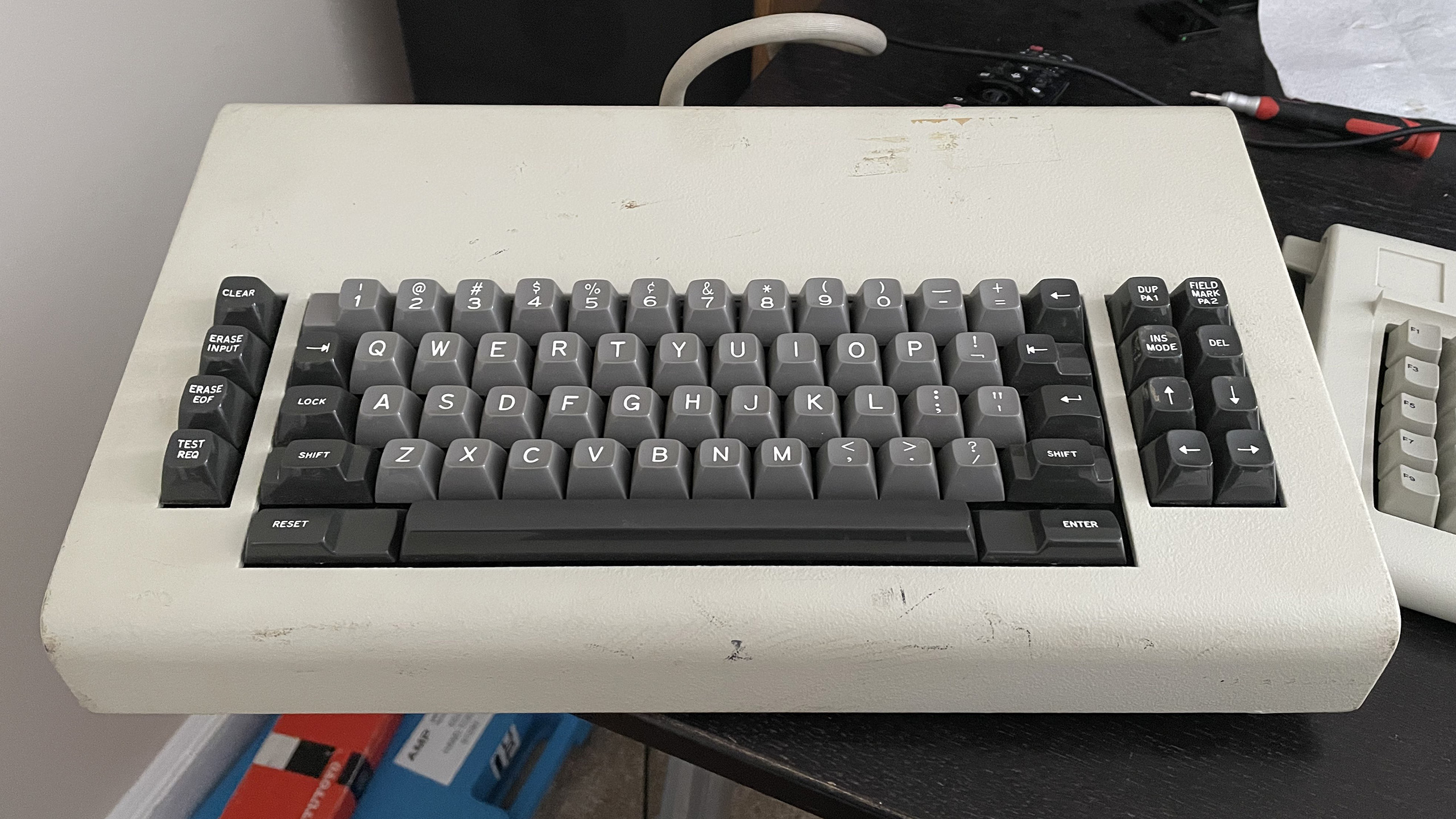
As an aside, it's worth noting that moving between fields was important enough on IBM terminals that they had a dedicated "back tab" key located on the opposite end of the keyboard to the tab key. On the original IBM PC, they decided to combine both functions into a single key. As a result, the tab key on the classic PC keyboard features the symbols for both forwards tab and back tab on the same key, the back tab symbol being on top to indicate that you need to hold down shift to use that function.
EDIT: The 5250 series terminals used the terms "Field Advance" and "Field Backspace" instead of Tab and Back Tab, but otherwise they used the same symbol on the keys, and the keys were located in roughly the same position as the 3270 series. Reference: https://www.bitsavers.org/pdf/ibm/5291/GA21-9409-0_5291_Disp...
The IBM 3270 was a device for filling up forms. The mainframe sent the terminal a form with blanks, and the terminal let the user fill in the blanks. The terminal hardware prevented the user from overwriting the static parts of the form, and could apply some other form constraints, such as numeric fields. That was all done by the terminal. When the form was filled in, the user pressed ENTER, and the completed form was sent to the mainframe as one transaction. This approach let one mainframe service huge numbers of terminals. The user never experienced delays while typing and could type at full speed, often without looking.
PCs didn't have that usage model. The PC crowd was thinking "typewriter". One of the first terminals for home computers was called the "TV Typewriter".
Web forms do have that model, but with less consistency.
[1] https://sharktastica.co.uk/resources/images/model_bs/themk_1...
With only a single combined Enter/Return key, it's hard to remember in any given context whether Shift+Enter or Control+Enter will open up a new line instead of immediately sending a message, dismissing a dialog box, completing input into a particular spreadsheet cell, editable filename, text object in a drawing program, etc., or whether I need to copy/paste a line break from another application because no such shortcut exists at all.
SAP call their forms "dynpros" (dynamic programms), and the reslting interactive mode of processing "realtime/dialog programming" as opposed to "batch processing". This all looked very IBM 3270-"inspired" (and so was the SAP logo made up of IBM blue with the well-known stripes...).
As another head scratcher, what is the shift-1 symbol? The exclamation point appears to be the shift next to one of the 3 left arrow keys, but I'm also unfamiliar with the regular unshifted key. Anyone familiar with these?
In the 80's IBM had a whole class of high level technical people called "Systems Engineers" whose entire job description was to opine on the merits of any given system. Not write systems, not debug them, and certainly not to explain them, it was simply to opine "you're doing it wrong."
Something that's bothered me about user-facing patents:
Let's assume that the idea of using a keyboard key to move between input fields in a software form is not obvious, and in fact is a brilliant stroke of genius the likes of which the world is not likely to see again. If that one guy hadn't been born, we would have gone thousands of years with no method, keyboard-based, mouse-based, or otherwise, of moving from one input field to another input field. Every piece of software would use nonconfigurable timers, and you'd just have to hope you could type fast enough.
I don't see what the hypothetical benefit of extending patent protection to this brilliant idea is supposed to be.
Say you're the company who comes up with the idea. You can benefit by including it in your product, where all your users can see it. In other words, the benefit you get from coming up with this idea is that you can publish it for the world to see, and that's the only way you can benefit from it. A usability feature that your users cannot use or know about doesn't increase usability.
Even though the idea isn't obvious, the implementation is. If you disclose your brilliant idea, everyone will copy it and your advantage in the marketplace will be transitory.
So... what is the purpose of giving you a patent? That cripples the marketplace, but it fails to realize the benefit of patents, publication. Publication necessarily had to happen anyway.
IBM insisting it not to be tab wouldn’t make sense. Microsoft was working for them and the programs should adhere to the CUA (Common User Access) standard.
While it seems odd in light of IBM's usual adherence to corporate norms across business units, having read a couple different books on the origins of the PC at IBM, it may be related to the entire PC unit in Boca being an extraordinary aberration outside the norm for IBM. Despite seeming hopelessly corporate to the Microsoft team, the Boca IBMers were considered a "Rebel Unit" inside IBM - when they were considered at all, since the vast majority of IBM wasn't even aware of it.
Due to being started virtually overnight (in IBM timescales), running incredibly fast and only existing thanks to Thomas Watson, Jr. himself overruling his lieutenants to approve such a "skunk works", Boca didn't have nearly the level of oversight, coordination or control as an effort that size normally would. In the early days Boca ran largely outside normal reporting channels and when they'd try to source tech or components from other parts of IBM, had to sometimes clarify that they were in fact part of IBM.
And that was true for many DOS programs. Pressing Return would just go to the next field, not submit the form. That was one of the things that needed some getting used to on Windows.
so they spent seven layers of management escalating against their own standard: https://archive.org/details/ibmsj2703E/page/n13/mode/2up
Another factor could be still-reverberating echoes of the likely political battles around something as broad and far-reaching as CUA. I can only imagine the quiet boardroom battles won and lost fighting over CUA between different factions across all of IBM's kingdoms, divisions and principalities.
Lame.
To be fair, Microsoft & Bill Gates are bad at quality user experience. "Ctrl+F" differs through their applications.
[0] https://archive.org/details/bitsavers_ibm525xGA2onDisplaySys...
*Edited.
The more I think of it the current TAB (SHIFT+TAB) key should of been used for entry navigation navigation only while the white space tab should of been something such as "SHIFT+SPACE".
RIP /.
The upstart adopts all the keyboard shortcuts of the dominant player. Then the existing userbase is comfortable... compatible, with the new and different software.
Then, slowly but surely, new novel shortcuts are introduced and you gradually find the “compatible” ones vanishing or conflicting or just glitched, until one day you’re no longer capable of using Apple or Word or Netscape or Excel.
I propose that IBM saw that coming, and fought against a future where IBM-trained users easily adopted someone else’s apps.
The tab key itself is hijacked by modern OS/UI behavior. It makes it complicated to actually type literal tab characters in certain contexts, particularly in the browser.
I still prefer tabs (and I'm a Go developer), but he is absolutely correct about that being a pain in the butt. For instance, try getting a tab character into the text area on Hacker News
I somewhat get the argument, but if you're writing code in the HN textarea you're doing something wrong (for code where tab/space matters anyways). Like, any code editor will use the tab key properly.
Though, it sills maddens me there's no somewhat universal tab-entry in OSes like we have with enter (somewhat because there's a mix of shift+enter, alt+enter and cmd+enter). All of shift/alt/ctrl tab are usually also hijacked.
Now that I think about it, I think I haven't hit the tab key for indenting code in ages. I use cmd+] and cmd+[ to indent/unindent blocks of code in my default editor and doing so habitual for single lines now as well that I have 'unlearned' the tab key. For the few occasions I'm in a editor that does not have this keybinding I am actually hitting spacebar a few times as it is more predictable than whatever amount of spaces using the tab key would give me (or if it gives me a tab instead of spaces) and me having to dance around with the backspace key as well. Some editors I think use tab/shift-tab to indent/unindent blocks/lines of code, but not insert a tab. But then you are having 2 modes for the same key depending on the context.
That's a good point!
Were it up to me, I'd probably say something like: Ctrl+`, or maybe ` followed by escape, or something like that. Maybe one of the function keys? Eh...most if not all of those have been hijacked to mean various inane and stupid things too. :/
Hmm...oh! How about: Caps Lock+Shift ? I'm using an ergonomic keyboard, but I think the button press would still work pretty easily. I assume most styles of keyboard would have both, so it wouldn't lock people out if they are writing in a different language, either.
Like the girl in Silicon Valley! [1]
I thought it was a bit funny that she was just hitting the space key over and over, but around the same time all my hobby programming was in TempleOS and I did the same thing. The indents were only 2 spaces though, and the tabs were eight wide.
Actually TempleOS' creator Terry Davis mixed tabs and spaces for the same argument stated in the Silicon Valley video, to save bytes. They're all rendered as spaces on the website but in the actual TempleOS code it's a mix of both. It means the indentation is really wonky on the Github mirrors (above 8 "spaces" deep), compare [2] and [3].
1. https://www.youtube.com/watch?v=oRva7UxGQDw
2. https://web.archive.org/web/20180906060812/https://templeos....
3. https://github.com/cia-foundation/TempleOS/blob/archive/Demo...
However, it might also be reasonable to have a key or key combination (some programs use ^V) to enter control characters as data rather than as commands.
It might also be a consideration when designing a new computer (which does not have to be the same as existing ones); I had thought about such things and may make such a consideration.
There is: Return vs. Enter. Sadly there are not many OSs and programs that honor this. I'm personally also sad about Scroll Lock. It would be useful, some programs even reinvent it, on Firefox it's basically F7.
It had a purpose, and it got hijacked and made its actual purpose more difficult to use.
It's not dissimilar to Apples initial Touch Bar and then removing the Escape key.
Average user might never use that key; average developer doesn't got long without using that key for its purpose.
To explain: control-shift-u allows entering a Unicode character by its hexadecimal code. This presumably depends on the Input Method Editor (IME) in use, which is something I've never fully understood, but this seems to work widely across different desktop environments (Xfce, KDE) and display servers (Xorg, Wayland).
I was once told that the tab key can be represented in different ways on different systems, and that's why spaces are safer because they're always represented the same.
Is that what Brendan was trying to say?
It's literally difficult to enter a "tab" character into many text entry fields and dialogs and applications, because it's used so often as a navigation key.
The main counter argument is that users have different preferences for the amount of indentation, so giving them control over that, just as they (nowadays) have control over the font used and window width, is a good idea.
The tongue-in-cheek counter argument is that fixed-width spaces are preferable over ‘normal’ spaces. They also give you more control over indentation, allowing, for example, mixing usage of THREE-PER-EM SPACE (https://unicode-explorer.com/c/2004) for indentation with FIGURE SPACE (https://unicode-explorer.com/c/2007) for right-aligning numbers.
Now that im thinking about it I’m convinced capslock would have been superior next field key and alt+capslock to be used for toggling capslock. But it’s not obvious to me capslock [e: must be] seen by the OS. It could be changed on the keyboards themselves.
You can configure your editor so that pressing the tab key inserts a tab character. Good luck with a web browser, or a UI where tab moves focus to the next control. The space bar basically always inserts a space character.
Bullshit reasoning though, because even people who use spaces for indentation don't do it by hammering the space bar - they also press the tab key. And of course in modern browsers we can give tab the expected behaviour.
The only logic I've ever heard for using spaces for indentation that actually makes sense and I vaguely agree with, is that lots of programmers do not give a shit about formatting code and even using spaces properly is often a bit too much for them.
That doesn't matter so much if you have an autoformatter though, so with the exception of Go I don't know why modern languages with widely used autoformatters don't use tabs.
About your point of tab being represented different on different systems: It will always be ascii 9, how it's draw does differ between text editors but I consider that one of it's strengths for programming. Everyone can configure what an indent looks like for them, it makes reading code easier.
Is it because they didn't want Tab to be both an input and a control character? I.e. there are some cases where you can type a Tab into an input field, and there are other cases where you can't, and it's not immediately obvious which ones are which?
All the way in 2026, I would still be sympathetic to this view.
Firstly it was a breaking change from dos. Dos programs used Enter. And enter meant you could capture numeric data using 1 hand, since the numeric keypad has an enter key.
That means left hand can stay on the (paper) source. Right hand types. People got fast at this. (Really fast). And this pattern lives on in some programs kline Excel).
Lots of people (ie my customers) hated needing both hands on the keyboard. Lots of our programs allowed mapping of enter=tab.
I should be clear. It's not the "name" of the key that matters, it's the location.
The dual-use of the key is just an annoyance we live with. Sometimes the key behaves as a navigator, but in other cases it behaves as a spacer. Daft. (Enter would have the same problem. )
The best solution (by far) would gave been to add another key to the keyboard. Preferably in the numeric key pad. We got lots of new keys in that era. Hindsight says we should have added a "move on" key at that time.
I have used plenty of DOS programs back in the late 80s/early 90s, and I don't remember a single one that used "enter" to move between fields. Most of the time, "enter" closes the dialog. They all use TAB to move to the next field.
But maybe you're talking about even older software?
The same issue arises (with much higher frequency) with Enter and even in the modern world I'm sure we all have a pretty complex ruleset we've committed of when ctrl+crlf triggers a newline, or a message send and what the corresponding behaviors of a bare crlf and shift+crlf are.
In HN's editor shift+crlf and a bare crlf cause a newline creation and ctrl+crlf does nothing - but often times ctrl+crlf will trigger a form/message/whatever submission, shift+crlf often causes a raw newline insertion (even when in a form context) and then a bare crlf might do one - might do the other or might even do neither! Those are the common bindings but I have seen exceptions and inversions of bindings with shift+crlf causing form submission while requiring ctrl+crlf for raw newline insertion.
All this stuff is just super annoying and causes a lot of user friction (and for a long time MSFT's style guide was considered a seminal reference for best practices as ironic as they may seem to folks these days).
Many MS folks used Xenix and were fans of Unix and very early DOS had SWITCHCHAR and AVAILDEV config.sys options for these things. But AFAIK IBM threw an absolute fit about it and forced their removal.
The DEV issue is specially annoying because DOS 1 didn't have directories - thus it could not have been much of a compatibility problem. But instead DOS/Windows is stuck being unable to support creating files named "CON" or "COM1" because it assumes device files exist in all directories.
I work at MSFT, this made me chuckle hard. Microsoft must have been a very different company back then, because now I find myself and my colleagues mired in pointless bureaucracy via endless meetings, AI mandates, promotion theatre and the list goes on. I am decently paid but the bureaucracy is soul destroying.
Great read
(It's intended to allow video games that use standard OS controls to be controlled sanely with a gamepad.)
Well before DOS was a thing, the mini I programed on was using Tabs to move between the TUI fields. Once you were happy you would press RETURN to process the data. At the time, seems IBM was trying to avoid doing anything similar to any of its competition.
I'm aware of folklore.org, but I wish there were something equivalent within Apple itself. Sadly, it's not part of Apple's culture.
It was 1992. I was a summer intern on the System Software team. One of my projects was to improve a Disk Initialization Package feature to mark bad blocks found during disk init. The existing feature worked, but it was super slow, it didn't show progress, and it wasn't cancellable.
The UI was the trickiest part. I'd improved the speed a lot, but we still couldn't know how long the whole process would take, so every heuristic I used to show remaining time was awful.
I noticed this guy a few cubicles down had a "User Interface" title, so I wondered whether he'd be able to help. I asked him if he had a minute, and sat down and hashed it out with Apple employee #4, Bill Fernandez, the person who introduced the two Steves to each other.
He was truly the nicest person I met that summer, other than my manager. He completely understood the problem instantly and came up with a great solution: ditch the time estimate and replace it with an indeterminate progress bar that advanced as each disk track was tested. It worked, people liked it, and it shipped with the point release after 7.1.
Not quite as gee-whiz as any of Raymond's articles, but it's a start!
Of course, that assumes it came from a place of corporate strategy rather than individual habit, which could have been learned from other older systems.
(And yes I do miss those - with an external keyboard these get less painful but still don't work 100% like on a PC)
Because sometimes you still do want to insert text with all caps, for example as part of an ID. Also Caps Lock as opposed to Shift Look is quite useful when you want to insert caps and numbers quickly, again as part of IDs.
> What does ScrLk key on my keyboard do?
It switches between the cursor or scroll wheel or the mouse moving the cursor or the viewport/document. It's quite useful. Firefox e.g. implements this functionality under F7.
> Why is there an Ins key when practically every text edit field is in insert mode anyway?
To switch, because sometimes you do want replacement mode. Also it is useful for the Ctrl-/Shift-Ins, which is the original CUA key for what people now know as Ctrl-C/V. It is quite useful for when the latter means something else.
> How often do you actually use the Pause key and what does it do?
It used to still work for a while in Linux, but sadly they removed it. Also it is still useful for the CTRL-ALT SysRQ, Pause sequence to advise the OS, when nothing else works, or you don't want to shutdown properly. Also it feels quite powerful to tell the computer to be off, and it basically immediately being off.
Mostly not to destroy people's muscle memory, I think.
People have gotten used to, and expect certain behaviour from OS+apps. Futz with that, and users become annoyed, frustrated, or ditch an otherwise fine piece of software.
In other words: history / inertia.
They still depended on IBM to some degree. If IBM stopped shipping Microsoft products on their PCs, it would hurt Microsoft quite a lot. But, clones had just begun to break out. Compaq and a few dozen other clone makers were exploding in popularity. I imagine Gates must have seen their orders from clone makers growing exponentially, and much faster than sales to IBM, and realized they didn't really have to kowtow to IBM, anymore.
A real shame about OS/2, though.
[1] to linkedin: making up anecdotes in order to create engagement in a professional setting. Often in the form of 'Today I learned' or '15 things my toddler taught me about stockpile management'.
"I may have invented it, but I think Bill made it famous." - David Bradley (IBM), creator of the Ctrl+Alt+Del shortcut key.
Microsoft has become IBM. IBM has become CA. Apple has become Microsoft. Oracle has become DEC (if DEC had a few more lawyers.) Amazon has become Oracle.
MSFT maintains a research arm (MSR) which routinely produces interesting concepts. Not that they would ever try to turn them into products. So maybe MSFT also turned into Xerox.
But yeah, I sometimes show that Sinofsky's blog entry as an example of difference.
Honestly, why should I even believe it?