For example, Excel would be a lot more usable and maintainable for me if there was a way to make a special "data sheet" in which data types are forced to be consistent within columns and there was a concept of column names. Still GUI-based and user-friendly. That would encourage a logical seperation between data entry, data output, and computations. In my experience, the main challenge of helping users with spreadsheets is when they create spaghetti code that mixes data and computation together.
Why use tables?
* Each column is uniquely named - no more wondering if you are referencing the right cell, no more thinking about "to $ or not to $"
* The table's rows and columns are reliably discovered by pivot tables - no more wondering if the entire dataset is referenced by the pivot
* New columns that are formulas are automatically applied to every row
* Tables have names, so it is easy to understand which table a pivot is referencing
The true, reliable and sane power of excel lies in Tables + Pivots + Charts. If you drive most of the problem solving into those paradigms you will keep hair!
But hey, to each their own. Good on ya if Excel tables are what you need.
I usually end up assigning names to nearly everything, single-cell constants, user input fields, computed lists, etc, etc
What a love hate relationship I have with it.
On the one hand, it is great for doing a quick and dirty analysis with data not in a DB, on the other, it mangles data and translates the keywords/function names.
You can already do both of those in Excel:
- data types: https://support.microsoft.com/en-gb/office/apply-data-valida... (though you'd also need to lock the spreadsheet as otherwise someone could remove the validation on the cells)
- column naming: https://smallbusiness.chron.com/give-name-columns-excel-7344... (you can name individual cells and ranges too. Which means you can actually start to write formulas that look more like C with name variables, very loosely speaking of course)
There's a surprising amount of hidden functionally in Excel. Personally I think that while ribbon bar might have made core features a lot easier for some, it's made a lot of the more advanced tools harder to discover.
It seems like there should be a way to combine the two. Maybe a minimal set of optional constraints (like a separation between data and code) like you proposed would be a good starting point. Make tables a first-class citizen backed by an embedded SQLite database (or something similar); let users write real SQL to query tables in formulas, maybe update the file format a bit to make it easier for programs to parse and access concurrently. Could be an interesting project...
Others have mentioned Filemaker and Access, and I think that's exactly right - non-programmers can understand datatypes, that's not the issue. The issue is a UI they can use and (more importantly) iterate on themselves.
One of the major strengths of spreadsheets is "touchability" - your stuff is right there. Psql is the opposite - nothing is visible without the right incantation, and non-programmers can't do much about that.
Why hasn't microsoft or someone taken the basic spreadsheet model to a shared-database scalable one? The UI is basically set at this point.
A naive schema (filename, tab, x, y, value) is what an excel sheet is. It's not like we are dealing with "impedence mismatch" and even shared editing can be reasonably handled with database transactions (or RAFT if you want to get really big/distributed)
I think the lack of this is a sign of Microsoft Office completely owning the space and not wanting to innovate at all. And the huge amount of effort it would take to replicate excel-level operations in a database application server is nontrivial.
But man, you could have an API for doing excel operations against a database schema, and export to excel...
And as you said, you could do lots of schema based options in databases that aren't natural to excel.
It takes about 10 minutes to learn the basics a spreadsheet, and what you get back is immense.
You couldn't get python up in running in 10 minutes, then you need to learn the language, the syntax, and how to structure a program, frankly I'm tired just starting to type out what needs to happen even before you can do *ANYTHING*.
Some people can get YEARS of productivity from those first minutes with a spreadsheet. The return on that initial 10 minute investment justifies spending more time to learn the more esoterica aspects of a spreadsheet, but even then, most people don't want to be bothered with learning how to "program".
Why do so many people start playing guitar/piano/drums/etc, but so few finish? Because it requires a significant up front investment, no immediate gratification, and a long, slow return on that significant up front investment, learning music is somewhat flexible, but you need to be highly skilled in order to exploit the flexibility.
For python, just think of installing it or setting up virtual environments.
Like the original article says, “spreadsheets are the original low code”
We had been using Excel for org charts like most places. We wanted to add grouping, metadata, and neatly be able to extend/add information with or without constraints. This was much before I knew anything database related, and Access seemed to be more powerful than Excel. Having generated forms to fit the data model was much more user friendly and a lot less error prone than adding a new row to an Excel sheet.
People criticize Access for being a dumb database or a Excel with too much heavy lifting. It occupies a specific space as a DB on rails.
Something that combined Airtable, excel, and maybe a more userfriendly (and more restricted) version of darklang for defining formulae could be really slick.
https://youtu.be/0nbkaYsR94c?t=2268
Although no validation/types
Excel thrived in banks, not because traders used it, but because IT/Quant people used it. It's so much more straightforward to build a UI in Excel than with React. Just type things in cells, then wire them with simple VBA buttons. Of course there are things you can't do, but for the purposes of a bank, it's very rare that you find one.
So if I am a quant, I don't need to go to the frontend guy, trying to explain to him what a "vega" is and why I would want to multiply by notional/vol to change the units. This is a huuuuge time saver. And you can change your UI anytime. Just open the file, add a column, click save and it's done.
At some point, banks knew that fat-finger-mistakes could cost them fortunes, and the lack of auditing was terrible. But they had to force traders to switch off their sheets by threatening them with internal fines (we'll charge you $2m for running things with Excel). So traders complied, but then they got into years-long projects, to create shitty shitty web apps, that couldn't do half of what Excel had built-in. Every change would need to go through an approval process, and it's unclear whether these systems had less bugs than spreadsheet did.
The first thing they wanted when the project was done? "Give me a button to export to Excel".
For the shameless plug part, I am building a tool to try and bridge code and spreadsheet (https://www.jigdev.com). Lmk if you have comments/suggestions.
Read "this is not a passion project, this is something I would like to make a living of."
Everyone uses spreadsheets, including developers. I use them. I'm not going to spend 50 hours coding when I can create a spreadsheet in 5 minutes.
Of course, the issue is when things get complicated, as the author and others here have noted.
Creating a CRM from spreadsheets is pure madness, for example, when there are so many other options that exist, without having to custom program.
For me, whenever you have a one-to-many or many-to-many situation, that's where spreadsheets, to me, fall apart.
I personally have used spreadsheets to do my finances, but only because I was too lazy to scope out different bookkeeping systems. I'm fairly expert in accounting, too. I've used a LOT of different accounting systems, and installed and trained people on them. But there's no way that one can get up and running as fast as one can by using Quickbooks or other accounting systems, in terms of all the report features, etc.
Pre-defined apps are fairly unchangeable, but unless one has critical information that depends on a custom solution, it's better to shoehorn your business into a pre-existing app. I do admit that. Very few small and medium sized businesses require that, though, I've never seen one yet that can't use a prior existing solution. Though there might be, but only very, very small percentage, like, less than 1%. However, a large Fortune 1000 enterprise could have stuff they need custom programming, because of the scale. But I don't have any experience with enterprise organizations so I can't comment on that. Maybe SAP or whatever is good for them, I don't know.
The only situation I can think of where you should discourage their use is in those situations where you know for sure in advance that the application is going to outgrow the spreadsheet very soon and/or immediately. If you are building a new microservice that will serve a million customers per day, don't make the mockup in a spreadsheet.
Agree!
> know for sure in advance that the application is going to outgrow the spreadsheet very soon and/or immediately
Hard to agree, what does "outgrow" mean here? Spreadsheets can handle very big use cases, with lots of data and still be useful, if you take care when building it (similarly to programming)
> If you are building a new microservice that will serve a million customers per day, don't make the mockup in a spreadsheet.
Hard disagree. Mockups are for prototyping/experimentation, so it hardly matters how you do them, as long as you throw them away before starting the main implementation (this throwing away tends to be the hardest part).
Spreadsheets are amazing prototyping tools!
Consider the output of your average audit. You'll have tables of findings, each of which needs a due date, a risk rating, a description of the problem, a description of the solution, auditor notes, customer comments, responsible party assignments, and so forth. (Yes, those would eventually go well in a tool like Jira, but that's for later--this is coming out of an audit visit.)
From a data standpoint, putting those in a spreadsheet makes sense: you can now order the findings by date or risk rating, hide ones that don't apply, cross-reference findings between visits, and so forth. However, from a text perspective, it's awful: the descriptions might run to multiple paragraphs, comments and instructions need more complicated formatting than just "bold or italic", some fields should be constrained on content while others need to be free-form, and so forth. All of those things work much better in a Word table than in Excel cells, but putting the content in Word utterly removes the ability to data-manipulate. So you wind up either creating some Frankenstein hybrid solution or with crushing one perspective to satisfy the other.
If Microsoft wants a win for Excel, making it an order of magnitude easier to deal with free-form text in cells would be an enormous step forward.
A really simplified version of access that works from one underlying spreadsheet as a data source perhaps?
Parsing them is actually very complex. You just have to hope your library can handle everything in excel. If you're a cli native I'm not really sure what you do.
Spreadsheets don't play very will with source control. If the underlying format was text and every cell and formula was on a new line it would work out ok. As it is now, merging them is very cumbersome....impossible for the laymen that might be the main user of the sheet.
By going with a speadsheet and not something like SQL, you lose a lot of rigor.
There's probably a few more needs but these are top of mind for me.
Look at what the UK tried to do their contact tracing program through an excel file. They ran in to problems at 80,000 entries because excel has limits and the whole thing fell apart during the peak of a pandemic. Spreadsheets are not Databases so don't use them as such -- thus "spreadsheets everywhere" isn't a good principal.
https://www.bbc.com/news/technology-54423988
Author seems to acknowledge the limits of Spreadsheets but then says:
"So you’re saying we should use spreadsheets more?
Yes! The hardest part about building most software is figuring out the process."
!! I'm lost at this point !!
Suddenly out of the blue it doesn't work anymore. It's fine given you stay within scope and don't rely too much on it.
All that said, I can see issues with errors that are hidden by spreadsheets but those can be handled with good spreadsheet design (i.e. NEVER EVER hard code anything into a cell) and they simply just need a way to do GIT type version control natively. We recently got the ability to have multiple people work in the same spreadsheet at a time if on MS Teams, but there's more work to do there.
Define 'hard code'...
Is "=MONTH(A1)+2" no good when I'm trying to write a row of every other month?
Is it bad to say '=IF(A1="USA",TRUE,FALSE)' when I'm trying to see what customers belong to our USA office?
I have this problem with coding too. In my mind, it's okay to hard code things, since you can always debug and abstract them later. Excel's "Evaluate Formula" and "Trace Precedents" are both pretty handy tools.
Maybe it's just me.
Minor quibble: it's an Apple III in the ad, not an Apple ][ as the post says. I remember running Visicalc on my Apple ][ but it wasn't until Excel appeared that I realized how seductive spreadsheets can be.
I'm not sure this is really a problem Microsoft can solve as an Excel feature. I think the better approach would be for MS to identify common ways in which people misuse spreadsheets and create new tools to accommodate those use cases. With how commonly Excel is misused as a database, I think there's a market for an alternative to Access which is more accessible (no pun intended). Something with Excel-like spreadsheets/tabs to represent tables and Excel-like formulas for computed columns would be pretty neat.
Just thinking off the top of my head. But... if that would be useful/doable, they may have already done it.
When we had no front-end devs available - we used Googles sheets API, connected our spreadsheets to our production DB, and did all the input of raw data, and ingestion of outputs automatically. User interaction happened within the spreadsheets.
When FE devs opened up, we eventually built the UI to replace the spreadsheet (Which is a very hard task, spreadsheets are good at what they do). But by this point, we knew exactly what we needed in the ux and had iterated on the ux multiple times.
Framework was pretty much Emacs for the office, and such was its power that unlike contemporary spreadsheets and word processors, which were usually positioned as productivity tools for generating business documents and reports, Framework was explicitly marketed as a decision making tool for executives. It did well in markets such as Europe where Lotus hadn't taken over, but it just about died when the Windows era started.
But, the problem with spreadsheets is that they are an engine of shoddy programming. I don't think it's fundamental. All currently existing spreadsheet implementations hide their functions and make review difficult. If we had spreadsheets that somehow exposed the relations between the cells and made them easier to inspect, ideally minimizing selective interaction (obviously you can mouseover, but that is a far more selective interaction than scrolling a file), they would be less of a problem.
To some degree notebooks (matlab/mathematica/octave, jupyter, pluto, livebook) are solving this problem, and probably being "halfway-between" spreadsheets code, with being fully reviewable is a game-changer, why data scientists like them.
I think you could also improve on the spreadsheet in other ways by being more opinionated. You could have each table be a named entity not on an "infinite-plane of cells" (so you have to set the # of rows and columns, obviously should still be easy to insert/remove rows and columns). I am sure I am not alone in thinking for the last 3 decades that graphs just "hanging out in the middle of the cells" is really stupid.
Also, there is little motivation to the spreadsheet user to change. In the examples given by the author, the original creator of the spreadsheet is long gone by the time the problems surface.
It has a GUI.
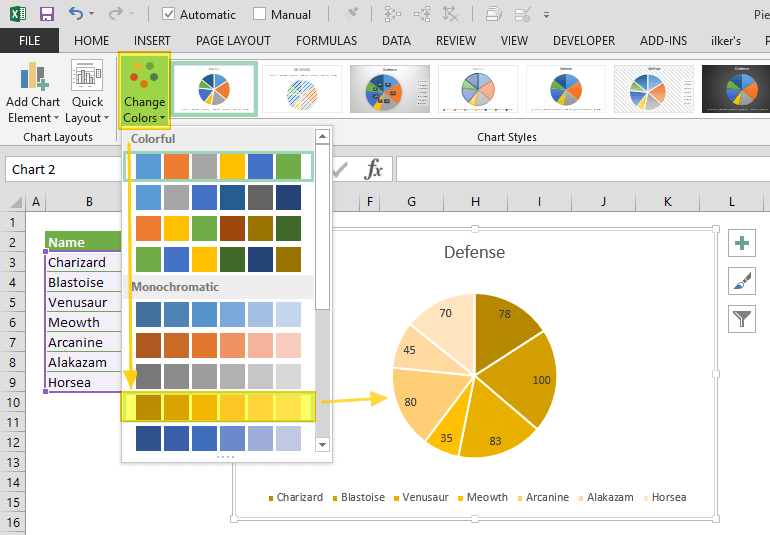
Click on a picture of a pie chart[1] is enormously easier than[2]:
    from matplotlib import pyplot as plt

    # Pie chart, where the slices will be ordered and plotted counter-clockwise:
    Aus_Players = 'Smith', 'Finch', 'Warner', 'Lumberchane'
    Runs = [42, 32, 18, 24]
    explode = (0.1, 0, 0, 0)  # it "explode" the 1st slice

    fig1, ax1 = plt.subplots()
    ax1.pie(Runs, explode=explode, labels=Aus_Players, autopct='%1.1f%%',
            shadow=True, startangle=90)
    ax1.axis('equal')  # Equal aspect ratio ensures that pie is drawn as a circle.

    plt.show()
And includes: previews of the available charts, recommended charts, all the styles of chart work through the same UX without having to care how they are named, they popup Wizard dialogs so you don't have to read in advance what parameters are required and what they mean, in-line editing by clicking and dragging to move and resize the whole thing or almost any part of it, change the chart style without having to rewrite code differently, rewrite e.g. axis labels without having to save/run, choosing colours and styles from visual dropdowns, having the chart redraw dynamically as you change the data in the source cells, works in Excel online, works with multiple people having the spreadsheet open, chart is inline with your data in the same worksheet saved with it.
[1] https://www.spreadsheetweb.com/wp-content/uploads/2019/04/pi...
[2] https://www.javatpoint.com/how-to-plot-a-graph-in-python
[1] https://docs.microsoft.com/en-us/office/dev/scripts/develop/...
Once you are able to read & write excel documents with a piece of software, you can do some pretty fucking incredible things.
Imagine being able to click a single button and download a total configuration output for a customer's environment (maybe 20-30 worksheets auto-generated in seconds). You can then email this human readable document to the customer for modifications. You then feed this back into the system to load their adjusted values (there is a diff/check-in report to confirm first).
The reason we and our customers like this approach is because there is a lot of configuration where we need to compare lists of things and slice parts of one thing into another. It makes replicating success absolutely trivial. Being able to style the document is a much bigger benefit than you would probably think at first. CSV is trivial to employ, but it is very constrained on this front. For a developer who is familiar, color & layout doesn't move the needle much. For a customer who has no clue how the back-end works, these things make all the difference in the universe. Things you can't edit are grey background, things you can are green, etc.
It's the user's decision that's usually wrong. Not the framework in which the solution is built.
For example, at Budibase [1], we've found a high percentage of our use cases are companies upgrading their in-house spreadsheets to applications due to several reasons: Volume of data Lack of auditing Lack of control Accessibility
Recently, we've started to see a major shift away from spreadsheet models to spreadsheets being used as data dumps and then being uploaded into third party software. Usually this "software" tends to be nothing more than some SQL and python scripts behind a fancy UI. I would personally prefer the banks to continue using Excel sheets and then pay for their employees to learn basic python and SQL but that's too simple and the SaaS sales guys have their claws firmly embedded in the upper levels of most orgs.
At https://www.dronahq.com we support 1. users to connect to their spreadsheets and build applications on top. or pull data from multiple datasources e.g. spreadsheets and support ticket system and build custom tool.
2. We understand people love columnar database like spreadsheet or airtable.com, hence we offer an built-in database called 'sheets'
3. We support most excel formula and functions for binding data or writing complex business logic i.e Logical Functions, Date and Time Functions, Text Functions, Math Functions, custom functions
However, I think spreadsheet programs are still way to complex for the vast majority of people. So many people are so math phobic that they won't even think of opening a spreadsheet.
One thing I've done with a spreadsheet a few dozen times is take the outputted CVS file my learning management system gives me in the form of last name, first name and convert it to first last in one cell. I still have to find the bookmarked answer I found years ago and cut and paste it in and I don't really understand how it works.
Spreadsheets are broken. It's easy to be at error due to calculation issues, which you'll only find out when manually going over it. It's a calculator that can't properly calculate. Many business have made huge mistakes due to it.
Never ever use it for financial calculations.
It should be interesting for anyone who's done a lot of thinking* about the relationship between spreadsheets, no code, and custom software. Check us out: https://stackerhq.com
* if this is you, and you're really interested, we're hiring. Email in my profile :-)
However, if your use case is narrower (e.g. only use CSVs), there are more suitable tools.
As a person who knows how to code, using a real programming language or SQL is way way better.
To that end, I've built a Desktop app that enables you to work with CSV using SQL here: https://superintendent.app
The main problem is when you embed a table in a sheet and use it as you would in a database. It is far too easy to overflow the maximum spreadsheet size, or overwrite data... or worst of all sort some but not all of the columns.
I want to like LibreOffice Calc but it's just too slow.
It's interesting to see non-excel/google sheets products use the same interface to good effect. Examples don't come to mind but I'm sure there are some.
Spreadsheets (Excel ones in particular) are great and presenting tabular data and they're mediocre at most other things including crunching numbers, taking notes, storing computational data, providing user interfaces, and much more. It's often okay to use a sub-optimal tool, but you have to draw the line somewhere.
A recent HN post[0] highlighted an example where Excel was being used to keep track of large-scale contact tracing data for covid in the UK. Excel is a mediocre database. It has hard limits on cell sizes and row/column counts among other things. They ran into one of those limits and lost track of 16K positive cases because of it.
From my own experience, I've had to deal with repositories containing tens of thousands of Excel spreadsheets. They were used to capture verification data. Excel files are large and difficult to parse with scripts, which was bad enough. But the worst part was that Excel doesn't really have a syntax or schema, so users editing the spreadsheets would frequently create changes to the table layouts which would have to be accounted for as edge cases in scripts. I'd be lucky to even recover data from half the files using automation. I even encountered one Excel workbook with over 300 tabs!
Every tool has limits and it can be frustrating working with popular tools when users fail to recognize those limits. I love working with Python, but I'd never try to write a kernel with it. Likewise, there is a time and place for spreadsheets.
[0] https://timharford.com/2021/07/the-tyranny-of-spreadsheets/
I've probably never been a real spreadsheet power user (though I've had some pretty big ones). But they're hard to beat for any sort of semi-structured tracking.
I sometimes wonder if spreadsheets as we know them were sort of an inevitable outcome of personal computers. There were some alternative takes early on but they never took off. It's also sort of interesting to me that some other tools in the same general space like databases on PCs sort of withered away.
There's tons of room for improvement, but it will be extremely hard to break in.
I am a CFO that has used spreadsheets my entire career (30+years). They can definitely have a vital role in any company and can also cause incredible problems.
A few thoughts that were not mentioned in the article:
   1) in many companies the users of spreadsheets are not allowed to use anything more powerful than spreadsheets (or maybe MS Access which causes more problems).  To get a SQL/Python (or other programming language) solution requires submitting a request to IT and then waiting two years to work up the priority queue.  This is not a complaint against IT and the priority process.  The reality is most spreadsheets do not start out as important enough to warrant high priority.
   2) Spreadsheets are great containers.  Not only can they hold a model, but also the raw data, and even emails regarding the model/inputs/etc.  This makes them very handy for keeping everything in one file regarding an analysis.
   3) IME, most significant spreadsheets get rewritten as they evolve, especially when they change hands.  This is both good and bad.  While the rewrite allows correction of built up badness, it is rarely done with the discipline one sees with refactoring in more traditional code.  Moreover, when a hand off happens, the rewrite is generally done because the recipient does not fully understand how the existing model works.
   4) Large spreadsheets cannot be effectively audited outside of locking/password protecting non-input cells. Very rarely is this actually done.  As a result, you get the scenario the author describes of hard-coded values in cells that once contained formulas.  These are almost impossible to find in worksheets with large numbers of tabs and thousands of formulas.
  5) Spreadsheets generally do not use true version control.  For most of my career, one simply used "File Save As" to create a new version.  In the early days it was due to a fear Windows would crash and you would lose your work.  Later, it became a way to step through changes and determine the impact of the change.  While this method provides some ability to go back to a prior state, people really do not track properly what each version contains and what are the true differences (would love to find a way to use Git effectively on spreadsheets).
   6) Most spreadsheets do not have test cases.  They certainly do not increase the test case universe as modifications are made.  As a result, cannot tell if things break when changes are made.
Before I bought a house, I built a stupid simple model to understand what my monthly expenses would look like. What you get an appreciation for is that very quickly you can go from comfortable to precarious with just a few additional fixed expenses (childcare, a new car, a boat).
Without laying it all out and seeing how your numbers change, it's hard to get a visceral appreciation for your finances.
=SUM(A1:A10) is no easier to do than sum(data$column). Why are we educating generations of excel users instead of generations of R and python users in undergraduate business programs? It seems so wasteful of young educated talent to learn how to do the same thing with such limited software, if its no harder to learn a general purpose software like python or R and do that same thing plus infinite more things.