I have accounts with 2 banks, one uses SMS 2fa and the other uses an app which generates a token. I had thought that the app was by default a better choice because of the inherent lack of security in SMS as a protcol BUT in the above attack the bank that sends the SMS would have been better because they send a different message when you're doing a transfer to a new payee than when you're logging in.
So really the ideal is not just having an app that generates a token but one that generates a specific type of token depending on what type of transaction you're performing and won't accept, for example, a login token when adding a new payee. I haven't seen any bank with that level of 2fa yet, has anyone else?
I guess perhaps passkeys make this obsolete anyway since it establishes a local physical connection to a piece of hardware.
[0] Ron Howard voice: "she eventually got it back"
In other words: If you're trying to improve your security posture, installing an ad-blocker is one of the best things you can do. If you have less tech-savvy friends and relatives, I would strongly recommend setting up uBlock Origin for them.
This seems like it ought to be low-hanging fruit. I would have less aversion to clicking on ads if I did not default to it being a security risk.
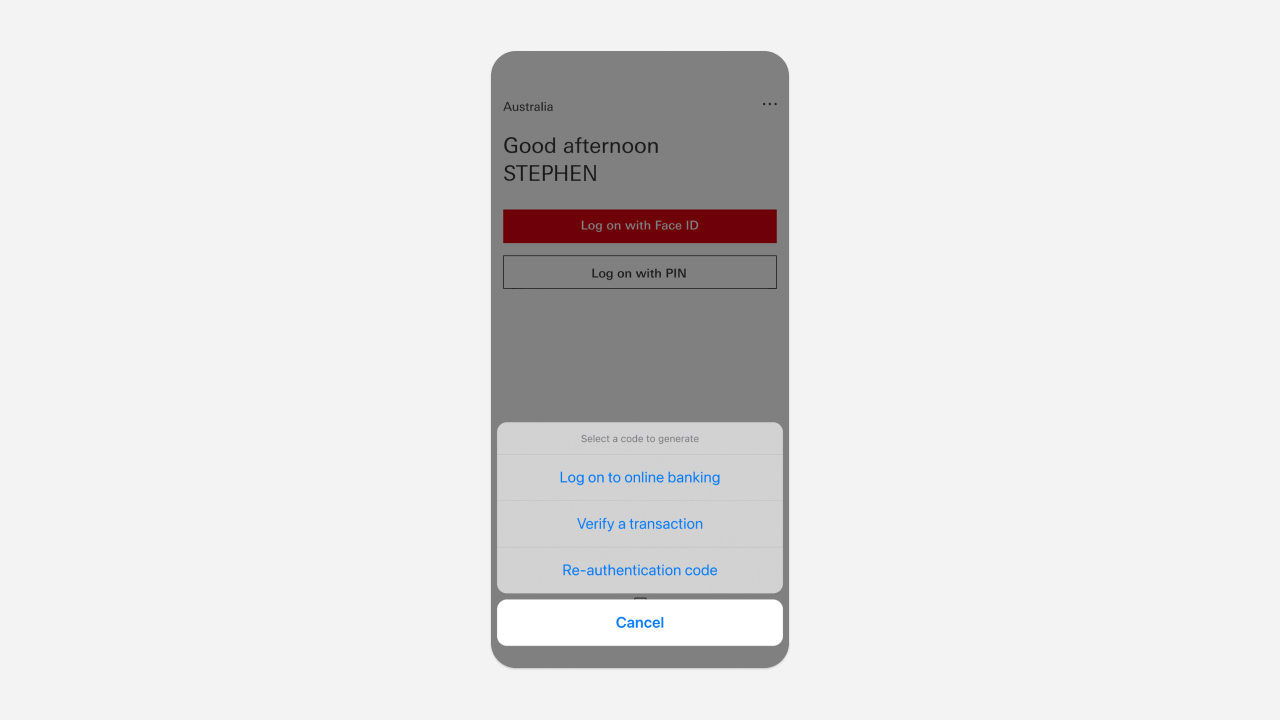
HSBC actually has this. All of their country-specific apps allow you to generate a different security code depending on whether you want to login to the website, verify a transaction (e.g. transfer funds to payee), or re-authenticate (e.g. to change your personal info, like your phone number).
Here's a screenshot of what that looks like on their Australia app (similar screens in their US and UK apps): https://www.hsbc.com.au/content/dam/hsbc/au/images/ways-to-b...
They've had this for years. I'm not quite sure why this isn't a standard yet or at least been adopted by other US banks.
I tried out buy Google ads once out of curiosity cause they gave me a free credit. It was crazy how many ridiculous stipulations and guidelines I had to work around before they'd accept my ad.
How are they that strict for me, but seemingly they'll sell to a phishing page that's impersonating a bank and targeting it to people searching for that bank?
Not to excuse failures, but there isn't a "it is easy for them but hard for me" situation.
The system probably produces a lot of false positives AND negatives.
> Use an ad blocking extension when performing internet searches. Most internet browsers allow a user to add extensions, including extensions that block advertisements. These ad blockers can be turned on and off within a browser to permit advertisements on certain websites while blocking advertisements on others.
Both of my banks use a payment flow which uses a hardware authenticator. But only one bank seems secure: it prompts for an amount and a reference and generates an OTP based on that. This is distinct from any other signing operations with the same authenticator. The other bank tells me to enter a 6 digit number (which is allegedly made up out of a part of the amount and a reference), but it is impossible to tell this apart from any other signing operation. It doesn't strike me as too hard to abuse that to either log in to my account, to sign another payment, or even to create a direct debit...
Sites like Digital Ocean try to load dozens of third-party trackers for a single page. Their supposedly secure payment processing includes cross-site violations that are blocked by modern browsers.
When their credit card management pages fail to work with reasonable browser defaults or sane browser add-ons they immediately advise their users to strip out all security protections. You are supposed to just trust content coming from seemingly unrelated domains including multiple processors you may or may not have ever heard of. Paypal? Ok, plausible. Stripe? I guess, but both? Pendo? Sentry? Optimizely? Hexagon? Google Ads? Google Analytics? Six other different Paypal domains? Eight other Stripe domains? Multiple Typekit domains? TagManager? Spuare? The list keeps going.
Plenty of reasonable protections cause alarm bells left and right. The answer? Disable those protections. Train users to think they are the problem.
The reasoning was it protects them against typosquatters and whitehouse.com situations. I guess when people were giving out that advice, google wasn't the way it is now.
In my experience with Bank of America and US Bank they bounce you around to several totally different top level domains as you navigate through the web-based banking.
These are third-party service providers that the banks contract for various pieces of their online infra… And it is a complete mess in terms of conditioning consumers to be phished.
Some banks in India have a separate “transaction password” that’s required to operate on the account vs just login and view balances. It’s not a rotating token, but it’s somewhat close to what you’re suggesting.
My gut? It actually works, and people didn't like that. Users and orgs like authentication slightly broken so they can work around systems.
People like authentication systems that are secure enough to keep bad actors out, but not so secure that it keeps legitimate users out. It's got nothing to do with users wanting to break into a system.
It's a nice-to-have but not even close to a universal solution.
I go further: I generate tens of thousands of variants of all the "sensitive" websites we use (like banks and brokers).
All the "levenshtein edit distance = 1" and some of the LED = 2. All variation of TLDs, etc.
I blocklist most TLDs (now that most are facetious): the entire TLD. I blocklist many countries both at the TLD level and by blocking their entire IP blocks (using ipsets).
For example for "keytradebank.be", I generate stuff like:
    # Generated by typosquat.clj for keytradebank.be (9809 entries)
    0.0.0.0 keeytraebank.be
    0.0.0.0 kebtradebank.be
    0.0.0.0 kytradebani.be
    0.0.0.0 keytrxdebak.be
    0.0.0.0 kewytadebank.be
    0.0.0.0 keytgadbank.be
    0.0.0.0 aeytradeank.be
    0.0.0.0 keytradebsan.be
    0.0.0.0 keymradebnk.be
    0.0.0.0 kytradeb9nk.be
    0.0.0.0 ketrade-bank.be
    0.0.0.0 keytradbeban.be
    0.0.0.0 eytradebafk.be
    0.0.0.0 keytraebank.ee
    0.0.0.0 keytrad3bak.be
    0.0.0.0 keytradebzn.be
    ...
I then force the browser to use the "corporate" DNS settings: where DoH/DoT is forbidden from the browser to the LAN DNS. I can still use DoH/DoT after that if I feel like it.
So any DNS request passes through the local DNS resolver (the firewall ensures that too).
My firewall also takes care of rejecting any DNS attempt to an internationalized domain names (by inspecting packets on port 53 and dropping any that contains "xn--"). I don't care a yota about the legit (for some definition of legit): "pile of poo heart" websites.
My local DNS resolver has 600 000 entries blocked I think, something like that.
I then also use a DNS resolver blocking known malware/porn sites (CloudFlare's 1.1.1.3 for example).
So copycat phishing sites have to dodge my blocklist, the usual blocklists (which I also put in my DNS), then 1.1.1.3's blocklist.
P.S: some people go further and block everything by default, then whitelist the sites they use. But it's a bit annoying to do with all the CDNs that have to be whitelisted etc.
This is an observation from a happy kagi subscriber that doesn't use an ad block.
Where they are nice though is that they are also tied to a specific origin (domain), so a phishing site can't ask for the real passkey. But I've never seen a passkey be a primary source of authentication, so they can always fool the user to falling back to some weaker auth (email reset or 2fa).
My local german bank uses an App specifically for 2fa. When i log in i have to approve the login within the app and the website redirects automatically. It shows me that I am approving a login or a transaction with all the transaction details. Since I don't enter my second factor into the browser, a replay wouldn't be possible and it would be VERY obvious to spot the difference between approving a login and approving a transaction. German Sparkasse for those that care.
But actually, we have put way too much stuff on the (inherently transient) web. What solves your problem is permanent client-side storage. Your friend shouldn't reach the bank through a google search.
In the US the bar to pull money out of an account is pretty low. Most banks would allow reasonably-sized transfers out with just routing and account numbers. I was stunned by this, but this is the reason utilities and stores can pull your money without you even talking to your bank. Just give them the info. And that information is not secret, it is printed on your every check.
The flip size is that for those "convenience" and service payments the money is easy to get back: banks, at least traditional, will bend over backwards to prevent being seen as enabling fraud.
It was in Australia, amount was thousands of dollars, she noticed when she was asked to enter yet another code and all of a sudden it made her snap out of her "autopilot" and take notice and look at the URL and other details. So as soon as she realised that something was fishy, she logged into the correct site, then saw the money was gone.
> In the US the bar to pull money out of an account is pretty low. Most banks would allow reasonably-sized transfers out with just routing and account numbers. I was stunned by this, but this is the reason utilities and stores can pull your money without you even talking to your bank. Just give them the info. And that information is not secret, it is printed on your every check. The flip size is that for those "convenience" and service payments the money is easy to get back: banks, at least traditional, will bend over backwards to prevent being seen as enabling fraud.
This was a "pay anyone" transfer. So money was being transferred to a bank by BSB/Account number in the background. The bank required a code when a new Payee is added, but the codes were not differentiated, so she was asked for a code to login, then told the code was wrong and asked for another code. In the background the real banking site to which her actions were being replaced had successfully logged in and had initiated a transfer to a new Payee. The real banking site asked the attackers for a code to add the new Payee, the fake banking site asked her for a new code to login.
The thing that really enabled the attack is that the same code generator was used for both codes, without any indication that a different action was being performed.
I still don't see how that's worse than no 2FA at all, which was an option, but I appreciated that they were banging the "SMS 2FA isn't very secure" drum.
My understanding of EU regulation is that it effectively requires this by requiring the 2FA to validate not just the identity but also the transaction (such as an amount, or destination account).
Unfortunately it means that all banks use SMS. We did have card reader 2FA that also did this but it's falling out of use because users don't like having to carry a card reader around.
The most elegant implementation I saw of this were card readers with a 2D (colored) barcode scan ; the 2D barcode contained transaction details that the card reader would display on its screen. This was an effective control against MITM. But even I myself always misplaced the card reader.
So now, most confirmations are done using the banking app. Even if I use a credit card by filling in its details on a US website, I get a push notification on my phone to confirm the tx on my app.
The app asks for a password or uses biometrics, so thats 1FA, and the app is enrolled at some point, so the token on your phone (I presume in some secure storage) counts as the 'thing you have' for 2FA.
Enrolling the app nowadays usually entails scanning your ID card and a 'live selfie' (blink your eyes). And of course you get notified (via e-mail) that you just installed the app on some device.
This is not true, I have used multiple financial things where they have different codes for different uses (Raiffeisen, K&H) or apps which have a server sent event and local approval showing the transaction (wise, Fineco)
They also send phishing warnings when they find active campaigns.
That said, plain old social engineering works well on people. Last week one small-scale influencer fell victim to a bank transfer scam. Got phoned by a bank person telling her that her account is targeted by hackers, then a cybersec police head phoned her and asked to transfer her savings to a 'secure account'.
(I know I could have just typed "amazon.com" and gone directly. But browser autocomplete makes it a tiny bit easier to use the omni-url bar and just type "amazon" than "amazon.com")
Maybe a secure browser profile that blocks search engine usage and can only visit sited in bookmarks or a whitelist so if you get a new bank and its not on the common whitelist have to explicitly add it to bookmarks.
Use your Chrome secure profile tm for banking and refuse to auto complete payment info on the insecure side.
They should also tell you when some major change was made.
Seems so silly!
I wonder how many people they've need to "help" with this. Yes, I know there's tons of old code in many banks, but they would have saved money if they had a single developer work on this full-time for a month or something. Support people may be cheaper than devs, but they're not free.
I think at least some UK banks will do this. When I've done it using a card + card reader, you select the option to choose which type of operation you're trying to do. And if you're just trying to login it just displays a rolling code, but for authorisation of particular events it will take the form of a challenge/response, i.e. you have to select the operation on the card reader + enter a code provided from the site. This should I think prevent _simple_ replay attacks.
I even think for some transactions such as transfers over a certain amount, you have to enter the amount into the reader as part of the code generation.
1. Login
2. Add payee
3. Create transaction
4. Verify transaction
This appears to be a banking issue where they do not try to maximize the attack surface.
Sure people will try to game the system by doing phishing but its the responsibility of banks to actively make it harder
Then I can picture a great way, locally, to screw these knock off big times.
Either the site is a great knock off, visually similar (if not identical) or it won't fool people, right?
So what about this: what about the browser saving, locally, screenshots of the login pages you visit.
Then, when a new login is made, compare, visually, the page to what's saved and see if any saved pages are similar?
"Oops, the page www.banklng.com looks nearly identical to www.banking.com which you visited previously, they're probably trying to scam you!".
I’d much prefer to use a Yubikey over all other options at this point.
Banks and payment processors have some of the worst technical debt. For example, a lot of transactions are processed using the ISO8583 standard, a binary bitmap-based protocol from the 80s. The way cryptography was bolted onto this was the minimum required to meet auditing standards: specific fields are encrypted but 99% of the message is left plaintext without even an HMAC.
Wouldn't this be MITM?
"A replay attack in a network communications setting involves intercepting a successful authentication process—often using a valid session token that gives a particular user access to the network—and replaying that authentication to the network to gain access"
Even though this wasn't a session token, it was an authentication process and token, gathered from a fraudlent source and replayed to a valid source.
MITM is:
"A man in the middle (MITM) attack is a general term for when a perpetrator positions himself in a conversation between a user and an application—either to eavesdrop or to impersonate one of the parties, making it appear as if a normal exchange of information is underway."
So to me a MITM would be more like using a wifi access point to access the correct banking URL, but the service carrying the data was acting maliciously.
I for one don't ever read those messages, and Android at least will usually copy the code for you making them even easier to ignore.
And just like SSNs both the "unique" and the "never change" are only true of the spherical cow version of the system. Phone numbers are actually substantially worse at being unique and unchanging, what with people in families sharing a phone or trading phone numbers, people forgetting to transfer the number when switching carriers, people intentionally switching numbers in an attempt to end spam calls... The number of ways to break the assumed invariants is actually quite high.
See Falsehoods Programmers Believe About Phone Numbers [0].
[0] https://github.com/google/libphonenumber/blob/master/FALSEHO...
I know I'm not the first person to be unable to port a number, so calling a phone number something that never changes is a bit skewed
I think the contribution of Spammers to the decline of the Internet is underrated.
First rule of designing anything: "if some cunt can make a buck by completely fucking over your system then that cunt will completely fuck over your system because that cunt is a cunt."
Meanwhile treasurydirect.gov still just uses a verification code via email. If it's good enough for the Treasury, it's probably good enough for a bank.
NIST SP 800-63B §5.1.3.3. https://pages.nist.gov/800-63-3/sp800-63b.html#pstnOOB
Customer: "What do you mean two factor app? I thought the code was supposed to come to my phone?"
Support: "It did, but we no longer support SMS two factor authentication."
Customer: "But I had no problems when the code came to my phone."
Support: "Yes, but NIST recommends that we don't use SMS 2FA"
Customer: "What's NIST? I'm finding this very frustrating, I need to get into my account."
"Unfortunately, many of our other customers, and customers of other financial institutions were not correctly protected by the code alone.. and were still getting scammed or confused.. and losing _all_ their money."
> Customer: "[...] I'm finding this very frustrating, I need to get into my account."
"That is understandable, but we take the security of your account and your personal information very seriously, and this requires us to make changes to maintain that security in the face of new threats and actors as they evolve."
In my country, almost all banks force the use of app 2FA without SMS as an alternative.
If I don't want to buy and carry an extra phone around, I'm limited to using the one bank that doesn't require it.
On a rooted phone, you've made it possible for other apps to spy on and steal your banking information.
Bank apps not running on phones where security has been compromised seems entirely reasonable.
I have root access on my laptop and I log in to my bank's website just fine. Making apps not run on rooted phones is just perpetuating the cycle of forcing users to comply with the restrictions placed upon them by Apple and Google. Root access != less secure. It means control over the device you paid for and own.
I instead have to use my desktop web browser, and desktop operating systems have a far worse security model than Android. No special permissions are generally needed to capture the screen, capture/inject keystrokes, or open .mozilla/whatever/cookies.sqlite
So my phone is still the significantly more secure environment. The fact that I have the ability to grant root does not make it "compromised"
I'm much less worried a hypothetical attack where I accidentally give sudo access to a malicious app than I am about the well-established ongoing attacks where Google violates the entire population's privacy, or the regular stream of malware that makes it into the official app store.
So... phones where a corporation has root are more secure that phones where the owner has root, you say? Secure for whom? For the user? Seems obviously wrong. It's more secure for someone else to have power over you?
Again, you're just a few words from "Freedom is slavery".
My computer is rooted, making it inherently less secure than my phone, yet I have no trouble accessing my bank website. What threat is a bank protecting against by disallowing app usage on a rooted phone?
The "1-click login" links are a concern and just having access to the SMS would be enough to take over things like WhatsApp.
But 2FA codes seem notably less worrying. They are the second factor and require an attacker to have the password too. For these cases I'm much more relaxed about the use of SMS and the risks of interception.
For every leaked database of SMS messages there are 1000 leaked databases of account credentials
But what's the threat model here?
I didn't think of 2FA as being protection against password reuse. People should still avoid reusing passwords and change them if they know of a breach.
Are there really attackers who are picking up breach databases and then sim-swapping to get the 2FA as well?
I hope that this will in due course be recognised as a terrible mistake and rectified. Unfortunately my hope is only faint.
Agree about the card reader being useful for offline. But I never remembered the thing and was often stuck when travelling
https://en.wikipedia.org/wiki/BankID
It is amazing what a little cooperation between public and private institutions can achieve. It is the only way to login and 2fa to government services and most banks (some legacy systems are still supported by banks) and it works great.
It is incredible there is no system like this for every country, heck it is incredible that there isn't a system like this for the whole EU.
Not having too high hopes though.
https://ec.europa.eu/digital-building-blocks/sites/display/E...
The CCC definition of this being only 2FA-SMS is incorrect though. It was not only Twilio Verify (2FA API) that was affected, it was all SMS sent through this vendor.
Also, storing secrets is day to day life in a lot of scenarios.
How interesting or uninteresting would bi-modal 2FA be ?
That is: you receive a code by text and you enter the code by email…
I haven’t spent any time to work out whether this significantly changes the attack surface but… At first glance it does seem like you would need to own two different account types…
… So I guess a first question would be: does this exist anywhere? Has anyone ever seen this or done this?
Moving from web browser to email for entering the 2FA code means that you (the user) have to make sure to send email to the correct address, not one provided by the attacker.
It described me the whole page, explaining it was a login page to log in to bank X in country Y. He compared the URL with the bank's name, etc.
Then I modified one letter in the URL, changing "https://online.banking.com" (just an example) to "https://online.banklng.com" and asked ChatGPT 4o again.
He said it was a phishing attempt.
So, basically, you can, today, already have a screenshot automatically analyzed and have a model tell you if it's seemingly legit or not.
As a sibling comment noted, performance will almost certainly be sensitive to temperature (randomness), exact prompt phrasing, exact sequence of messages in a dialog, and the training-data frequency of both the site being analyzed and the phishing approach used.
One could conceivably train a specialized ML model, perhaps with an LLM component, to detect sophsticated phishing attempts and I would assume this has even been done.
But using a relying on generic "helpful chatbot" to do that reliably and sufficiently is a really bad idea. That's not what it's for, not what's good at, and not something its vendor promises for it to remain good at even if it happens to be today.
At it's best, it may even "recognize" the top 90% of sites. Often, it's not a bulletproof solution, and shouldn't be trusted to generate either false positive/negative
My best operational security advice is not to click shit in your inbox and navigate directly to the hostname you trust to do sensitive actions
But for login you basically register a single phone, download a certificate to it and that becomes your second factor. If you login via web or another phone, you need to approve the login from that phone.
Of course if you lose the phone (or it's damaged) you need to go to the bank to fix it, but that seems like a reasonable approach.
Unfortunately, for some other services, like banks or government agencies, you don’t have any option. You can only minimize the impact by using a unique password and username and keeping them updated.
For a sophisticated user who can confidently use distinct and strong passwords for each service and protect those passwords, SMS-based 2FA offers minimal safety improvement.
For a business, they know that a significant number of their users don't do this. These users are exposed to credential stuffing attacks. SMS-based 2FA means you need to phish somebody (or otherwise obtain the code). That's an improvement for these users.
The only time where there is an active reduction in security is when SMS can be used as single factor. This is frustratingly common for password reset flows, which allows a sim-swap attack to fully compromise an account.
1. Insecure ones
2. Ones where many users needing recovery will get locked out with no ability to recover their accounts, guaranteed
[1] https://news.sophos.com/en-us/2018/10/01/facebook-turn-off-s...
Use 2FA. Use 2FA. Use 2FA. Worry about the design decisions in your spare time.
Instead they bought API access without the leastest of due diligence, putting their customers and their reputation at risk.
Additionally, the merging of different customer’s data by the processor is probably not GDPR-compliant (even if access control was in place).
Isn't the hard prt the connectivity bit i.e. negotiating with the various telcos? I once saw a telco use a third party SMS vendor for messaging their own customers for an app - because setting it up internally was too much of a hassle.
GDPR is not necessary applicable here. An SMS gateway is most likely classified as a telecom carrier, and thus any local telco laws would be applicable and not GDPR. That applies only to the transfer of the SMS though, so for example a customer GUI of sent SMS would be out of that scope.
(And before someone tells us that SMS 2FA is insecure I would like to point out that we use this for verification purposes in our booking system when a customer makes a booking. So for end-customers, not for users. It is a chosen strategy for making verification easy as alternatives are too complex for many consumers. All users however authenticate with email and password, and have the option of adding TOTP 2FA).
I hope a day or another people will understand and IMPOSE an end to such crappy unsafe practice.
I mean, even if we disregard the auth codes thing, which according to CCC were being generated on a static timer, if someone did get access to this bucket - they would have gotten away with a juicy list of phone numbers and names from some of the top companies, at the very least.
I'm not sure how hard it would be for an S3 scanner to guess "idmdatastore", so it is difficult to say if anyone else got in. Even if not, a live database storing live data without encryption or anything is crazy. I feel like IdentifyMobile will feel the wrath of this no matter what.
[0]: https://stackdiary.com/twilio-issues-an-alert-about-a-securi...
All the articles and videos I found are like:
1. Attacker calls phone companies support hotline or alternatively his confidante there
2. ** MAGIC **
3. Atacker has access to SMS messages sent to victims number
I understand that some might be deliberately vague but I don't want a step by step instructions, just a high level technical overview.
And to give another hint why this is so hard for me to understand: To the best of my knowledge, if I call my phone company with whatever scenario that I can imagine that involves my SIM, all they will do is send me a new SIM to my physical address.
So, step 1, convince the carrier representative. Step 2, give the the IMSI. Step 3, put the sim in your phone and receive SMS.
If you do step 1 in a physical store, the representative will probably give you a new sim from their stack even.
That's basically SIM-swapping. The only step you haven't described is getting the new SIM sent somewhere else, which probably isn't too hard a thing to achieve given sufficient corruption.
Ultimately, the phone company uses its information to work out where to send an SMS, and that information is an entry in a database - SMS to number X is routed to SIM card ID Y. If an inside job can change that database entry for a while, that's enough to attack SMS-2FA.
Google has recently started enforcing their own “click yes on already authorize mobile device” 2FA, which is very frustrating.
I have hardware 2FA keys that I keep in a safe. I deliberately do not keep them on me, and using them to re-auth is mentally an “event”.
This is not the case with my cell phone, which my kids play with, gets left on my dresser while the cleaners work, etc.
Really pushing me to run my own services again, but that obviously comes with its own challenges.
Your desktop, laptop, tablet, and phone can all share a password manager. They work offline and online. Passwords generated are unique, breaking password reuse attacks. Password managers support auto-filled TOTP codes per-login. They support passkeys. There's password managers built into browsers in addition to the 3rd party ones. There are personal, family, and enterprise options. They could be installed as a system service to isolate them from userland attacks. They support advanced functionality like SSH keys, git signing and biometrics.
If you're a stickler about having a completely independent factor from your desktop/phone/etc, password managers could be used with different profiles on different devices, and allow several easy ways to pass an auth token between devices (via sound, picture, bluetooth, network, etc), ensuring an independent device authenticates the login to avoid malware attacking the password manager.
We already have the tools to do something way more secure than SMS, and it's already on most of our devices/browsers. We just have to make it the preferred factor.
SMS has an extraordinary advantage in that the vast majority of people transparently have access to it. No need to download another app. No need to install anything. No need to buy a special usb device. It also has a recovery mechanism built in, as the carriers will all let you move your phone number to a new device. This, of course, comes with the high cost of sim-swapping attacks. But few companies will be happy with "customers just lose their accounts when they drop their phones in the toilet."
We'll see if the google/apple security key system takes off. That's probably the best bet we've got given the ubiquity of these ecosystems.
No thank you.
A password manager is, in essentially every respect except interoperability, inferior to WebAuthn. Let’s not make an inferior solution mandatory when we already have a superior solution.
With a slight caveat that it doesn't work. At least not on Linux without some proprietary junk dongles or their emulators.
Basic usability? The security theatre is making computing more and more yanky every year, with questionable benefits, and with no regard to the drop in efficiency.
For most accounts I don't care much if they are compromised. And have never been compromised even with a lot of "worst practices".
Would you agree also that MFA should be mandated for everybody's doors? Or to my bike?
You have to HAVE the key and you have to KNOW exactly how to wiggle the key to get it to work.
Attacks in the digital world are simply more scalable than in real world. I can try to log into 1000 Gmail accounts in seconds, but it'll take me hours to try to open 1000 doors.
Dead simple… Works off-line… Requires no account or personal infra to use…
… And as a bonus I already have a nice workflow where a WebCam is pointed at my token sitting on my desk.
I kid.
Or do I … ?