While I think Apple was off the rocker on this particular decision, I do respect their org structure that allows this type of decision to occur. Believe me, there are companies where a dozen people or more would weigh in and prevent an unpopular choice. Consensus sometimes hinders a desired result (both good and bad).
I actually think it's a really good choice and shows Apple really understands design. And with the relatively low power consumption it makes sense. It's not like it's drawing a ton of power on idle
I think I shut it down once for an extended vacation just to make sure appliances weren't on while I was gone and when I switched apartments. Otherwise I'd check and post my uptime from the command line.
It's a launch M1 mini so I'd wager less times pressing the power button than I have fingers on one hand.
While macOS presents a "Start up automatically after a power failure" option, and it works, the reality is…complicated.
Intel Macs require a model-specific hardware register to be set after each reboot:
https://web.archive.org/web/20230218203824/http://www.macfre...
The analogous setting on Apple Silicon Macs appears to be nonvolatile:
https://github.com/AsahiLinux/linux/blob/de1c5a8be0ee99602e4...
I use a Mac Mini (older model) in my music studio. It shares a surge protector with approx. $12k worth of audio gear (some of it nearly impossible to replace). I have all the gear + the surge protector switched off anytime I'm not using it. Which is most of the time.
While the weight and form factor would make powering the M4 Mini on a little more than a nuisance, I have a hard time lumping this into one of Apple's great design features.
I guess someone thinks the astetics are worth it, but even if the power button did notably harm astetics (which I doubt) I would take functionality over astetics any day.
If there were two models with different power button placements which one do you think people would buy?
Probably even drawing less than a "normal" PC PSU would just burn to heat in losses, lol. 3 watts of total idle power consumption, that's nuts how low it is...
Your average PC PSU hits up to 95% efficiency, so even at maximum efficiency at full load it would burn like 30 watts.
Many leave their devices on their desk and Apple always had a problem with just letting devices turn of completely, there are regularly problems with it. And they do drain power on idle, which is a frequent complaint.
Yes, we are that insane to use a lot of Apple devices for business in some departments. MDM for phones and iPads is top for the baseline administration, but the devices are eccentric to say the least.
The power supply connected to the mains for sure does that.
It's also larger, more satisfying tactile/clicky, and concave compared to the old button (which was rounded into the outside curve, not particularly be satisfying to press). I think the old one being so small and indistinct feeling, and also being so close to the cables meant you would never try to reach for it blindly. You do have to lift it up a bit, but the device is so light you can do that with the same finger you're using to push the button (of course you need another finger to push the top of the mini _down_).
I think neither old nor new button were really meant to be used more than occasionally, since you typically wake your Mac from the keyboard, and both designs reflect that. I do sympathize that the new version could be less flexible in different mounting positions though.
(that said, I'd bet Jobs/Ive Apple would never have shipped this, unless the height underneath was exactly perfect for even the larger fingers to fit)
I love it when my macbook is turned off and I accidentally nudge a single letter on the keyboard and it powers back on - not to mention when you're drying to clean it with a micro fiber cloth.
Now, I end up restarting with that mere act, and have to long-press to shut down again because the shut down option won't show up on login screen.
For mobile devices, removing the headphone jack was not well received and it annoyed me too when it happened. Last year I made the switch to airpod pros, and I think I was the last person on earth to switch to BT for headphones - never looking back. So much better not to have a cable and untangled it.
The wired ones are decent yet cheap, but if they did not remove the 3.5mm, then except teens and hip adults, most people would opt for the wired ones.
My M1 Max Pro again has the 3.5mm port, and I have bought a pair of wired ones and gifted my airpods to my teen nephew.
Keep it on the bottom where it's hard to hit accidentally.
I'm the first to shit on apple but this sounds like a complete non issue
Rendering HDR video was around 12fps there on the i5 - the same project in the Mac mini gets 60fps.
The M4 10 core GPU seems on par or better with a mobile RTX3060(65W) for video tests (NR / Deflicker) so I'm also impressed about the M4's efficiency. A lot of power per Watt.
It's becoming a dedicated video rendering machine for me where all the SMB auto mounting issues with macOS seem solvable. Pretty happy so far with the base model price even in the EU. The power button placement is an annoyance for me, though.
Keep the thing upside down.
Not joking.
Edit: any downvoters care to elaborate?
You might scratch the top, maybe? Nothing that a small piece of cloth wouldn't prevent, anyway.
Playback works well - up to 60fps. However, export to H.265 creates a lot of Swap. Rendering went with 15-18fps. All videos on a SMB network drive but the GPU was the bottleneck for rendering.
Swap was even around 24GB with 5 videos which I tested first. Using 4x4K it went 9 GB before stabilizing at around 2GB. No effects or grading whatsoever - plain 4K60 SDR videos.
One single SDR 4K clip renders to 8K at 25fps. Using Superscale 2x makes that 0.5-1fps.
For 8K rendering you may be better off with 32GB RAM minimum or trying the M4 Pro model maybe with 24GB. For 4K/6K editing the base 16/256 M4 Mac mini seems sufficient when all video storage will be on external drives or network.
Edit: added single 4k->8K rendering performance
You could pick a variety of non Apple CPUs that easily deliver 4-5x the performance of an 11th gen i5. Maybe don't be disingenous and compare the M4 to a more recent CPU like i5-14600K, which is also 4x the performance. I'm not comparing on power efficiency, since that was not mentioned at all as part of your comment.
Passmark shows 38,951 / 4,282 versus 24,724 / 4,555:
https://www.cpubenchmark.net/cpu.php?cpu=Intel+Core+i5-14600...
https://www.cpubenchmark.net/cpu.php?cpu=Apple+M4+10+Core&id...
So i5-14600K is 1.57x on multi-core, slightly worse on single-core. $235 for the CPU versus $599 for a whole system. Could maybe match the total price, but Intel won't be able to come anywhere close on the power efficiency.
Once I patched my old Dell T1650 BIOS for ReBAR support yet the iGPU of the i5 1135-g7 had similar GPU performance for video as the Intel Arc A380 in the desktop PC. The old PCIe3 speed limited its performance. I heard others reported a smoother replay experience with Apple silicon compared to even a RTX4090.
I get some delays when fast scrubbing through a 9 multicam 720p timeline and just 360p proxies. Still impressed compared to what I was used to. Video editors may be surprised about the performance for the price.
Edit: This is in contrast to my M1 Macbook Air with 16GB of ram which would stutter a lot during color grading. So definitely feeling the improvement.
And while I'm broadly satisfied with its performance, I do think that the SSD is probably carrying some of that load. And for a machine that often gets used far longer than a PC, I can't see that being great for longevity.
This isn't the early 2010s anymore - SSDs last "long enough" for most people, to the point they are no more consumable than your motherboard or your RAM. (I've actually experienced more RAM failures than SSD failures, but that's an individual opinion here.)
And for the downvoters - do you remember the last time you handed in your Steam Deck, Nintendo Switch, iPhone, or even laptop specifically for a random SSD failure, unrelated to water damage or another external cause? Me neither.
I guess it takes 10 Watts to maintain the Thunderbolt controller, USB hub, A13 processor, and run the fan.
Power usage does drop to <1 Watt when the Mac is actually sleeping, unless anything is plugged into the USB hub. Even an empty iPhone cable will cause the display to draw 5 Watts. It's disappointing.
The built in mics and speakers are fantastic, 5k is great, the webcam is meh.
iFixIt and others have already posted videos showing that the flash storage is now upgradable.
> M4 Mac mini Teardown - UPGRADABLE SSD, Powerful, and TINY
I wonder if 3rd parties will start selling them. If the memory controller is in the cpu, there’s no reason for the little board housing the ssd to have any proprietary chips…
At the moment it's only the best computer ever made, but too expensive if you want any sort of storage.
We've already seen videos from the usual suspects showing that people who are sufficiently skilled with a soldering iron can replace the flash chips in the modules with higher capacity chips, in addition to replacing the whole module.
Sure, but I don't think soldering skills is exactly what I'd have in mind when I think "upgradeable".
> Anobit appears to be applying a lot of signal processing techniques in addition to ECC to address the issue of NAND reliability and data retention. In its patents there are mentions of periodically refreshing cells whose voltages may have drifted, exploiting some of the behaviors of adjacent cells and generally trying to deal with the things that happen to NAND once it's been worn considerably.
https://www.anandtech.com/show/5258/apple-acquires-anobit-br...
You can't just swap the module out.
So to expand storage in an M4 Mac, you indeed need to desolder the flash chips and solder in new ones.
My m3 air draws around 3W on avarage and that's with a 14 inch screen running at around 40% brightness.. impressive stuff. Passive cooling too!
Docker desktop can be configured to start on login. For keeping the mac awake “forever”, i’d suggest the Amphetamine app.
I also appreciate that you can easily use the macOS screen sharing app to login and manage the mac from a laptop.
I suppose you could try running Asashi Linux in the future? I think it only works on m1 and m2 mac’s at the moment but don’t quote me on that.
macOS has a built-in console command for that: `caffeinate` [1]
If you want to run Linux server apps, you should run Linux. Because Apple hardware and macOS isn't giving you any advantages over a generic piece of hardware running a Linux distribution. The hardware costs more and is less upgradable than off-the-shelf hardware.
Servers should not run desktop environments because they are a waste of resources and widen the attack surface due to having more components installed and running.
And even if you want a desktop environment for your Linux server, Linux most certainly has a wide selection of mature stable desktop environments.
If you need to do development work or just achieve the goal of running Linux applications on a Mac, that can be easily done via virtual machines, containers, etc.
A "dumb" NAS 2.5" SSD drive array plugged into one via ~~firewire~~, and then out to the network via the Mac Mini would work.
edit: thunderbolt!
Once I have some more disposable income I plan to buy a Thunderbolt RAID array and a mini. FireWire hasn’t been on Macs for at least a decade.
Apple’s internal storage pricing is absurd but you wouldn’t plan to use a NUC or a Raspberry Pi SOC’s onboard storage for a NAS anyways.
This machine is for people at home to for editing video. It's great in the field for production where it goes from pelican case to hotel desk to folding table to pelican case to cargo hold to storage.
MacOS would need syncookies to be a viable tcp server on public IPs, IMHO, but MacOS pulled FreeBSD's TCP stack a couple months before syncookies were added, and they never rebased or otherwise added syncookies later.
I haven't looked into if they pulled any scalability updates over the years, but I kind of assume they haven't, and the stack would have a lot of lock contention if you had more than say 10,000 tcp sockets.
Given that, if I were Apple compatible, I might run a mini as a LAN server, but my home servers provide services for the LAN as well as some public services (of limited value and usefulness, but still public).
But IMO the real advantage of ARMv8 for a server is that it has better security.
Dual power supplies is a nice to have.
32 W for the PowerPC to 5w to Apple Arm ones (Current).
On my ~2010 Macbook Pro they had a series of small green lights on the chassis that acted as a battery indicator. When the laptop went to sleep, it would take on a slow breathing like animation effect. It was beautifully done. I was sad when it was removed.
Please bring this back.
The m4 pro has 4 e-cores and 6-8 p-cores, hence I would not expect similar increase.
> Mac mini is:
> Designed with more than 50% recycled content. Made with electricity sourced from 100% renewables. Shipped 50% or more with low-carbon methods.
* https://www.macrumors.com/2024/10/29/apple-m4-mac-mini-carbo...
* https://www.apple.com/environment/pdf/products/desktops/Mac_...
As a mainly non-Apple user I see the following caveats for my own uses:
- I'd love to see better Linux support. (As far as I know, Asahi Linux only covers the M1 and M2 lines, and as amazing of a project as it is, last I looked, it's neither upstreamed nor exactly what one might consider first class. Maybe it's getting there now, though...)
- I'm worried about the SSD situation still. It seems like it hasn't amounted to much (yet), but some use cases might be more impacted than others, and once the SSD does finally fail, the machine's dead. This is not how things work in most PCs, even mini PCs, and it's a bit of a hard pill to swallow.
- The pricing is great at the baseline, but it gets progressively worse as you go up. The Apple M4 Pro Mac Mini has a baseline price of $1,399.00, which I think is pretty decent for a high-end computer with 24 GiB of RAM. But, it maxes out at 64 GiB of RAM, which is less than half of what I have in my current main machine, and believe me, I use it. That 64 GiB of RAM upgrade costs $600. For comparison, the most expensive 64 GiB DDR5 RAM kit on PCPartPicker is $328.99. Don't get me wrong either, I understand that Apple's unified RAM is part of the secret sauce of how these things are as efficient and small as they are, but at least for my main computer I really don't need things to be this compact, so it's another tradeoff that's really hard to swallow.
But on the other hand, for people happy to use macOS as their primary operating system, the M4 line of Macs really does look the best computer Apple has ever produced. (For me, it is rare that I feel compelled to even consider an Apple computer; the last time was with the original M1 Mac Mini, which I did buy, although after some experimentation I mainly just use it for testing things on macOS rather than as a daily driver machine.) There really aren't many caveats especially since the base memory configurations this time around are actually reasonable.
I suspect these things could be great on homelab racks if the longevity issues don't wind up being a huge problem.
As I understand it M3 is not supported because there's no M3 Mini to run the continuous integration
There is now an M4 Mini, so there might be a chance Asahi Linux will eventually support M4.
https://social.treehouse.systems/@marcan/112277289414246878
Edit: Turns out the lack of Mini isn't really a huge issue and it's more just that there were significant changes between M2 and M3.
https://www.reddit.com/r/AsahiLinux/comments/1g07jui/mac_min...
Comparing the M4 with PC CPUs will be hard. Typically when comparing two PC CPUs, to make the comparison more realistic, you'd set some reasonable similar constraints, like using the same memory kits and so on. However, even without considering overclocking, the actual performance of a given CPU can vary massively depending on the thermals, power delivery, memory and so forth. (It can vary by over 50%. I didn't check but you should be able to see this on benchmark charts that allow user submission.)
(However, for what it's worth, I always do at least a bit of mild overclocking personally. Nothing extreme, but what does fit within the power and thermal budget is basically just free performance at the cost of some efficiency, a trade-off I'm happy to make for my main desktop machine.)
I'm very keen on one of these, but I simply have no idea how good they are at my day to day tasks in R or Python.
I can't tell if anyone is being serious about the "Powergate" issue. The thing is 5" wide and weighs 1.5 lbs, it's not exactly a burden to lift it a little. And there are highly practical workarounds: https://www.reddit.com/r/macmini/comments/1gncek7/nailed_the...
I consider it a typical Tim Cook decision, in that the man led the company that made one of the fastest CPUs in the world, makes it draw as much as a Raspberry Pi. Absolutely crazy feats of engineering, design, manufacturing… and -
There is that ONE detail that would’ve made it perfected but it’s botched!
I don’t mind it too much, since it’s still 99% close to perfect.
But, but…
Tim Cook cares about money and efficiency of building and moving product. That’s it. I highly doubt there’s been any important design detail about any product that he made himself.
And then when there's a fault requiring a hard reset to fix you have to insert a bent paperclip into a tiny unlabeled hole on the bottom, or spell out a message in morse code by unplugging and re-plugging the power cord with some special timing. (This is not sarcasm)
He would've kept the power button on the bottom, though.
Instead, he would have put motion/light sensors on the screen, so it would automatically wake up when you are sitting in front of it. Macs don't shutdown, they just go to sleep and wake up when you need them.
Nobody’s perfect.
Do people really use the physical button that often? 99% of the time I just let it go to sleep.
2. How often do people exactly have to turn off and on a mac that consumes less than a pi for them to constantly be reaching out to that power button?
3. Standby, hibernate exist.
This is also the same Apple that made the G4 Cube: that felt like this in reverse, with Jobs driving them to make a capacitive touch button because of an obsession with a seamless surface.
That's a funny comparison. They don't have power buttons at all. Without mounting, you need to pick it up to be able to remove the power supply.
And the power supply I bought with my Pi 4, at the Cambridge store, doesn't even work.
Hard rebooot is the only situation where you should be using the physical power button on a modern Mac. If you're installing Macs on a rack, presumably you can sudo shutdown -r.
The button on the bottom is trying to tell you that the system is built to be well behaved on stand by.
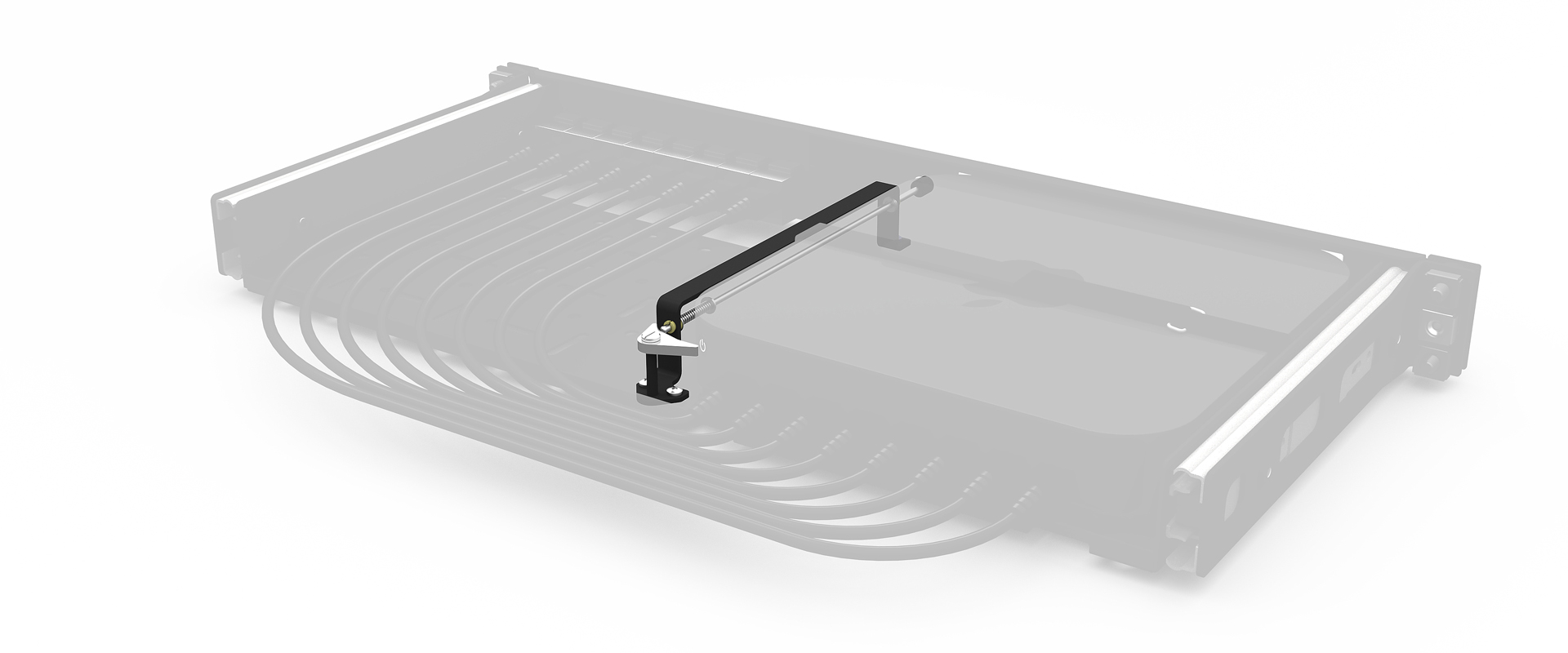
I am working on a solution to make it easier to hit the button from the front of a rack shelf, but the fact I have to mess with 3D printing just to hit a power button is silly.
Older Macs also had the power button on the back, which was also annoying, but at least a Mac that's secured to a shelf could have its power button pressed pretty easily.
The Mac mini _requires_ a mechanism to press up from the bottom in any permanent-ish install.
https://gizmodo.com/apple-mac-minis-odd-power-button-locatio...
> Apple isn’t wrong here. The Mac mini measures 5 x 5 x 2 inches, compared to 7.75 x 7.75 x 1.4 inches from the last generation; it takes up much less space on your desk, which is great. The trade-off is that you run out of space for some important things, like a power button.
The excuse that most users never use the power button is the "you're holding it wrong" of 2024. Stop telling me how to use your devices, Apple.
The explanation mentioned on several forums that it's a cost cutting measure to avoid extruding yet another hole in the aluminum case, or routing the power cable, makes no sense either. This is a state-of-the-art machine, yet they're cutting costs on such trivialities? Give me a break.
This is unequivocally poor design. Yet Apple will never publicly admit that, and will gaslight everyone to think it's actually good, as they usually do.
It's the difference between being able to hit the button one-handed or needing two hands. My Mac Mini is sitting at the back of my desk, and the power button is toward the rear end of the Mac, and I definitely find it a bit clumsy to reach back with two hands, flip it over (disturbing an wires/peripherals that might be plugged in), find the button, and press it.
> And there are highly practical workarounds
Not as practical as putting the button on the front or top.
It's certainly not a deal breaker, but I do find it mildly annoying. The ideal for me would be to have the button easily accessible on the front or top, and have it behave like other devices I use: a short press to sleep/wake, and a long press to initiate shutdown. And when I'm getting up from my desk, I could give it a quick tap to put it to sleep and lock it.
My workaround is to use a keyboard shortcut to put it to sleep, which it works fine and is not a big deal. But I still think Apple deserves a bit of mockery for this decision.
I only reboot my Mac laptop when I’m forced to due to os updates. With a Mac mini? That thing would never get shut down.
If moving the power button there changes the behavior of thousands of people that would typically shut their computer down when they're not using it, that half glass of orange juice turns into thousands of gallons.
It's pretty zippy.
I have pressed the power button exactly once, since Friday (the day I got it). All other restarts were "soft" (including a couple of crashes). The keyboard and trackpad do fine, starting a shut-down computer.
It's replacing a docked MBP. That power button was a lot more difficult to reach, and I needed to hit it more often than this.
Heck, way back in the day, Macs all had power buttons on the keyboard.
The Mini starts up a lot faster than the laptop.
That said, I should actually do a test, to make sure that the system is in real shutdown...
Given my cat, after learning to press a button on his automated feeder, now presses anything that looks like a button with the curious expectation of food, I can only presume he got out while I was in Cupertino.
Button on the bottom isn't a design mistake. It's an opinionated choice.
things like the button on the bottom of the new mac mini or the dumb notch on the macbooks.
according to the theory, such things:
1. they catch attention of people and give them something to talk about (and to fight about)
2. they might steal attention from other flaws
it makes perfect sense: the notch, this idiotic decision about the button, the charge port on the mouse.
Come on, it's a dumb idea. Apple has them sometimes - really!
Either way, it works for the use case its designed for.
Actually, the M4 model is a little taller so it no longer fits in a 1U rack mount. Whereas before you could fit 2 horizontally in 1U, now you'd possibly fit 8 or 9 vertically in 3U. (Edit: This company says 10 per 2U https://www.racksolutions.com/m4-mac-mini-apple-hypershelf.h....)
I have designed for both, I think both have great use cases. 2 x 8 in 6u is really neat and tidy, I just don't love the concept of sitting the fans on their side, though I think they'll still last 5 years.
(I've only ever racked things remotely, so don't know if this is common.)
The most efficient is managed power + serial + ssh and probably the best to go for.
I'm sorry but this is nonsense, if you're really racking them in bulk the above is obvious.
Human dexterity is not constant. Some people have injuries which compromise them.
> And there are highly practical workarounds:
Apple. A consumer product company where every _single_ product has some massive defect which must be apologized around.
Which is fine.. but I'm not sure how that justifies their typical price point.
I have a 2015 iMac and I've been holding off (and haven't really been using my Apple Silicon MacBook as intended) so it may be time to do the upgrade.
Does it have extra performance that makes full use of the 155W input?
What would have it taken Apple to have given us the option to be powered by 100W USB C (eg the tech to downgrade power usage to match the power input)?
Blog post mentions that power usage during benchmark was at 42W.
My goal is to venture into 180-degree VR production. With the Canon R5C and the RF 5.2mm f/2.8 Dual Fisheye Lens, I want to produce stereoscopic video at 8K. However, rendering such high-resolution footage demands substantial processing power, and my current setup definitely isn't enough.
I've done some 8k fisheye footage and converted for Vision Pro / Quest with the prior gen hardware kit and was able to edit and process it on an M2 Max with 96gb ram.
Wondering if it's worth spending that much money on the M4 Pro or just building a PC tbh.
The globe continuously inching towards war makes me quite paranoid, unfortunately.
I guess marketing matters.
"The root of trust for Private Cloud Compute is our compute node: custom-built server hardware that brings the power and security of Apple silicon to the data center, with the same hardware security technologies used in iPhone, including the Secure Enclave and Secure Boot."
https://www.notebookcheck.net/Apple-M4-Pro-analysis-Extremel...
Assuming they refer to the full chips rather than the binned ones, each generation of pro chips has the following number of p and e cores:
  | Model  | # p-cores | # e-cores |
  |--------|-----------|-----------|
  | M2 Pro | 8         | 4         |
  | M3 Pro | 6         | 6         |
  | M4 Pro | 10        | 4         |
That’s comparing a M4 Pro (middle level) to a M3 Air. The Air is a lower power machine with the low spec processor.
There is no M4 Pro Air. They have to be using a MacBook Pro. That likely has a bigger display, a display capable of getting way brighter, showing more colors, better speakers, all sorts of other stuff.
That’s not a very valid comparison.
If anything, the fact that the M4 Pro gets so close to the M3 is impressive.
The M3 was on a process that was known to run hot. I strongly suspect that every M4 chip is more efficient than the equivalent M3 chip.
Also I can highly recommend using version managers (e.g. nvm, jenv, pyenv, gvm, etc..) for these languages to quickly install and manage different versions.
The regular backend stack on docker is smooth. Vs code / jetbrain is smooth. Nothing to complain about.
I could use more ports however. That is easily fixed with an USB hub.
Question for HN: How would you redesign the power button, assuming you work at Apple and the final design should align with Apple's design ethos?
I would put the power on any vertical side of the mini if I were designing it for my use.
How different is the efficiency of this compared to something like an Intel N100/200/300 or a Ryzen 7 7735HS that you can get in cheap mini PCs from manufacturers like Beelink?
I am not doubting that Apple's processors are class-leading but at the same time it seems like I see a lot of people impressed that a mini PC can idle under 10 watts. That's been common for a long time now.
TL;DR: The M4 blows everything away, but isn't a general purpose machine. The N100 is slightly better than 50% of the power efficiency of the remainder. It's also slightly faster despite having less cores. Single core speed is looks to be twice the speed of ARM.
An N100 box with 16GB of RAM and 1TB of NVME is around the USD$200 mark, which is far cheaper than the Mac or Ampere, but in line with the other ARM options. It comes in more form factors with more customisability options than you can poke a pointed stick at.
All in all, it doesn't fair too badly. The low price, fast single core speed, and compatibility with everything makes up for a lot of sins.
> The M4 blows everything away, but isn't a general purpose machine.
Perhaps that upset Apple fans.
My definition of "general purpose machine" is one that I can realistically write software for. I written operating systems (with a custom network and GUI stack) in the past. Doing that requires hardware that isn't locked down, and somewhat less obviously is well documented. As in "Intel Architecture Manual" style documented, or failing that at least open source drivers like the Linux i915 driver. Apple doesn't come close to meeting that criteria.
That's a shame, because their consumer hardware is stellar. If it was open, I would chose it over anything else.
I suspect Apple tracks/measure the usage of the button and took the decision to design it hidden.
How often are these people powering down their iMacs? Why!?
People love complaining. Apple doubles the base ram and keeps the price the same, people complain that base storage is too low. If that doubled then they would find something new.
I thought it was pretty clear from "the system I bought" that he was not talking about the base model. And I think $100 for 10 GbE is surprisingly reasonable for an upgrade from Apple. For comparison, 10 GbE Thunderbolt adapters typically cost about $200 - and while 10 GbE PCIe cards can be bought for less, they tend to be much less power efficient and generate a surprising amount of heat.
I actually think it's very commendable that Apple even gives the option to upgrade to 10 GbE on a mass market desktop. I was recently looking to buy a non-Apple Mini PC, and while 2.5 GbE is very common now, 10 GbE is still relatively rare. The options I found were to go with a Minisforum MS-01, which is considerably more expensive than the base M4 Mac Mini w/10 GbE upgrade, or to order something slightly sketchy from Aliexpress. So as soon as Apple announced the new M4 Mac Mini, I went with that instead.
I mean, 1.25U at 5" deep. Lots of cabinets are 35+" deep, if memory serves. So technically it would be 21 Mac Minis in 1.25U of space, so it's more like almost 6 teraflops. Again, button-on-the-bottom and wiring and thermals aside.
Can't upgrade any of the internals, doesn't run Linux easily, no way to use any of the internal components separately, or rebuild them into a different form factor. Imagine being able to directly mount these to VESA behind a dashboard. I have an old M1 Mac Mini I'd love to use as a NAS, but the disk is slightly too small and you can't upgrade it, so it's just useless to me instead.
Impressive to see Apple match the Pi for idle power & efficiency, but deeply frustrating to see them takes the exact opposite design philosophy.
A good fanless build with a i3-14100T is more expensive and 40-50% slower on Geekbench. An i5 is a bit closer. Some 2024 Ryzen CPUs can match or exceed its multicore performance, but these are also more expensive and much less energy efficient. Pricewise, things start favoring PCs if you need more RAM, as Mac upgrades are costly.
One can potentially use Nix on a Mac Mini to keep similar development environments to those used in Linux, but AFAIK some packages are not supported on ARM. Any experiences using Nix and nix-darwin as a daily driver?
I don't understand why so many people use the discounted price as reference. Surely very few of us on HN are still in college? So let's use the actual price when making comparisons.
Or when they only use it to make the Apple pricing seem more favorable and ignore it when it comes to PC pricing. Most PC manufacturers also have educational pricing, whether directly or through some portal provided by your institution. I know my son's college had a deal and also had a list of the tax free days in the state so that you could pre-order and then pay and pick up on the day the tax didn't apply.
That said, a far chunk of HNs never completed college, like myself and lost access to any email accounts of this sort, which only further supports your argument directly, as the EDU discount isn't universally attainable
Pay someone with an edu account to complete the purchase for you. Also, they are commonly available for community college students, including those taking free classes.
Still looks pretty affordable. Until you look at the upgrades. € 230,00 for +8 MB RAM?! There are places you can get that for a tenth of that price.
I suppose doing your own upgrades isn't an option anymore? (My last Mac was a 2011 unibody.)
Anecdotally, last week I visited a local Apple Store with my son who is in middle school. Without any prompting from us, the Apple rep asked my son if he is planning to go to college some day, and applied the college discount to our purchase without my son saying much…
Suppose I know of a non-Mac that has similar performance and silence for €1000 non-educational. To decide if that meets the requirement I'd need to either look up the non-educational price of the Mac to compare to €1000 or I'd need to look up the educational price of the €1000 machine (if it has one) to compare with €650.
They are more likely to get useful answers if they post the non-educational price so that people don't have to do extra work to figure out if they should respond.
They also go on sale at a similar price to the general public relatively frequently.
But also a ton of people are absolutely in college, at any age, new people are coming to HN every day; I'd think HN is an easier place to discuss and explore vaguely tech/startup related topics than in school
But anyways, 15% is pretty much in the error fuzz range of "which platform do I like better" and "dominated by RAM upgrade price.
So it is in practice available to everyone if you want to ruin nice things for students.
> it's around €650, including VAT.
Whatever taxes and discounts apply to the commenter’s own idiosyncratic situation have nothing to do with the price of the product.
A couple of years ago, I might have cared what the price of an M2 with Pasadena sales taxes was since I lived there at the time, but I sure wouldn’t have included them when talking about Apple prices here.
Similarly, VAT costs are between you and whatever jurisdiction you live in that’s levying them. Apple isn’t the one to thank or complain to about them.
I don’t think I ever encounter here such collective encouragement to bypass a law (ok probably for jailbreak which is not a fraud). Not sure if the demography changes, societal culture change or just luck.
Edit: Oh and yeas I never completed college, don’t own a .edu and am maybe just subconsciously jealous.
What makes you think that? I'm back in school getting a MEng degree in my 30s.
That's the position I'm in, along with some other people I've talked to recently, too.
For our situations, the M4 would likely offer more than enough processing power, and the efficiency and physical size are attractive, but a maximum of 32 GB of RAM definitely isn't sufficient.
The M4 Pro's 64 GB of RAM is somewhat better, but the cost of those upgrades are very hard to justify.
I'd also prefer to use the system for at least 5 years, and likely up to 10 years, if not longer. Even if 64 GB is tolerable now, I can easily see it becoming insufficient for my needs before then.
The lack of reasonably-priced internal storage, while easier to work around than the lack of sufficient and reasonably-priced RAM, doesn't help matters, too.
Even if future Studio models, for example, might allow for a more ideal amount of RAM, I have to expect that unjustifiable upgrade costs will likely still be an issue, and then there's the wait on top of that.
I can easily see myself and the others I've talked to settling for PCs, rather than making unjustifiably-expensive Mac purchases.
I'm leaning towards an upgrade next year to the 9950x3d if reviews pan out. Sure, it's going to be a bigger machine with louder components, but the upgrade will likely be half the cost of anything close from Apple since I can take my existing GPU, PSU and storage at the very least along with me.
And "upgrade costs" is highly misleading for most of the components. You are buying a different machine config that you can't change, up or down, later on. I get that most people don't want to bother opening up a PC to swap out components, but the easier they made it, the more people will do it, and Apple is running the other way.
It won't help the RAM situation, but storage at least is upgradable like that.
much more efficient in what? mops the floor by what? which year's i7?
Don't get me wrong, I 100% believe what happened, but if you mean "my macbook is faster than my i7 thinkpad" you should use those exact words, but not bring RAM into this discussion. If you want to make a point about RAM, you need to be clear about what workflow you were measuring, the methodology you were using, and what the exact result is. Otherwise your words have no meaning.
Nix-darwin is good, and I use it, but it is nowhere close to NixOS. I think there are some options I've set through it that macOS keeps overriding, so the declarative configuration drifts from the real one eventually
I think the only real issue with Nix on macOS is that Nix can eat through storage quite quickly, and storage upgrades are pretty expensive on Macs. This might push the balance back to an fanless ryzen build
Only if you want to be able to roll back multiple versions. Otherwise, I think it is fine.
I've had Nix installed from the traditional installer since the very first M1 and never had to reinstall nixpkgs across OS updates.
A good way to get started is to start using Nix to replace/supplement Homebrew. You can install Nix in addition to Homebrew and have some packages installed by one and some by the other. You can uninstall a Homebrew package and then reinstall it with Nix. You can even remove it with Nix and go back to Homebrew if you like.
I would generally recommend the following:
1. Use the Determinate Systems Nix installer, see https://zero-to-nix.com/start/install
2. Use "Flakes" (unfortunately the core documentation isn't updated for flakes)
3. Use "Home Manger" -- I would recommend the Flakes-based "Standalone setup": https://nix-community.github.io/home-manager/index.xhtml#sec...
I would wait on nix-darwin until you are sure you need/want it. (I have recently started using it for its support of the `linux-builder` feature, but not everyone needs that.)
As a software developer who uses macOS to develop for Linux, it is a great tool and I cautiously recommend it to those who are willing to deal with some learning curve and frustration.
I haven't yet used nix-darwin enough to make a recommendation one way or another. (But the `linux-builder` feature is compelling if you need it: https://nixcademy.com/posts/macos-linux-builder/)
The CPU in it is faster in raw multi-thread performance, single-threaded it's a bit slower, but still quite impressive.
The only problem I had with Minisforum is that they couldn't supply the exact hardware I ordered and their suggested solution was either to wait for 1+ month or get a sligtly different configuration. Two times out of two.
Quality-wise they're pretty good though, no complaints there.
[1] https://store.minisforum.com/products/minisforum-mini-itx-pc...
[2] https://www.apple.com/us-edu/shop/buy-mac/mac-mini/apple-m4-...
BD790i that I just received (didn't even install anywhere) has a rather substantial heatsink over the CPU similar to high wattage GPUs. The chip itself is rated at 55W TDP so it shouldn't be that much of a problem cooling it. The motherboard doesn't come with a fan and I'm definitely not going to spend extra on high-end ones at least just yet.
I don't know anything about the thermals of 790S7's case though. It looks like they gave it at least some thought judging by the duct over the CPU, but how it actually performs I have no idea.
Been using that ever since M1 became a thing; nothing worth mentioning, "not supported" is vanishingly rare in practice.
Made the switch back to MacOS with the M series after being on x86 and NixOS prior.
The experience was refreshingly tepid.
Next to that I run a NixOS VM on https://getutm.app/ using Virtualization Framework. Performance is great.
You're one setting away `virtualisation.rosetta.enable = true;` to also use that VM for x86_64 packages and builds.
I have a WIP PR for Rosetta AOT caching on NixOS as well: https://github.com/NixOS/nixpkgs/pull/330829
The Beelink (and other mini-PC brands) offer comparable performance.
The fact they offer lots of different configurations lets you choose your own trade-offs.
Assuming you don't have an operating system preference, the base model Mac Mini is tough to beat outright, but as you upgrade it there are other options that get interesting.
FWIW, Mitchell Hashimoto runs NixOS VM on his Mac for development. And that's the option I'm gonna implement once I get my MBP from repairs.
Base Mac mini: $599, 16/256 GB
Double storage and ram: $600 upgrade.
Price of 32/512 config: $1199
Two 16/256 machines: $1198.
The ram is (Apple) reasonable at $200, but $400 for the storage doubling is insane.
Still, you can easily get a good kit of DDR5 DIMMs for 110€/32GB from a retailer. So while LPDDR5 RAM is more expensive, it is most certainly not expensive enough to justify a 230€/8GB price as being driven by BOM costs
I appreciate the technical achievement of the M4 Mac Mini for what it is, but an old x86 machine is more than adequate for my home or even work needs.
For my music studio I’ve enjoyed the M1 mini since it is totally silent and am eager to read some noise tests on the new M4 mini.
[1] https://wccftech.com/m4-mac-mini-ssd-already-modded-to-2tb-s...
I picked mine up from the post office yesterday, it's 50% faster in Geekbench single/multi-core CPU benchmarks than my M1 Pro Macbook Pro and about as fast in GPU performance. Impressive.
I'm using a Mac at work and Linux at home with a programmable keyboard but I didn't find a solution to "merge" cmd and ctrl on Mac, so I still need to use both on Mac (not a big drama, but slightly annoying).
Would this run anything Docker/ARM?
My entire home server setup is Linux/Dockerized and the Mac Mini hardware looks so good, but the more I read about MacOS as a server OS the worse it seems to get.
Not positive ones, even on x86 Darwin. Homebrew feels a lot more stable, which is a decidedly concerning thing for the average Nix enjoyer.
Also, my Mac is 256gb which feels far too cramped for Nix. I'd really only recommend it if you're working with 512gb or more.
It is €579 including VAT. The Educational discount in US is only $499. €650 sounds wrong. Where in EU is that.
Shame, I'd love to use Linux on Apple's latest and greatest MacBooks, but will stay with tried and true Dell Precision series until the year of the Linux Apple laptop becomes a reality.
also you could just Containerize All The Things on macos idk
(Well they do have a thing called containers, but it's a desktop app security/sandboxing feature that does something conceptually different)
That's not a thing. Apple silicon doesn't use EFI so you need a completely custom ROM to satisfy the boot process, hence Asahi. And Asahi doesn't support M4 and likely won't for a while.
ARM64 support for GUI apps (via flatpak in the Fedora Asahi Remix) is also pretty poor, though your standard fair of CLI apps are present.
4 cores instead of 10 cores, 69W TDP instead of 22W, UHD Graphics 730 versus Apple's 10 core GPU (0.5 TFLOPs vs about 4.3), 23% worse single core performance, 45% worse multicore, and much louder cooling.
It's not a fair comparison.
I have 13th gen i7, with 64 GB RAM and 2 TB ssd (and 2.5 GbE). It was 800 EUR + VAT, last year. How much would similar Mac Mini cost?
Not a fair comparison either.
Edit: 69W for the NUC is not TDP. It is 69W power brick that ships with the machine.
Apple is certainly out of their mind on storage. But on a desktop it’s trivial to plug-in an external disc that you can buy at an absolutely reasonable price instead of the insane Apple one.
And while you can plug in storage, I think it does kind of ruin the appeal of having such a small device by having a bunch of spaghetti cables. And if the boot drive goes it's not easily replaceable and makes the machine a brick until it is.
Apple does amazing stuff. But it's very pricey in most markets and unaffordable to those on budget.